
iOS 8 定位功能問題一次解決:Info 設定與授權流程
從 iOS 8 開始,定位服務的授權機制有了明顯變化,若未妥善設定,App 很容易出現無法取得位置的問題。以下整理了三個關鍵環節。
一、修改 Info.plist
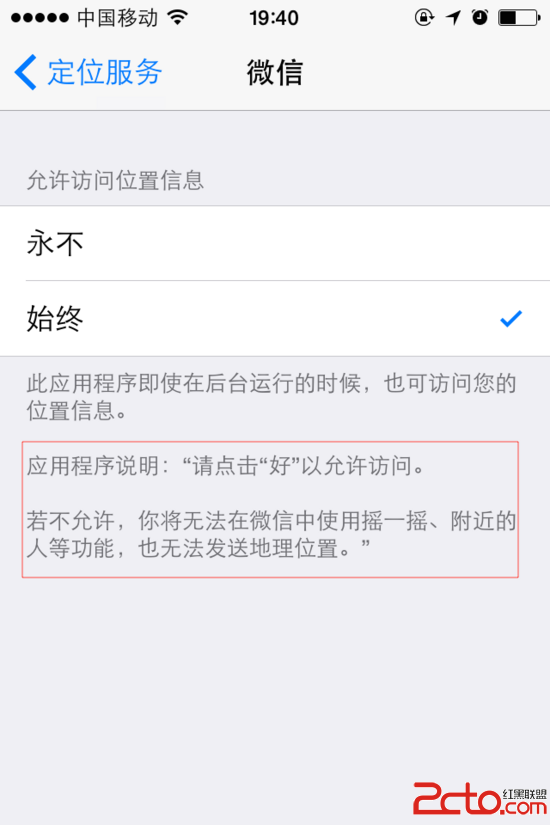
需要在 Info.plist 中新增兩個 Key:NSLocationAlwaysUsageDescription 與 NSLocationWhenInUseUsageDescription。它們的值分別用來描述 App「始終使用定位」與「使用期間使用定位」的用途說明,這些文字會顯示在系統的設定畫面裡,供使用者查看。
新增的鍵值對如下:


這些描述文字會顯示在使用者的權限設定中:
二、CLLocationManager 初始化
iOS 8 為 CLLocationManager 新增了 requestWhenInUseAuthorization 與 requestAlwaysAuthorization 兩個方法,需要在初始化時依需求呼叫,主動向使用者請求定位權限。
if([CLLocationManager locationServicesEnabled]){ self.locationManage = [[CLLocationManager alloc] init]; self.locationManage.delegate = self; //定位頻率,每個多少米定位一次 self.locationManage.distanceFilter = 200; //設置定位精度 self.locationManage.desiredAccuracy = kCLLocationAccuracyBestForNavigation;//kCLLocationAccuracyBest; //啟動跟蹤定位 [self.locationManage startUpdatingLacation]; if (SYSTEM_VERSION >= 8.0) { //使用期間 [self.locationManage requestWhenInUseAuthorization]; //始終 //or [self.locationManage requestAlwaysAuthorization] } }
三、CLLocationManagerDelegate 代理方法
定位失敗時的處理:
- (void)locationManager:(CLLocationManager *)manager didFailWithError:(NSError *)error
{
[MBHUDUntil hideAllHUDForView:self.window];
if (![SharedData shareInstance].isMB == NO) {
[MBHUDUntil showHUDToWindowWithText:@"地圖定位失敗,請確認您已允許本程序開啟定位服務"];
}
}
// 跟蹤定位代理方法,每次位置發生變化即會執行(只要定位到相應位置)
-(void)locationManager:(CLLocationManager *)manager didUpdateLocations:(NSArray *)locations{
//如果不需要實時定位,使用完即使關閉定位服務
[_locationManager stopUpdatingLocation];
}
此外,iOS 8 還需要實作以下這個監聽授權狀態變化的代理方法:
- (void)locationManager:(CLLocationManager *)manager didChangeAuthorizationStatus:(CLAuthorizationStatus)status { switch (status) { case kCLAuthorizationStatusNotDetermined: if ([self.locationManage respondsToSelector:@selector(requestAlwaysAuthorization)]) { [self.locationManage requestWhenInUseAuthorization]; } break; default: break; } }