
iOS 倒計時器實作:用 dispatch_source 打造簡潔的倒數計時
編輯:iOS 開發綜合
倒數計時是許多 App 的常見需求,例如秒殺活動、限時優惠或活動倒數。以下這份範例程式碼寫法直觀、容易理解,很適合直接借用在自家專案裡。
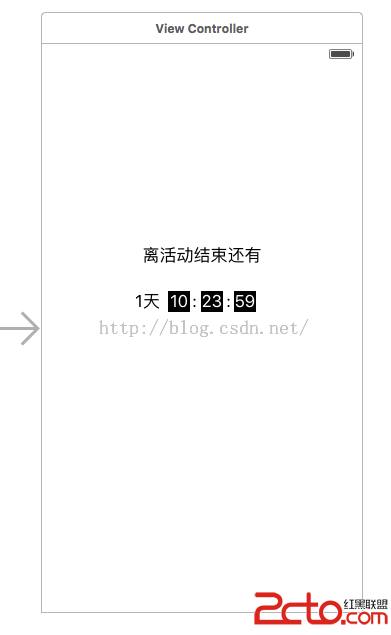
首先在介面控制器中,我們用四個 Label 分別負責顯示天、時、分、秒:
#import@interface ViewController : UIViewController @property (weak, nonatomic) IBOutlet UILabel *dayLabel; @property (weak, nonatomic) IBOutlet UILabel *hourLabel; @property (weak, nonatomic) IBOutlet UILabel *minuteLabel; @property (weak, nonatomic) IBOutlet UILabel *secondLabel; @end
接著在實作檔中,我們以 GCD 的 dispatch_source_t 建立一個每秒觸發一次的計時器,計算距離當天結束剩餘的時間,並即時刷新到各個 Label;一旦倒數歸零,計時器便自動取消,避免資源浪費:
#import "ViewController.h" @interface ViewController () { dispatch_source_t _timer; } @end @implementation ViewController /** * 獲取當天的年月日的字符串 * 這裡測試用 * @return 格式為年-月-日 */ -(NSString *)getyyyymmdd{ NSDate *now = [NSDate date]; NSDateFormatter *formatDay = [[NSDateFormatter alloc] init]; formatDay.dateFormat = @"yyyy-MM-dd"; NSString *dayStr = [formatDay stringFromDate:now]; return dayStr; } - (void)viewDidLoad { [super viewDidLoad]; NSDateFormatter *dateFormatter=[[NSDateFormatter alloc] init]; [dateFormatter setDateFormat:@"yyyy-MM-dd"]; NSDate *endDate = [dateFormatter dateFromString:[self getyyyymmdd]]; NSDate *endDate_tomorrow = [[NSDate alloc] initWithTimeIntervalSinceReferenceDate:([endDate timeIntervalSinceReferenceDate] + 24*3600)]; NSDate *startDate = [NSDate date]; NSTimeInterval timeInterval =[endDate_tomorrow timeIntervalSinceDate:startDate]; if (_timer==nil) { __block int timeout = timeInterval; //倒計時時間 if (timeout!=0) { dispatch_queue_t queue = dispatch_get_global_queue(DISPATCH_QUEUE_PRIORITY_DEFAULT, 0); _timer = dispatch_source_create(DISPATCH_SOURCE_TYPE_TIMER, 0, 0,queue); dispatch_source_set_timer(_timer,dispatch_walltime(NULL, 0),1.0*NSEC_PER_SEC, 0); //每秒執行 dispatch_source_set_event_handler(_timer, ^{ if(timeout<=0){ //倒計時結束,關閉 dispatch_source_cancel(_timer); _timer = nil; dispatch_async(dispatch_get_main_queue(), ^{ self.dayLabel.text = @""; self.hourLabel.text = @"00"; self.minuteLabel.text = @"00"; self.secondLabel.text = @"00"; }); }else{ int days = (int)(timeout/(3600*24)); if (days==0) { self.dayLabel.text = @""; } int hours = (int)((timeout-days*24*3600)/3600); int minute = (int)(timeout-days*24*3600-hours*3600)/60; int second = timeout-days*24*3600-hours*3600-minute*60; dispatch_async(dispatch_get_main_queue(), ^{ if (days==0) { self.dayLabel.text = @"0天"; }else{ self.dayLabel.text = [NSString stringWithFormat:@"%d天",days]; } if (hours<10) { self.hourLabel.text = [NSString stringWithFormat:@"0%d",hours]; }else{ self.hourLabel.text = [NSString stringWithFormat:@"%d",hours]; } if (minute<10) { self.minuteLabel.text = [NSString stringWithFormat:@"0%d",minute]; }else{ self.minuteLabel.text = [NSString stringWithFormat:@"%d",minute]; } if (second<10) { self.secondLabel.text = [NSString stringWithFormat:@"0%d",second]; }else{ self.secondLabel.text = [NSString stringWithFormat:@"%d",second]; } }); timeout--; } }); dispatch_resume(_timer); } } }
實際執行的動態效果如下:
