
《精通 iOS 開發》第 14 章示例代碼缺陷修復
先說結論:這本書值得推薦。整體邏輯非常清晰,從空白開始一步步把代碼寫出來、再逐步豐富,節奏很有條理。全書到目前為止的錯誤也很少,但在第 14 章前半部分的示例代碼裡,有一處確實會導致功能失效。
問題描述
作者在 MasterVC 到 DetailVC 之間又添加了一個 segue,ID 為 "masterToDetail",作用是新建一個 tinyPix 文檔後直接跳轉到 DetailVC 進行編輯。
同時作者也意識到:如果從 MasterVC 的表視圖 cell 點進 DetailVC,需要額外做一件事——打開用戶點擊的那份已存在文檔。於是他這樣改寫 prepareForSegue:sender::
- (void)prepareForSegue:(UIStoryboardSegue *)segue sender:(id)sender
{
    if (sender == self) {
        UIViewController *destination = segue.destinationViewController;
        if ([destination respondsToSelector:@selector(setDetailItem:)]) {
            [destination setValue:_chosenDoc forKey:@"detailItem"];
        }
    } else {
        NSIndexPath *indexPath = self.tableView.indexPathForSelectedRow;
        NSString *filename = _docFilenames[indexPath.row];
        NSURL *docUrl = [self urlForFilename:filename];
        _chosenDoc = [[HyTinyPixDocument alloc] initWithFileURL:docUrl];
        [_chosenDoc openWithCompletionHandler:^(BOOL success) {
            if (success) {
                UIViewController *destination = segue.destinationViewController;
                if ([destination respondsToSelector:@selector(setDetailItem:)]) {
                    [destination setValue:_chosenDoc forKey:@"detailItem"];
                }
            } else {
                NSLog(@"failed to load!");
            }
        }];
    }
}
實際表現與原因
運行後會發現:點擊已存在的 tinyPix,DetailVC 裡並不能正確顯示文檔內容。在 else 分支後面下斷點,可以看到由 cell 觸發的 segue,其 destinationViewController 並不是我們期望的 DetailViewController,而是 UINavigationController——它自然沒有 setDetailItem: 方法,respondsToSelector: 直接返回 NO,赋值被靜默跳過。
這是 Master-Detail 模板的結構使然:storyboard 裡 segue 的目標是包裹在裡面的導航控制器,真正的 DetailViewController 是它的 root。難以判斷這是原作者的筆誤,還是不同 Xcode 版本下模板結構變化所致,但在 Xcode 7.2 中情況確實如此。
修復方式
改法比想像中簡單,取導航控制器的 topViewController 即可:
if (success) {
    // UIViewController *destination = segue.destinationViewController;
    DetailViewController *detailVC = (DetailViewController *)[segue.destinationViewController topViewController];
    if ([detailVC respondsToSelector:@selector(setDetailItem:)]) {
        [detailVC setValue:_chosenDoc forKey:@"detailItem"];
    }
} else {
    NSLog(@"failed to load!");
}
我們需要的是 destinationVC 的 topViewController,而不是 destinationVC 本身。
重新編譯運行,兩種進入 DetailVC 的路徑都正常了:
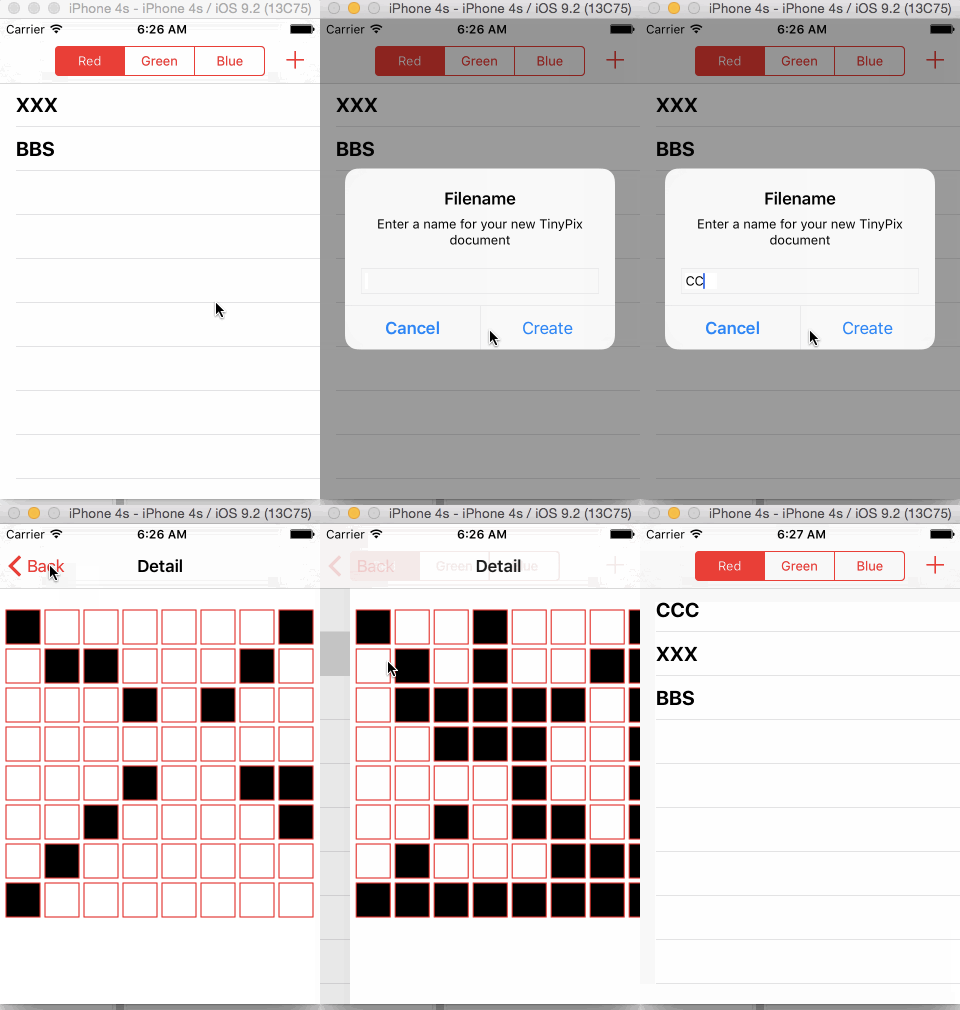
這類問題有個通用教訓:在 storyboard 場景下處理 prepareForSegue 時,不要默認 destinationViewController 就是業務頁面。凡是可能出現容器控制器(UINavigationController、UITabBarController、UISplitViewController)的路徑,都值得先確認層級,再取值。