iOS學習筆記(三十三):UICollectionView入門完全指南
一、UICollectionView 簡介
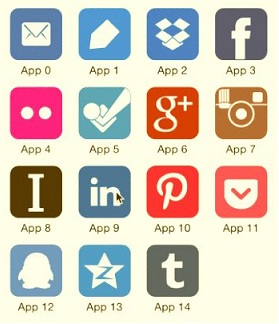
UICollectionView與UICollectionViewController這兩個類別是iOS 6才引進的新API,專門用於呈現集合視圖,布局方式比表格靈活得多,能輕鬆做出多欄排列的效果。它的用法與UITableView、UITableViewController頗為相似,卻又藏著不少差異。UICollectionView能實現的效果非常多,是日常開發中相當常用的一個控制項:
二、UICollectionView 的使用
與UITableView相比,UICollectionView的建立方式略有不同:
1. UITableView只要設定好frame就能直接使用;而UICollectionView除了frame之外,還必須額外傳入一個布局參數。
-(id)initWithFrame:(CGRect)frame /* 尺寸 */ collectionViewLayout:(UICollectionViewLayout *)layout;/* 布局參數 */
UITableView可以不註冊Cell類別,改以手動建立;但UICollectionView則一定要先註冊視圖類別才能顯示,且無需手動建立。
UICollectionView 的布局參數
它是一個UICollectionViewLayout類別的物件,不過實務上我們通常會使用它的子類別UICollectionViewFlowLayout。透過布局物件的滾動方向屬性scrollDirection來設定:
typedef NS_ENUM(NSInteger, UICollectionViewScrollDirection) { UICollectionViewScrollDirectionVertical, /*垂直滾動*/ UICollectionViewScrollDirectionHorizontal /* 水平滾動 */ };
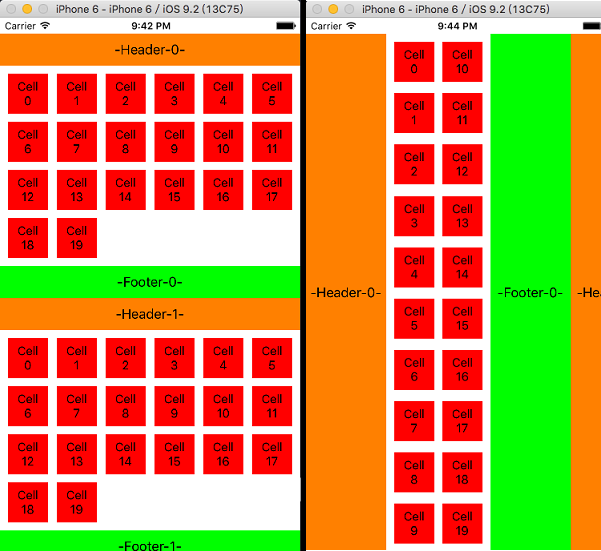
選擇垂直滾動時,Cell方塊會由左而右、由上而下排列;選擇水平滾動時,則由上而下、由左而右排列。
和UITableView不同的是,UICollectionView只能在此處設定頂部視圖與底部視圖的大小:設為垂直滾動時,頂部與底部視圖的寬度會等於UICollectionView的寬度而無法自訂;設為水平滾動時,其高度則會等於UICollectionView的高度而無法自訂。
UICollectionView 的常用實體方法
/* 向容器視圖注冊Cell方塊視圖,有2種方式,一種是類名注冊,一種是Xib注冊 */ - (void)registerClass:(Class)cellClass /* 視圖類 */ forCellWithReuseIdentifier:(NSString *)identifier;/* 綁定標識 */ - (void)registerNib:(UINib *)nib /* Xib */ forCellWithReuseIdentifier:(NSString *)identifier;/* 綁定標識 */ /* 從緩存池中取出Cell方塊視圖對象,如果緩存池沒有,自動調用alloc/initWithFrame創建 */ - (UICollectionViewCell *)dequeueReusableCellWithReuseIdentifier:(NSString *)identifier forIndexPath:(NSIndexPath *)indexPath; /* kind參數設置 */ NSString *const UICollectionElementKindSectionHeader;/* 頂部視圖用這個 */ NSString *const UICollectionElementKindSectionFooter;/* 底部視圖用這個 */ /* 向容器視圖注冊頂部視圖或者底部視圖,有2種方式,一種是類名注冊,一種是Xib注冊 */ - (void)registerClass:(Class)viewClass forSupplementaryViewOfKind:(NSString *)kind /* 參考上面 */ withReuseIdentifier:(NSString *)identifier;/* 綁定標識 */ - (void)registerNib:(UINib *)nib forSupplementaryViewOfKind:(NSString *)kind /* 參考上面 */ withReuseIdentifier:(NSString *)identifier;/* 綁定標識 */ /* 從緩存池中取出頂部視圖對象或者底部視圖對象,如果緩存池沒有,自動調用alloc/initWithFrame創建 */ - (UICollectionReusableView *)dequeueReusableSupplementaryViewOfKind:(NSString *)kind withReuseIdentifier:(NSString *)identifier forIndexPath:(NSIndexPath *)indexPath;
UICollectionView 的資料來源方法
@required /* 設置容器視圖各個組都有多少個Cell方塊 */ - (NSInteger)collectionView:(UICollectionView *)collectionView numberOfItemsInSection:(NSInteger)section; /* 設置Cell方塊視圖,類似於UITableViewCell的設置 */ - (UICollectionViewCell *)collectionView:(UICollectionView *)collectionView cellForItemAtIndexPath:(NSIndexPath *)indexPath; @optional /* 容器視圖有多少個組,默認返回1 */ - (NSInteger)numberOfSectionsInCollectionView:(UICollectionView *)collectionView; /* 設置頂部視圖和底部視圖,通過kind參數分辨是設置頂部還是底部 */ - (UICollectionReusableView *)collectionView:(UICollectionView *)collectionView viewForSupplementaryElementOfKind:(NSString *)kind atIndexPath:(NSIndexPath *)indexPath;
UICollectionViewDelegate 的常用方法
/* 選中Cell方塊時調用 */ - (void)collectionView:(UICollectionView *)collectionView didSelectItemAtIndexPath:(NSIndexPath *)indexPath; /* 取消選中Cell方塊時調用 */ - (void)collectionView:(UICollectionView *)collectionView didDeselectItemAtIndexPath:(NSIndexPath *)indexPath;
不過實務上我們更常使用其子協議UICollectionViewDelegateFlowLayout,它不仅涵蓋了父協議的所有方法,還能額外進行一連串的布局設定。
UICollectionViewDelegateFlowLayout 的常用布局方法
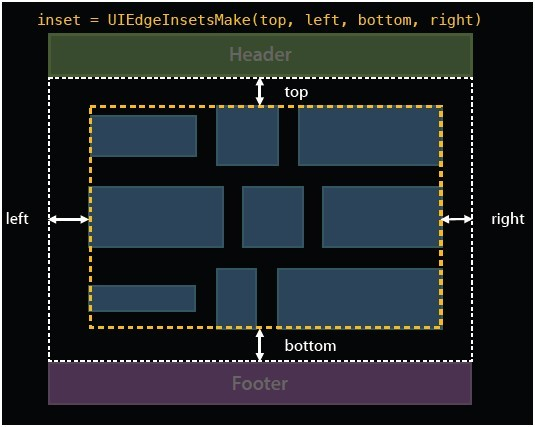
/* 設置每個方塊的尺寸大小 */ - (CGSize)collectionView:(UICollectionView *)collectionView layout:(UICollectionViewLayout*)collectionViewLayout sizeForItemAtIndexPath:(NSIndexPath *)indexPath; /* 設置方塊視圖和邊界的上下左右間距 */ - (UIEdgeInsets)collectionView:(UICollectionView *)collectionView layout:(UICollectionViewLayout*)collectionViewLayout insetForSectionAtIndex:(NSInteger)section;
自訂的 Cell、頂部視圖、底部視圖類別目錄結構如下
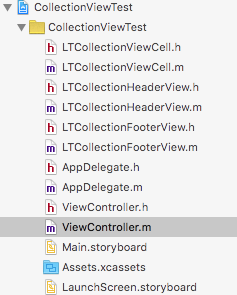
方塊視圖 LTCollectionViewCell.h
#import @interface LTCollectionViewCell : UICollectionViewCell @property (strong, nonatomic) UILabel *textLabel; /* 方塊視圖的緩存池標示 */ + (NSString *)cellIdentifier; /* 獲取方塊視圖對象 */ + (instancetype)cellWithCollectionView:(UICollectionView *)collectionView forIndexPath:(NSIndexPath *)indexPath; @end
方塊視圖 LTCollectionViewCell.m
#import "LTCollectionViewCell.h" @implementation LTCollectionViewCell /* 方塊視圖的緩存池標示 */ + (NSString *)cellIdentifier{ static NSString *cellIdentifier = @"CollectionViewCellIdentifier"; return cellIdentifier; } /* 獲取方塊視圖對象 */ + (instancetype)cellWithCollectionView:(UICollectionView *)collectionView forIndexPath:(NSIndexPath *)indexPath { //從緩存池中尋找方塊視圖對象,如果沒有,該方法自動調用alloc/initWithFrame創建一個新的方塊視圖返回 LTCollectionViewCell *cell = [collectionView dequeueReusableCellWithReuseIdentifier:[LTCollectionViewCell cellIdentifier] forIndexPath:indexPath]; return cell; } /* 注冊了方塊視圖後,當緩存池中沒有底部視圖的對象時候,自動調用alloc/initWithFrame創建 */ - (instancetype)initWithFrame:(CGRect)frame{ if (self = [super initWithFrame:frame]) { //創建label UILabel *textLabel = [[UILabel alloc] init]; //設置label尺寸 CGFloat x = 5; CGFloat y = 5; CGFloat width = frame.size.width - 10; CGFloat height = frame.size.height - 10; textLabel.frame = CGRectMake(x, y, width, height); //設置label屬性 textLabel.numberOfLines = 0; textLabel.textAlignment = NSTextAlignmentCenter; textLabel.font = [UIFont systemFontOfSize:15]; //添加到父控件 [self.contentView addSubview:textLabel]; self.textLabel = textLabel; } return self; } @end
頂部視圖 LTCollectionHeaderView.h
#import @interface LTCollectionHeaderView : UICollectionReusableView @property (strong, nonatomic) UILabel *textLabel; /* 頂部視圖的緩存池標示 */ + (NSString *)headerViewIdentifier; /* 獲取頂部視圖對象 */ + (instancetype)headerViewWithCollectionView:(UICollectionView *)collectionView forIndexPath:(NSIndexPath *)indexPath; @end
頂部視圖 LTCollectionHeaderView.m
#import "LTCollectionHeaderView.h" @implementation LTCollectionHeaderView /* 頂部視圖的緩存池標示 */ + (NSString *)headerViewIdentifier{ static NSString *headerIdentifier = @"headerViewIdentifier"; return headerIdentifier; } /* 獲取頂部視圖對象 */ + (instancetype)headerViewWithCollectionView:(UICollectionView *)collectionView forIndexPath:(NSIndexPath *)indexPath { //從緩存池中尋找頂部視圖對象,如果沒有,該方法自動調用alloc/initWithFrame創建一個新的頂部視圖返回 LTCollectionHeaderView *headerView = [collectionView dequeueReusableSupplementaryViewOfKind:UICollectionElementKindSectionHeader withReuseIdentifier:[LTCollectionHeaderView headerViewIdentifier] forIndexPath:indexPath]; return headerView; } /* 注冊了頂部視圖後,當緩存池中沒有頂部視圖的對象時候,自動調用alloc/initWithFrame創建 */ - (instancetype)initWithFrame:(CGRect)frame{ if (self = [super initWithFrame:frame]) { //創建label UILabel *textLabel = [[UILabel alloc] init]; //設置label尺寸 CGFloat x = 5; CGFloat y = 5; CGFloat width = frame.size.width - 10; CGFloat height = frame.size.height - 10; textLabel.frame = CGRectMake(x, y, width, height); //設置label屬性 textLabel.numberOfLines = 0; textLabel.textAlignment = NSTextAlignmentCenter; //添加到父控件 [self addSubview:textLabel]; self.textLabel = textLabel; } return self; } @end
底部視圖 LTCollectionFooterView.h
#import @interface LTCollectionFooterView : UICollectionReusableView @property (strong, nonatomic) UILabel *textLabel; /* 底部視圖的緩存池標示 */ + (NSString *)footerViewIdentifier; /* 獲取底部視圖對象 */ + (instancetype)footerViewWithCollectionView:(UICollectionView *)collectionView forIndexPath:(NSIndexPath *)indexPath; @end
底部視圖 LTCollectionFooterView.m
#import "LTCollectionFooterView.h" @implementation LTCollectionFooterView /* 底部視圖的緩存池標示 */ + (NSString *)footerViewIdentifier{ static NSString *footerIdentifier = @"footerViewIdentifier"; return footerIdentifier; } /* 獲取底部視圖對象 */ + (instancetype)footerViewWithCollectionView:(UICollectionView *)collectionView forIndexPath:(NSIndexPath *)indexPath { //從緩存池中尋找底部視圖對象,如果沒有,該方法自動調用alloc/initWithFrame創建一個新的底部視圖返回 LTCollectionFooterView *footerView = [collectionView dequeueReusableSupplementaryViewOfKind:UICollectionElementKindSectionFooter withReuseIdentifier:[LTCollectionFooterView footerViewIdentifier] forIndexPath:indexPath]; return footerView; } /* 注冊了底部視圖後,當緩存池中沒有底部視圖的對象時候,自動調用alloc/initWithFrame創建 */ - (instancetype)initWithFrame:(CGRect)frame{ if (self = [super initWithFrame:frame]) { //創建label UILabel *textLabel = [[UILabel alloc] init]; //設置label尺寸 CGFloat x = 5; CGFloat y = 5; CGFloat width = frame.size.width - 10; CGFloat height = frame.size.height - 10; textLabel.frame = CGRectMake(x, y, width, height); //設置label屬性 textLabel.numberOfLines = 0; textLabel.textAlignment = NSTextAlignmentCenter; //添加到父控件 [self addSubview:textLabel]; self.textLabel = textLabel; } return self; } @end
使用實例
1. 視圖控制器的屬性與相關方法
#import "ViewController.h" #import "LTCollectionViewCell.h" #import "LTCollectionHeaderView.h" #import "LTCollectionFooterView.h" @interface ViewController () @property (strong, nonatomic) UICollectionView *collectionView;/*< 容器視圖 */ @end @implementation ViewController - (void)viewDidLoad { [super viewDidLoad]; //初始化容器視圖 [self initCollectionView]; }
2. 初始化容器視圖
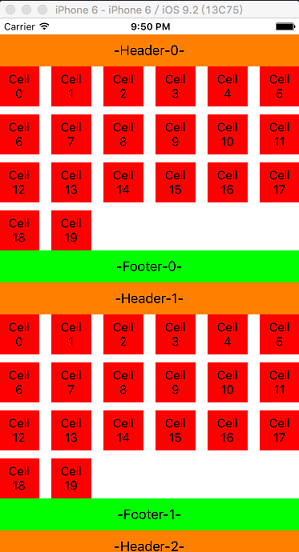
/* 初始化容器視圖 */ - (void)initCollectionView { CGFloat x = 0; CGFloat y = 20; CGFloat width = self.view.frame.size.width; CGFloat height = self.view.frame.size.height - 20; //創建布局對象 UICollectionViewFlowLayout *layout = [[UICollectionViewFlowLayout alloc] init]; //設置滾動方向為垂直滾動,說明方塊是從左上到右下的布局排列方式 layout.scrollDirection = UICollectionViewScrollDirectionVertical; //設置頂部視圖和底部視圖的大小,當滾動方向為垂直時,設置寬度無效,當滾動方向為水平時,設置高度無效 layout.headerReferenceSize = CGSizeMake(100, 40); layout.footerReferenceSize = CGSizeMake(100, 40); //創建容器視圖 CGRect frame = CGRectMake(x, y, width, height); UICollectionView *collectionView = [[UICollectionView alloc] initWithFrame:frame collectionViewLayout:layout]; collectionView.delegate = self;//設置代理 collectionView.dataSource = self;//設置數據源 collectionView.backgroundColor = [UIColor whiteColor];//設置背景,默認為黑色 //添加到主視圖 [self.view addSubview:collectionView]; self.collectionView = collectionView; //注冊容器視圖中顯示的方塊視圖 [collectionView registerClass:[LTCollectionViewCell class] forCellWithReuseIdentifier:[LTCollectionViewCell cellIdentifier]]; //注冊容器視圖中顯示的頂部視圖 [collectionView registerClass:[LTCollectionHeaderView class] forSupplementaryViewOfKind:UICollectionElementKindSectionHeader withReuseIdentifier:[LTCollectionHeaderView headerViewIdentifier]]; //注冊容器視圖中顯示的底部視圖 [collectionView registerClass:[LTCollectionFooterView class] forSupplementaryViewOfKind:UICollectionElementKindSectionFooter withReuseIdentifier:[LTCollectionFooterView footerViewIdentifier]]; }
3. UICollectionViewDataSource 資料來源方法
#pragma mark - UICollectionViewDataSource /* 設置容器中有多少個組 */ - (NSInteger)numberOfSectionsInCollectionView:(UICollectionView *)collectionView{ return 10; } /* 設置每個組有多少個方塊 */ - (NSInteger)collectionView:(UICollectionView *)collectionView numberOfItemsInSection:(NSInteger)section { return 20; } /* 設置方塊的視圖 */ - (UICollectionViewCell *)collectionView:(UICollectionView *)collectionView cellForItemAtIndexPath:(NSIndexPath *)indexPath { //獲取cell視圖,內部通過去緩存池中取,如果緩存池中沒有,就自動創建一個新的cell LTCollectionViewCell *cell = [LTCollectionViewCell cellWithCollectionView:collectionView forIndexPath:indexPath]; //設置cell屬性 cell.contentView.backgroundColor = [UIColor redColor]; cell.textLabel.text = [NSString stringWithFormat:@"Cell %2ld",indexPath.row]; return cell; } /* 設置頂部視圖和底部視圖 */ - (UICollectionReusableView *)collectionView:(UICollectionView *)collectionView viewForSupplementaryElementOfKind:(NSString *)kind atIndexPath:(NSIndexPath *)indexPath { if ( [kind isEqualToString:UICollectionElementKindSectionHeader] ) {//頂部視圖 //獲取頂部視圖 LTCollectionHeaderView *headerView = [LTCollectionHeaderView headerViewWithCollectionView:collectionView forIndexPath:indexPath]; //設置頂部視圖屬性 headerView.backgroundColor = [UIColor orangeColor]; headerView.textLabel.text = [NSString stringWithFormat:@"-Header-%ld-",indexPath.section]; return headerView; } else if( [kind isEqualToString:UICollectionElementKindSectionFooter] ) {//底部視圖 //獲取底部視圖 LTCollectionFooterView *footerView = [LTCollectionFooterView footerViewWithCollectionView:collectionView forIndexPath:indexPath]; //設置底部視圖屬性 footerView.backgroundColor = [UIColor greenColor]; footerView.textLabel.text = [NSString stringWithFormat:@"-Footer-%ld-",indexPath.section]; return footerView; } return nil; }
4. UICollectionViewDelegateFlowLayout 布局代理方法
#pragma mark - UICollectionViewDelegateFlowLayout /* 設置各個方塊的大小尺寸 */ - (CGSize)collectionView:(UICollectionView *)collectionView layout:(UICollectionViewLayout*)collectionViewLayout sizeForItemAtIndexPath:(NSIndexPath *)indexPath { CGFloat width = 50; CGFloat height = 50; return CGSizeMake(width, height); } /* 設置每一組的上下左右間距 */ - (UIEdgeInsets)collectionView:(UICollectionView *)collectionView layout:(UICollectionViewLayout*)collectionViewLayout insetForSectionAtIndex:(NSInteger)section { return UIEdgeInsetsMake(10, 10, 10, 10); }
5. 父協議 UICollectionViewDelegate 的代理方法
#pragma mark - UICollectionViewDelegate /* 方塊被選中會調用 */ - (void)collectionView:(UICollectionView *)collectionView didSelectItemAtIndexPath:(NSIndexPath *)indexPath { NSLog(@"點擊選擇了第%ld組第%ld個方塊",indexPath.section,indexPath.row); } /* 方塊取消選中會調用 */ - (void)collectionView:(UICollectionView *)collectionView didDeselectItemAtIndexPath:(NSIndexPath *)indexPath { NSLog(@"取消選擇第%ld組第%ld個方塊",indexPath.section,indexPath.row); } @end
下圖左側為垂直滾動的效果,右側則為水平滾動的效果:
若把布局代理方法中的上下左右間距改為:
/* 設置每一組的上下左右間距 */ - (UIEdgeInsets)collectionView:(UICollectionView *)collectionView layout:(UICollectionViewLayout*)collectionViewLayout insetForSectionAtIndex:(NSInteger)section { return UIEdgeInsetsMake(0, 0, 0, 0); }
呈現出來的樣子便會像下圖這樣: