
iOS CoreText 文本排版開發詳解
本文整理自 ibireme 大神的源碼,聚焦 CoreText 排版引擎與文字排版中的各類專有名詞。
CoreText 核心類
CoreText 框架中最常用的幾個類包括:
- CTFont
- CTFontCollection
- CTFontDescriptor
- CTFrame
- CTFramesetter
- CTGlyphInfo
- CTLine
- CTParagraphStyle
- CTRun
- CTTextTab
- CTTypesetter
該框架的結構圖如下:
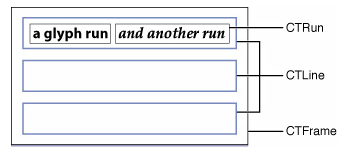
CTFrame 如同一塊完整的畫布 (Canvas),由多行 (CTLine) 組成;而每一行 CTLine 又可以拆分為一個或多個小方塊 (CTRun)。
需要特別注意的是,你不需要自己創建 CTRun,CoreText 會根據 NSAttributedString 的屬性自動創建 CTRun。每個 CTRun 對應不同的屬性,正因為如此,你可以自由控制字體、顏色、字間距等信息。
基本處理流程
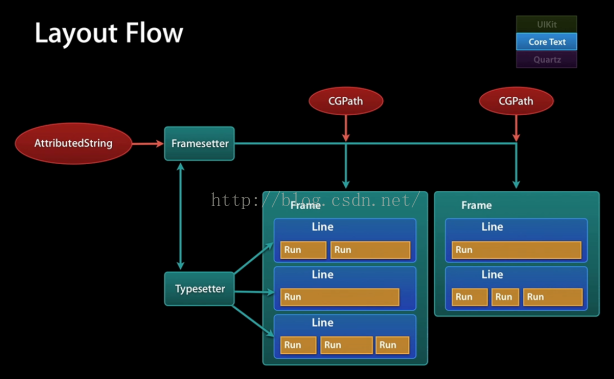
使用 CoreText 的通常步驟是:先準備好要顯示的字符串,然後定義各部分的樣式,生成 attributedString,接著創建 CTFramesetter,得到 CTFrame,最後進行繪制 (CTFrameDraw)。
其中可以更細緻地設置換行方式、對齊方式、繪制區域大小等。
繪制只是顯示,若還要處理點擊事件,就需要額外判斷。CTFrame 包含多個 CTLine,可以取得各行 line 的起始位置與大小,判斷點擊處是否落在某個 line 上。CTLine 又能判斷該點(相對於 CTLine 的坐標)所處的文字范圍,然後遍歷字符串的所有 NSTextCheckingResult,根據 result 的 range 判斷點擊處是否落在該 range 內,從而獲取被點擊的鏈接與位置。
字體基本知識
字體 (Font):指一系列字號、樣式和磅值相同的字符(例如 10 磅黑體 Palatino),現多被視為字樣的同義詞。
字面 (Face):是所有字號的磅值與格式的綜合。
字體集 (Font family):是一組相關字體(例如 Franklin family 包含 Franklin Gothic、Franklin Heavy 和 Franklin Compressed)。
磅值 (Weight):用於描述字體的粗細。典型的磅值從最粗到最細依次為:極細、細、book、中等、半粗、粗、較粗、極粗。
樣式 (Style):字形有三種形式——Roman type 是直體;oblique type 是斜體;italic type 是斜體兼曲線(比 Roman type 更像書法體)。
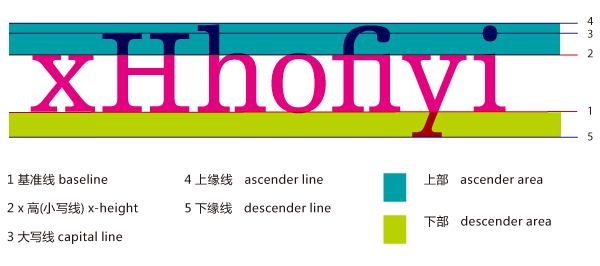
x 高度 (X height):指小寫字母的平均高度(以 x 為基準)。磅值相同的兩個字母中,x 高度越大的字母看起來就越大。
Cap 高度 (Cap height):與 x 高度相似,指大寫字母的平均高度(以 C 為基準)。
下行字母 (Descender):例如在字母 q 中,基線以下的部分叫做下伸部分。
上行字母 (Ascender):x 高度以上的部分(比如字母 b)叫做上伸部分。
基線 (Baseline):通常位於 x、v、b、m 下方的那條線。描邊 (Stroke):組成字符的線或曲線,可以加粗或改變字符形狀。
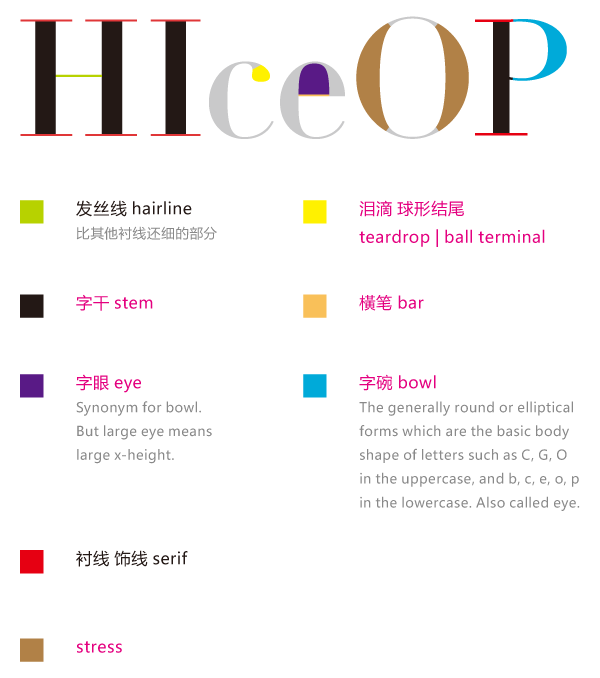
襯線 (Serif):用來使字符更易辨識的一條水平線,如字母左上角和下部的水平線。無襯線 (Sans Serif):讓排字員不使用襯線裝飾。
方形字 (Block):這類字體的筆畫使字符比無襯線字更顯眼,但還不到常見襯線字的程度,例如 Lubalin Graph 就是方形字,看起來像木頭塊刻出來的一樣。
手寫體腳本 (Calligraphic script):一種仿效手寫體的字體,例如 Murray Hill 或 Fraktur。
藝術字 (Decorative):像繪畫般的字體。Pi 符號 (Pi symbol):非標準字母數字字符的特殊符號,例如 Wingdings 和 Mathematical Pi。
連寫 (Ligature):是一系列連寫字母,如 fi、fl、ffi 或 ffl。由於這些字母形狀的原因經常被連寫,排字員已習慣將它們連寫。
讀完這些概念後,可以參考下面的圖片,看看具體的位置:
屬性定義
在 Apple 的 SDK 中,這些屬性是這樣定義的:
const CFStringRef kCTCharacterShapeAttributeName; //字體形狀屬性 必須是CFNumberRef對象默認為0,非0則對應相應的字符形狀定義,如1表示傳統字符形狀 const CFStringRef kCTFontAttributeName; //字體屬性 必須是CTFont對象 const CFStringRef kCTKernAttributeName; //字符間隔屬性 必須是CFNumberRef對象 const CFStringRef kCTLigatureAttributeName; //設置是否使用連字屬性,設置為0,表示不使用連字屬性。標准的英文連字有FI,FL.默認值為1,既是使用標准連字。也就是當搜索到f時候,會把fl當成一個文字。必須是CFNumberRef 默認為1,可取0,1,2 const CFStringRef kCTForegroundColorAttributeName; //字體顏色屬性 必須是CGColor對象,默認為black const CFStringRef kCTForegroundColorFromContextAttributeName; //上下文的字體顏色屬性 必須為CFBooleanRef 默認為False const CFStringRef kCTParagraphStyleAttributeName; //段落樣式屬性 必須是CTParagraphStyle對象 默認為NIL const CFStringRef kCTStrokeWidthAttributeName; //筆畫線條寬度 必須是CFNumberRef對象,默為0.0f,標准為3.0f const CFStringRef kCTStrokeColorAttributeName; //筆畫的顏色屬性 必須是CGColorRef 對象,默認為前景色 const CFStringRef kCTSuperscriptAttributeName; //設置字體的上下標屬性 必須是CFNumberRef對象 默認為0,可為-1為下標,1為上標,需要字體支持才行。如排列組合的樣式Cn1 const CFStringRef kCTUnderlineColorAttributeName; //字體下劃線顏色屬性 必須是CGColorRef對象,默認為前景色 const CFStringRef kCTUnderlineStyleAttributeName; //字體下劃線樣式屬性 必須是CFNumberRef對象,默為kCTUnderlineStyleNone 可以通過CTUnderlineStyleModifiers 進行修改下劃線風格 const CFStringRef kCTVerticalFormsAttributeName; //文字的字形方向屬性 必須是CFBooleanRef 默認為false,false表示水平方向,true表示豎直方向 const CFStringRef kCTGlyphInfoAttributeName; //字體信息屬性 必須是CTGlyphInfo對象 const CFStringRef kCTRunDelegateAttributeName //CTRun 委托屬性 必須是CTRunDelegate對象
例如:
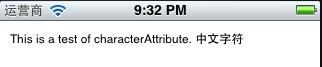
NSMutableAttributedString *mabstring = [[NSMutableAttributedString alloc]initWithString:@"This is a test of characterAttribute. 中文字符"];
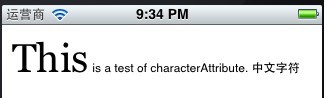
//設置字體屬性 CTFontRef font = CTFontCreateWithName(CFSTR("Georgia"), 40, NULL); [mabstring addAttribute:(id)kCTFontAttributeName value:(id)font range:NSMakeRange(0, 4)];
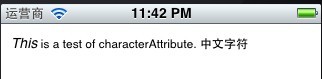
//設置斜體字 CTFontRef font = CTFontCreateWithName((CFStringRef)[UIFont italicSystemFontOfSize:20].fontName, 14, NULL); [mabstring addAttribute:(id)kCTFontAttributeName value:(id)font range:NSMakeRange(0, 4)];
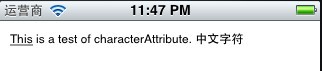
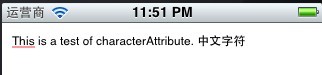
下劃線 kCTUnderlineStyleAttributeName、kCTUnderlineStyleDouble:
//下劃線 [mabstring addAttribute:(id)kCTUnderlineStyleAttributeName value:(id)[NSNumber numberWithInt:kCTUnderlineStyleDouble] range:NSMakeRange(0, 4)];
//下劃線顏色 [mabstring addAttribute:(id)kCTUnderlineColorAttributeName value:(id)[UIColor redColor].CGColor range:NSMakeRange(0, 4)];
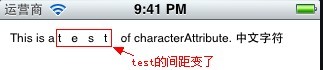
//設置字體簡隔 eg:test long number = 10; CFNumberRef num = CFNumberCreate(kCFAllocatorDefault,kCFNumberSInt8Type,&number); [mabstring addAttribute:(id)kCTKernAttributeName value:(id)num range:NSMakeRange(10, 4)];
//設置連字 long number = 1; CFNumberRef num = CFNumberCreate(kCFAllocatorDefault, kCFNumberSInt8Type,&number); [mabstring addAttribute:(id)kCTLigatureAttributeName value:(id)num range:NSMakeRange(0, [str length])];
暫時沒有效果圖。
//設置字體顏色 [mabstring addAttribute:(id)kCTForegroundColorAttributeName value:(id)[UIColor redColor].CGColor range:NSMakeRange(0, 9)];
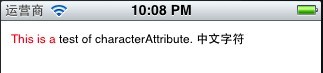
//設置字體顏色為前影色 CFBooleanRef flag = kCFBooleanTrue; [mabstring addAttribute:(id)kCTForegroundColorFromContextAttributeName value:(id)flag range:NSMakeRange(5, 10)];
暫無效果。
//設置空心字 long number = 2; CFNumberRef num = CFNumberCreate(kCFAllocatorDefault,kCFNumberSInt8Type,&number); [mabstring addAttribute:(id)kCTStrokeWidthAttributeName value:(id)num range:NSMakeRange(0, [str length])];
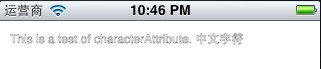
//設置空心字 long number = 2; CFNumberRef num = CFNumberCreate(kCFAllocatorDefault, kCFNumberSInt8Type,&number); [mabstring addAttribute:(id)kCTStrokeWidthAttributeName value:(id)num range:NSMakeRange(0, [str length])]; //設置空心字顏色 [mabstring addAttribute:(id)kCTStrokeColorAttributeName value:(id)[UIColor greenColor].CGColor range:NSMakeRange(0, [str length])];
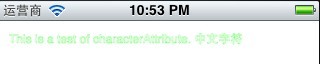
在設置空心字顏色時,必須先將字體設為空心,否則設置顏色不會有效果。
//對同一段字體進行多屬性設置 //紅色 NSMutableDictionary *attributes = [NSMutableDictionary dictionaryWithObject:(id)[UIColor redColor].CGColor forKey:(id)kCTForegroundColorAttributeName]; //斜體 CTFontRef font = CTFontCreateWithName((CFStringRef)[UIFont italicSystemFontOfSize:20].fontName, 40, NULL); [attributes setObject:(id)font forKey:(id)kCTFontAttributeName]; //下劃線 [attributes setObject:(id)[NSNumber numberWithInt:kCTUnderlineStyleDouble] forKey:(id)kCTUnderlineStyleAttributeName]; [mabstring addAttributes:attributes range:NSMakeRange(0, 4)];
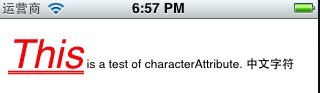
最後 Draw 一下:
-(void)characterAttribute { NSString *str = @"This is a test of characterAttribute. 中文字符"; NSMutableAttributedString *mabstring = [[NSMutableAttributedString alloc]initWithString:str]; [mabstring beginEditing]; //對同一段字體進行多屬性設置 //紅色 NSMutableDictionary *attributes = [NSMutableDictionary dictionaryWithObject:(id)[UIColor redColor].CGColor forKey:(id)kCTForegroundColorAttributeName]; //斜體 CTFontRef font = CTFontCreateWithName((CFStringRef)[UIFont italicSystemFontOfSize:20].fontName, 40, NULL); [attributes setObject:(id)font forKey:(id)kCTFontAttributeName]; //下劃線 [attributes setObject:(id)[NSNumber numberWithInt:kCTUnderlineStyleDouble] forKey:(id)kCTUnderlineStyleAttributeName]; [mabstring addAttributes:attributes range:NSMakeRange(0, 4)]; NSRange kk = NSMakeRange(0, 4); NSDictionary * dc = [mabstring attributesAtIndex:0 effectiveRange:&kk]; [mabstring endEditing]; NSLog(@"value = %@",dc); CTFramesetterRef framesetter = CTFramesetterCreateWithAttributedString((CFAttributedStringRef)mabstring); CGMutablePathRef Path = CGPathCreateMutable(); CGPathAddRect(Path, NULL ,CGRectMake(10 , 0 ,self.bounds.size.width-10 , self.bounds.size.height-10)); CTFrameRef frame = CTFramesetterCreateFrame(framesetter, CFRangeMake(0, 0), Path, NULL); //獲取當前(View)上下文以便於之後的繪畫,這個是一個離屏。 CGContextRef context = UIGraphicsGetCurrentContext(); CGContextSetTextMatrix(context , CGAffineTransformIdentity); //保存現在得上下文圖形狀態 CGContextSaveGState(context); //x,y軸方向移動 CGContextTranslateCTM(context , 0 ,self.bounds.size.height); //坐標系轉換,沿x軸翻轉180度 CGContextScaleCTM(context, 1.0 ,-1.0); CTFrameDraw(frame,context); CGPathRelease(Path); CFRelease(framesetter); } - (void)drawRect:(CGRect)rect { [self characterAttribute]; }
學習難點
學習 CoreText 並用它開發雜志類應用(如網易、Zarca 這類),主要面臨三大難題:一、對 CGContextRef 的 CTM 的理解;二、對文字繪制坐標系的掌握;三、對 CoreText 各項 API 的熟悉。
關於 CTM
CTM 即 Context Translate Matrix。它把要繪制的上下文用一個 Matrix 來表示,可以簡單理解為:上下文的每一個點都映射在 Matrix 上,你在 Matrix 上的操作都會讓上下文上的點產生相應的變動,如放大、旋轉、移動。
為了達到旋轉或縮放的目的,通常會先改變上下文,例如:
CGContextTranslateCTM(context, 0, self.bounds.size.height); CGContextScaleCTM(context, 1.0f, -1.0f); // some draw code // ....
很多人會誤以為 context 就是畫布,所有 matrix 旋轉都是針對畫布的旋轉,這樣理解其實是錯的(雖然結果恰好正確)。實際上 context 說的是繪畫人所處的角度上下文。默認情況下,繪畫人的角度是正對著畫布的:
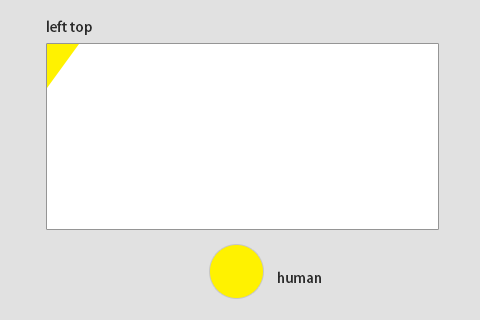
要記住!!畫布無論如何都是正對著屏幕的,它不會旋轉、縮放或移動。之所以看起來放大或移動了,其實移動的是你的 context,也就是你所處的視角。比方說我要旋轉 180 度後在左上角寫一個「abcdefg」,先旋轉 180 度:
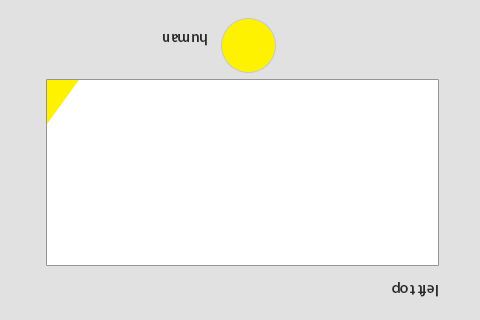
然後在左上角寫上「abcdefg」:
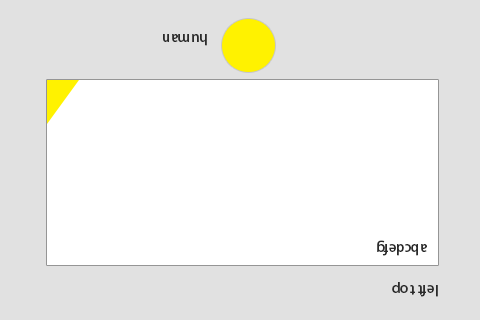
再重置 context:
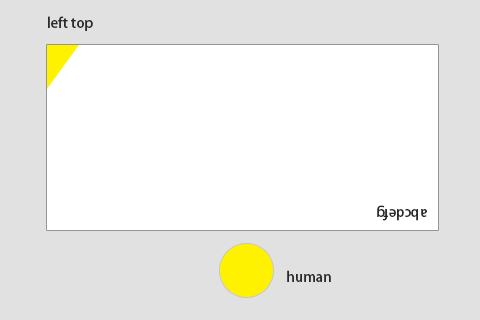
可見改變 context 只是改變了自己面對畫布的角度,畫布始終正對著屏幕。剛才繪畫時的坐標 (0,0) 是你旋轉後 context 的左上角,而不是畫布的左上角——因為旋轉了 180 度,實際上坐標 0,0 已經是畫布的右下角了。始終記住:畫布從來沒動過。所以繪畫時其實是倒著畫在了畫布的右下角上,而重置 context 則是把自己重新擺正。這也解釋了為什麼要在使用 matrix 更改 context 之後再繪圖(先調整好面對畫布的角度),而不是畫完之後再調整(都畫完了再調整角度還有什麼用)。正確理解 matrix 與 context 的關係非常重要,因為它直接關乎坐標系問題。
關於坐標系
NS 坐標系以左下角為 (0,0),因此它與 iOS 的 UIKit 坐標系在 Y 軸上正好相反。所以在 iOS 上用 CoreText 繪制時,X 方向一致,Y 方向卻是顛倒的。當你在 (20, 20) 處用 CoreText 畫一個長方形,實際上是畫在了畫布的 (20, canvas.height - 20 + rect.size.height) 位置,而且是倒過來的:
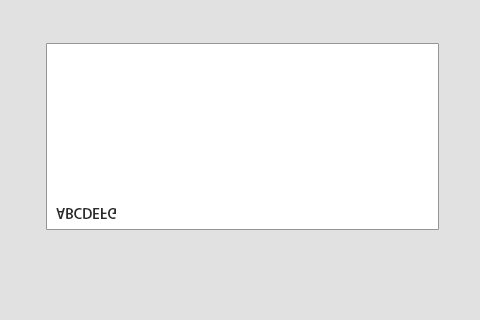
解決辦法:先向下平移,再把坐標系反過來:
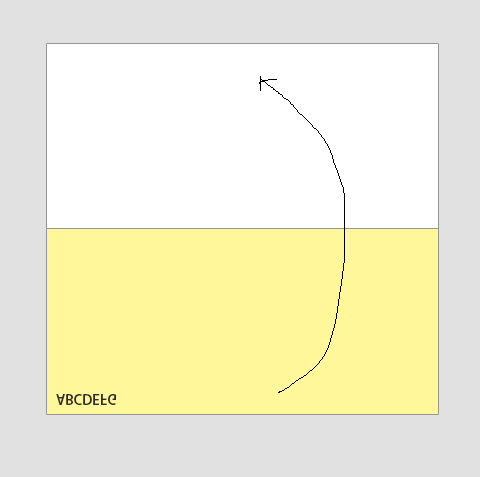
效果:
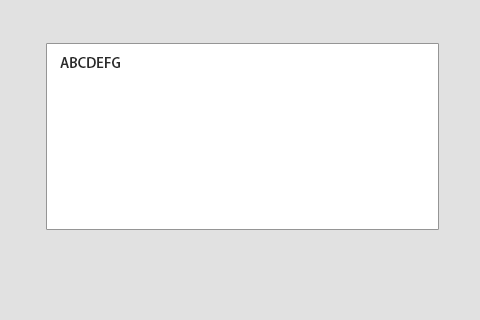
此時進行了兩次 matrix 轉換,context 的左上角變成了畫布的左下角,其他都不變。理解了這一點,就不會再對結果感到意外了。
關於 CoreText API
使用 Create 函數創建的對象引用,必須使用 CFRelease 釋放。
CoreText 是什麼
它是一套底層 API,數據源是 NSAttributedString,可以根據 NSAttributedString 中每個 range 的樣式對字符串進行渲染。可以說,它是一個強大的富文本渲染器。
為什麼要用 CoreText
UIWebView 做不了一些事情,比如分列顯示,這點網頁很難做到。此外,UILabel 在多行文本時只能垂直居中,這也是使用 CoreText 的一個重要理由。使用 CoreText 還能很好地實現個性化效果,比如添加動畫——這是 UIWebView 做不到的。它能做出很酷的東西,例如雜志、新聞類應用。
核心概念
CTFramesetterRef
顧名思義,這是一個屬性設置器,它引用了一些有用的對象(如字體),工作就是生成一個 CTFrameRef 對象。
CTFrameRef
一個 Frame 對象,用於表示繪制區域,由 CTFramesetterRef 生成。
CTLineRef
表示要繪制的一行,CTFrameRef 對象包含了多個 line 對象。
CTNodeRef
表示要繪制的某個節點(subNSAttributedString),每個 line 對象包含多個 node 對象,這個節點表示不同格式的 NSAttributedString 該如何繪制。若要插入圖片則需特別考慮——CoreText 本身不支持中間插入圖片,但我們可以在讀到特殊標記的 node 時返回不同的行高和行寬,預留空間,待 CoreText 繪制完成後,再在這些空間處補畫相應的圖片。
使用流程
1、生成要繪制的 NSAttributedString 對象。
2、生成一個 CTFramesetterRef 對象,然後創建一個 CGPath 對象,用於表示可繪制區域的坐標值與長寬。
3、用上面生成的 setter 和 path 生成一個 CTFrameRef 對象,它包含了這兩個對象的信息(字體信息、坐標信息),就可以用 CTFrameDraw 方法繪制了。
這裡有一段 demo 代碼:
- (void)_drawRectWithContext:(CGContextRef)context { // generate NSAttributedString object NSAttributedString *contentAttrString = [self _generateAttributeString]; // 初始一個 path CGRect bounds = CGRectInset(self.bounds, 10.0f, 10.0f); CGMutablePathRef path = CGPathCreateMutable(); CGPathAddRect(path, NULL, bounds); // ------------------------ begin draw // 初始一個framesetter CTFramesetterRef framesetter = CTFramesetterCreateWithAttributedString((__bridge CFAttributedStringRef)(contentAttrString)); // 通過 framesetter 和 path 生成 Frame CTFrameRef frame = CTFramesetterCreateFrame(framesetter, CFRangeMake(0, 0), path, NULL); CTFrameDraw(frame, context); CFRelease(frame); CFRelease(path); CFRelease(framesetter); // ------------------------ end draw }
NSAttributedString 的屬性設置
一直談 CoreText,那麼怎麼設置 NSAttributedString 的屬性、行高、字體大小與樣式呢?首先要會設置屬性,調用 NSAttributedString 的 setAttributes:range: 方法即可:
// set attributes to attributed string [attrString setAttributes:attributes range:NSMakeRange(0, attrString.length)];
可用的屬性包括:
const CFStringRef kCTCharacterShapeAttributeName; const CFStringRef kCTFontAttributeName; const CFStringRef kCTKernAttributeName; const CFStringRef kCTLigatureAttributeName; const CFStringRef kCTForegroundColorAttributeName; const CFStringRef kCTForegroundColorFromContextAttributeName; const CFStringRef kCTParagraphStyleAttributeName; const CFStringRef kCTStrokeWidthAttributeName; const CFStringRef kCTStrokeColorAttributeName; const CFStringRef kCTSuperscriptAttributeName; const CFStringRef kCTUnderlineColorAttributeName; const CFStringRef kCTUnderlineStyleAttributeName; const CFStringRef kCTVerticalFormsAttributeName; const CFStringRef kCTGlyphInfoAttributeName; const CFStringRef kCTRunDelegateAttributeName
各屬性說明:
kCTCharacterShapeAttributeName:控制字形選擇,值必須是 CFNumberRef,默認 0(禁用),非 0 值對應 Apple Type Services 的字符形狀選擇器 + 1,例如值為 1 對應 kTraditionalCharactersSelector。
kCTFontAttributeName:文本所用字體,值必須是 CTFont 對象,默認為 Helvetica 12。
kCTKernAttributeName:對下一個字符的 kerning 量,值必須是 CFNumber float,默認為標準 kerning。正值表示後續字符離得更遠,負值表示離得更近。若設為 0.0,則完全不進行 kerning。
kCTLigatureAttributeName:使用的連字類型,值必須是 CFNumber,默認為整數 1。0 表示僅使用渲染必需的連字,1 表示標準連字,2 表示所有可用連字。英文文本通常只有 fi、fl 兩個標準連字。
kCTForegroundColorAttributeName:文本前景色,值必須是 CGColor,默認為黑色。
kCTForegroundColorFromContextAttributeName:使用上下文的填充色作為前景色,值必須是 CFBooleanRef,默認為 false。它讓 CoreText 只設置字體信息而不設置顏色,從而繞開 NSAttributedString 默認黑色的行為。
kCTParagraphStyleAttributeName:段落樣式,用於指定行對齊、tab、書寫方向等,值必須是 CTParagraphStyle 對象。
kCTStrokeWidthAttributeName:描邊寬度,值必須是 CFNumberRef,默認 0.0(不描邊)。以字體點大小的百分比解釋,正值為僅描邊,負值為描邊加填充,空心文字的典型值為 3.0。
kCTStrokeColorAttributeName:描邊顏色,值必須是 CGColorRef,默認為前景色。
kCTSuperscriptAttributeName:控制文字垂直位置,值必須是 CFNumberRef,默認 0,1 為上標,-1 為下標,需字體支持。
kCTUnderlineColorAttributeName:下劃線顏色,值必須是 CGColorRef,默認為前景色。
kCTUnderlineStyleAttributeName:下劃線樣式,值必須是 CFNumber,默認為 kCTUnderlineStyleNone,可通過 CTUnderlineStyleModifiers 修改下劃線外觀。
kCTVerticalFormsAttributeName:字形方向,值必須是 CFBoolean,默認為 false(水平),true 為豎直。
kCTGlyphInfoAttributeName:應用的字形信息對象,值必須是 CTGlyphInfo 對象。
kCTRunDelegateAttributeName:應用於某 range 的 run-delegate 對象,值必須是 CTRunDelegate,可控制字形的 ascent、descent、width 等排版特徵,建議僅應用於單個字符 U+FFFC。
行高、縮進等段落樣式
上面說的似乎只涉及字體與樣式,卻沒有行高、縮進之類的設置。其實 CoreText 把它們當作段落樣式處理,只要設置 kCTParagraphStyleAttributeName 屬性即可。該屬性的值是一個 CTParagraphStyle 對象,把你想要的段落屬性放進去就行:
kCTParagraphStyleSpecifierAlignment = 0, kCTParagraphStyleSpecifierFirstLineHeadIndent = 1, kCTParagraphStyleSpecifierHeadIndent = 2, kCTParagraphStyleSpecifierTailIndent = 3, kCTParagraphStyleSpecifierTabStops = 4, kCTParagraphStyleSpecifierDefaultTabInterval = 5, kCTParagraphStyleSpecifierLineBreakMode = 6, kCTParagraphStyleSpecifierLineHeightMultiple = 7, kCTParagraphStyleSpecifierMaximumLineHeight = 8, kCTParagraphStyleSpecifierMinimumLineHeight = 9, kCTParagraphStyleSpecifierLineSpacing = 10, /* deprecated */ kCTParagraphStyleSpecifierParagraphSpacing = 11, kCTParagraphStyleSpecifierParagraphSpacingBefore = 12, kCTParagraphStyleSpecifierBaseWritingDirection = 13, kCTParagraphStyleSpecifierMaximumLineSpacing = 14, kCTParagraphStyleSpecifierMinimumLineSpacing = 15, kCTParagraphStyleSpecifierLineSpacingAdjustment = 16, kCTParagraphStyleSpecifierLineBoundsOptions = 17, kCTParagraphStyleSpecifierCount
主要 specifier 說明:
kCTParagraphStyleSpecifierAlignment:文本對齊方式,類型 CTTextAlignment,默認 kCTNaturalTextAlignment。
kCTParagraphStyleSpecifierFirstLineHeadIndent:段落首行距前邊距的距離(點),類型 CGFloat,默認 0.0。
kCTParagraphStyleSpecifierHeadIndent:除首行外各行距前邊距的距離,類型 CGFloat,默認 0.0。
kCTParagraphStyleSpecifierTailIndent:行尾距邊距的距離,類型 CGFloat,默認 0.0。
kCTParagraphStyleSpecifierTabStops:段落樣式的 CTTextTab 對象數組,默認為 12 個左對齊 tab,間隔 28.0 點。
kCTParagraphStyleSpecifierDefaultTabInterval:文檔默認 tab 間隔,類型 CGFloat,默認 0.0。
kCTParagraphStyleSpecifierLineBreakMode:換行模式,類型 CTLineBreakMode,默認 kCTLineBreakByWordWrapping。
kCTParagraphStyleSpecifierLineHeightMultiple:行高倍數,類型 CGFloat,默認 0.0。
kCTParagraphStyleSpecifierMaximumLineHeight:每行最大高度,類型 CGFloat,默認 0.0(無限制)。
kCTParagraphStyleSpecifierMinimumLineHeight:每行最小高度,類型 CGFloat,默認 0.0。
kCTParagraphStyleSpecifierLineSpacing:段內行間距(leading),類型 CGFloat,默認 0.0。
kCTParagraphStyleSpecifierParagraphSpacing:段後間距,類型 CGFloat,默認 0.0。
kCTParagraphStyleSpecifierParagraphSpacingBefore:段首到文本開始的距離,類型 CGFloat,默認 0.0。
kCTParagraphStyleSpecifierBaseWritingDirection:基礎書寫方向,類型 CTWritingDirection,默認 kCTWritingDirectionNatural。
kCTParagraphStyleSpecifierCount:樣式 specifier 的數量,用於簡化驗證。
下面是一個設置段落樣式的 demo:
NSMutableAttributedString *attrString = [[NSMutableAttributedString alloc] initWithString:_content]; // line space CTParagraphStyleSetting lineSpaceSetting; lineSpaceSetting.spec = kCTParagraphStyleSpecifierLineSpacing; lineSpaceSetting.value = &_lineSpace; lineSpaceSetting.valueSize = sizeof(float); // indent CTParagraphStyleSetting indentSetting; indentSetting.spec = kCTParagraphStyleSpecifierFirstLineHeadIndent; indentSetting.value = &_indent; indentSetting.valueSize = sizeof(float); // composite settings CTParagraphStyleSetting settings[] = { lineSpaceSetting, indentSetting }; CTParagraphStyleRef style = CTParagraphStyleCreate(settings, 2); // build attributes NSDictionary *attributes = @{(__bridge id)kCTParagraphStyleAttributeName: (__bridge id)style}; // set attributes to attributed string [attrString setAttributes:attributes range:NSMakeRange(0, attrString.length)];
分欄顯示
分欄是相當有趣的功能,可以用 CTFrameGetVisibleStringRange 函數計算指定 frame 繪制了多少字符,然後另建一個 frame 把剩餘字符繪制進去:
// get current context and store it's state CGContextRef context = UIGraphicsGetCurrentContext(); CGContextSaveGState(context); // translate CTM for iOS CGContextTranslateCTM(context, 0, self.bounds.size.height); CGContextScaleCTM(context, 1, -1); // generate attributed string NSAttributedString *attrString = [self _generateAttributedString]; // Draw code start ------------------------------------------------------------------------------------------------- CGRect bounds = CGRectInset(self.bounds, 25.0f, 25.0f); float columnWidth = (bounds.size.width - 30.0f) / 2.0f; float columnHeight = bounds.size.height; CTFramesetterRef framesetter = CTFramesetterCreateWithAttributedString((__bridge CFAttributedStringRef)(attrString)); int location = 0; // ------------- first column CGRect firstColumnRect = CGRectMake(bounds.origin.x, bounds.origin.y, columnWidth, columnHeight); CGMutablePathRef firstColumnPath = CGPathCreateMutable(); CGPathAddRect(firstColumnPath, NULL, firstColumnRect); CTFrameRef firstColumnFrame = CTFramesetterCreateFrame(framesetter, CFRangeMake(location, 0), firstColumnPath, NULL); CFRange firstColumnStringRange = CTFrameGetVisibleStringRange(firstColumnFrame); CTFrameDraw(firstColumnFrame, context); // recalculate the location for next frame. location = firstColumnStringRange.length; // ------------- second column CGRect secondColumnRect = CGRectMake(bounds.origin.x + 30 + columnWidth, bounds.origin.y, columnWidth, columnHeight); CGMutablePathRef secondColumnPath = CGPathCreateMutable(); CGPathAddRect(secondColumnPath, NULL, secondColumnRect); CTFrameRef secondColumnFrame = CTFramesetterCreateFrame(framesetter, CFRangeMake(location, 0), secondColumnPath, NULL); CTFrameDraw(secondColumnFrame, context); // release CFRelease(firstColumnPath); CFRelease(firstColumnFrame); CFRelease(secondColumnPath); CFRelease(secondColumnFrame); CFRelease(framesetter); // Draw code end ------------------------------------------------------------------------------------------------- // restore current context CGContextRestoreGState(context);
- 上一篇文章: iOS Core Animation 動畫開發完全指南
- 下一篇文章: iOS 引導頁的簡潔實現方案