《從零開始學 Swift》學習筆記(Day 57)——Swift 編碼規範之注釋規範
前面說到 Swift 的注釋語法有兩種:單行注釋(//)和多行注釋(/*...*/)。這裡來介紹它們的使用規範。
文件注釋
文件注釋就是在每一個文件開頭添加的注釋,通常包括如下信息:版權信息、文件名、所在模塊、作者信息、歷史版本信息、文件內容和作用等。
下面看一個文件注釋的示例:
/* Copyright (C) 2015 EorientInc. All Rights Reserved. See LICENSE.txtfor this sample’s licensing information Description: This file contains thefoundational subclass of NSOperation. History: 15/7/22: Created by TonyGuan. 15/8/20: Add socketlibrary 15/8/22: Add math library */
這個注釋提供了版權信息、文件內容和歷史版本信息等。文件注釋要根據自己的實際情況包含相應內容。
文檔注釋
文檔注釋,就是這種注釋內容能夠生成 API 幫助文檔。文檔注釋主要用於說明類型、屬性、方法或函數等。
文檔注釋其實是把單行注釋(//)和多行注釋(/*...*/)做一點“手腳”後得到的:單行文檔注釋(///)和多行文檔注釋(/**...*/)。
下面代碼示例:
import Foundation /** The protocol that types may implement ifthey wish to be notified of significantoperation lifecycle events. */ protocol OperationObserver{ /// Invoked immediately prior to the`Operation`'s `execute()` method. func operationDidStart(operation:Operation) }
代碼中使用了文檔注釋,可以借助一些工具把這些文檔注釋生成 API 文件。
代碼注釋
程序代碼中除了文檔注釋,還需要在一些關鍵的地方添加代碼注釋。文檔注釋一般是給看不到源代碼的人看的幫助文檔,而代碼注釋則是給閱讀源代碼的人參考的。代碼注釋一般採用單行注釋(//)和多行注釋(/*...*/)。
有的時候也會在代碼的尾端進行注釋,這要求注釋內容極短,並且要有足夠的空白來分開代碼和注釋。尾端注釋示例代碼如下:
init(timeout:NSTimeInterval) { self.timeout = timeout //初始化 }
使用地標注釋
隨著編碼過程深入,工程代碼量會不斷增加,如何在這大量代碼中快速找到需要的方法,或剛才修改過的代碼呢?
在 Swift 代碼中使用地標注釋,就可以借助 Xcode 工具在代碼中快速查找了。地標注釋有三個:
MARK,用於方法或函數的注釋。
TODO,表示這裡代碼還沒完成,還要處理。
FIXME,表示這裡修改了代碼。
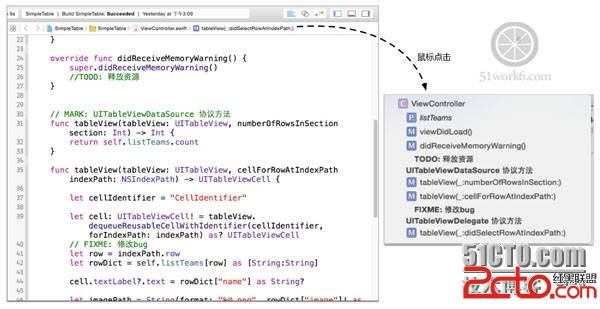
這些注釋會出現在 Xcode 的 Jump Bar 中。來看一個示例:
class ViewController:UIViewController, UITableViewDataSource, UITableViewDelegate { var listTeams: [[String:String]]! override func viewDidLoad() { super.viewDidLoad() ... } override func didReceiveMemoryWarning() { super.didReceiveMemoryWarning() //TODO: 釋放資源 //使用TODO注釋 } // MARK: UITableViewDataSource 協議方法 //使用MARK注釋 func tableView(tableView: UITableView, numberOfRowsInSection section: Int) -> Int { return self.listTeams.count } func tableView(tableView: UITableView, cellForRowAtIndexPath indexPath: NSIndexPath) -> UITableViewCell { let cellIdentifier ="CellIdentifier" let cell: UITableViewCell! = tableView .dequeueReusableCellWithIdentifier(cellIdentifier, forIndexPath: indexPath) as? UITableViewCell // FIXME: 修改bug //使用了FIXME注釋 let row = indexPath.row let rowDict = self.listTeams[row] as[String:String] ... return cell } // MARK: UITableViewDelegate 協議方法 //使用MARK注釋 func tableView(tableView: UITableView, didSelectRowAtIndexPath indexPath: NSIndexPath) { ... } }
上述代碼使用了三種地標注釋,使用時後面要跟有一個冒號(:)。
注釋之後如何使用呢?打開 Xcode 的 Jump Bar,如下圖,這些地標注釋會在下拉列表中粗體顯示,點擊列表項就會跳轉到注釋行。