
只用三個 UIImageView 打造 iOS 無限輪播控件
幾乎每個 App 的首頁頂部都有一個自動滾動的輪播圖,點擊可跳轉對應詳情。本文示範如何封裝一個可複用的輪播控件:用三個 UIImageView 循環復用來顯示任意張圖片,並透過代理把被點擊圖片的資料回傳給呼叫方。
需求拆解
- 只用三個
UIImageView,實現任意數量圖片的無限循環滾動。 - 支援點擊回調,把被點擊圖片對應的 model 交給呼叫方。
- 顯示頁碼指示器
UIPageControl,並支援定時自動切換。
頭文件設計
#import <UIKit/UIKit.h>

@class InfiniteRollScrollView;

@protocol InfiniteRollScrollViewDelegate <NSObject>
@optional
/**
 * 點擊圖片的回調
 * @param scrollView 一般傳 self
 * @param info 每張圖片對應的 model,由控制器透過 imageModelInfoArray 傳入,再由本方法回傳
 */
- (void)infiniteRollScrollView:(InfiniteRollScrollView *)scrollView tapImageViewInfo:(id)info;
@end

@interface InfiniteRollScrollView : UIView
/** 圖片資訊,每張圖片對應一個 model,需由控制器傳入 */
@property (strong, nonatomic) NSMutableArray *imageModelInfoArray;
/** 需要顯示的圖片,需由控制器傳入 */
@property (strong, nonatomic) NSArray *imageArray;
/** 是否豎屏滾動,預設 NO */
@property (assign, nonatomic, getter=isScrollDirectionPortrait) BOOL scrollDirectionPortrait;
@property (weak, nonatomic, readonly) UIPageControl *pageControl;
@property (weak, nonatomic) id<InfiniteRollScrollViewDelegate> delegate;
@end
核心實作
#import "InfiniteRollScrollView.h"

static const NSInteger ImageViewCount = 3;

@interface InfiniteRollScrollView () <UIScrollViewDelegate>
@property (weak, nonatomic) UIScrollView *scrollView;
@property (weak, nonatomic) NSTimer *timer;
@property (assign, nonatomic) BOOL isFirstLoadImage;
@end

@implementation InfiniteRollScrollView

#pragma mark - 初始化
- (instancetype)initWithFrame:(CGRect)frame {
    if (self = [super initWithFrame:frame]) {
        UIScrollView *scrollView = [[UIScrollView alloc] init];
        scrollView.showsHorizontalScrollIndicator = NO;
        scrollView.showsVerticalScrollIndicator = NO;
        scrollView.pagingEnabled = YES;
        scrollView.bounces = NO;
        scrollView.delegate = self;
        [self addSubview:scrollView];
        self.scrollView = scrollView;

        for (int i = 0; i < ImageViewCount; i++) {
            UIImageView *imageView = [[UIImageView alloc] init];
            imageView.frame = CGRectMake(0, 0,
                                         scrollView.frame.size.width,
                                         scrollView.frame.size.height);
            imageView.tag = i;
            imageView.userInteractionEnabled = YES;

            UITapGestureRecognizer *tap = [[UITapGestureRecognizer alloc]
                                           initWithTarget:self action:@selector(tapCallback:)];
            tap.cancelTouchesInView = NO;
            [imageView addGestureRecognizer:tap];

            [scrollView addSubview:imageView];
        }

        UIPageControl *pageControl = [[UIPageControl alloc] init];
        CGFloat pageW = 80, pageH = 20;
        CGFloat pageX = scrollView.frame.size.width - pageW;
        CGFloat pageY = scrollView.frame.size.height - pageH;
        pageControl.frame = CGRectMake(pageX, pageY, pageW, pageH);
        [self addSubview:pageControl];
        _pageControl = pageControl;
    }
    return self;
}

- (void)layoutSubviews {
    [super layoutSubviews];
    self.scrollView.frame = self.bounds;
    self.scrollView.contentSize = CGSizeMake(0, self.scrollView.frame.size.height * ImageViewCount);
    // 讓 scrollView 顯示中間那張
    if (self.isScrollDirectionPortrait) {
        self.scrollView.contentOffset = CGPointMake(0, self.scrollView.frame.size.height);
    } else {
        self.scrollView.contentOffset = CGPointMake(self.scrollView.frame.size.width, 0);
    }
}

#pragma mark - 資料與手勢
- (void)displayImage {
    for (int i = 0; i < ImageViewCount; i++) {
        UIImageView *imageView = self.scrollView.subviews[i];
        NSInteger index = imageView.tag;
        if (index >= self.pageControl.numberOfPages) {
            // 滾到最後一張後 index 加一會越界,重置為 0,於是再往後滾就回到第一張
            index = 0;
        }
        imageView.tag = index;
        imageView.image = self.imageArray[index];
    }
    self.isFirstLoadImage = YES;

    // 每次滾完一張,直接把 contentOffset 拉回中間位置
    if (self.isScrollDirectionPortrait) {
        self.scrollView.contentOffset = CGPointMake(0, self.scrollView.frame.size.height);
    } else {
        self.scrollView.contentOffset = CGPointMake(self.scrollView.frame.size.width, 0);
    }
}

- (void)tapCallback:(UITapGestureRecognizer *)tap {
    if ([self.delegate respondsToSelector:@selector(infiniteRollScrollView:tapImageViewInfo:)]) {
        UIImageView *imageView = (UIImageView *)tap.view;
        id info = self.imageModelInfoArray[imageView.tag];
        [self.delegate infiniteRollScrollView:self tapImageViewInfo:info];
    }
}

#pragma mark - UIScrollViewDelegate
- (void)scrollViewDidScroll:(UIScrollView *)scrollView {
    // 兩張圖同時出現在螢幕上時,找出佔比較多的那一張
    NSInteger page = 0;
    CGFloat minDistance = MAXFLOAT;
    for (int i = 0; i < self.scrollView.subviews.count; i++) {
        UIImageView *imageView = self.scrollView.subviews[i];
        CGFloat distance = 0;
        if (self.isScrollDirectionPortrait) {
            distance = fabs(self.scrollView.contentOffset.y - imageView.frame.origin.y);
        } else {
            distance = fabs(self.scrollView.contentOffset.x - imageView.frame.origin.x);
        }
        if (distance < minDistance) {
            minDistance = distance;
            page = imageView.tag;
        }
    }
    self.pageControl.currentPage = page;
}

- (void)scrollViewDidEndDecelerating:(UIScrollView *)scrollView {
    [self displayImage];
    if (self.isFirstLoadImage) {
        self.isFirstLoadImage = NO;
        return;
    }
    [self updateImageViews];
}

- (void)updateImageViews {
    for (UIImageView *imageView in self.scrollView.subviews) {
        NSInteger index = imageView.tag;
        if (index >= self.pageControl.numberOfPages) {
            index = 0;
        }
        imageView.tag = index;
        imageView.image = self.imageArray[index];
    }
}

#pragma mark - 定時器
- (void)startTimer {
    NSTimer *timer = [NSTimer timerWithTimeInterval:2.0
                                            target:self
                                          selector:@selector(displayNextImage)
                                          userInfo:nil
                                           repeats:YES];
    [[NSRunLoop mainRunLoop] addTimer:timer forMode:NSRunLoopCommonModes];
    self.timer = timer;
}

- (void)stopTimer {
    [self.timer invalidate];
    self.timer = nil;   // 計時器被 runloop 強引用,必須手動斷開
}

- (void)displayNextImage {
    if (self.isScrollDirectionPortrait) {
        [self.scrollView setContentOffset:CGPointMake(0, 2 * self.scrollView.frame.size.height) animated:YES];
    } else {
        [self.scrollView setContentOffset:CGPointMake(2 * self.scrollView.frame.size.width, 0) animated:YES];
    }
}

#pragma mark - setter
- (void)setImageArray:(NSArray *)imageArray {
    _imageArray = imageArray;
    self.pageControl.numberOfPages = imageArray.count;
    self.pageControl.currentPage = 0;
    [self displayImage];
    [self startTimer];
}
@end
難點一:如何判斷哪張圖佔螢幕更多
使用者拖到一半松手時,兩張圖各佔一部分,此時必須決定完整顯示哪一張。做法是把 contentOffset 與每個 imageView 的 frame.origin 作差取絕對值,差值最小的那張就是佔比較多的。

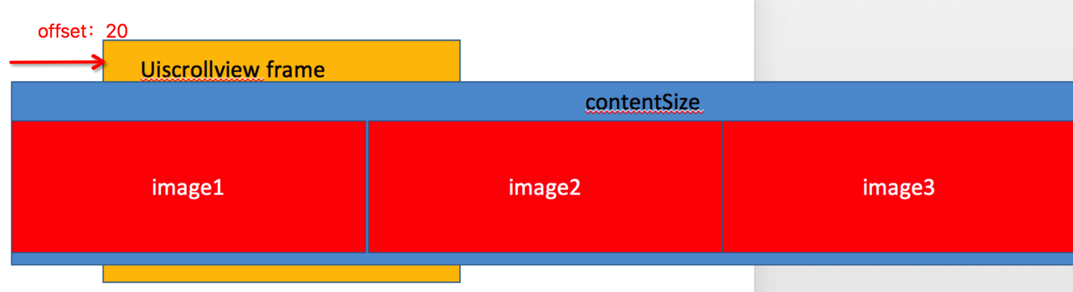
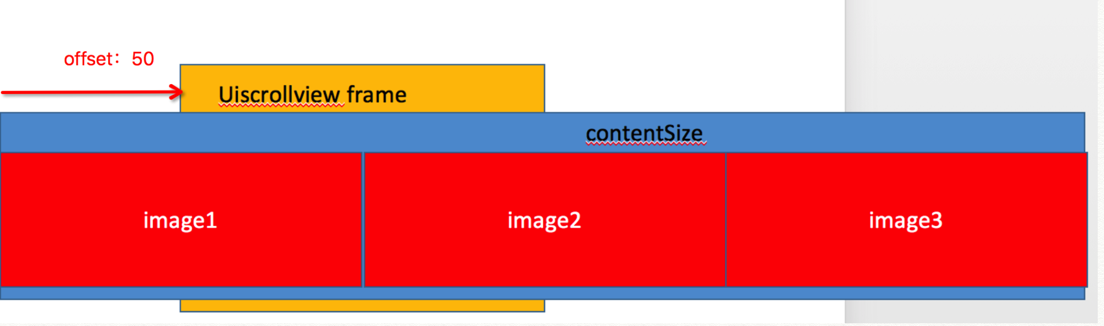
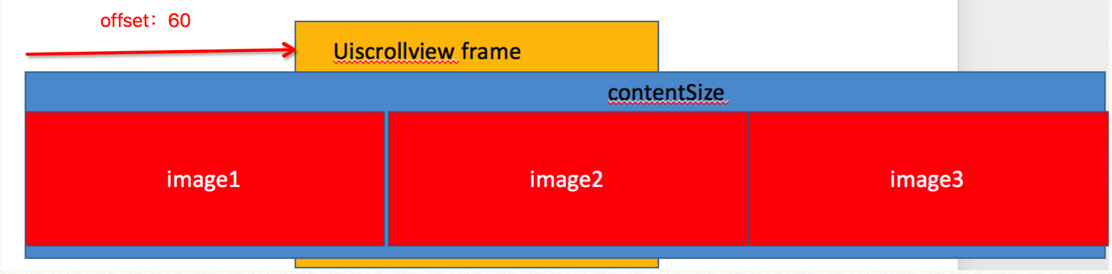
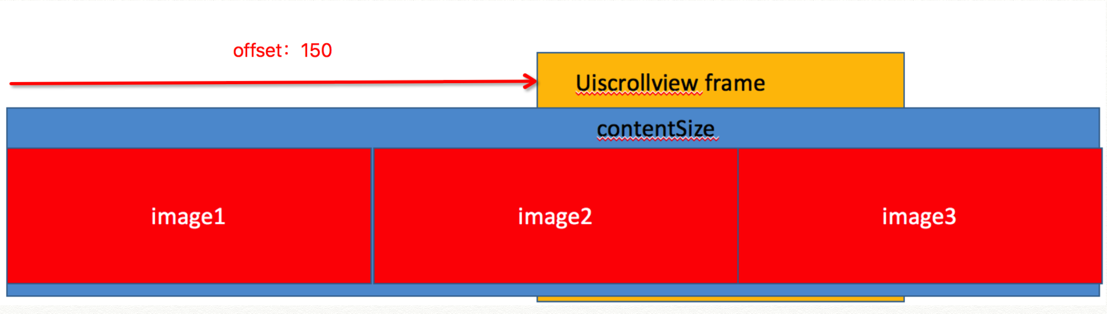
假設三個 imageView 的 x 分別是 0、100、200(只討論橫向滾動)。注意:滾動時 imageView 的 frame 不變,變的是 scrollView 的 bounds,所以才會有「圖像在移動」的錯覺。
情況一:offset = 20
差值分別為 20、80、180。image3 差值超過 100,已在螢幕外;最小差值是 image1 的 20,此時 image1 佔 80%、image2 佔 20%,松手應停在 image1。
情況二:offset = 50(臨界點)
差值為 50、50、150。image1 與 image2 各佔一半,image3 在螢幕外。
情況三:offset = 60
差值為 60、40、140。最小差值是 image2 的 40,此時 image1 佔 40%、image2 佔 60%,松手應停在 image2。
情況四:offset = 150(臨界點)
差值為 150、50、50。image1 已在螢幕外,image2 與 image3 各佔一半。
情況五:offset = 160
差值為 160、60、40。最小差值 40 對應 image3,松手應停在 image3。
五種情況涵蓋了所有可能,可見「取最小差值」這個判據是成立的。
難點二:三個 imageView 如何顯示無限張圖
核心思路是「首尾相接的環」:三個 imageView 依次排開,中間那個當前可見;每次滾動結束後,把即將移出視線的那一個挪到隊尾並換上下一張圖的內容,同時把 contentOffset 無感地拉回中間位置。因為 offset 的跳變和圖片內容的更新在同一幀內完成,使用者察覺不到。
使用方式
#import "ViewController.h"
#import "ImageModel.h"

@interface ViewController () <InfiniteRollScrollViewDelegate>
@end

@implementation ViewController

- (void)viewDidLoad {
    [super viewDidLoad];

    InfiniteRollScrollView *scrollView = [[InfiniteRollScrollView alloc] init];
    scrollView.frame = CGRectMake(30, 50, 300, 130);
    scrollView.delegate = self;
    scrollView.pageControl.currentPageIndicatorTintColor = [UIColor orangeColor];
    scrollView.pageControl.pageIndicatorTintColor = [UIColor grayColor];

    scrollView.imageArray = @[
        [UIImage imageNamed:@"0"], [UIImage imageNamed:@"1"],
        [UIImage imageNamed:@"2"], [UIImage imageNamed:@"3"],
        [UIImage imageNamed:@"4"]
    ];

    // 實務中這些 model 通常由伺服器返回
    scrollView.imageModelInfoArray = [NSMutableArray array];
    for (int i = 0; i < 5; i++) {
        ImageModel *model = [[ImageModel alloc] init];
        model.name = [NSString stringWithFormat:@"picture-%zd", i];
        model.url  = [NSString stringWithFormat:@"https://www.example.com/%zd", i];
        [scrollView.imageModelInfoArray addObject:model];
    }

    [self.view addSubview:scrollView];
}

- (void)infiniteRollScrollView:(InfiniteRollScrollView *)scrollView tapImageViewInfo:(id)info {
    ImageModel *model = (ImageModel *)info;
    NSLog(@"name:%@---url:%@", model.name, model.url);
}
@end
還可以更好
目前這個封裝要求呼叫方先把圖片下載好再傳進來。更理想的做法是只傳入 model 陣列(含 url),由控件內部異步下載並做快取,呼叫方完全不用關心加載細節。另外,記得在 view 消失時呼叫 stopTimer,否則計時器會一直存活並造成記憶體洩漏。
Demo 地址:https://github.com/XiMuYouZi/InfiniteRoll
- 上一篇文章: iOS 應用內購買(IAP)完整實踐指南
- 下一篇文章: 深入理解 RunLoop:原理、Mode 機制與實戰應用