
【iOS】利用 Runtime 優雅處理程式中的常見崩潰
前言
一個已上架 App Store 的 App,最忌諱的就是崩潰。為何在開發或測試階段都好好的,一上架卻頻頻崩潰?追根究柢,最主要的原因就是數據錯亂,尤其是服務器返回數據的錯亂,會嚴重影響 App 的穩定性。
Foundation 框架潛藏許多崩潰風險
將 nil 插入可變數組會崩潰;數組越界會崩潰;給字典元素重新賦值時若 key 為 nil 也會崩潰……這些都是開發中常見的隱患。
JQSafeKit 簡介
這個框架利用 Runtime 技術,對一些常用且容易導致崩潰的方法進行處理,能有效防止崩潰,並打印出具體是哪一行代碼導致崩潰,讓你快速定位問題。你還能獲取原本導致崩潰的主要資訊(由於框架存在,程式不會崩潰),進而做相應處理——例如把崩潰資訊發送到自己的服務器,或透過 Bugly 等第三方崩潰日誌 SDK 上報自定義異常。
防止崩潰的效果
可導致崩潰的代碼:
NSString *nilStr = nil;
NSArray *array = @[@"HaRi", nilStr];
若沒有 JQSafeKit,則會直接崩潰:
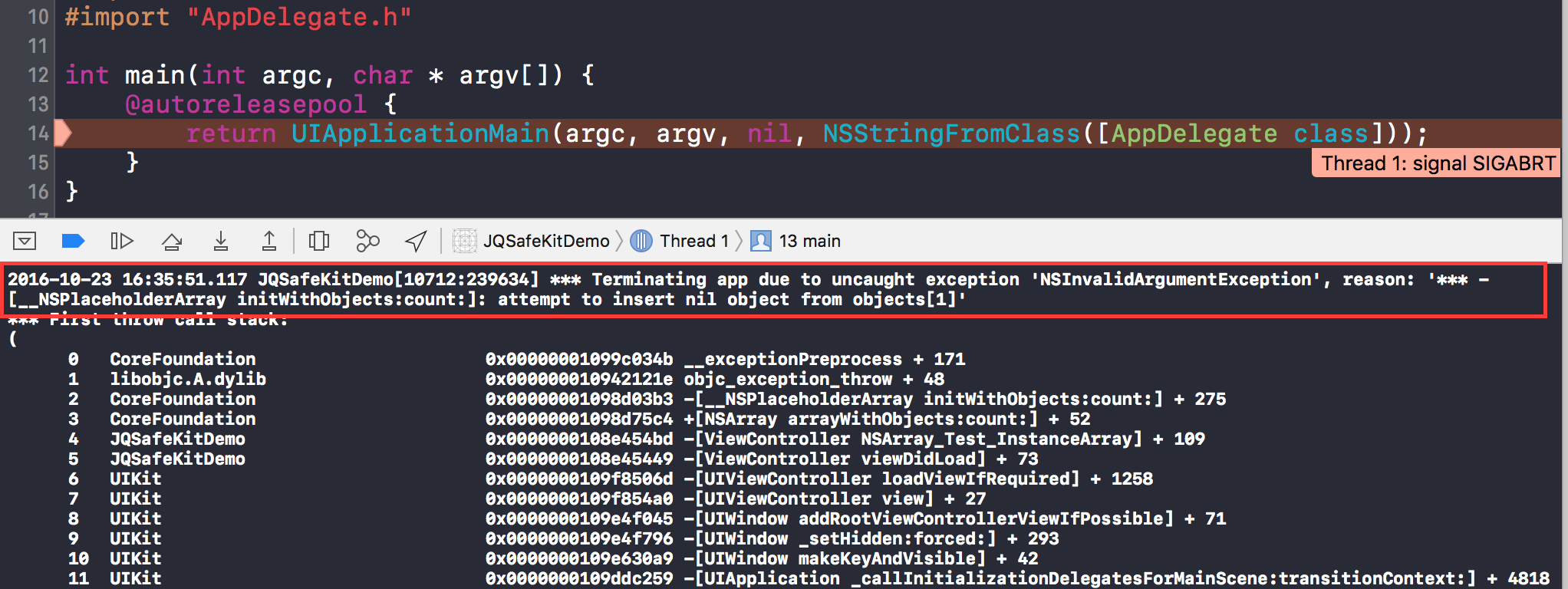
若有 JQSafeKit,則不會崩潰,並會把原本會崩潰的詳細資訊打印出來:

安裝(Installation)
使用 CocoaPods
pod "JQSafeKit"手動導入
將 JQSafeKit 文件夾中的所有源代碼拖入項目中即可。
使用方法
在 AppDelegate 的 didFinishLaunchingWithOptions 方法中添加如下代碼,讓 JQSafeKit 生效:
// 這句代碼會讓 JQSafeKit 生效,若無此行則不起作用
[JQSafeKit becomeEffective];
若想獲取崩潰日誌的所有詳細資訊,只需添加通知監聽,通知名為 JQSafeKitNotification:
- (BOOL)application:(UIApplication *)application didFinishLaunchingWithOptions:(NSDictionary *)launchOptions {
    [JQSafeKit becomeEffective];
    // 監聽通知 JQSafeKitNotification,獲取 JQSafeKit 捕獲的崩潰日誌詳細資訊
    [[NSNotificationCenter defaultCenter] addObserver:self selector:@selector(dealwithCrashMessage:) name:JQSafeKitNotification object:nil];
    return YES;
}

- (void)dealwithCrashMessage:(NSNotification *)note {
    // 注意: 所有資訊都在 userInfo 中
    // 你可以在這裡收集相應的崩潰資訊進行處理(比如傳到自己服務器)
    NSLog(@"%@", note.userInfo);
}
透過斷點可以查看 userInfo 的資訊結構,也可透過控制台輸出日誌查看其中包含的內容:


目前可以防止崩潰的方法
NSArray
1. 快速創建方式:NSArray *array = @[@"HaRi", @"JQSafeKit"];(其實調用的是下面的方法)
2. +(instancetype)arrayWithObjects:(const id _Nonnull __unsafe_unretained *)objects count:(NSUInteger)cnt
3. - (id)objectAtIndex:(NSUInteger)index
NSMutableArray
1. - (id)objectAtIndex:(NSUInteger)index
2. - (void)setObject:(id)obj atIndexedSubscript:(NSUInteger)idx
3. - (void)removeObjectAtIndex:(NSUInteger)index
4. - (void)insertObject:(id)anObject atIndex:(NSUInteger)index
NSDictionary
1. 快速創建方式:NSDictionary *dict = @{@"frameWork" : @"JQSafeKit"};(其實調用的是下面的方法)
2. +(instancetype)dictionaryWithObjects:(const id _Nonnull __unsafe_unretained *)objects forKeys:(const id
NSMutableDictionary
1. - (void)setObject:(id)anObject forKey:(id
2. - (void)removeObjectForKey:(id)aKey
NSString
1. - (unichar)characterAtIndex:(NSUInteger)index
2. - (NSString *)substringFromIndex:(NSUInteger)from
3. - (NSString *)substringToIndex:(NSUInteger)to
4. - (NSString *)substringWithRange:(NSRange)range
5. - (NSString *)stringByReplacingOccurrencesOfString:(NSString *)target withString:(NSString *)replacement
6. - (NSString *)stringByReplacingOccurrencesOfString:(NSString *)target withString:(NSString *)replacement options:(NSStringCompareOptions)options range:(NSRange)searchRange
7. - (NSString *)stringByReplacingCharactersInRange:(NSRange)range withString:(NSString *)replacement
NSMutableString
1. 由於繼承自 NSString,與 NSString 相同的方法不再重複
2. - (void)replaceCharactersInRange:(NSRange)range withString:(NSString *)aString
3. - (void)insertString:(NSString *)aString atIndex:(NSUInteger)loc
4. - (void)deleteCharactersInRange:(NSRange)range
- 上一篇文章: iOS GCD 多線程完全解析:隊列、任務與常用 dispatch 方法
- 下一篇文章: iOS 獲取通訊錄的四種方式詳解