Apple Watch 開發要點:透徹理解 WatchKit 應用架構
本文譯自:Apple Watch: WatchKit App Essentials
WatchKit 應用程序架構
上一篇我們簡單介紹過 WatchKit。開發一款 Apple Watch 應用,實際上由兩部分構成:WatchKit 應用程序與 WatchKit 擴展。
WatchKit 應用程序:運行在 Apple Watch 中的可執行文件,包含 storyboard 以及渲染屏幕所需的資源。
WatchKit 擴展:運行在 iPhone 上的可執行文件,承載管理界面的邏輯代碼,並負責處理用戶的交互操作。
要讓界面正常運轉,這兩部分必須協同工作。用戶與應用交互的典型流程如下:
用戶與 WatchKit 應用程序交互。
WatchKit 應用程序分析交互情況,選定需要管理的 storyboard。
WatchKit 與 iPhone 通訊,以運行 WatchKit 擴展。
WatchKit 擴展完成初始化,創建提供給 storyboard 使用的對象。
Storyboard 依據擴展創建的對象生成 scene,並顯示到 Apple Watch 上。
此後 WatchKit 應用程序與 WatchKit 會共享一些信息,直到用戶停止使用。此時 iOS 會讓 WatchKit 擴展休眠,等待下一次交互。
下圖演示了整個流程:
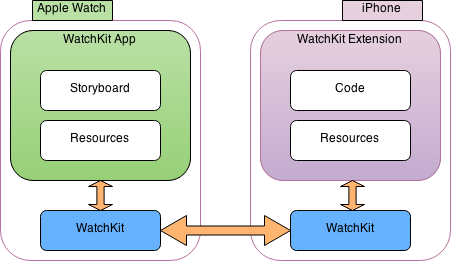
圖中有個至關重要的概念:storyboard 通過 interface controller 對象(WKInterfaceController 的實例)來響應用戶操作、配置待顯示的屏幕內容,它相當於 iOS 裡的 view controller。
與 view controller 不同的是,interface controller 並不直接管理屏幕上的 view——WatchKit 以透明的方式處理 view。一般來說,一個 WatchKit 應用會有多個 interface controller,分別展示不同類型的數據,只是同一時間僅顯示其中一個。
WatchKit 應用程序的生命周期
WatchKit 應用有三種啟動方式:
用戶點擊 Apple Watch 主屏上的圖標。
用戶與應用的 glance 交互。
用戶與通知交互。
無論哪種方式,都會初始化 WatchKit 應用程序與 WatchKit 擴展。系統會依據不同的啟動方式,加載相應的 storyboard scene,並請求 WatchKit 擴展初始化對應的 interface controller。
下圖演示了這一過程:
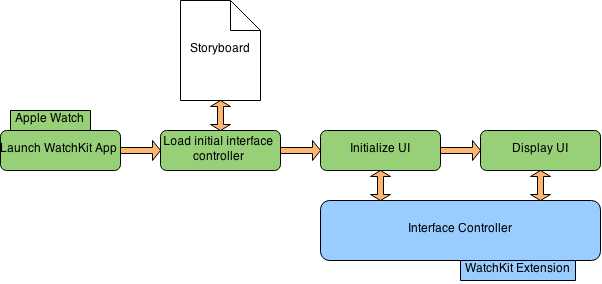
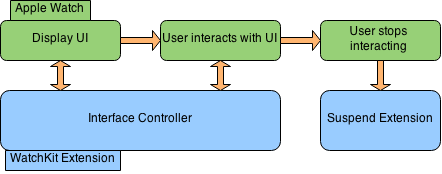
如圖所示,界面中由 interface controller 對象管理相關交互。當用戶與 Apple Watch 上的應用互動時,WatchKit 擴展隨之運行;一旦用戶停止操作或退出,iOS 便關閉當前的 interface controller,並讓擴展休眠。這種交互模式非常簡潔,因此 interface controller 應當保持輕量、任務執行了了。
下圖演示了相關過程: