
把 App 內容保存到 iPhone 桌面的實作解析
今天,我發現淘寶手機 App 能把使用者喜歡的店鋪保存到 App 的桌面上,感覺相當神奇。研究了它的實現方式後,我把過程記錄下來,順便分享心得。附上 demo 位址。
下面是實際效果:
安裝描述檔案
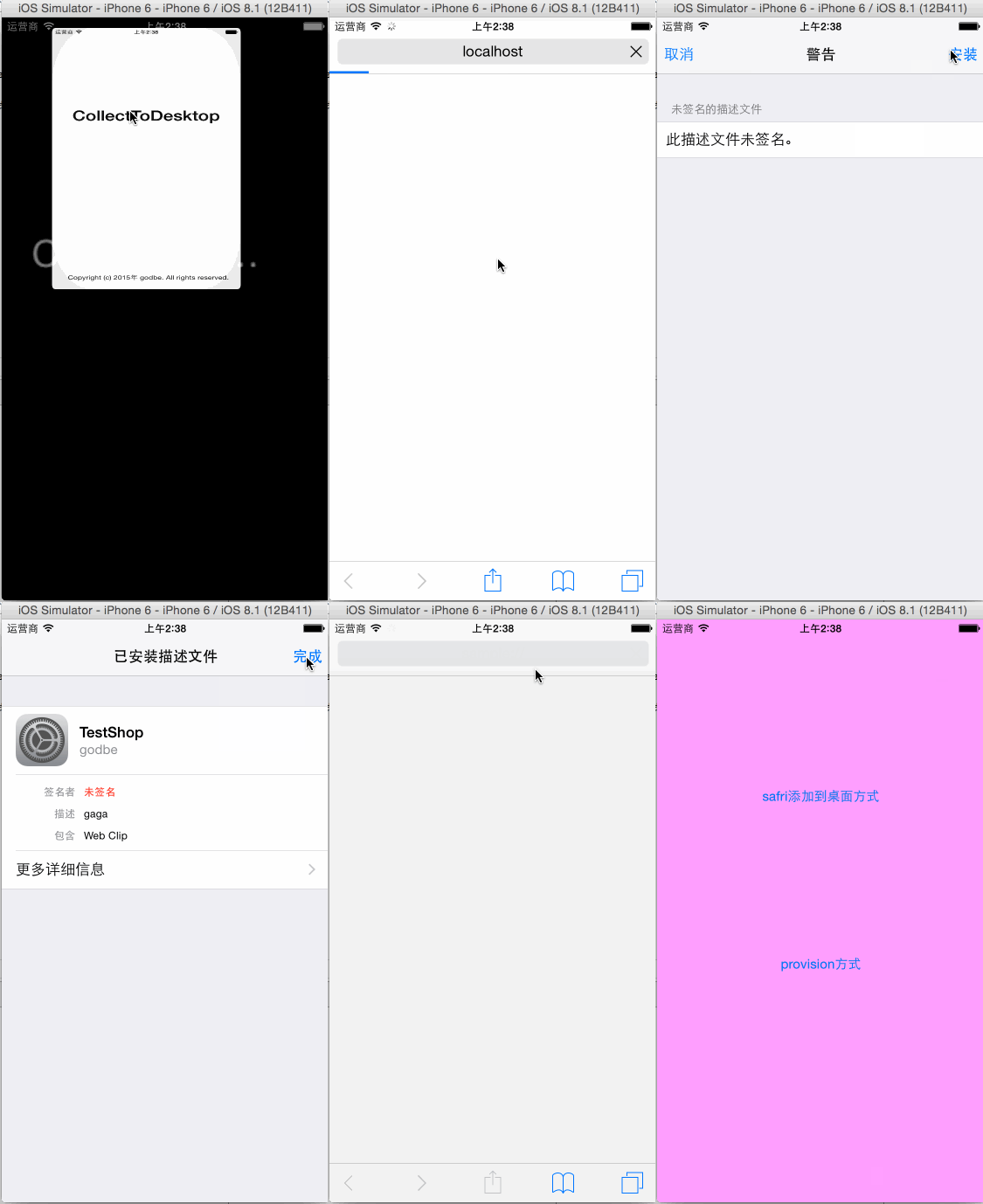
safari 生成 webclip
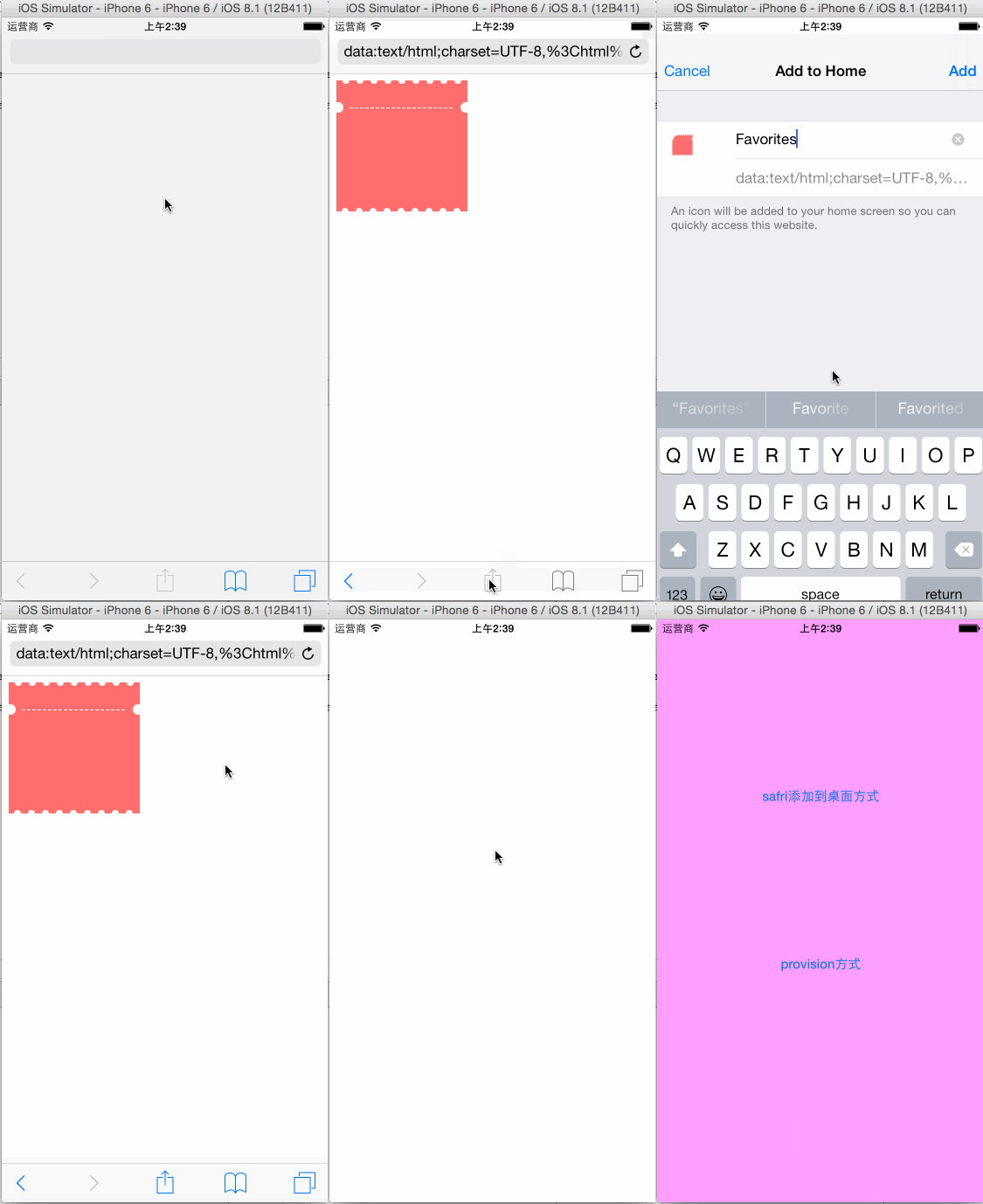
這種效果其實就是蘋果的 webclip。要在 App 上生成它,主要有兩種方式。
透過安裝描述檔案生成 webclip
使用 iPhone Configuration Utility 產生一個 webclip 描述檔案。
下載 iPhone Configuration Utility 後,配置一個描述檔案並導出即可。
使用 Safari 安裝這個描述檔案。
用 [UIApplication sharedApplication] openURL: 的方式,無法直接打開描述檔案,UIWebView 也不支援開啟這種檔案類型。
Safari 是可以直接安裝描述檔案的,但 Safari 與應用處於兩個獨立的沙盒,因此這裡需要解決應用與 Safari 共享檔案的問題。這裡的思路,是把 App 本身變成一個伺服器,讓 Safari 造訪這個伺服器來取得描述檔案並安裝。由於程式進入背景後仍能運行一段時間,所以這個方案是可行的。
可以使用第三方庫 CocoaHTTPServer,在 App 端運行一個伺服器;在 Safari 中造訪 localhost:埠號/目錄,即可打開檔案。
- (void)startServer { // Create server using our custom MyHTTPServer class _httpServer = [[RoutingHTTPServer alloc] init]; // Tell the server to broadcast its presence via Bonjour. // This allows browsers such as Safari to automatically discover our service. [_httpServer setType:@"_http._tcp."]; // Normally there's no need to run our server on any specific port. // Technologies like Bonjour allow clients to dynamically discover the server's port at runtime. // However, for easy testing you may want force a certain port so you can just hit the refresh button. [_httpServer setPort:12345]; NSString *documentsDirectory = [NSSearchPathForDirectoriesInDomains(NSDocumentDirectory, NSUserDomainMask, YES) objectAtIndex:0]; [_httpServer setDocumentRoot:documentsDirectory]; if (_httpServer.isRunning) [_httpServer stop]; NSError *error; if([_httpServer start:&error]) { NSLog(@"Started HTTP Server on port %hu", [_httpServer listeningPort]); } else { NSLog(@"Error starting HTTP Server: %@", error); // Probably should add an escape - but in practice never loops more than twice (bug filed on GitHub https://github.com/robbiehanson/CocoaHTTPServer/issues/88) [self startServer]; } } - (void)applicationDidEnterBackground:(UIApplication *)application { // Use this method to release shared resources, save user data, invalidate timers, and store enough application state information to restore your application to its current state in case it is terminated later. // If your application supports background execution, this method is called instead of applicationWillTerminate: when the user quits. backgroundTask = [application beginBackgroundTaskWithExpirationHandler:^{ [application endBackgroundTask:backgroundTask]; backgroundTask = UIBackgroundTaskInvalid; }]; } - (BOOL)application:(UIApplication *)application didFinishLaunchingWithOptions:(NSDictionary *)launchOptions { // Override point for customization after application launch. [self startServer]; return YES; }Safari 中打開的關鍵程式碼
__weak AppDelegate *appDelegate = (AppDelegate *)[[UIApplication sharedApplication] delegate]; UInt16 port = appDelegate.httpServer.port; NSLog(@"%u", port); if (success) [[UIApplication sharedApplication] openURL:[NSURL URLWithString:[NSString stringWithFormat:@"https://localhost:%u/profile.mobileconfig", port]]]; else NSLog(@"Error generating profile");
透過 Safari 自帶功能生成 webclip
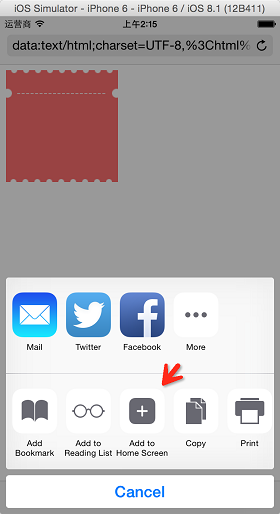
Safari 本身帶有一個為當前網頁生成 webclip 的功能,我們正好可以借助它來生成 webclip。
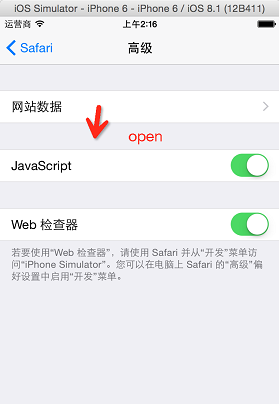
這種方式的工作流程是這樣的:先用 App 打開 Safari 並顯示指定網頁內容(通常是引導使用者如何用 Safari 生成 webclip,並打開 Safari 的 js 權限),接著使用者開啟 js 權限、保存 webclip;下次使用者點擊桌面上的 webclip 後,即可再次打開該網頁、觸發 js,進而跳回 App。
因為使用者點開 webclip 時,需要取得網頁的所有資訊,而我們的應用並不會長時間在背景運行,所以必須把整個網頁內容以 url 的形式保存在 webclip 中——這種技術叫做 data-url 技術。
我們需要讓 App 把網頁內容透過 data-url 的形式傳給 Safari。我試過用 openURL 的傳輸方式,但它無法傳輸太長的資料,行不通。所以這裡的思路,同樣是把 App 變成一個伺服器:當 Safari 造訪時回傳 302 讓它重定向,重定向的 url 即為我們要傳輸的 data-url,Safari 重定向後就能顯示指定的網頁內容。這裡可以用基於 CocoaHTTPServer 之上封裝的庫 RoutingHTTPServer。
配置並傳輸 data-url
//配置返回值 [appDelegate.httpServer get:@"/old" withBlock:^(RouteRequest *request, RouteResponse *response) { [response setStatusCode:302]; // or 301 [response setHeader:@"Location" value:@"data:text/html;charset=UTF-8,"]; }]; //跳轉 UInt16 port = appDelegate.httpServer.port; NSLog(@"%u", port); [[UIApplication sharedApplication] openURL:[NSURL URLWithString:[NSString stringWithFormat:@"https://localhost:%u/old", port]]];使用者開啟 js
透過 Safari 保存 webclip
在 data-url 中加入 js
透過 Safari 打開的 html 處於 safari mode,而直接透過 webclip 打開的 html 則處於 app mode——可以理解為:safari mode 是嵌入在 Safari 中的網頁,app mode 的網頁則是獨立的網頁。透過這個狀態,我們可以控制何時呼叫 js,進而決定最終是展示當前網頁,還是跳轉到指定的 App。這裡我寫的是 sample://,可依需求替換成 App 的 scheme,即可跳轉到 App。
其他可以做的細節
html 與配置檔案,我們都可以透過替換字串等方式修改最終生成的內容,以此為不同使用者生成不同內容。
NSString *templatePath = [[NSBundle mainBundle] pathForResource:@"phone_template" ofType:@"mobileconfig"]; NSString *data = [NSString stringWithContentsOfFile:templatePath encoding:NSUTF8StringEncoding error:NULL]; data = [data stringByReplacingOccurrencesOfString:@"!!NAME!!" withString:name]; data = [data stringByReplacingOccurrencesOfString:@"!!PHONENUMBER!!" withString:phoneNumber]; NSLog(@"%@", data); BOOL success = [data writeToFile:[ProfileGenerator profilePath] atomically:YES encoding:NSUTF8StringEncoding error:nil]; return success;
埠號不一定要寫死,這裡僅是為了方便測試。
總結
這兩種方式都能達到最終效果,究竟選哪種來實現,可以自行評估優劣。由於本人對服務端與前端都不太熟悉,實現還有兩點不足,希望有人能給出更好的方案。
其一,可能是基於瀏覽器快取的問題,如果先前 Safari 打開過 localhost:埠號,下次再進入時可能不會重定向,導致 webclip 保存的不是重定向後的 url,而是原本請求的 url。
其二,重定向回傳的 response header 長度在這裡也有限制,過長會造成截斷,這部分應該可以透過程式碼加以改進。