
跳出手掌心:iOS 邊緣手勢那 70 像素的距離

最近用 UIButton 時碰到一個問題:我想要拿到手指拖動並離開 button 邊界那一刻的回調,於是監聽了 UIControlEventTouchDragExit。文件寫得很清楚:
An event where a finger is dragged from within a control to outside its bounds.
這正是我要的東西。但實測之後發現,手指離開 button 邊界時事件並沒有觸發,而是要拉到離 button 將近 70 個像素的地方才收到回調。
目錄
來自 StackOverflow 的答案
檢驗結果
換個思路
註冊回調
回調函數
處理 TouchUp 事件
結尾
為了把問題說清楚,我寫了個示例。期望的行為是:手指離開 button 邊界時把內容改成「離開」,進入時改成「進入」,同時在手指位置顯示它距離 button 最上端的像素差。
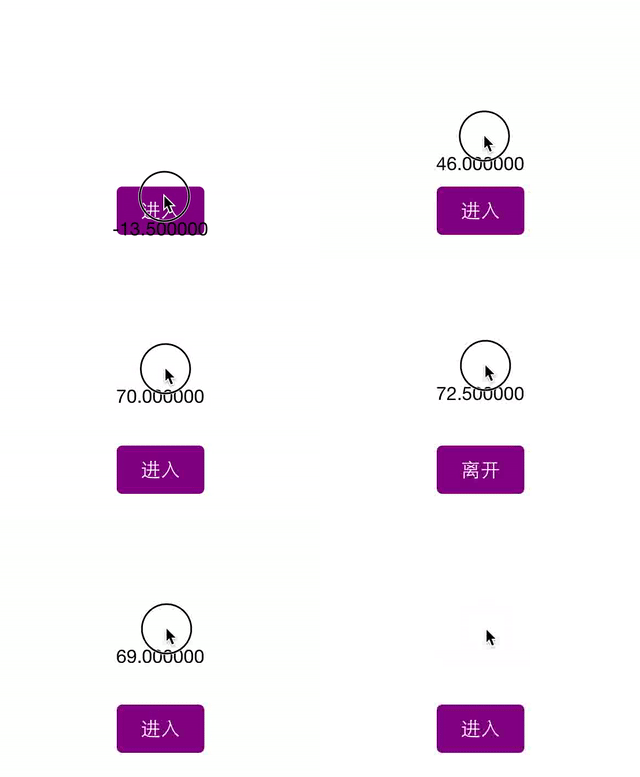
但實際上,手指離開邊界時內容並沒有變;一直拉到距離 button 頂端約 70 像素時才變成「離開」。也就是說,UIControlEventTouchDragExit 並不是在越界那一刻觸發,而是延後到 70 像素之外。
這裡只演示了向上移動的情況,其實往另外三個方向拖 likewise 有同樣的效果,有興趣可以自己試試。
而且問題不只出在 UIControlEventTouchDragExit,所有跟邊界相關的事件都是如此:
UIControlEventTouchDragInside
UIControlEventTouchDragOutside
UIControlEventTouchDragEnter
UIControlEventTouchDragExit
UIControlEventTouchUpInside
UIControlEventTouchUpOutside
Apple 為什麼要這樣設計,我翻了不少資料也沒找到說明。猜測是考慮到手指比較粗、和螢幕的接觸面積大,定位本來就不需要那麼精準,於是留了這麼大一圈緩衝區。
但有時候我們就是需要更精確的控制,這 70 像素的外擴就成了障礙。有沒有辦法讓手指更快跳出 button 的「手掌心」?
來自 StackOverflow 的答案
查了一輪之後,我在 StackOverflow 上找到一個答案:覆寫 UIControl 的 continueTrackingWithTouch:withEvent:。由於 UIButton 繼承自 UIControl,自然也繼承了這個方法。先看它的宣告:
- (BOOL)continueTrackingWithTouch:(UITouch *)touch withEvent:(UIEvent *)event /* Description Sent continuously to the control as it tracks a touch related to the given event within the control’s bounds. Parameters touch A UITouch object that represents a touch on the receiving control during tracking. event An event object encapsulating the information specific to the user event Returns YES if touch tracking should continue; otherwise NO. */
這個方法決定是否繼續追蹤目前的觸摸事件。答案的做法是根據當前位置判斷是否仍在 button 範圍內,進而自行送出對應事件:
- (BOOL)continueTrackingWithTouch:(UITouch *)touch withEvent:(UIEvent *)event { CGFloat boundsExtension = 25.0f; CGRect outerBounds = CGRectInset(self.bounds, -1 * boundsExtension, -1 * boundsExtension); BOOL touchOutside = !CGRectContainsPoint(outerBounds, [touch locationInView:self]); if(touchOutside) { BOOL previousTouchInside = CGRectContainsPoint(outerBounds, [touch previousLocationInView:self]); if(previousTouchInside) { NSLog(@"Sending UIControlEventTouchDragExit"); [self sendActionsForControlEvents:UIControlEventTouchDragExit]; } else { NSLog(@"Sending UIControlEventTouchDragOutside"); [self sendActionsForControlEvents:UIControlEventTouchDragOutside]; } } return [super continueTrackingWithTouch:touch withEvent:event]; }程式碼裡 boundsExtension 設為 25,對應的就是前面討論的那 70,也就是 button「手掌心」的範圍。這個值可以換成任何你想要的數字。
檢驗結果
這個方法看起來很漂亮,在原問題下也被採為解答。但我實測之後發現兩個嚴重問題:
UIControlEventTouchDragExit 會觸發兩次:一次是手指離開邊界 25 像素時,第二次仍在 70 像素處,也就是 UIButton 的預設行為。
在回調函數
- (void)callback:(UIButton *)sender withEvent:(UIEvent *)event中,由 UIEvent 參數算出的位置永遠是 (0, 0),它並沒有被正確初始化。
仔細想想就不難理解:覆寫的方法裡我們自行判斷並送出了事件,但並沒有取消 UIControl 原本該送的那一次,於是出現了兩次回應;而我們只做了送事件的動作,沒有觸及 UIEvent 的初始化,位置自然不對。
關於重複觸發,有人可能會懷疑是不是最後那行呼叫父類造成的:
1 return [super continueTrackingWithTouch:touch withEvent:event];
我後來也試過直接在結尾回傳 YES,問題依然存在,可見不是它的緣故。
換個思路
既然這個答案有上述兩個問題,那就不能用。還有別的辦法嗎?
再觀察一下前面的做法:用它的前半段程式碼,其實很容易判斷當前位置是否在 button 之內。那我們是不是可以不去底層攪和,而是在上層的回調裡做判斷?基於這個想法,我又試了一輪。
註冊回調
// to get the drag event [btn addTarget:self action:@selector(btnDragged:withEvent:) forControlEvents:UIControlEventTouchDragInside]; [btn addTarget:self action:@selector(btnDragged:withEvent:) forControlEvents:UIControlEventTouchDragOutside];
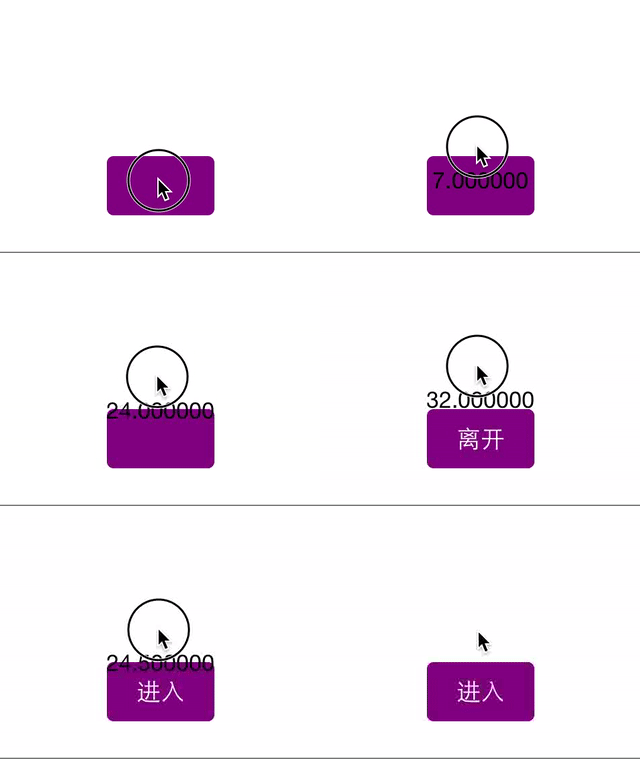
第一步依然是註冊回調,但注意:這兩個事件綁的是同一個函數 btnDragged:withEvent:。而且我沒有註冊 UIControlEventTouchDragExit 和 UIControlEventTouchDragEnter,改用了 UIControlEventTouchDragInside 與 UIControlEventTouchDragOutside。為什麼?往下看。
回調函數
回調裡沿用了前面答案的判斷邏輯,依當前與上一個位置判斷是否身在 button 內部,接著就能判斷此刻究竟屬於哪個事件,如註解所示。至此,每個分支都能做各自該做的事。
- (void)btnDragged:(UIButton *)sender withEvent:(UIEvent *)event { UITouch *touch = [[event allTouches] anyObject]; CGFloat boundsExtension = 25.0f; CGRect outerBounds = CGRectInset(sender.bounds, -1 * boundsExtension, -1 * boundsExtension); BOOL touchOutside = !CGRectContainsPoint(outerBounds, [touch locationInView:sender]); if (touchOutside) { BOOL previewTouchInside = CGRectContainsPoint(outerBounds, [touch previousLocationInView:sender]); if (previewTouchInside) { // UIControlEventTouchDragExit } else { // UIControlEventTouchDragOutside } } else { BOOL previewTouchOutside = !CGRectContainsPoint(outerBounds, [touch previousLocationInView:sender]); if (previewTouchOutside) { // UIControlEventTouchDragEnter } else { // UIControlEventTouchDragInside } } }注意,我們只註冊了兩個事件,卻達到了四個事件的效果。成果如下,這裡同樣把 boundsExtension 設為 25,你當然可以換成任何想要的值。
處理 TouchUp 事件
文章開頭提到,所有需要判斷「是否在 button 內部」的事件都有這個毛病,UIControlEventTouchUpInside 和 UIControlEventTouchUpOutside 也不例外,同樣可以用這招:
先讓兩個事件共用同一個回調函數:
// to get the touch up event [btn addTarget:self action:@selector(btnTouchUp:withEvent:) forControlEvents:UIControlEventTouchUpInside]; [btn addTarget:self action:@selector(btnTouchUp:withEvent:) forControlEvents:UIControlEventTouchUpOutside];
再處理回調:
- (void)btnTouchUp:(UIButton *)sender withEvent:(UIEvent *)event { UITouch *touch = [[event allTouches] anyObject]; CGFloat boundsExtension = 25.0f; CGRect outerBounds = CGRectInset(sender.bounds, -1 * boundsExtension, -1 * boundsExtension); BOOL touchOutside = !CGRectContainsPoint(outerBounds, [touch locationInView:sender]); if (touchOutside) { // UIControlEventTouchUpOutside } else { // UIControlEventTouchUpInside } }結尾
因為 UIButton 的 addTarget:action:forControlEvents: 繼承自 UIControl,所以上面的做法對所有 UIControl 子類都適用,比如 UISwitch、UISlider 等等。
我也在 StackOverflow 的原本問題下做了補充。如果你有更好的解法,或者知道 Apple 為何要這樣設計,歡迎留言或到原問題下回答。
(全文完)
feihu
2015.05.21 於 Shenzhen
本文來自南栀傾寒(簡書)的投稿。
- 上一篇文章: iOS 專案的持續整合與自動化管理
- 下一篇文章: 一個絲滑到底的全屏滑動返回手勢