用 UIScrollView 搭配 UIImageView 實作圖片無限循環滾動
編輯:iOS 開發基礎
作者:KenmuHuang,經授權轉載於本站。
為什麼要重用 imageView
專案裡經常會遇到「一組圖片要循環播放」的需求。用 UIScrollView 搭配 UIImageView 是最直覺的做法,但這裡有個容易忽略的細節:圖片數量多寡不該決定 imageView 的數量,否則幾十張圖就配幾十個 imageView,記憶體會被吃得很難看。
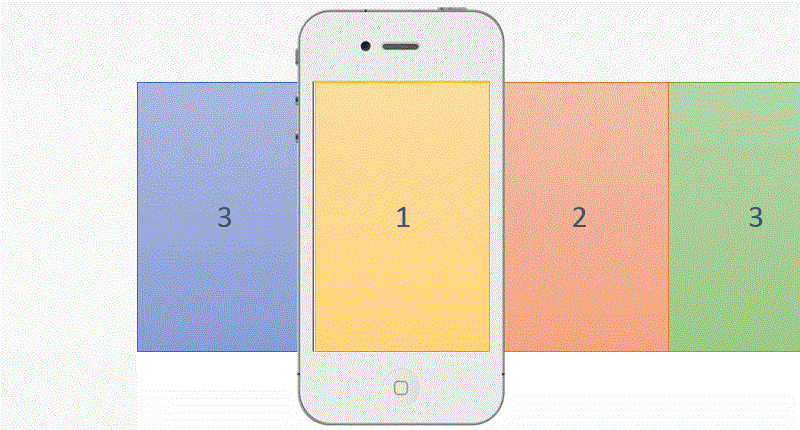
正確的思路是讓 imageView 盡量重用。本文的示範用「左、中、右」三個 imageView 輪流載入資料, achieves 無限循環的效果;其實若你的畫面較窄,用兩個 imageView 交替也完全可行。
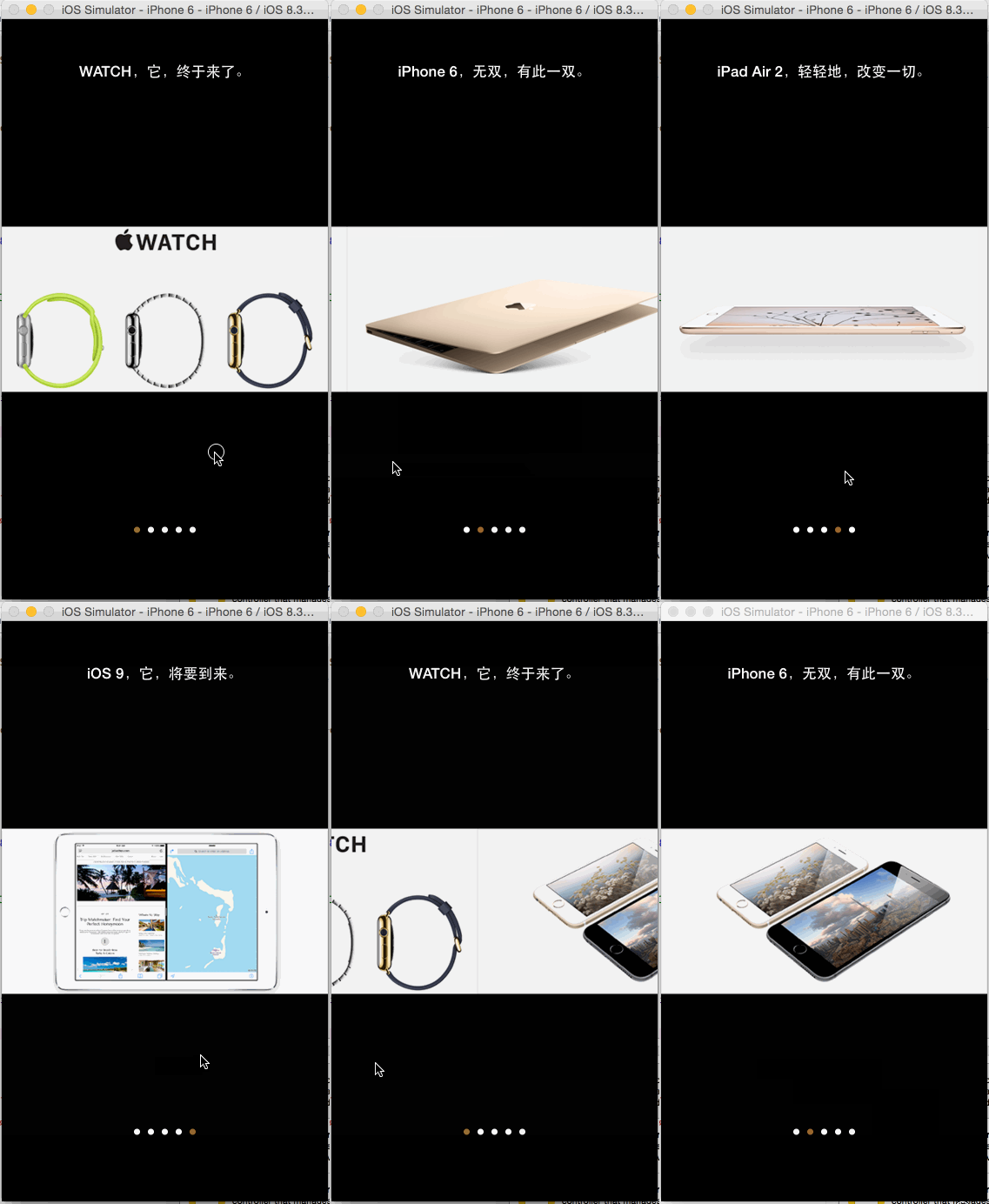
最終效果如下:
ViewController.h
#import@interface ViewController : UIViewController @property (strong, nonatomic) UIScrollView *scrV; @property (strong, nonatomic) UIPageControl *pageC; @property (strong, nonatomic) UIImageView *imgVLeft; @property (strong, nonatomic) UIImageView *imgVCenter; @property (strong, nonatomic) UIImageView *imgVRight; @property (strong, nonatomic) UILabel *lblImageDesc; @property (strong, nonatomic) NSMutableDictionary *mDicImageData; @property (assign, nonatomic) NSUInteger currentImageIndex; @property (assign, nonatomic) NSUInteger imageCount; @end
ViewController.m
#import "ViewController.h" #define kWidthOfScreen [[UIScreen mainScreen] bounds].size.width #define kHeightOfScreen [[UIScreen mainScreen] bounds].size.height #define kImageViewCount 3 @interface ViewController () /** * 加載圖片數據 */ - (void)loadImageData; /** * 添加滾動視圖 */ - (void)addScrollView; /** * 添加三個圖片視圖到滾動視圖內 */ - (void)addImageViewsToScrollView; /** * 添加分頁控件 */ - (void)addPageControl; /** * 添加標簽;用於圖片描述 */ - (void)addLabel; /** * 根據當前圖片索引設置信息 * * @param currentImageIndex 當前圖片索引;即中間 */ - (void)setInfoByCurrentImageIndex:(NSUInteger)currentImageIndex; /** * 設置默認信息 */ - (void)setDefaultInfo; /** * 重新加載圖片 */ - (void)reloadImage; - (void)layoutUI; @end @implementation ViewController - (void)viewDidLoad { [super viewDidLoad]; [self layoutUI]; } - (void)didReceiveMemoryWarning { [super didReceiveMemoryWarning]; // Dispose of any resources that can be recreated. } - (void)loadImageData { NSString *path = [[NSBundle mainBundle] pathForResource:@"ImageInfo" ofType:@"plist"]; _mDicImageData = [NSMutableDictionary dictionaryWithContentsOfFile:path]; _imageCount = _mDicImageData.count; } - (void)addScrollView { _scrV = [[UIScrollView alloc] initWithFrame:[[UIScreen mainScreen] bounds]]; _scrV.contentSize = CGSizeMake(kWidthOfScreen * kImageViewCount, kHeightOfScreen); _scrV.contentOffset = CGPointMake(kWidthOfScreen, 0.0); _scrV.pagingEnabled = YES; _scrV.showsHorizontalScrollIndicator = NO; _scrV.delegate = self; [self.view addSubview:_scrV]; } - (void)addImageViewsToScrollView { //圖片視圖;左邊 _imgVLeft = [[UIImageView alloc] initWithFrame:CGRectMake(0.0, 0.0, kWidthOfScreen, kHeightOfScreen)]; _imgVLeft.contentMode = UIViewContentModeScaleAspectFit; [_scrV addSubview:_imgVLeft]; //圖片視圖;中間 _imgVCenter = [[UIImageView alloc] initWithFrame:CGRectMake(kWidthOfScreen, 0.0, kWidthOfScreen, kHeightOfScreen)]; _imgVCenter.contentMode = UIViewContentModeScaleAspectFit; [_scrV addSubview:_imgVCenter]; //圖片視圖;右邊 _imgVRight = [[UIImageView alloc] initWithFrame:CGRectMake(kWidthOfScreen * 2.0, 0.0, kWidthOfScreen, kHeightOfScreen)]; _imgVRight.contentMode = UIViewContentModeScaleAspectFit; [_scrV addSubview:_imgVRight]; } - (void)addPageControl { _pageC = [UIPageControl new]; CGSize size= [_pageC sizeForNumberOfPages:_imageCount]; //根據頁數返回 UIPageControl 合適的大小 _pageC.bounds = CGRectMake(0.0, 0.0, size.width, size.height); _pageC.center = CGPointMake(kWidthOfScreen / 2.0, kHeightOfScreen - 80.0); _pageC.numberOfPages = _imageCount; _pageC.pageIndicatorTintColor = [UIColor whiteColor]; _pageC.currentPageIndicatorTintColor = [UIColor brownColor]; _pageC.userInteractionEnabled = NO; //設置是否允許用戶交互;默認值為 YES,當為 YES 時,針對點擊控件區域左(當前頁索引減一,最小為0)右(當前頁索引加一,最大為總數減一),可以編寫 UIControlEventValueChanged 的事件處理方法 [self.view addSubview:_pageC]; } - (void)addLabel { _lblImageDesc = [[UILabel alloc] initWithFrame:CGRectMake(0.0, 40.0, kWidthOfScreen, 40.0)]; _lblImageDesc.textAlignment = NSTextAlignmentCenter; _lblImageDesc.textColor = [UIColor whiteColor]; _lblImageDesc.font = [UIFont boldSystemFontOfSize:[UIFont labelFontSize]]; _lblImageDesc.text = @"Fucking now."; [self.view addSubview:_lblImageDesc]; } - (void)setInfoByCurrentImageIndex:(NSUInteger)currentImageIndex { NSString *currentImageNamed = [NSString stringWithFormat:@"%lu.png", (unsigned long)currentImageIndex]; _imgVCenter.image = [UIImage imageNamed:currentImageNamed]; _imgVLeft.image = [UIImage imageNamed:[NSString stringWithFormat:@"%lu.png", (unsigned long)((_currentImageIndex - 1 + _imageCount) % _imageCount)]]; _imgVRight.image = [UIImage imageNamed:[NSString stringWithFormat:@"%lu.png", (unsigned long)((_currentImageIndex + 1) % _imageCount)]]; _pageC.currentPage = currentImageIndex; _lblImageDesc.text = _mDicImageData[currentImageNamed]; } - (void)setDefaultInfo { _currentImageIndex = 0; [self setInfoByCurrentImageIndex:_currentImageIndex]; } - (void)reloadImage { CGPoint contentOffset = [_scrV contentOffset]; if (contentOffset.x > kWidthOfScreen) { //向左滑動 _currentImageIndex = (_currentImageIndex + 1) % _imageCount; } else if (contentOffset.x < kWidthOfScreen) { //向右滑動 _currentImageIndex = (_currentImageIndex - 1 + _imageCount) % _imageCount; } [self setInfoByCurrentImageIndex:_currentImageIndex]; } - (void)layoutUI { self.view.backgroundColor = [UIColor blackColor]; [self loadImageData]; [self addScrollView]; [self addImageViewsToScrollView]; [self addPageControl]; [self addLabel]; [self setDefaultInfo]; } #pragma mark - UIScrollViewDelegate - (void)scrollViewDidEndDecelerating:(UIScrollView *)scrollView { [self reloadImage]; _scrV.contentOffset = CGPointMake(kWidthOfScreen, 0.0); _pageC.currentPage = _currentImageIndex; NSString *currentImageNamed = [NSString stringWithFormat:@"%lu.png", (unsigned long)_currentImageIndex]; _lblImageDesc.text = _mDicImageData[currentImageNamed]; } @end
幾個關鍵設計點
contentSize 設為三個螢幕寬,初始 contentOffset 落在中間那一頁,使用者無論往哪個方向滑都還有內容可看。
每次 scrollViewDidEndDecelerating 觸發時,先依滑動方向更新 currentImageIndex(用取餘運算達成環狀循環),再重新為三個 imageView 配置「前一張、當前、後一張」,最後把 contentOffset 拉回中央。這個「滑完就歸位」的動作,正是無限循環得以成立的關鍵。
ImageInfo.plist
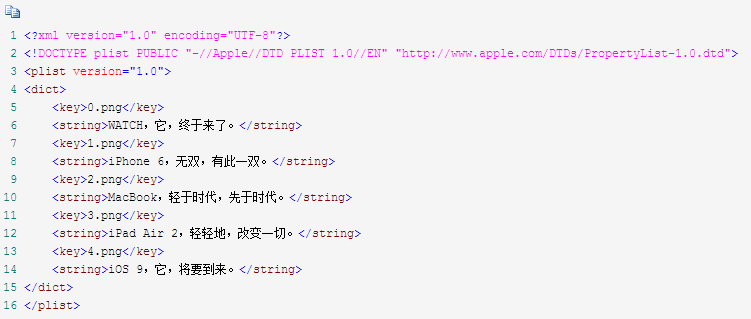
以 plist 存放圖片名稱與描述文字的對應關係,方便日後替換素材而不必改動程式碼。