
iOS 警告收錄與快速消除指南:從 Pod 設定到常見錯誤
編輯:iOS 開發基礎

專案中的警告看似不影響編譯,但長期累積會降低可讀性,也可能掩蓋真正重要的問題。本文整理常見 iOS 編譯警告與處理方式。
快速抑制第三方庫警告
若警告來自 CocoaPods 第三方庫,可在 Podfile 中加入 inhibit_all_warnings!,避免每次更新都被無關警告干擾。
針對特定程式碼忽略警告
若某段程式碼暫時無法修改,可用 Clang 的 diagnostic 指令包住該區段,忽略指定警告。
例如可針對未使用變數、廢棄 API 或型別轉換警告做局部處理。若要查看警告代號,可在編譯日誌中查看方括號內的標記。
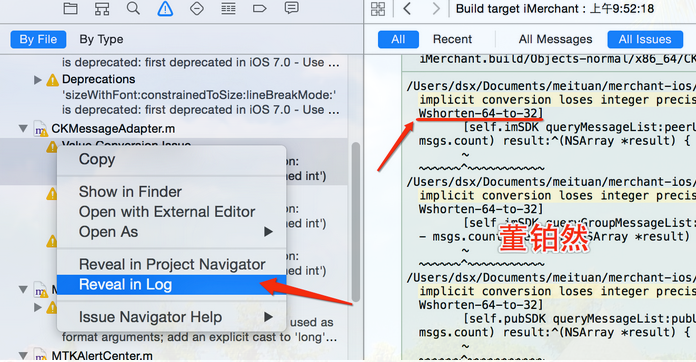
若想讓整個專案忽略某類警告,可在 Build Settings 中加入對應旗標。
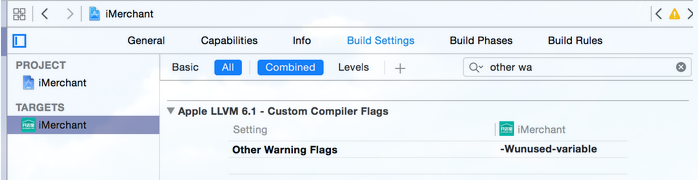
常見警告類型
- Unused variable:宣告但未使用的變數。
- Cannot find protocol definition:通常與前向宣告或缺少 import 有關。
- Null passed to a callee that requires a non-null argument:可搭配 nullable 與 nonnull 標記釐清意圖。
- Auto property synthesis will not synthesize property:父類已實作 getter 或 setter,可用 dynamic 表示。
- Scene is unreachable:Storyboard 場景缺少入口或 identifier。
- Push segues are deprecated:iOS 8 後建議改用 show。
- Method deprecated:API 已被取代,應改用新介面。
- Code will never be executed:通常是 return 後還有程式碼。
- Incompatible pointer types:常出現在 delegate 指派時未遵循協議。
- Format specifies type but the argument has type:格式化字串與參數型別不一致。
主動加上警告
若要提醒團隊某個方法即將廢棄,可用 deprecated 標記,讓呼叫處出現編譯提示。

- 上一篇文章: 圖片旋轉鋸齒怎麼辦?兩種抗鋸齒方案與效能比較
- 下一篇文章: FFmpeg 在 iOS 的應用:從影片幀擷取到播放流程