
深度解析開源組件:MMPopupView 彈出框方案

作者:裡脊串,經授權轉載本站。
前言
彈出框組件幾乎是絕大多數應用的標配(只有極少數精心設計的 App 用不到)。我們的 App 也不例外,早期用 pop 手寫,後來發現它與系統原生動畫會有衝突(pop 內部用到 CATransaction,與系統動畫同時發生時會出問題),於是上週花了大半天重寫了 MMPopupView。由於新組件完全以 Masonry 撰寫,是個很好的示例教程,結合我先前寫的 Masonry 入門,能幫助大家更好地理解和運用 Masonry/Auto Layout,因此我又整理了這個簡單的開源庫。
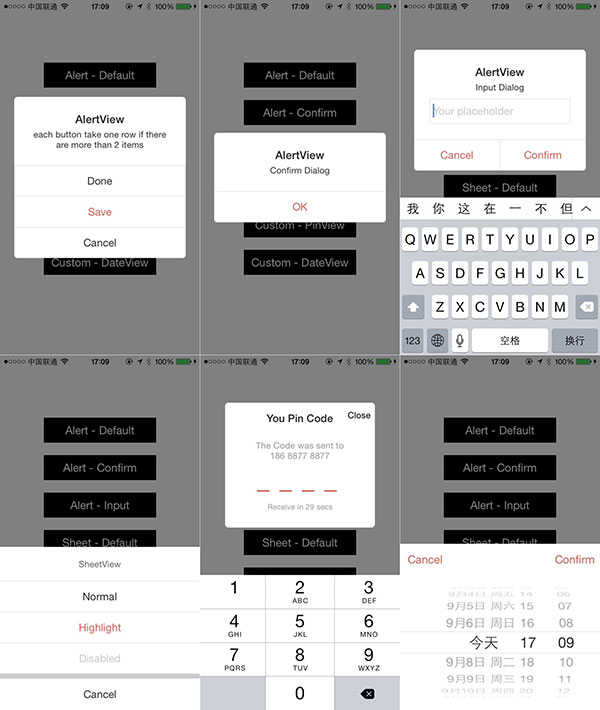
介紹
整體結構大致如下:
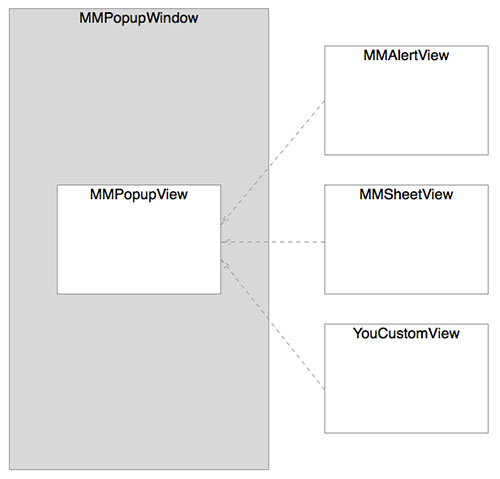
MMPopupWindow 是顯示所有彈出框的容器,相較直接顯示在當前 UIWindow 上,獨立 Window 當容器會更好;MMPopupView 是彈出框基類,所有彈出框只要繼承它,就具備了顯示能力,用戶只需關注彈出框本身的表現;MMAlertView 與 MMSheetView 則是基于 MMPopupView 的簡易組件,可直接使用且高度可定制。
MMPopupWindow
其定義如下,僅有一個屬性 touchWildToHide 控制是否可點擊非彈出框區域使其消失,另有 cacheWindow 用於預加載以防首次使用頓卡,以及顯示/隱藏背景色的方法(自定義動畫時會用到):
@interface MMPopupWindow : UIWindow @property (nonatomic, assign) BOOL touchWildToHide; // 點擊半透明背景時是否隱藏 + (MMPopupWindow *)sharedWindow; - (void)cacheWindow; // 預加載防止首次顯示頓卡 - (void)showDimBackground; - (void)hideDimBackground; @end
MMPopupView
使用很簡單,定義好自己的 view 後呼叫 show / hide 即可。它默認提供三種類型,對應三種動畫:MMPopupTypeAlert(中間隱出)、MMPopupTypeSheet(向上滑出)、MMPopupTypeCustom(向下掉落);也可重載 showAnimation 與 hideAnimation 兩個 block 自定義動畫,並透過 showCompletionBlock、hideCompletionBlock 或 showWithBlock:、hideWithBlock: 取得動畫回調。
typedef NS_ENUM(NSUInteger, MMPopupType) { MMPopupTypeAlert, MMPopupTypeSheet, MMPopupTypeCustom, }; - (void)show; - (void)hide; @property (nonatomic, copy) MMPopupBlock showAnimation; @property (nonatomic, copy) MMPopupBlock hideAnimation;MMAlertView
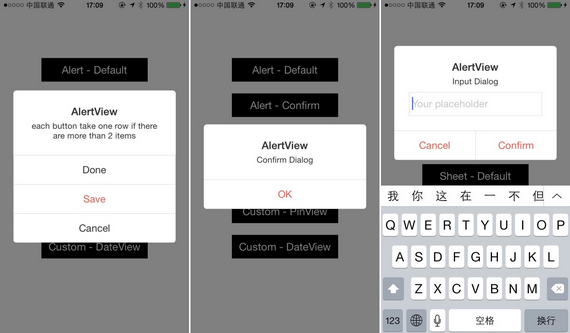
作為 UIAlertView 的替代品,提供含輸入框、確認框與多選項三種初始化形式,並透過全局配置類 MMAlertViewConfig 充分自定義寬度、按鈕高度、內邊距、圓角、字體與各項顏色等。
@interface MMAlertView : MMPopupView @property (nonatomic, assign) NSUInteger maxInputLength; // 默認 0,不限長度 - (instancetype)initWithInputTitle:(NSString*)title detail:(NSString*)detail placeholder:(NSString*)inputPlaceholder handler:(MMPopupInputHandler)inputHandler; - (instancetype)initWithTitle:(NSString*)title detail:(NSString*)detail items:(NSArray*)items; @end
MMSheetView
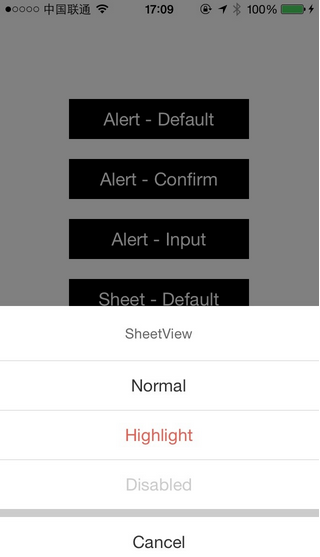
以 initWithTitle:items: 初始化,並透過全局配置類 MMSheetViewConfig 自定義按鈕高度、內邊距、字體與各狀態顏色等。
@interface MMSheetView : MMPopupView - (instancetype)initWithTitle:(NSString*)title items:(NSArray*)items; @end
MMPopupItem
作為 MMAlertView 與 MMSheetView 的動作對象(對應按鈕),可設定 highlight、disabled、title、color 與 handler,並提供 MMItemMake 便捷構造方法,支援 Normal、Highlight、Disabled 三種類型:
typedef void(^MMPopupItemHandler)(NSInteger index); @interface MMPopupItem : NSObject @property (nonatomic, assign) BOOL highlight; @property (nonatomic, assign) BOOL disabled; @property (nonatomic, strong) NSString *title; @property (nonatomic, strong) UIColor *color; @property (nonatomic, copy) MMPopupItemHandler handler; @end NS_INLINE MMPopupItem* MMItemMake(NSString* title, MMItemType type, MMPopupItemHandler handler) { MMPopupItem *item = [MMPopupItem new]; item.title = title; item.handler = handler; return item; }使用方式如下:
// MMAlertView NSArray *items = @[MMItemMake(@"Done", MMItemTypeNormal, block), MMItemMake(@"Save", MMItemTypeHighlight, block), MMItemMake(@"Cancel", MMItemTypeNormal, block)]; [[[MMAlertView alloc] initWithTitle:@"AlertView" detail:@"each button take one row if there are more than 2 items" items:items] showWithBlock:completeBlock]; // MMSheetView NSArray *items = @[MMItemMake(@"Normal", MMItemTypeNormal, block), MMItemMake(@"Highlight", MMItemTypeHighlight, block), MMItemMake(@"Disabled", MMItemTypeDisabled, block)]; [[[MMSheetView alloc] initWithTitle:@"SheetView" items:items] showWithBlock:completeBlock];
自定義
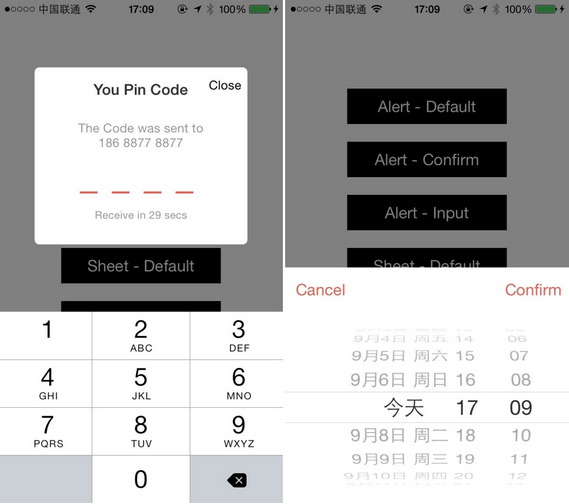
除了內建的 MMAlertView 與 MMSheetView,像是輸入驗證碼的提示框、日期選擇框等,都能用 MMPopupView 輕鬆實現。
小結
源碼與 Demo 已開源,更多細節歡迎運行 Demo 或直接查看源代碼,有任何問題都歡迎提出一起討論研究。