
黑暗代碼:各種花式搞崩 Cocoa 的方式

文本由 CocoaChina 譯者小袋子(博客)翻譯
作者:Mike Ash(Blog、GitHub)
原文:Friday Q&A 2014-01-10: Let's Break Cocoa
本文最初發布於 2014 年 1 月 10 日。
「Let's Build」系列是我在這個博客裡最喜歡的欄目。但有時候,把程序搞崩比編寫它們更有樂趣。接下來,我就來開發幾種新奇又別出心裁的方式,把 Cocoa 徹底搞崩。
帶有 NUL 的字符串
NUL(即 '\0')字符在 ASCII 與 Unicode 中代表 0,是個不尋常的麻煩鬼。在 C 字符串裡,它不是一個普通字符,而是標誌字符串結束的哨兵;而在其他上下文中,它又和普通字符無異。當你把 C 字符串與其他上下文混用時,就會產生有趣的結果。例如 NSString 對象,攜帶 NUL 字符毫無問題:
NSString *s = @"abc\0def";
仔細觀察,我們可以用 lldb 打印它:
(lldb) p (void)[[NSFileHandle fileHandleWithStandardOutput] writeData: [s dataUsingEncoding: 5]] abcdef
然而,更典型的展示方式是把字符串當作 C 字符串,在某個點提前結束。由於 '\0' 意味著 C 字符串的終結,字符串會在轉換時被截斷:
(lldb) po s abc (lldb) p (void)NSLog(s) LetsBreakCocoa[16689:303] abc
而原始字符依然保留預期的長度:
(lldb) p [s length] (unsigned long long) $1 = 7
對這樣的字符串進行操作,會讓你真正感到困惑:
(lldb) po [s stringByAppendingPathExtension: @"txt"] abc
如果你不知道字符串中間藏著一個 NUL,這類問題會讓你覺得整個世界滿是惡意。一般來說你不會遇到 NUL,但它很可能通過加載外部資源進入你的程序——`-initWithData:encoding:` 會輕易讀入零比特,並在返回的 NSString 中產生 NUL 字符。
循環容器
先看一個數組:
NSMutableArray *a = [NSMutableArray array];
這是一個包含其他數組的數組:
NSMutableArray *a = [NSMutableArray array]; NSMutableArray *b = [NSMutableArray array]; [a addObject: b];
目前還一切正常。現在,我們讓一個數組包含它自身:
NSMutableArray *a = [NSMutableArray array]; [a addObject: a];
猜猜打印會發生什麼?
NSLog(@"%@", a);
以下是調用堆棧(bt 命令用於打印調用堆棧):
(lldb) bt * thread #1: tid = 0x43eca, 0x00007fff8952815a CoreFoundation`-[NSArray descriptionWithLocale:indent:] + 154, queue = 'com.apple.main-thread, stop reason = EXC_BAD_ACCESS (code=2, address=0x7fff5f3ffff8) frame #0: 0x00007fff8952815a CoreFoundation`-[NSArray descriptionWithLocale:indent:] + 154 frame #1: 0x00007fff895282da CoreFoundation`-[NSArray descriptionWithLocale:indent:] + 538 frame #2: 0x00007fff895282da CoreFoundation`-[NSArray descriptionWithLocale:indent:] + 538 frame #3: 0x00007fff895282da CoreFoundation`-[NSArray descriptionWithLocale:indent:] + 538 frame #4: 0x00007fff895282da CoreFoundation`-[NSArray descriptionWithLocale:indent:] + 538 frame #5: 0x00007fff895282da CoreFoundation`-[NSArray descriptionWithLocale:indent:] + 538 frame #6: 0x00007fff895282da CoreFoundation`-[NSArray descriptionWithLocale:indent:] + 538 frame #7: 0x00007fff895282da CoreFoundation`-[NSArray descriptionWithLocale:indent:] + 538 frame #8: 0x00007fff895282da CoreFoundation`-[NSArray descriptionWithLocale:indent:] + 538 frame #9: 0x00007fff895282da CoreFoundation`-[NSArray descriptionWithLocale:indent:] + 538 frame #10: 0x00007fff895282da CoreFoundation`-[NSArray descriptionWithLocale:indent:] + 538 frame #11: 0x00007fff895282da CoreFoundation`-[NSArray descriptionWithLocale:indent:] + 538
這裡省略了成千上萬個棧幀。description 方法無法處理遞歸容器,它會不斷嘗試追蹤到「樹」的末端,最終引發崩潰。我們也可以用它與自身比較相等性:
NSLog(@"%d", [a isEqual: a]);
這看上去是 YES。再創造一個結構相同的數組 b,讓 a 與它比較:
NSMutableArray *b = [NSMutableArray array]; [b addObject: b]; NSLog(@"%d", [a isEqual: b]);
哎呀:
(lldb) bt * thread #1: tid = 0x4412a, 0x00007fff8946a8d7 CoreFoundation`-[NSArray isEqualToArray:] + 103, queue = 'com.apple.main-thread, stop reason = EXC_BAD_ACCESS (code=2, address=0x7fff5f3fff28) frame #0: 0x00007fff8946a8d7 CoreFoundation`-[NSArray isEqualToArray:] + 103 frame #1: 0x00007fff8946f6b7 CoreFoundation`-[NSArray isEqual:] + 71 frame #2: 0x00007fff8946aa07 CoreFoundation`-[NSArray isEqualToArray:] + 407 frame #3: 0x00007fff8946f6b7 CoreFoundation`-[NSArray isEqual:] + 71 frame #4: 0x00007fff8946aa07 CoreFoundation`-[NSArray isEqualToArray:] + 407 frame #5: 0x00007fff8946f6b7 CoreFoundation`-[NSArray isEqual:] + 71 frame #6: 0x00007fff8946aa07 CoreFoundation`-[NSArray isEqualToArray:] + 407 frame #7: 0x00007fff8946f6b7 CoreFoundation`-[NSArray isEqual:] + 71 frame #8: 0x00007fff8946aa07 CoreFoundation`-[NSArray isEqualToArray:] + 407 frame #9: 0x00007fff8946f6b7 CoreFoundation`-[NSArray isEqual:] + 71
相等性檢查同樣無從應對遞歸容器。
循環視圖
你可以用 NSView 做同樣的實驗:
NSWindow *win = [self window]; NSView *a = [[NSView alloc] initWithFrame: NSMakeRect(0, 0, 1, 1)]; [a addSubview: a]; [[win contentView] addSubview: a];
要讓程序崩潰,你只需嘗試顯示窗口,甚至不必打印描述或做相等性比較。當應用試圖追蹤到底的視圖結構時便會崩潰。
(lldb) bt * thread #1: tid = 0x458bf, 0x00007fff8c972528 AppKit`NSViewGetVisibleRect + 130, queue = 'com.apple.main-thread, stop reason = EXC_BAD_ACCESS (code=2, address=0x7fff5f3ffff8) frame #0: 0x00007fff8c972528 AppKit`NSViewGetVisibleRect + 130 frame #1: 0x00007fff8c9725c6 AppKit`NSViewGetVisibleRect + 288 frame #2: 0x00007fff8c9725c6 AppKit`NSViewGetVisibleRect + 288 frame #3: 0x00007fff8c9725c6 AppKit`NSViewGetVisibleRect + 288 frame #4: 0x00007fff8c9725c6 AppKit`NSViewGetVisibleRect + 288 frame #5: 0x00007fff8c9725c6 AppKit`NSViewGetVisibleRect + 288 frame #6: 0x00007fff8c9725c6 AppKit`NSViewGetVisibleRect + 288 frame #7: 0x00007fff8c9725c6 AppKit`NSViewGetVisibleRect + 288 frame #8: 0x00007fff8c9725c6 AppKit`NSViewGetVisibleRect + 288 frame #9: 0x00007fff8c9725c6 AppKit`NSViewGetVisibleRect + 288 frame #10: 0x00007fff8c9725c6 AppKit`NSViewGetVisibleRect + 288 frame #11: 0x00007fff8c9725c6 AppKit`NSViewGetVisibleRect + 288
濫用 Hash
讓我們創建一個類 AlwaysEqual,它的實例永遠與其他對象相等,但 hash 值卻各不相同:
@interface AlwaysEqual : NSObject @end @implementation AlwaysEqual - (BOOL)isEqual: (id)object { return YES; } - (NSUInteger)hash { return random(); } @end這顯然違反了 Cocoa 的約定:當兩個對象相等時,它們的 hash 應始終相等。當然,這並非強制檢查,因此上述代碼仍能編譯運行。
把一個實例加入 NSMutableSet:
NSMutableSet *set = [NSMutableSet set]; for(;;) { AlwaysEqual *obj = [[AlwaysEqual alloc] init]; [set addObject: obj]; NSLog(@"%@", set); }這產生了一段有趣的日志:
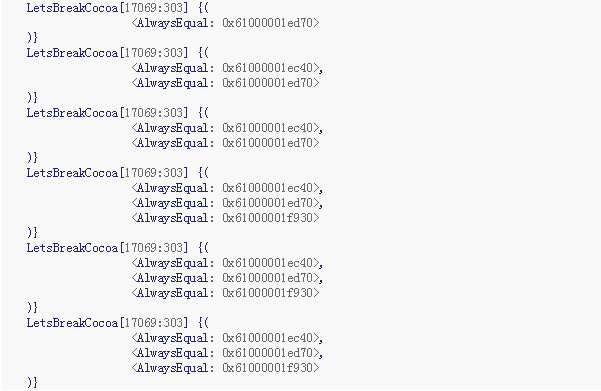
每次運行結果未必相同,但大致如此。addObject: 通常先添加一個新對象,之後的添加極少成功,最終頂部只剩三個對象。此時集合裡有三個看似獨一無二的對象,看上去不會再增加了。所以,重寫 isEqual: 時,一定要同時重寫 hash 方法。
濫用 Selector
Selector 是一種特殊數據類型,在運行期用於表示方法名。按慣例它們必須是唯一的字符串,儘管並非嚴格要求。在當前的 Objective-C 運行時中,它們就是字符串,而利用 Selector 把程序搞崩頗有樂趣。馬上試試:
SEL sel = (SEL)""; [NSObject performSelector: sel];
編譯運行後,運行期會產生令人費解的錯誤:
LetsBreakCocoa[17192:303] *** NSForwarding: warning: selector (0x100001f86) for message '' does not match selector known to Objective C runtime (0x6100000181f0)-- abort LetsBreakCocoa[17192:303] +[NSObject ]: unrecognized selector sent to class 0x7fff75570810
通過構造奇怪的 selector,還能產生更詭異的錯誤:
SEL sel = (SEL)"]: unrecognized selector sent to class 0x7fff75570810"; [NSObject performSelector: sel]; LetsBreakCocoa[17262:303] +[NSObject ]: unrecognized selector sent to class 0x7fff75570810]: unrecognized selector sent to class 0x7fff75570810
你甚至能讓錯誤看起來像是 NSObject 停止響應了完整信息:
SEL sel = (SEL)"alloc"; [NSObject performSelector: sel]; LetsBreakCocoa[46958:303] *** NSForwarding: warning: selector (0x100001f77) for message 'alloc' does not match selector known to Objective C runtime (0x7fff8d38d879)-- abort LetsBreakCocoa[46958:303] +[NSObject alloc]: unrecognized selector sent to class 0x7fff75570810
顯然,這並非真正的 alloc selector,而是一個恰好指向含 "alloc" 字符串的偽裝 selector,但運行時仍會把它打印為 alloc。
偽造對象
儘管如今對象模型越發複雜,Objective-C 對象本質上仍是大塊內存中的一小塊。基於這一思路,我們可以偽造對象:
id obj = (__bridge id)(void *)&(Class){ [NSObject class] };這些偽造對象也能正常工作:
NSMutableArray *array = [NSMutableArray array]; for(int i = 0; i < 10; i++) { id obj = (__bridge id)(void *)&(Class){ [NSObject class] }; [array addObject: obj]; } NSLog(@"%@", array);上述代碼不僅能運行,還打印出如下日志:
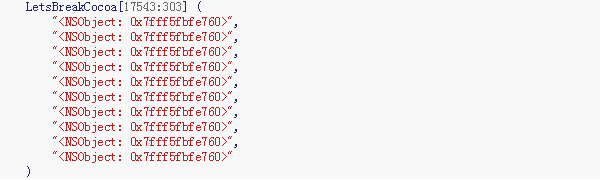
可惜,所有偽造對象最終都落在相同地址上,但仍能繼續工作。然而,當你退出方法、autorelease pool 試圖清理時:
(lldb) bt * thread #1: tid = 0x46790, 0x00007fff8b3d55c9 libobjc.A.dylib`realizeClass(objc_class*) + 156, queue = 'com.apple.main-thread, stop reason = EXC_BAD_ACCESS (code=1, address=0x7fff00006000) frame #0: 0x00007fff8b3d55c9 libobjc.A.dylib`realizeClass(objc_class*) + 156 frame #1: 0x00007fff8b3d820c libobjc.A.dylib`lookUpImpOrForward + 98 frame #2: 0x00007fff8b3cb169 libobjc.A.dylib`objc_msgSend + 233 frame #3: 0x00007fff8940186f CoreFoundation`CFRelease + 591 frame #4: 0x00007fff89414ad9 CoreFoundation`-[__NSArrayM dealloc] + 185 frame #5: 0x00007fff8b3cd65a libobjc.A.dylib`(anonymous namespace)::AutoreleasePoolPage::pop(void*) + 502 frame #6: 0x00007fff89420d72 CoreFoundation`_CFAutoreleasePoolPop + 50 frame #7: 0x00007fff8551ada7 Foundation`-[NSAutoreleasePool drain] + 147
因為這些偽造對象沒有合適分配的內存,一旦 autorelease pool 在方法返回時試圖操作它們,就會出現嚴重錯誤,內存也會被覆寫。
KVC
這是一個類的數組:
NSArray *classes = @[ [NSObject class], [NSString class], [NSView class] ]; NSLog(@"%@", classes); LetsBreakCocoa[17726:303] ( NSObject, NSString, NSView )
這是一個由這些類的實例組成的數組:

鍵值編碼並不意味著要這樣用,但看起來也能正常運行。
調用者檢查
編譯器的內建方法 __builtin_return_address 可以返回調用你的代碼的地址:
void *addr = __builtin_return_address(0);
於是我們可以獲取調用者的信息,包括它的名字:
Dl_info info; dladdr(addr, &info); NSString *callerName = [NSString stringWithUTF8String: info.dli_sname];
借此我們可以做些「窮凶極惡」的事(譯者認為這未必是坏事,反而可作為動態方法調用的一種可選途徑,儘管並不可靠),比如根據不同調用者調用合適的方法:
@interface CallerInspection : NSObject @end @implementation CallerInspection - (void)method { void *addr = __builtin_return_address(0); Dl_info info; dladdr(addr, &info); NSString *callerName = [NSString stringWithUTF8String: info.dli_sname]; if([callerName isEqualToString: @"__CFNOTIFICATIONCENTER_IS_CALLING_OUT_TO_AN_OBSERVER__"]) NSLog(@"Do some notification stuff"); else NSLog(@"Do some regular stuff"); } @end測試代碼如下:
id obj = [[CallerInspection alloc] init]; [[NSNotificationCenter defaultCenter] addObserver: obj selector: @selector(method) name: @"notification" object: obj]; [[NSNotificationCenter defaultCenter] postNotificationName: @"notification" object: obj]; [obj method]; LetsBreakCocoa[47427:303] Do some notification stuff LetsBreakCocoa[47427:303] Do some regular stuff
當然,這種方式並不可靠,因為 __CFNOTIFICATIONCENTER_IS_CALLING_OUT_TO_AN_OBSERVER__ 是 Apple 的內部符號,未來很可能被修改。
Dealloc Swizzle
讓我們用 swizzle(方法調配)技術,把 -[NSObject dealloc] 調配到一個什麼都不做的方法。在 ARC 下獲取 @selector(dealloc) 有點棘手,因為不能直接讀取:
Method m = class_getInstanceMethod([NSObject class], sel_getUid("dealloc")); method_setImplementation(m, imp_implementationWithBlock(^{}));現在來欣賞這段代碼所製造的混亂(堪稱代碼界的黑暗料理):
for(;;) @autoreleasepool { [[NSObject alloc] init]; }調配 dealloc 之後,這段代碼便完美而瘋狂地洩露內存,因為對象再無法被銷毀。
總結
用新奇有趣的方式搞崩 Cocoa,能帶來無盡的娛樂性,而這一切也切實體現在真實代碼中。想起我第一次遇到字符串裡嵌入 NUL 時,那簡直是一段充滿痛苦的調試經歷。其餘的,則純粹是為了好玩與教學目的。就是這些了!若你有任何想討論的問題,可以給我發郵件(mike@mikeash.com)。
(譯者注:作者此前已將網站上的 Friday Q&A 系列整理成一本書,開發者可在 iBooks 和 Kindle 上查看,另有 PDF 與 ePub 格式供下載。)