
Loading 動畫實現思路(一):把複雜任務拆成簡單任務
作者:雪夜吐息
前幾天朋友推薦了一款 Loading 動畫,看著挺有意思:
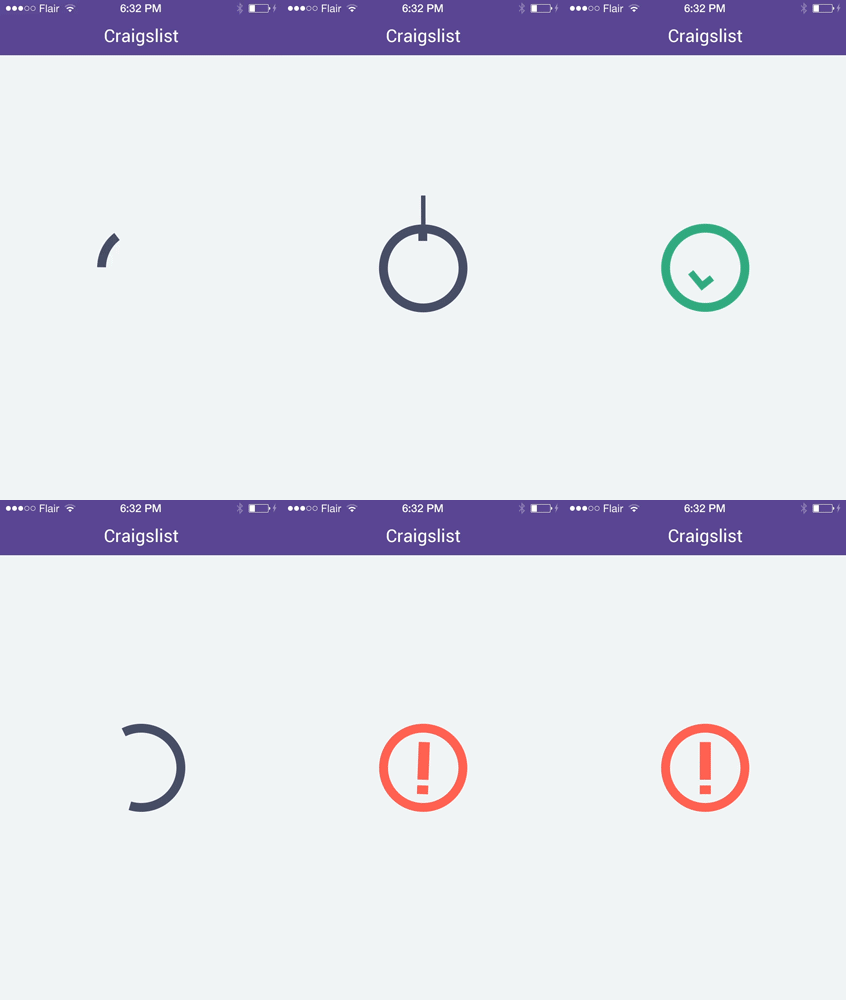
正好這段時間在學動畫,就試著做了一版。為了降低難度,我對原動畫做了簡化,成品是這樣:
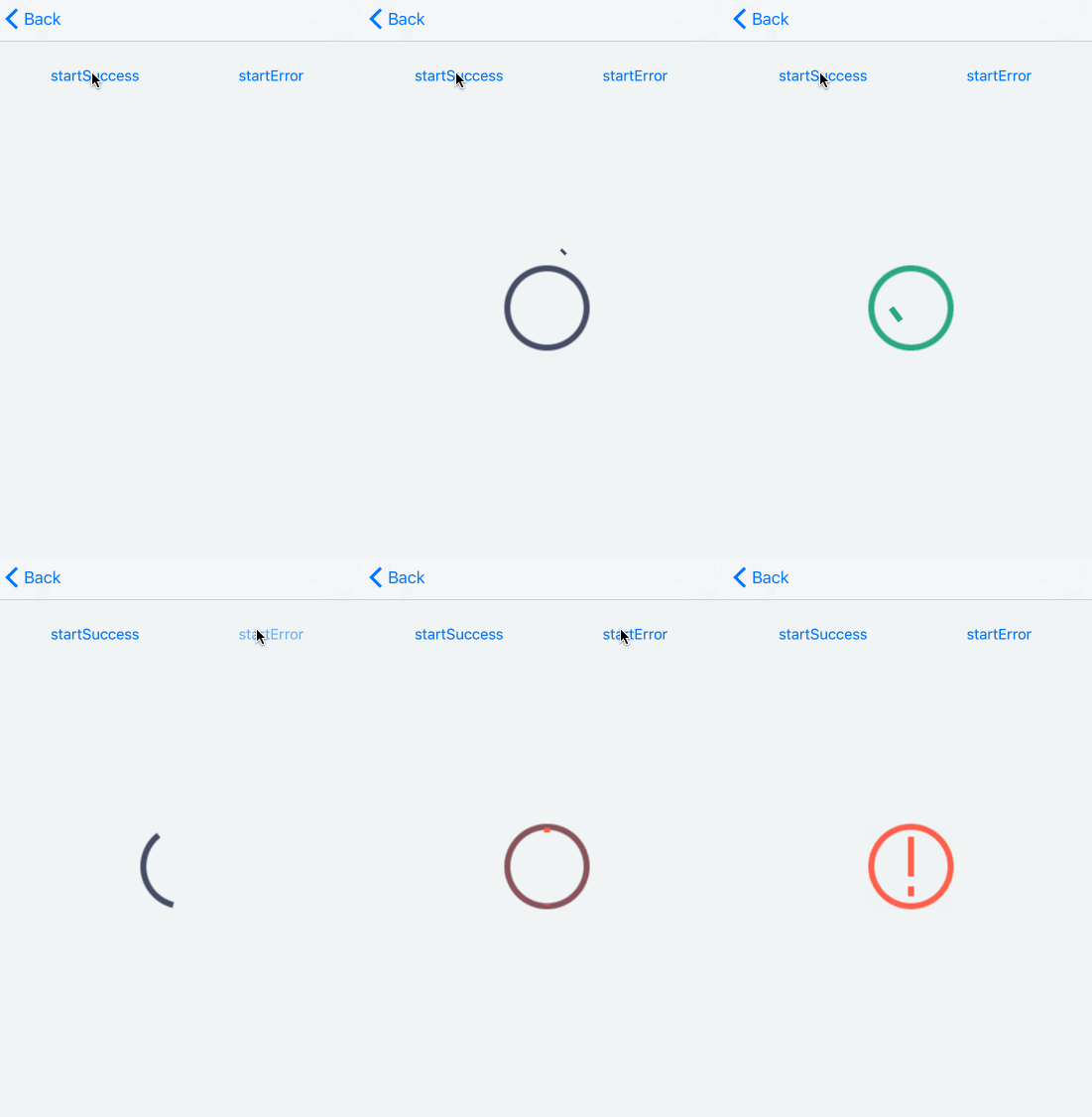
拋磚引玉是最好的學習方式之一,所以我打算分幾篇把自己的思路寫出來,歡迎把更好的想法砸過來。
這個動畫乍看很複雜,但我堅信一點:
一個複雜任務可以拆分為一組簡單任務。
於是我先按時間把整段動畫切成幾個階段,再把每個階段拆成若干個可並行的簡單動畫。
怎麼拆?如果手上有 gif,用系統自帶的 Preview 逐幀看一遍,思路大概就出來了:
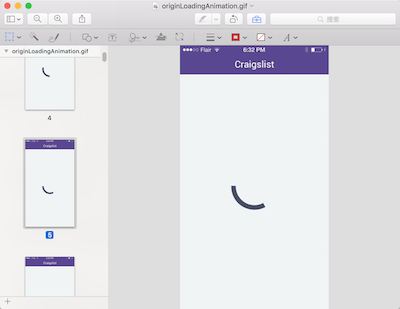
每個人的拆法都不一樣,本來就沒有唯一答案。這一篇我們先看第一階段。
第一階段放慢後是這樣:
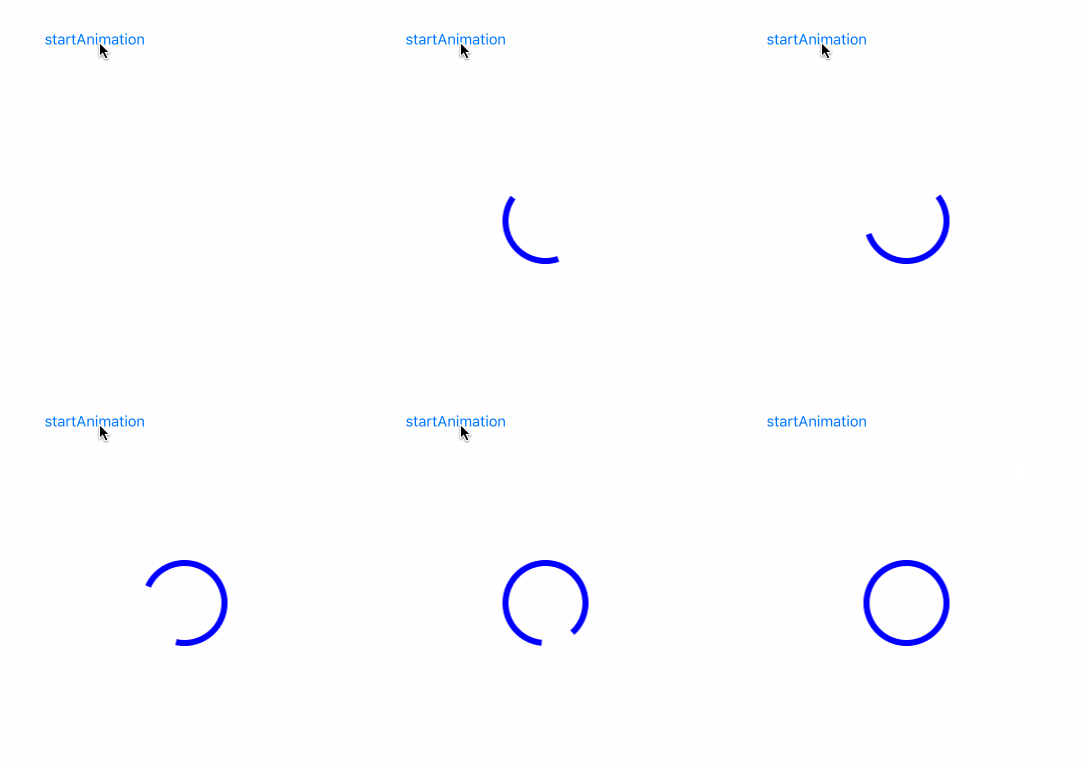
看起來就是一段起點與終點不斷變化的弧,於是我決定用「重繪弧」的方式實現,繪製工具選用我最熟的 UIBezierPath。
畫弧用的是這個方法:
+ (instancetype)bezierPathWithArcCenter:(CGPoint)center
                                  radius:(CGFloat)radius
                              startAngle:(CGFloat)startAngle
                                endAngle:(CGFloat)endAngle
                               clockwise:(BOOL)clockwise
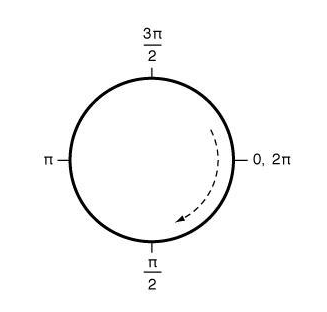
為了後文描述方便,先祭出官方文檔裡的這張示意圖,看我手繪的醜圖時可以對照參考:
拆解角度變化
設弧的起點為 O(origin)、終點為 D(dest)。動畫中弧是逆時針轉動的,那我們畫弧時也採用逆時針,即從 O 逆時針畫到 D。
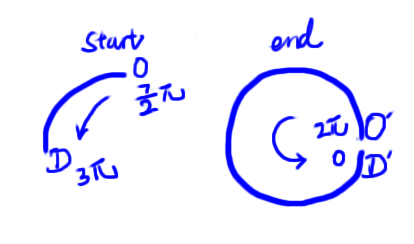
先看動畫首尾兩個狀態(注意:結束時的弧其實是一個圓,這裡故意留了個缺口方便說明):
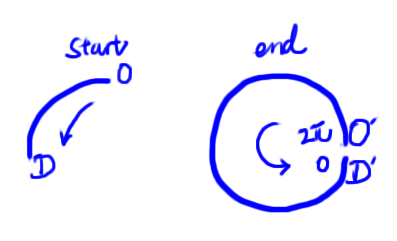
再回頭觀察動畫可知,結束時 O 與 D 在 0(或 2π)處重合。因此結束狀態可以理解為「從 2π 逆時針畫到 0」——雖然 0 和 2π 是同一點,但從 0 到 0、從 0 到 2π、從 2π 到 0,畫出來是完全不同的,建議動手試一下。
終點確定了,起點呢?這就需要觀察 O、D 的運行軌跡:
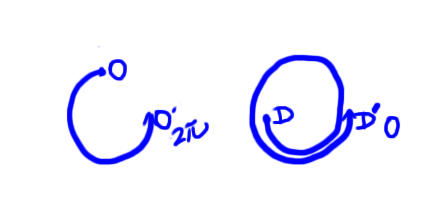
可以看出:O 點逆時針(逆時針意味著角度在減小,可再參考前面的官方文檔示意圖)繞了 3/4 圈到達 2π,D 點逆時針繞了 1.5 圈到達 0。於是他們的角度變化為:
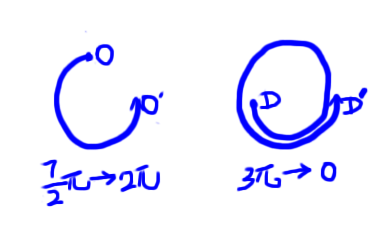
即 O 從 7π/2 減小到 2π,D 從 3π 減小到 0。把起點補進之前那張圖:
於是動畫過程中(progress 取值 0~1)兩點的角度為:
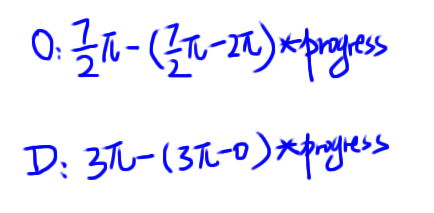
只要讓 progress 從 0 平滑走到 1,O 與 D 就從起點運動到終點;每次變化時重繪從 O 到 D 的逆時針弧,動畫就出來了。思路清晰,關鍵數值也有了,剩下的就是寫代碼。
寫代碼
整體思路是「屬性變化觸發重繪」。自定義 CALayer 子類並重寫這兩個方法即可:
+ (BOOL)needsDisplayForKey:(NSString *)key;
- (void)drawInContext:(CGContextRef)ctx;
官方文檔對 needsDisplayForKey: 的說明是:子類可以重寫此方法,在指定屬性值變化時返回 YES 以觸發重繪;「改變該屬性值的動畫同樣會觸發重繪」。
先定義 progress 屬性:
@interface ArcToCircleLayer : CALayer
@property (nonatomic) CGFloat progress;
@end
然後重寫 needsDisplayForKey::
@implementation ArcToCircleLayer

@dynamic progress;

+ (BOOL)needsDisplayForKey:(NSString *)key {
    if ([key isEqualToString:@"progress"]) {
        return YES;
    }
    return [super needsDisplayForKey:key];
}
這樣 progress 變化時,layer 會把自己標記為需要重繪,系統便會在合適的時機調用 drawInContext:。而既然「動畫改變屬性也會觸發重繪」,我們就可以直接用 CA 動畫來驅動 progress:
self.arcToCircleLayer.progress = 1;  // 讓動畫結束後停留在終態

CABasicAnimation *animation = [CABasicAnimation animationWithKeyPath:@"progress"];
animation.duration = 5;
animation.fromValue = @0.0;
animation.toValue = @1.0;
[self.arcToCircleLayer addAnimation:animation forKey:nil];
動畫執行期間 progress 持續變化,不斷觸發 drawInContext: 重繪,動畫由此產生。
(第一句代碼的作用:動畫執行時改變的是 presentation layer 的值,model layer 不變;動畫結束後顯示 model layer 的值,若不預先同步,畫面就會「跳」回初始狀態。把 model layer 直接設為終態即可避免。這部分可參考 Core Animation Programming Guide 的相關章節。)
看到 CABasicAnimation,你可能會想再玩玩其他參數,比如:
self.arcToCircleLayer.progress = 0;

CABasicAnimation *animation = [CABasicAnimation animationWithKeyPath:@"progress"];
animation.duration = 5;
animation.fromValue = @0.0;
animation.toValue = @1.0;
animation.autoreverses = YES;
[self.arcToCircleLayer addAnimation:animation forKey:nil];
如你所料,動畫變成了往復運動:
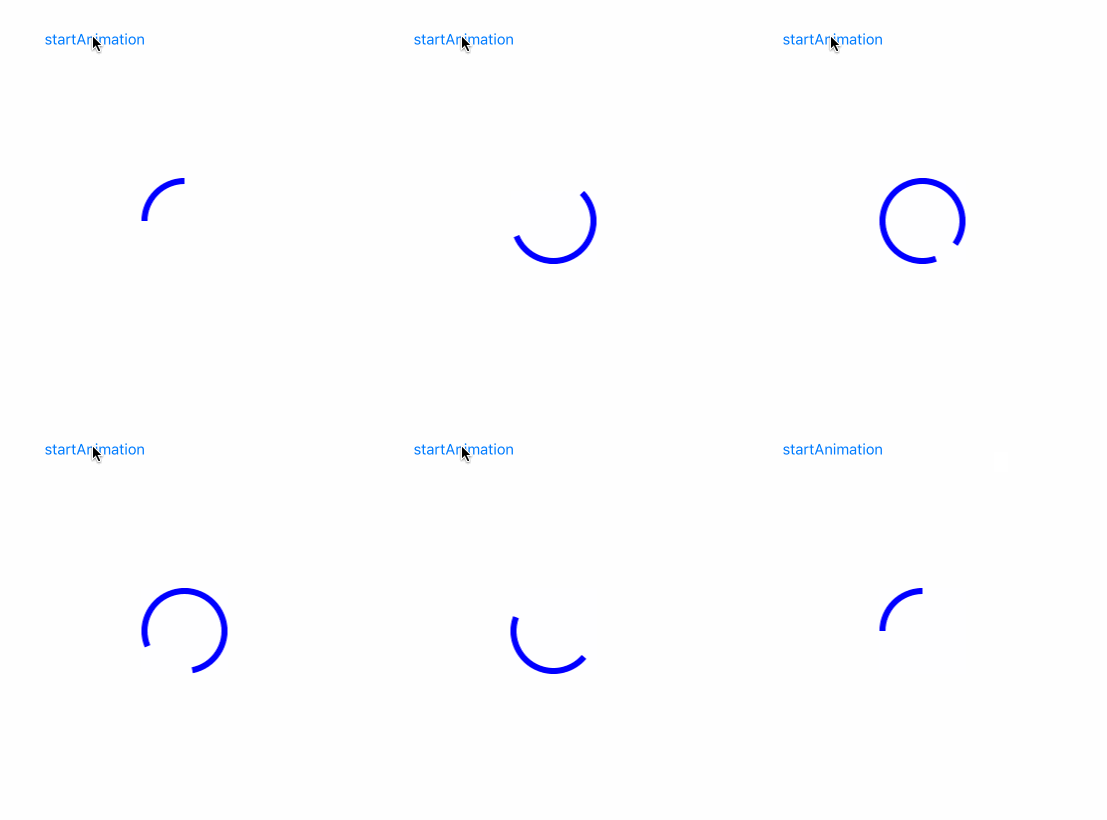
這說明我們的方式能充分利用 CA 動畫系統的既有能力。
流程明確後,重寫 drawInContext: 即可。數值前文已推導完成,直接上代碼(為表達清晰聲明了多個局部變量,可與下面這張圖對照):
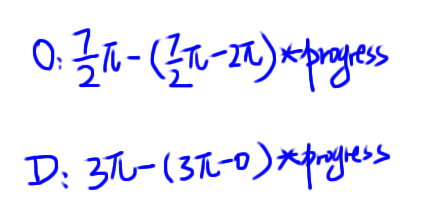
- (void)drawInContext:(CGContextRef)ctx {
    UIBezierPath *path = [UIBezierPath bezierPath];
    CGFloat radius = MIN(CGRectGetWidth(self.bounds), CGRectGetHeight(self.bounds)) / 2 - kLineWidth / 2;
    CGPoint center = CGPointMake(CGRectGetMidX(self.bounds), CGRectGetMidY(self.bounds));

    // O
    CGFloat originStart = M_PI * 7 / 2;
    CGFloat originEnd   = M_PI * 2;
    CGFloat currentOrigin = originStart - (originStart - originEnd) * self.progress;

    // D
    CGFloat destStart = M_PI * 3;
    CGFloat destEnd   = 0;
    CGFloat currentDest = destStart - (destStart - destEnd) * self.progress;

    [path addArcWithCenter:center radius:radius startAngle:currentOrigin endAngle:currentDest clockwise:NO];

    CGContextAddPath(ctx, path.CGPath);
    CGContextSetLineWidth(ctx, kLineWidth);
    CGContextSetStrokeColorWithColor(ctx, [UIColor blueColor].CGColor);
    CGContextStrokePath(ctx);
}
第一階段的主要代碼到此完成,完整工程可參考 GitHub 上該項目的 OneLoadingAnimationStep1 目錄。
關於 @dynamic progress
由於我對 property 的機制理解還不深,這裡暫不展開。有興趣可以先看 CALayer.h 中的這段注釋:
/** Property methods. **/
/* CALayer implements the standard NSKeyValueCoding protocol for all
 * Objective C properties defined by the class and its subclasses. It
 * dynamically implements missing accessor methods for properties
 * declared by subclasses.
 */
鳴謝與延伸閱讀
鳴謝:Kitten's 時間膠囊、葉孤城_
相關文檔:Core Animation Programming Guide、CALayer Class Reference、UIBezierPath Class Reference