寫一個 Xcode 插件:讓代碼註釋自動對齊縮進

自從團隊開始做 code review,大家的代碼風格逐漸收攏到一條線上,看著整齊的代碼確實舒服。
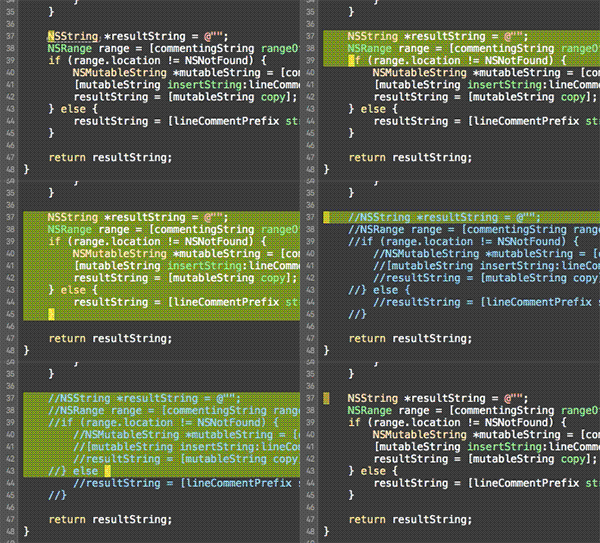
但 Xcode 的註釋功能一直讓人彆扭,比如:
// 註釋前:
- (void)viewDidLoad {
    [super viewDidLoad];
    self.view.backgroundColor = [UIColor whiteColor];
}

// 註釋後:
- (void)viewDidLoad {
    [super viewDidLoad];
//    self.view.backgroundColor = [UIColor whiteColor];
}

// 註釋前:
- (void)viewDidLoad {
    [super viewDidLoad];

    self.view.backgroundColor = [UIColor whiteColor];
}

// 註釋後:
- (void)viewDidLoad {
    [super viewDidLoad];
//    self.view.backgroundColor = [UIColor whiteColor];
}
問題很明顯:Xcode 只是在行首塞進註釋符,原本的縮進全被破壞,對齊一團糟。對有強迫症的人來說,這基本是種折磨。
去 Stack Overflow 搜了一圈,有人提過同樣的問題,最高票回答是:先按 command + [ 頂到最左、再按 command + / 註釋、最後按 command + ] 縮回來。這個答案被選為最差答案。
於是只能自己寫個插件。新建 Xcode 插件工程的方式可以參考《Xcode 插件 AllTargets 開發教程》。
思路
按下 command + / 時,Xcode 必然會呼叫某個方法來完成註釋,而這個方法的實現大概率就是「在行首插入 //」。既然縮進用的都是空格,那麼只要 hook 住這個方法,把註釋符改插到第一個非空格字元之前就行了。
找到註釋方法
在 Xcode 私有類頭檔裡搜 comment,一個可疑目標很快浮現:- (void)commentAndUncommentCurrentLines:(id)arg1;。先 hook 它,把參數印出來看看:
#import "DVTSourceTextView+Hook.h"

@implementation DVTSourceTextView (Hook)

+ (void)hook {
    [self jr_swizzleMethod:@selector(commentAndUncommentCurrentLines:)
              withMethod:@selector(hook_commentAndUncommentCurrentLines:)
                 error:nil];
}

- (void)hook_commentAndUncommentCurrentLines:(id)arg1 {
    NSLog(@"%@", arg1);
    [self hook_commentAndUncommentCurrentLines:arg1];
}

@end
用 command + / 進行註釋與反註釋,控制台沒有任何輸出。這說明快捷鍵走的是菜單欄命令,但既然註釋時確實能看到 log,就證明方法找對了。
commentAndUncommentCurrentLines: 位於 DVTSourceTextView,而這個類在 DVTKit.framework 裡。打開 Hopper Disassembler,把 framework 拖進去反彙編,搜到該方法並按 alt + enter 生成偽代碼,關鍵部分如下:
void -[DVTSourceTextView commentAndUncommentCurrentLines:](void * self, void * _cmd, void * arg2) {
    //......
    rax = (r12)(r15, @selector(stringByTogglingCommentsInLineRange:), rdx, r13);
    //......
}
可見它呼叫了 stringByTogglingCommentsInLineRange: 並取得處理後的字串。繼續看這個方法:
void * -[DVTSourceLanguageService stringByTogglingCommentsInLineRange:](void * self, void * _cmd, struct _NSRange arg2)  {
    //......
    if (var_70 == 0x2) {
        rbx = [[rdi stringByUncommentingString:r15] retain];
    } else {
        rbx = [[rdi stringByCommentingString:r15] retain];
    }
    //......
}
分支很直白:要反註釋就走 stringByUncommentingString:,要註釋就走 stringByCommentingString:。我們關心後者:
void * -[DVTSourceLanguageService stringByCommentingString:](void * self, void * _cmd, void * arg2) {
    rdx = arg2;
    r15 = self;
    r12 = [rdx retain];
    r14 = *objc_msgSend;
    rbx = [[r15 lineCommentPrefixes] retain];
    r13 = [[rbx firstObject] retain];
    [rbx release];
    if ([r13 length] != 0x0) {
        r15 = r13;
    } else {
        // 沒有行註釋前綴,退回使用塊註釋 /* */
        rbx = [[r15 blockCommentCircumfixes] retain];
        r12 = [[rbx firstObject] retain];
        r15 = [[r12 firstObject] retain];
        r13 = [[r12 lastObject] retain];
        if (r13 != 0x0) {
            r12 = [[var_30 stringByAppendingString:r13] retain];
        } else {
            r12 = var_30;
        }
    }
    rbx = [[r15 stringByAppendingString:r12] retain];
    return [rbx autorelease];
}
這段就是 Xcode 註釋代碼的真實實現。翻譯回 Objective-C:
- (NSString *)stringByCommentingString:(NSString *)commentingString {
    NSString *lineCommentPrefix = [self.lineCommentPrefixes firstObject];

    if (lineCommentPrefix.length == 0) {
        // 使用 `/* */` 註釋塊
        NSArray *blockCommentCircumfix = [self.blockCommentCircumfixes firstObject];
        lineCommentPrefix = [blockCommentCircumfix firstObject];

        NSString *lineCommentSuffix = [blockCommentCircumfix lastObject];
        if (lineCommentSuffix) {
            commentingString = [commentingString stringByAppendingString:lineCommentSuffix];
        }
    }

    // 在待註釋代碼最前面加上註釋符
    return [lineCommentPrefix stringByAppendingString:commentingString];
}
所以我們只要 hook 這個方法,把插入位置改到第一個非空格字元處。另外,空行不需要註釋——大多數編輯器也是這麼處理的。
- (NSString *)hook_stringByCommentingString:(NSString *)commentingString {
    NSString *lineCommentPrefix = [self.lineCommentPrefixes firstObject];

    if (lineCommentPrefix.length == 0) {
        // 使用 `/* */` 註釋塊
        NSArray *blockCommentCircumfix = [self.blockCommentCircumfixes firstObject];
        lineCommentPrefix = [blockCommentCircumfix firstObject];

        NSString *lineCommentSuffix = [blockCommentCircumfix lastObject];
        if (lineCommentSuffix) {
            commentingString = [commentingString stringByAppendingString:lineCommentSuffix];
        }
    }

    // 判斷代碼是否含有非空格字元
    NSRange range = [commentingString rangeOfString:@"[^\\s]" options:NSRegularExpressionSearch];
    if (range.location == NSNotFound) {
        // 沒有非空格字元,就不註釋
        return commentingString;
    }

    // 在第一個非空格字元的位置插入註釋符
    NSMutableString *mutableString = [commentingString mutableCopy];
    [mutableString insertString:lineCommentPrefix atIndex:range.location];
    return [mutableString copy];
}
插件地址:https://github.com/poboke/IndentComments
安裝後的效果: