
debugDescription 與 runtime:讓 Model 在調試時說人話
編輯:iOS 開發基礎

本文為投稿文章,作者:咖啡豬_iOSer
先說 description
專案裡到處都是裝屬性的 Model,開發期最常做的事之一就是打開控制台確認屬性值对不对。問題來了:Objective-C 裡寫 NSLog(@"%@", model),印出來的是記憶體位址,而不是我們想看的內容。

解法很直接——重寫 - (NSString *)description。
// TestModel.h
@interface TestModel : NSObject
@property (copy, nonatomic) NSString *text;
@property (assign, nonatomic) NSInteger index;
@end

// TestModel.m
@implementation TestModel
- (NSString *)description {
    return [NSString stringWithFormat:@"text:%@--index:%zi", self.text, self.index];
}
@end
之後再印一次,就會輸出我們期待的內容。
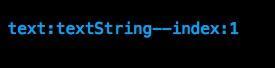
但問題繼續:如果 Model 有十幾二十個屬性,難道要在 description 裡一個個手寫拼接?與其忍受這種重複勞動,不如用 runtime 動態拿屬性。
#import <objc/runtime.h>

@implementation TestModel
- (NSString *)description {
    NSMutableDictionary *dictionary = [NSMutableDictionary dictionary];

    // 取得當前 class 的所有屬性
    uint count;
    objc_property_t *properties = class_copyPropertyList([self class], &count);

    // 遍歷,用 KVC 取值
    for (int i = 0; i < count; i++) {
        objc_property_t property = properties[i];
        NSString *name = @(property_getName(property));
        id value = [self valueForKey:name] ?: @"nil";
        [dictionary setObject:value forKey:name];
    }

    free(properties);
    return [NSString stringWithFormat:@"<%@: %p> -- %@", [self class], self, dictionary];
}
@end
這樣不管多少屬性,一次印出來全都有。
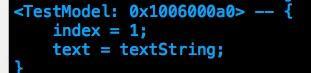
再說 debugDescription
可是重寫 description 有副作用:專案裡 NSLog 語句往往很多,每次印 Model 都吐出一大坨屬性,控制台反而更難看;更麻煩的是,有些場合我們並不想看到屬性細節,這時重寫 description 就是扣分項。
更好的選擇是重寫 debugDescription。它和 description 效果一致,唯一差別是:debugDescription 只在 Xcode 控制台使用 po 命令時才會被呼叫,而它的預設實作本身就是轉去呼叫 description。
所以調試 Model 時,建議重寫 debugDescription,而不是 description。平時的 NSLog 維持簡潔,需要看屬性時打個斷點,用 po model 即可。
#import <objc/runtime.h>

@implementation TestModel
// 重寫 debugDescription,而不是 description
- (NSString *)debugDescription {
    NSMutableDictionary *dictionary = [NSMutableDictionary dictionary];

    uint count;
    objc_property_t *properties = class_copyPropertyList([self class], &count);

    for (int i = 0; i < count; i++) {
        objc_property_t property = properties[i];
        NSString *name = @(property_getName(property));
        id value = [self valueForKey:name] ?: @"nil";
        [dictionary setObject:value forKey:name];
    }

    free(properties);
    return [NSString stringWithFormat:@"<%@: %p> -- %@", [self class], self, dictionary];
}
@end
對比一下 NSLog 與 po 兩種輸出:
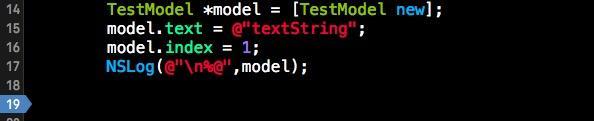
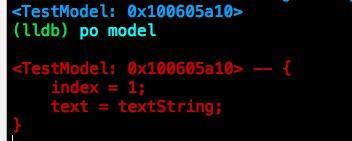
效果符合預期:日常日誌保持乾淨,想看屬性時斷點加 po 就夠了。
Demo
示例程式碼已放在 GitHub:https://github.com/DemoMania/DebugDescriptionDemo
小結
- 調試 Model 時,重寫 debugDescription 優於重寫 description。
- 用 runtime 的 class_copyPropertyList 搭配 KVC,動態取得所有屬性,不必手寫拼接。
- 把這份實作放進 BaseModel,所有 Model 繼承即可複用。
- 重寫的 debugDescription 內部不要再呼叫
[self debugDescription],否則無限遞迴。