
ResearchKit 官方文檔詳解:獲取授權(Consent)

本文翻譯自蘋果官方文檔,譯者:@星夜暮晨、@有情況_R。涉及人類受試者的研究通常需要某種形式的倫理審查,具體由倫理審查委員會(IRB)或倫理委員會(EC)進行。對於某些研究,必須先獲取授權(Consent)——研究者要確保每位參與者都充分了解研究性質,並取得其簽署的授權;授權也可能成為應用審查的條件之一。
ResearchKit 可以輕鬆展示授權文件並獲取受試者簽名。需要特別注意的是,框架本身不包含數字簽名支持;若需要可證實且不可撤銷的簽名,你必須負責生成數字簽名,或生成可用於證明受試者身份的 PDF 文件。
使用 ResearchKit 獲取授權時,首先創建授權文檔模型對象(ORKConsentDocument),對文檔的每個章節及所需簽名進行編碼。完成文檔結構後,可向文檔中添加可視化授權步驟(ORKVisualConsentStep),以帶動畫的可視序列幫助用戶理解文檔信息;要展示需審查的文檔並獲取簽名,則將文檔添加到授權審核步驟(ORKConsentReviewStep)中。若要同時展示這兩個步驟,可創建一個包含它們的授權任務,並用 ORKTaskViewController 展示。
你還可以添加其他步驟,例如授權共享步驟(ORKConsentSharingStep)用於明確獲取與其他研究者共享數據的授權(前提是獲得 IRB 或 EC 許可),或添加指令、表單、問題步驟來詢問理解程度的問題,確保受試者充分理解研究性質。
1. 創建授權文檔模型
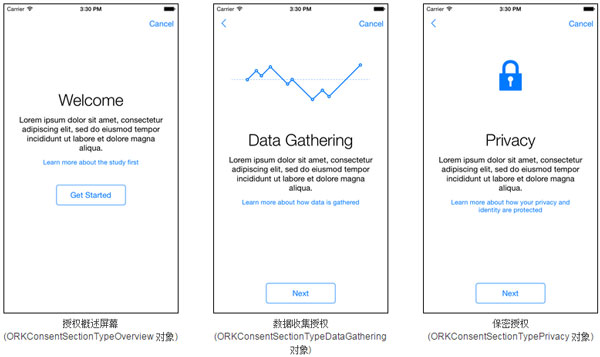
創建授權文檔模型前,先決定如何展示文檔,並按章節對內容分類。ResearchKit 提供一些常見的預定義章節:
- 概述(ORKConsentSectionTypeOverview)
- 數據收集(ORKConsentSectionTypeDataGathering)
- 保密(ORKConsentSectionTypePrivacy)
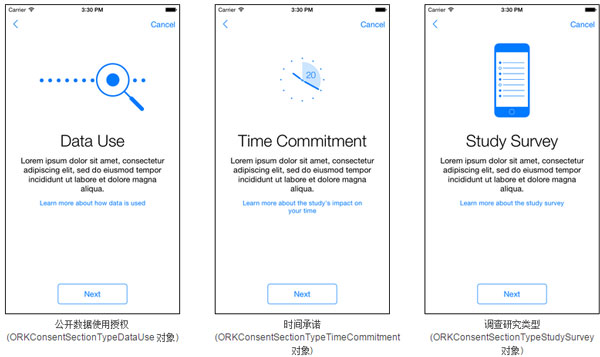
- 數據使用(ORKConsentSectionTypeDataUse)
- 時間承諾(ORKConsentSectionTypeTimeCommitment)
- 調查(ORKConsentSectionTypeStudySurvey)
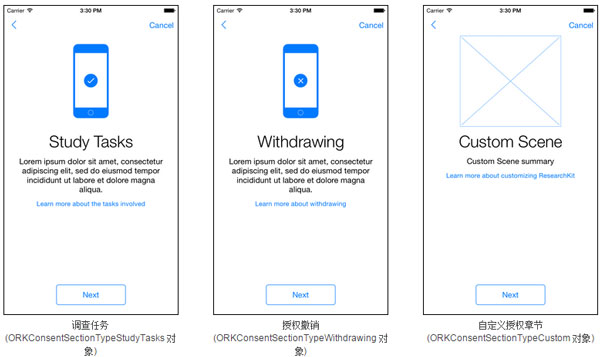
- 任務(ORKConsentSectionTypeStudyTasks)
- 撤銷授權(ORKConsentSectionTypeWithdrawing)
預定義章節包含相應圖像與本地化標題。使用 ORKConsentSection 的 content 或 htmlContent 屬性提供一句話概述,以及用戶點擊「Learn More」時顯示的內容。框架會為不同章節間的過渡提供動畫效果,帶來流暢體驗。示例:
ORKConsentDocument *document = [ORKConsentDocument new]; ORKConsentSection *section1 = [[ORKConsentSection alloc] initWithType:ORKConsentSectionTypeDataGathering]; section1.title = @"在這裡輸入章節的標題..."; section1.summary = @"在這裡輸入章節的概述..."; section1.content = @"在 Learn More 中顯示的內容..."; document.sections = @[section1, ...]; ORKVisualConsentStep *step = [[ORKVisualConsentStep alloc] initWithIdentifier:kVisualConsent document:document]; // 然後接下來創建並展示一個包含此步驟的任務
若預定義章節無法充分涵蓋你的文檔,可自行創建自定義章節、圖像與動畫。所添加的動畫應為 H.264 視頻,為獲得最佳效果,建議先嘗試匹配框架中包含的所有資源。
創建可視化授權步驟
可視化授權步驟展示授權文檔的所有章節,需由你使用相應內容填充,ORKVisualConsentStep 對象本身不包含任何默認內容。
// 為每一頁的可視化授權添加授權章節 ORKConsentSection *section1 = [[ORKConsentSection alloc] initWithType:ORKConsentSectionTypeDataGathering]; document.sections = @[section1, ...]; // 向可視化授權步驟中添加文檔 ORKVisualConsentStep *visualConsent = [[ORKVisualConsentStep alloc] initWithIdentifier:kVisualConsentIdentifier document:document]; // 創建並展示包含此步驟的任務
可視化步驟示例如下:
添加審核步驟
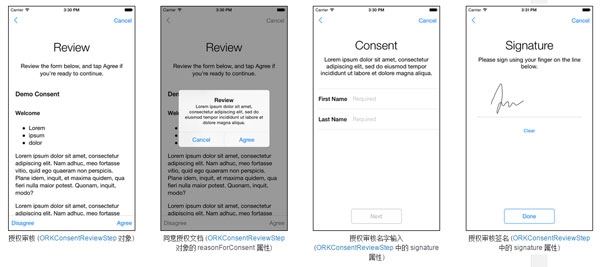
用戶可在授權審核步驟(ORKConsentReviewStep)中審核授權文檔,並可要求用戶輸入姓名及在屏幕上簽名。審核內容既可通過將所有授權章節串聯生成,也可通過 htmlReviewContent 屬性提供完全獨立的 HTML 內容。當用戶同意後會顯示確認對話框,其文本可通過 reasonForConsent 屬性自定義。若 signature 屬性包含 requiresName 為 YES 的簽名對象,則審核步驟會包含姓名輸入頁;若 requiresSignature 為 YES,則包含簽名輸入頁。
ORKConsentDocument *consent = [[ORKConsentDocument alloc] init]; consent.title = @"授權示例"; consent.signaturePageTitle = @"授權"; ORKConsentReviewStep *reviewStep = [[ORKConsentReviewStep alloc] initWithIdentifier:kConsentReviewIdentifier signature:consent.signatures[0] inDocument:consent]; reviewStep.text = @"Lorem ipsum .."; reviewStep.reasonForConsent = @"Lorem ipsum ..."; // 向任務中添加內容並將其展示
審核步驟的示例界面如下:
授權共享步驟
使用 ResearchKit 的應用主要目的是收集用於某項研究的數據。若你想讓受試者同意與其他研究人員共享數據,則必須讓受試者能夠控制這一權限。授權共享步驟(ORKConsentSharingStep)可用於明確獲取相關許可(前提是 IRB 或 EC 准許),通常可添加在授權審核步驟之前。
ORKConsentSharingStep *sharingStep = [[ORKConsentSharingStep alloc] initWithIdentifier:kConsentSharingIdentifier investigatorShortDescription:@"機構名稱" investigatorLongDescription:@"機構名稱及合作機構" localizedLearnMoreHTMLContent:@"Lorem ipsum..."]; // 然後向任務中添加此步驟,然後在任務視圖控制器中將其展示
2. 創建授權任務
創建完步驟後,創建一個 ORKOrderedTask 並將步驟添加進去,再掛接到任務視圖控制器上展示。以下代碼展示了如何創建包含可視化授權步驟與授權審核步驟的任務:
ORKVisualConsentStep *visualStep = [[ORKVisualConsentStep alloc] initWithIdentifier:kVisualConsentIdentifier document:consent]; ORKConsentReviewStep *reviewStep = [[ORKConsentReviewStep alloc] initWithIdentifier:kConsentReviewIdentifier signature:consent.signatures[0] inDocument:consent]; ORKOrderedTask *task = [[ORKOrderedTask alloc] initWithIdentifier:kConsentTaskIdentifier steps:@[visualStep, reviewStep]]; ORKTaskViewController *taskViewController = [[ORKTaskViewController alloc] initWithTask:task taskRunUUID:nil]; // 然後展示任務視圖控制器
3. 生成 PDF 文件(可選)
ResearchKit 可以幫助你生成一份經過簽名的授權書 PDF 並提供給用戶。例如可在本地生成 PDF 後寫入硬盤、通過郵件發送給受試者,或發送到服務器。做法是先從已完成的授權審核中獲取任一簽名,將其應用到授權文檔的拷貝中,然後調用 makePDFWithCompletionHandler: 方法:
ORKConsentDocument *documentCopy = [document copy]; ORKConsentSignatureResult *signatureResult = (ORKConsentSignatureResult *)[[[taskViewController result] stepResultForStepIdentifier:kConsentReviewIdentifier] firstResult]; [signatureResult applyToDocument:documentCopy]; [documentCopy makePDFWithCompletionHandler:^(NSData *pdfData, NSError *error) { // 將 PDF 數據寫入到硬盤當中,或者通過郵件發送出去,也可以將其發送到服務器當中 }];
注意:你只能將一個簽名結果應用到授權文檔的拷貝當中。