
iOS 實作:做一個不惹人煩的 App 好評引導
編輯:iOS 開發基礎

起因很樸實:自己的 App 下載量不大、評論更少,而評論在 ASO 裡權重不低,前幾個版本又完全沒有引導評論的入口,只能乾著急。於是就動手封裝了這個功能。
先看效果:
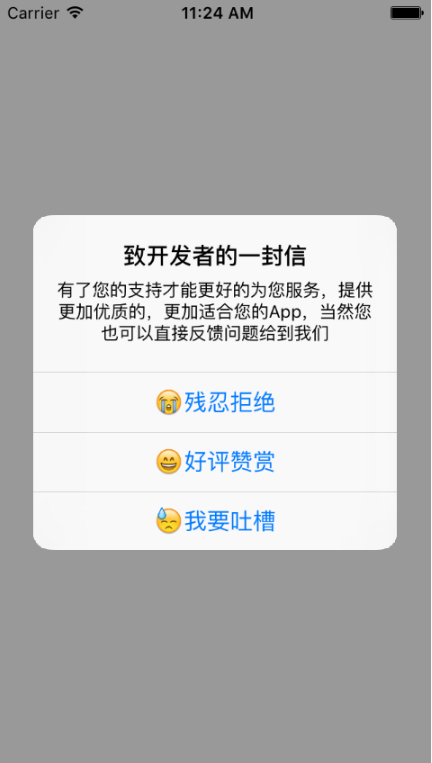
彈窗本身沒做額外美化:iOS 8 之前用 UIAlertView,8.0 以上改用 UIAlertController。
設計思路:把「打擾」次數控制住
核心是幾個用 NSUserDefaults 保存的狀態:當前記錄的版本號、上次彈窗距今的天數、用戶上一次的選擇。判定規則大致是:
- 從沒彈過 → 彈。
- 用戶選了「稍後再說」→ 7 天後再問。
- 用戶選了「我要吐槽」→ 之後每 7 天問一次,連續三次後停 30 天。
- App 升級了 → 清空所有規則,重新開始問。
三個按鈕分別是「殘忍拒絕」「好評贊賞」「我要吐槽」,後兩者都會跳到 App Store 頁面,差別只在記錄的狀態值不同。
建立 LBToAppStore 類
新建一個繼承 NSObject 的類,命名為 LBToAppStore。
.h 檔案
#import <UIKit/UIKit.h>

@interface LBToAppStore : NSObject
{
#if __IPHONE_OS_VERSION_MAX_ALLOWED < __IPHONE_8_0
    UIAlertView *alertViewTest;
#else
    UIAlertController *alertController;
#endif
}

@property (nonatomic, strong) NSString *myAppID;  // App Store 的 appID

- (void)showGotoAppStore:(UIViewController *)VC;

@end
.m 檔案
#import "LBToAppStore.h"

@implementation LBToAppStore

- (void)showGotoAppStore:(UIViewController *)VC {
    // 當前版本號
    NSDictionary *infoDictionary = [[NSBundle mainBundle] infoDictionary];
    float appVersion = [[infoDictionary objectForKey:@"CFBundleShortVersionString"] floatValue];

    NSUserDefaults *userDefaults = [NSUserDefaults standardUserDefaults];
    int udtheDays = [[userDefaults objectForKey:@"theDays"] intValue];           // 上次彈窗距今天數
    float udAppVersion = [[userDefaults objectForKey:@"appVersion"] floatValue];  // 記錄的版本號
    int udUserChoose = [[userDefaults objectForKey:@"userOptChoose"] intValue];  // 上次的選擇

    // 用時間戳換算天數
    NSTimeInterval interval = [[NSDate date] timeIntervalSince1970];
    int daySeconds = 24 * 60 * 60;
    NSInteger theDays = interval / daySeconds;

    if (udAppVersion && appVersion > udAppVersion) {
        // 版本升級:清空全部規則,重新開始
        [userDefaults removeObjectForKey:@"theDays"];
        [userDefaults removeObjectForKey:@"appVersion"];
        [userDefaults removeObjectForKey:@"userOptChoose"];
        [self alertUserCommentView:VC];
    } else if (udUserChoose == 0 ||                                        // 從沒彈過
               (udUserChoose == 2 && theDays - udtheDays > 7) ||            // 選了稍後再說,7 天後
               (udUserChoose >= 3 && theDays - udtheDays > udUserChoose - 3) ||
               (udUserChoose >= 3 && theDays - udtheDays > 30)) {          // 選了我要吐槽
        [self alertUserCommentView:VC];
    }
}

- (void)alertUserCommentView:(UIViewController *)VC {
    NSUserDefaults *userDefaults = [NSUserDefaults standardUserDefaults];
    NSTimeInterval interval = [[NSDate date] timeIntervalSince1970];
    int daySeconds = 24 * 60 * 60;
    NSInteger theDays = interval / daySeconds;

    NSDictionary *infoDictionary = [[NSBundle mainBundle] infoDictionary];
    float appVersion = [[infoDictionary objectForKey:@"CFBundleShortVersionString"] floatValue];
    float udAppVersion = [[userDefaults objectForKey:@"appVersion"] floatValue];
    int udUserChoose = [[userDefaults objectForKey:@"userOptChoose"] intValue];
    int udtheDays = [[userDefaults objectForKey:@"theDays"] intValue];

    if (appVersion > udAppVersion) {
        [userDefaults setObject:[NSString stringWithFormat:@"%f", appVersion] forKey:@"appVersion"];
    }

    NSString *storeUrl = [NSString stringWithFormat:@"https://itunes.apple.com/cn/app/id%@?mt=8", self.myAppID];

    if ([[[UIDevice currentDevice] systemVersion] floatValue] >= 8.0) {
        alertController = [UIAlertController alertControllerWithTitle:@"致開發者的一封信"
            message:@"有了您的支持才能更好的為您服務,提供更加優質的、更加適合您的 App,當然您也可以直接反饋問題給到我們"
            preferredStyle:UIAlertControllerStyleAlert];

        UIAlertAction *refuseAction = [UIAlertAction actionWithTitle:@"殘忍拒絕"
            style:UIAlertActionStyleDefault handler:^(UIAlertAction *action) {
                [userDefaults setObject:@"1" forKey:@"userOptChoose"];
                [userDefaults setObject:[NSString stringWithFormat:@"%d", (int)theDays] forKey:@"theDays"];
            }];

        UIAlertAction *okAction = [UIAlertAction actionWithTitle:@"好評贊賞"
            style:UIAlertActionStyleDefault handler:^(UIAlertAction *action) {
                [userDefaults setObject:@"2" forKey:@"userOptChoose"];
                [userDefaults setObject:[NSString stringWithFormat:@"%d", (int)theDays] forKey:@"theDays"];
                [[UIApplication sharedApplication] openURL:[NSURL URLWithString:storeUrl]];
            }];

        UIAlertAction *showAction = [UIAlertAction actionWithTitle:@"我要吐槽"
            style:UIAlertActionStyleDefault handler:^(UIAlertAction *action) {
                [[UIApplication sharedApplication] openURL:[NSURL URLWithString:storeUrl]];
            }];

        [alertController addAction:refuseAction];
        [alertController addAction:okAction];
        [alertController addAction:showAction];
        [VC presentViewController:alertController animated:YES completion:nil];
    }
#if __IPHONE_OS_VERSION_MAX_ALLOWED < __IPHONE_8_0
    else {
        alertViewTest = [[UIAlertView alloc] initWithTitle:@"致開發者的一封信"
            message:@"有了您的支持才能更好的為您服務,提供更加優質的、更加適合您的 App,當然您也可以直接反饋問題給到我們"
            delegate:self cancelButtonTitle:@"殘忍拒絕"
            otherButtonTitles:@"好評贊賞", @"我要吐槽", nil];
        [alertViewTest show];
    }
#endif
}

@end
怎麼用
在需要的地方引入頭檔案,於合適的時機(例如 viewDidAppear:)呼叫即可。注意填入自己 App 的 AppID。
#import "ViewController.h"
#import "LBToAppStore.h"

@implementation ViewController

- (void)viewDidAppear:(BOOL)animated {
    [super viewDidAppear:animated];
    LBToAppStore *toAppStore = [[LBToAppStore alloc] init];
    toAppStore.myAppID = @"1067787090";
    [toAppStore showGotoAppStore:self];
}

@end
實務上還可以多走一層:把「我要吐槽」引導到 App 內的意見回饋頁而非直接跳商店,這樣負評就不會直接落在評論區了。演算法細節都在程式碼裡,需要的話直接取用。
- 上一篇文章: 把 MVVM 再拆一層:MVVMM 的誕生與落地思路
- 下一篇文章: SuPhotoPicker:兩行程式碼接入的 iOS 圖片選擇庫