
iOS 開發實戰:SQLite 資料庫從設計到應用的完整指南

iOS 系統本身提供了 Core Data 這套持久化解決方案,它最大的魅力在於提供了圖形化的建模界面,開發者可以像畫圖一樣把資料實體與關聯關係定義出來。但要注意的是,Core Data 並不是一個關聯式資料庫,它更擅長的場景是管理「使用者當場產生的物件資料」。當你的 App 需要處理大量結構化、彼此關聯的資料時,採用 SQL 關聯式資料庫會是更合適的選擇。
有趣的是,Core Data 在底層其實也是靠 SQLite 來落盤的,只不過蘋果把這一層完全封裝起來了:開發者不能繞過 Core Data 提供的 API 去直接讀寫實體檔,否則一旦用 SQLite 從外部竄改了內容,Core Data 下次載入時就會因為結構對不上而報錯。
SQLite 是什麼
SQLite 是一套以 C 語言實作的開源資料庫庫,它自帶完整的 SQL 關聯式資料庫引擎,不需要另外起服務程序,整個資料庫就是一個檔案。作為關聯式資料庫,我們可以在同一個資料庫中建立多張彼此關聯的資料表,用正規化的方式消除大量重複資料;而 SQLite 本身也針對行動裝置的資源限制做過優化,因此在 iOS 上廣泛被採用。
由於 SQLite 的介面是用 C 寫的,而 Objective-C 又是 C 的超集,所以我們可以在專案裡直接呼叫 SQLite,不需要額外的橋接層。
先想清楚:資料庫要怎麼設計
動手之前,第一件事永遠是釐清「要存什麼資料」以及「怎麼存」。
假設我們要做一個人員資料庫,最直覺的設計是把所有欄位塞進同一張表:
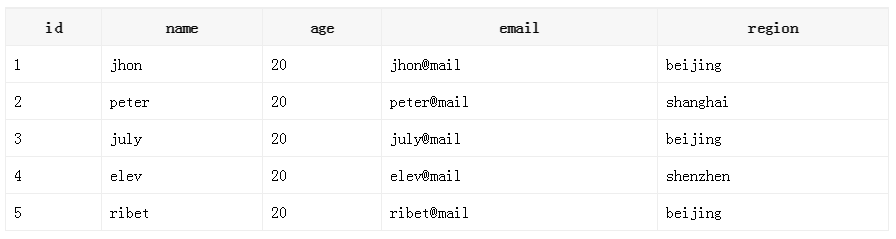
欄位看起來不多,但真實專案裡往往會膨脹到十幾二十個。仔細觀察會發現,region 這一欄出現了大量重複值——很多人來自同一個地區。這種冗餘正是正規化要解決的問題:我們另外建一張 region 表專門存放地區資訊,再在人員表中透過外鍵引用它。這樣做的好處是,日後想為地區補上郵遞區號、經緯度、詳細行政區等欄位時,只需要改一張表。拆分後的兩張表如下:
people 表
region 表

用命令列建立資料庫
想熟悉 SQLite 語法,最快的方式是開啟 shell,直接用 SQLite 命令列操作一遍。
開啟 shell,切換到目標目錄後輸入:
sqlite3 database.db
這行指令會啟動 SQLite 命令列,同時建立名為 database.db 的新資料庫並附加到當前工作階段。
進入命令列後,輸入 .help 可以列出所有可用指令,輸入 .databases 檢視目前附加了哪些資料庫,輸入 .quit 或 .exit 離開。
建立資料表
create table "main"."people" ("id" integer primary key autoincrement not null, "name" text, "age" integer, "email" text, "region" integer);這條指令建立 people 表,把 id 設為主鍵並指定為自動遞增欄位,代表我們不需要手動提供 id,資料庫會自行產生。後面括號內則是這張表擁有的所有欄位。
因為要設計兩張表,接著建立 region 表:
create table "main"."region" ("regionid" integer primary key autoincrement not null, "regioninfo" text, "address" text not null);寫入資料
insert into "main"."people" ("name","age","email","region") values ('jhon','20','jhon@mail','1');如此一來就成功插入一筆資料。但這種寫法效率很低,一次只能新增一筆。還好 SQLite 支援直接從檔案批次匯入,純文字檔或 Excel 檔都可以。以下建立一個 people.txt,格式如下:
1 jhon 20 jhon@mail
2 peter 20 peter@mail
3 july 20 july@mail
4 elev 20 elev@mail
5 ribet 20 ribet@mail
關鍵在於欄位之間必須用「定位字元(Tab)」分隔,也就是編輯檔案時每一欄用 Tab 鍵隔開,而且欄位順序必須和資料表定義的順序一致。接著執行:
.separator ""
指定分隔符號後,再執行匯入:
.import "people.txt" people
這時可能會看到類似下面的錯誤訊息:
people.txt:1: INSERT failed: UNIQUE constraint failed: people.id
不必緊張,它的意思是 id 為 1 的資料已經存在(就是我們稍新手動插入的那筆),所以這一列被跳過。可以用下面的指令確認匯入結果:
select * from people;
接著用同樣的方式建立 region.txt 並匯入 region 表。
小提醒:命令列若出現 ...> 提示符號,代表指令有語法錯誤尚未結束,按 Ctrl+D 即可回到正常狀態。
查詢資料
select * from people;
上面這條指令會列出 people 表中的所有資料。
關聯查詢
select name, regioninfo from people, region where people.region = region.regionid;
輸出結果:
jhon beijing
peter shanghai
july beijing
elev shenzhen
ribet beijing
這裡從 people 與 region 兩張表取出 name 與 regioninfo 欄位,並限定 people.region = region.regionid 才算符合條件。如果少了這個條件,就會變成兩表笛卡兒積,也就是 5 × 3 = 15 筆資料。
若要挑出某個地區的人,再用 where 加上條件即可:
select name, regioninfo from people, region where people.region = region.regionid and region.regioninfo = "beijing";
輸出結果:
jhon beijing
july beijing
ribet beijing
在 iOS 專案中使用 SQLite
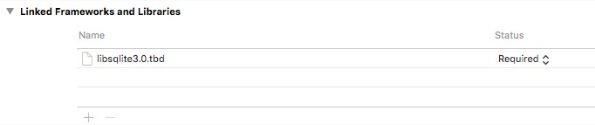
第一步是把 SQLite 函式庫加入專案:TARGETS → General → Linked Frameworks and Libraries,如下圖。
接著把先前建立好的 database.db 拖進專案,並引入 sqlite3.h 標頭檔。
#import <sqlite3.h>
整體流程可以拆成幾個固定步驟:
宣告 sqlite3 型別的類變數,用來保存資料庫連線
呼叫 sqlite3_open 開啟資料庫
撰寫 SQL 敘述字串
建立 SQL 敘述物件 sqlite3_stmt
以 sqlite3_prepare_v2 編譯準備 SQL 敘述
用 sqlite3_step 逐列走訪結果
開啟資料庫
sqlite3 *database;

-(void)initDatabase {
    NSString *path = [[NSBundle mainBundle] pathForResource:@"database" ofType:@"db"];
    if (sqlite3_open([path UTF8String], &database) == SQLITE_OK) {
        NSLog(@"open database");
    } else {
        sqlite3_close(database);
        NSLog(@"error %s", sqlite3_errmsg(database));
    }
}
若 sqlite3_open 回傳的狀態碼不是 SQLITE_OK,代表開啟失敗,此時要先關閉連線再印出錯誤訊息,方便排查。
查詢資料
-(void)operateDatabase {
    const char *sql = "select name,regioninfo from people,region where people.region=region.regionid";
    sqlite3_stmt *statement;  // 建立 SQL 敘述物件
    int sqlResult = sqlite3_prepare_v2(database, sql, -1, &statement, NULL);  // 準備 SQL 敘述
    if (sqlResult == SQLITE_OK) {  // 是否準備成功
        while (sqlite3_step(statement) == SQLITE_ROW) {  // 開始走訪查詢結果
            NSLog(@"name %s, region %s", sqlite3_column_text(statement, 0), sqlite3_column_text(statement, 1));
        }
    }
}
輸出結果:
name jhon, region beijing
name peter, region shanghai
name july, region beijing
name elev, region shenzhen
name ribet, region beijing
參數說明:sqlite3_prepare_v2 的第一個參數是資料庫連線,第二個是 SQL 敘述,第三個是敘述長度(傳入 -1 代表讀到第一個 null 結束字元為止),第四個是回傳的敘述物件,第五個則是回傳指向該 SQL 敘述首字元的指標。
當 sqlite3_prepare_v2 回傳 SQLITE_OK 後,就能開始走訪結果。sqlite3_step 每次呼叫會推進一列,回傳 SQLITE_ROW 代表下一列已就緒,因此這裡用 while 迴圈把所有列都讀完。
取值則透過 sqlite3_column_* 系列函式完成:
SQLITE_API const void *SQLITE_STDCALL sqlite3_column_blob(sqlite3_stmt*, int iCol);
SQLITE_API int SQLITE_STDCALL sqlite3_column_bytes(sqlite3_stmt*, int iCol);
SQLITE_API int SQLITE_STDCALL sqlite3_column_bytes16(sqlite3_stmt*, int iCol);
SQLITE_API double SQLITE_STDCALL sqlite3_column_double(sqlite3_stmt*, int iCol);
SQLITE_API int SQLITE_STDCALL sqlite3_column_int(sqlite3_stmt*, int iCol);
SQLITE_API sqlite3_int64 SQLITE_STDCALL sqlite3_column_int64(sqlite3_stmt*, int iCol);
SQLITE_API const unsigned char *SQLITE_STDCALL sqlite3_column_text(sqlite3_stmt*, int iCol);
SQLITE_API const void *SQLITE_STDCALL sqlite3_column_text16(sqlite3_stmt*, int iCol);
SQLITE_API int SQLITE_STDCALL sqlite3_column_type(sqlite3_stmt*, int iCol);
SQLITE_API sqlite3_value *SQLITE_STDCALL sqlite3_column_value(sqlite3_stmt*, int iCol);
這些函式的第一個參數都是 SQL 敘述物件,第二個參數則是要取出的欄位索引(從 0 開始)。
參數化查詢
上面的寫法把條件寫死了,每次換條件都得重寫一整條 SQL。所幸 SQLite 支援參數化查詢,只要替換參數即可,不必改動敘述本身。以下只查詢北京地區:
-(void)operateDatabase {
    const char *sql = "select name,regioninfo from people,region where people.region=region.regionid and regioninfo=?";
    sqlite3_stmt *statement;  // 建立 SQL 敘述物件
    int sqlResult = sqlite3_prepare_v2(database, sql, -1, &statement, NULL);  // 準備 SQL 敘述
    sqlite3_bind_text(statement, 1, "beijing", -1, SQLITE_TRANSIENT);  // 綁定參數
    if (sqlResult == SQLITE_OK) {  // 是否準備成功
        while (sqlite3_step(statement) == SQLITE_ROW) {  // 開始走訪查詢結果
            NSLog(@"name %s, region %s", sqlite3_column_text(statement, 0), sqlite3_column_text(statement, 1));
        }
    }
}
輸出結果:
name jhon, region beijing
name july, region beijing
name ribet, region beijing
可見需要變動的條件用 ? 佔位,再用 sqlite3_bind_text 把實際值綁上去。依型別不同,綁定函式也不同:
SQLITE_API int SQLITE_STDCALL sqlite3_bind_blob(sqlite3_stmt*, int, const void*, int n, void(*)(void*));
SQLITE_API int SQLITE_STDCALL sqlite3_bind_blob64(sqlite3_stmt*, int, const void*, sqlite3_uint64, void(*)(void*));
SQLITE_API int SQLITE_STDCALL sqlite3_bind_double(sqlite3_stmt*, int, double);
SQLITE_API int SQLITE_STDCALL sqlite3_bind_int(sqlite3_stmt*, int, int);
SQLITE_API int SQLITE_STDCALL sqlite3_bind_int64(sqlite3_stmt*, int, sqlite3_int64);
SQLITE_API int SQLITE_STDCALL sqlite3_bind_null(sqlite3_stmt*, int);
SQLITE_API int SQLITE_STDCALL sqlite3_bind_text(sqlite3_stmt*, int, const char*, int, void(*)(void*));
SQLITE_API int SQLITE_STDCALL sqlite3_bind_text16(sqlite3_stmt*, int, const void*, int, void(*)(void*));
SQLITE_API int SQLITE_STDCALL sqlite3_bind_text64(sqlite3_stmt*, int, const char*, sqlite3_uint64, void(*)(void*), unsigned char encoding);
SQLITE_API int SQLITE_STDCALL sqlite3_bind_value(sqlite3_stmt*, int, const sqlite3_value*);
SQLITE_API int SQLITE_STDCALL sqlite3_bind_zeroblob(sqlite3_stmt*, int, int n);
以上是 SQLite 支援的所有綁定型別函式。另外別忘了在收尾時呼叫 sqlite3_finalize 釋放敘述物件、以 sqlite3_close 關閉連線,避免資源洩漏。
結語
本文只涵蓋了 SQLite 最常被使用的基礎 API。真實專案中的資料庫往往複雜得多,還需要處理多執行緒下的資料競爭與執行緒安全問題(例如改用 FMDB、WCDB 這類封装層,或加上佇列序列化存取)。這些都必须在實際開發中累積經驗,才能真正掌握。
- 上一篇文章: Storyboard 團隊開發規範:讓 iOS 介面協作更清晰
- 下一篇文章: Xcode 8 六大重點新功能全面解析