
Core Spotlight 結合深度鏈接(上):讓 App 內容被系統搜到
在 iOS 9.0 之前,Spotlight 只能檢索系統自帶應用的內容,例如郵件、備忘錄、提醒事項和短信,美團、大眾點評、今日頭條這類第三方 App 都無法被搜到。iOS 9 推出 Search API 之後,App 內部的頁面內容也能進入檢索範圍,開發者按 Search API 編程,用戶就能在 Spotlight 和 Safari 中直接搜到 App 內的內容(In-App Search),價值相當可觀。
WWDC 官方公布的數據是:用戶 86% 的時間花在 App 裡,只有 14% 花在 Web 上。因此 App 內的體驗至關重要。
對開發者而言:最大的價值是提高 App 的打開率,進而帶動留存與活躍,同時增加曝光,讓用戶更快抵達想要的內容。
對用戶而言:裝了几十個 App 之後,想找到某一個都很费劲。在 Spotlight 輸入名字就能定位,甚至可以直接搜到大眾點評裡的某家餐廳。
iOS 9 Search API 概覽
它包含兩類索引:
- 私有設備索引(private on-device index):保存在用戶設備上,不會同步到服務器或其他設備。
- Apple 服務端索引(public index):內容保存在公共服務器上。
三種用法
NSUserActivity:這個類在 iOS 8 時被用來做 Handoff,iOS 9 之後能做的事更多了。當內容被記為 NSUserActivity,就能同時被 Spotlight 和 Safari 搜到。
Core Spotlight:iOS 9 全新提出的 API,允許 App 在本地維護一份類似索引的數據,支持增刪改查,適合持續性的用戶數據。
Web markup:讓網站內容能在 App 搜索結果中呈現相關信息,屬於 public index,內容必須放在應用服務器,由 Applebot 抓取(國內不支持)。
為 App 添加 Spotlight 支持
注意:Spotlight 只支援 iOS 9 以上。若項目需要兼容更低版本,要用條件編譯做判斷:
#if __IPHONE_OS_VERSION_MAX_ALLOWED >= 90000
// code...
#endif
第一步,導入 Framework:
MobileCoreServices.framework
CoreSpotlight.framework
第二步,導入頭文件:
#import <CoreSpotlight/CoreSpotlight.h>
#import <MobileCoreServices/MobileCoreServices.h>
第三步,創建索引:
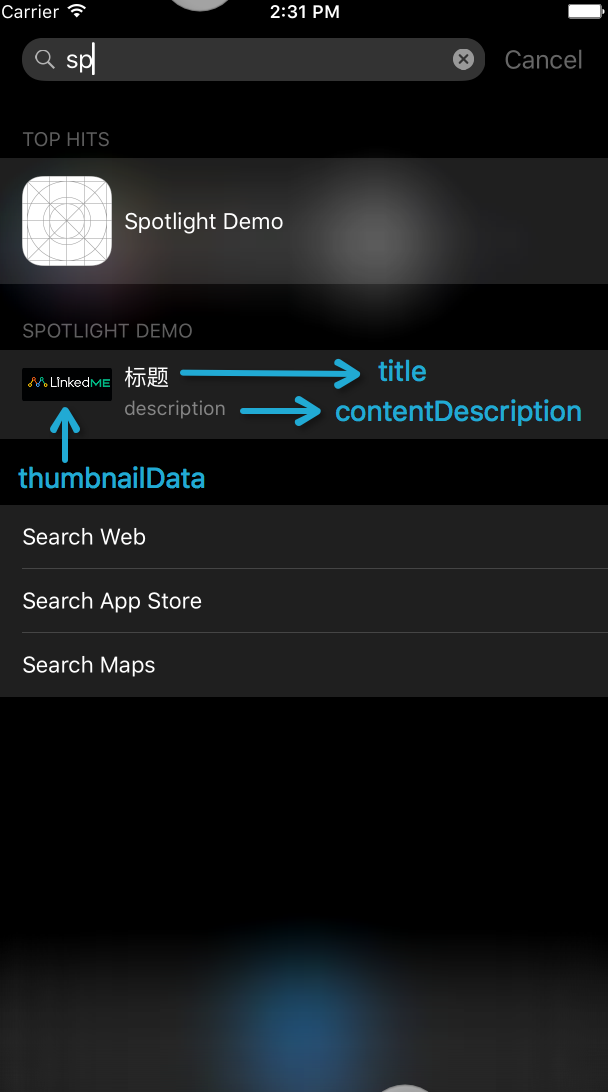
CSSearchableItemAttributeSet *attributeSet = [[CSSearchableItemAttributeSet alloc] initWithItemContentType:(NSString *)kUTTypeImage];
attributeSet.title = @"標題";
attributeSet.keywords = @[@"demo", @"sp"];   // 可設置多個關鍵字
attributeSet.contentDescription = @"description";
attributeSet.thumbnailData = UIImagePNGRepresentation([UIImage imageNamed:@"icon"]);

CSSearchableItem *item = [[CSSearchableItem alloc] initWithUniqueIdentifier:@"1" domainIdentifier:@"linkedme.cc" attributeSet:attributeSet];
NSMutableArray *searchItems = [NSMutableArray arrayWithObjects:item, nil];

[[CSSearchableIndex defaultSearchableIndex] indexSearchableItems:searchItems completionHandler:^(NSError * error) {
    if (error) {
        NSLog(@"索引創建失敗:%@", error.localizedDescription);
    } else {
        [self performSelectorOnMainThread:@selector(showAlert:) withObject:@"索引創建成功" waitUntilDone:NO];
    }
}];
CSSearchableItemAttributeSet 是描述搜索內容的類,可以設置的屬性很多:
初始化方法的聲明:
- (instancetype)initWithUniqueIdentifier:(NSString *)uniqueIdentifier
                       domainIdentifier:(NSString *)domainIdentifier
                           attributeSet:(CSSearchableItemAttributeSet *)attributeSet;
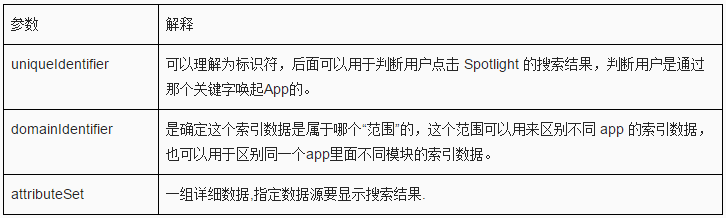
更多細節可查閱官方文檔。做到這一步,Spotlight 已經能搜到我們創建的內容,接下來要解決的是「搜到之後如何打開對應頁面」。
從搜索結果跳轉到相應頁面
在 AppDelegate 中實現:
- (BOOL)application:(UIApplication *)application continueUserActivity:(NSUserActivity *)userActivity restorationHandler:(void (^)(NSArray * _Nullable))restorationHandler {
    NSString * idetifier = userActivity.userInfo[@"kCSSearchableItemActivityIdentifier"];
    if ([idetifier isEqualToString:@"1"]) {
        DemoOneViewController * ovc = [[DemoOneViewController alloc] init];
        UINavigationController *navigationController = (UINavigationController *)self.window.rootViewController;
        [navigationController pushViewController:ovc animated:true];
    }
    NSLog(@"%@", idetifier);
    return YES;
}
Spotlight 同時提供刪除索引的能力,過期內容需要主動清理,一共三種方式。
按 identifier 刪除:
[[CSSearchableIndex defaultSearchableIndex] deleteSearchableItemsWithIdentifiers:@[@"1"] completionHandler:^(NSError * _Nullable error) {
    if (error) {
        NSLog(@"%@", error.localizedDescription);
    } else {
        [self performSelectorOnMainThread:@selector(showAlert:) withObject:@"通過 identifier 刪除索引成功" waitUntilDone:NO];
    }
}];
按 domainIdentifier 刪除:
[[CSSearchableIndex defaultSearchableIndex] deleteSearchableItemsWithDomainIdentifiers:@[@"linkedme.cc"] completionHandler:^(NSError * _Nullable error) {
    if (error) {
        NSLog(@"%@", error.localizedDescription);
    } else {
        [self performSelectorOnMainThread:@selector(showAlert:) withObject:@"通過 DomainIdentifiers 刪除索引成功" waitUntilDone:NO];
    }
}];
清空所有索引:
[[CSSearchableIndex defaultSearchableIndex] deleteAllSearchableItemsWithCompletionHandler:^(NSError * _Nullable error) {
    if (error) {
        NSLog(@"%@", error.localizedDescription);
    } else {
        [self performSelectorOnMainThread:@selector(showAlert:) withObject:@"刪除所有索引成功" waitUntilDone:NO];
    }
}];
總結一下:移動開發者在集成 Spotlight 時難免會踩到各種各樣的坑。把 Spotlight 與深度鏈接結合起來,不僅能大幅降低開發成本,增強後的深度鏈接還能引導用戶從微信、微博、短信、郵件等渠道一鍵喚醒 App。兩者究竟如何更好地融合,敬請期待下篇。
Demo 下載與參考鏈接:LinkedME
- 上一篇文章: iOS TableView 入場動畫實作(一):3D 翻轉、位移與淡入
- 下一篇文章: Git 與 GitHub 你可能不知道的十個技巧