
iOS 高仿喜馬拉雅 FM:推薦頁架構與關鍵細節實作筆記
專案位址:https://github.com/Eastwu5788/XMLYFM 如果覺得有幫助,歡迎給個 star。
最近利用零碎時間做了一個喜馬拉雅 FM 的高仿練習,目前完成的主要是「發現」分頁裡的推薦頁。這篇記錄一下過程中幾個比較值得說的設計決策。
效果預覽
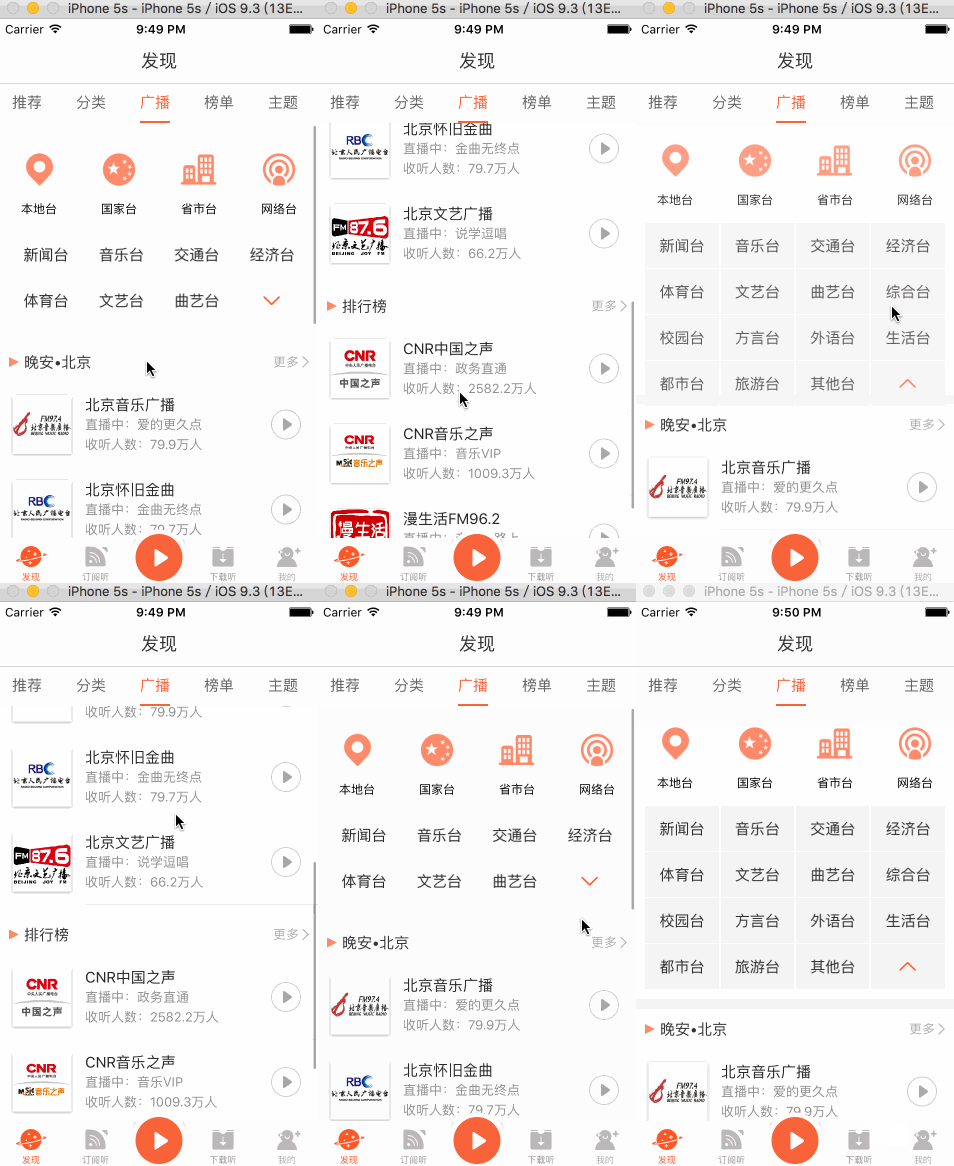


整體分析
「發現」分頁下有五個小分類,各自對應一個頁面,因此在「發現」的控制器裡我用 UIPageViewController 來統籌這五個子控制器,讓左右滑動的切換手感與原廠一致。
從 Charles 抓到的介面來看,推薦頁一次啟動會打三個請求,分別負責推薦內容、熱門內容與直播內容。這三個請求彼此沒有依賴關係,如果序列執行,首屏會被最慢的那一個拖住。因此我選擇用 ReactiveCocoa 把它們組合成並發,全部回來後再統一刷新畫面。
併發請求的組合
- (void)refreshDataSource {
    @weakify(self);

    RACSignal *signalRecommend = [RACSignal createSignal:^RACDisposable *(id<RACSubscriber> subscriber) {
        @strongify(self);
        [self requestRecommendList:^{ [subscriber sendNext:nil]; }];
        return nil;
    }];

    RACSignal *signalHotAndGuess = [RACSignal createSignal:^RACDisposable *(id<RACSubscriber> subscriber) {
        @strongify(self);
        [self requestHotAndGuessList:^{ [subscriber sendNext:nil]; }];
        return nil;
    }];

    RACSignal *signalLiving = [RACSignal createSignal:^RACDisposable *(id<RACSubscriber> subscriber) {
        @strongify(self);
        [self requestLiving:^{ [subscriber sendNext:nil]; }];
        return nil;
    }];

    [[RACSignal combineLatest:@[signalRecommend, signalHotAndGuess, signalLiving]]
        subscribeNext:^(id x) {
            @strongify(self);
            [(RACSubject *)self.updateContentSignal sendNext:nil];
        }];
}
這裡的關鍵是 combineLatest::三個 signal 各自獨立發出訊號,只有全部至少發送過一次之後才會觸發 subscribeNext,正好符合「三個區塊都拿到資料再一次刷新」的需求。
無限循環的輪播圖
推薦頁頂部有幾張輪播圖,仔細看會發現它其實是一直往左捲動、永不停歇的。要做出這種效果,做法是先把最後一張之後補上第一張,再配合滾動位置的重置。
資料綁定與視圖鋪排
- (void)setModel:(XMLYFindFocusImagesModel *)model {
    _model = model;
    [self.adverScrollView removeAllSubViews];

    self.adverScrollView.contentSize = CGSizeMake(kScreenWidth * _model.list.count, 150);

    // 在最後一張之後補上第一張,形成首尾相接
    for (NSInteger index = 0; index <= _model.list.count; index++) {
        XMLYFindFocusImageDetailModel *detail = index == _model.list.count
            ? _model.list.firstObject
            : [_model.list objectAtIndex:index];

        UIImageView *imageView = [[UIImageView alloc] init];
        imageView.frame = CGRectMake(kScreenWidth * index, 0, kScreenWidth, 150);
        [imageView yy_setImageWithURL:[NSURL URLWithString:detail.pic]
                              options:YYWebImageOptionSetImageWithFadeAnimation];
        [self.adverScrollView addSubview:imageView];
    }
}
滾動結束後的位置重置
當使用者(或計時器)滑到那張「補上去的第一張」時,只要偵測到目前頁碼等於資料筆數,就立刻把位移拉回原點。因為兩張圖在視覺上完全相同,這個跳躍肉眼幾乎看不出來。
- (void)scrollViewDidScroll:(UIScrollView *)scrollView {
    NSInteger curPage = self.adverScrollView.contentOffset.x / kScreenWidth;
    if (curPage == self.model.list.count) {
        [self.adverScrollView setContentOffset:CGPointMake(0, 0) animated:NO];
    }
}
計時器的生命週期陷阱
有輪播的地方就有計時器。如果直接把 NSTimer 寫在 cell 裡,cell 重用會讓計時器狀態錯亂,所以一般會把計時器放在控制器層級。
但這樣又衍生另一個問題:巢狀屬性互相持有會形成循環參照,導致控制器的 dealloc 永遠不會被呼叫——畫面已經退出,計時器卻還在背景默默跑。我的解法是另外抽一個單例輔助類來集中管理計時器,讓控制器在 dealloc 時主動通知它全部銷毀。
@interface XMLYFindRecommendHelper : NSObject

#pragma mark - Common
// 取得輔助類單例
+ (instancetype)helper;
// 銷毀所有計時器
- (void)destoryAllTimer;

#pragma mark - Live
// 開啟直播區塊的計時器
- (void)startLiveTimer;
// 銷毀直播區塊的計時器
- (void)destoryLiveTimer;

#pragma mark - Header
// 開啟頭部輪播的計時器
- (void)startHeadTimer;
// 銷毀頭部輪播的計時器
- (void)destoryHeaderTimer;

@end
問候語與 NSDateFormatter 的效能問題
廣播頁有一個小細節:根據目前時間顯示不同問候語,例如早上六點顯示「早安,北京」。這需要日期格式化,而 NSDateFormatter 的建立成本相當高,如果在列表快速滾動時反覆 new 一個出來,掉幀會很明顯。
因此我另外寫了一個 XMLYTimeHelper 統一管理時間轉換,把 formatter 依格式字串做快取,並用 dispatch_semaphore_t 保證多線快取讀寫的執行緒安全。
// 依格式字串建立 NSDateFormatter,例如 "yyyy-MM-dd HH:mm:ss"
static force_inline NSDateFormatter *XMLYDataCreateFormatter(NSString *string) {
    NSDateFormatter *formatter = [[NSDateFormatter alloc] init];
    formatter.locale = [[NSLocale alloc] initWithLocaleIdentifier:@"en_US_POSIX"];
    formatter.dateFormat = string;
    return formatter;
}

// 對外入口:傳入格式字串即可取得(並快取)對應的 formatter
static force_inline NSDateFormatter *XMLYDateFormatter(NSString *string) {
    // 1. 檢查輸入合法性
    if (!string || ![string isKindOfClass:[NSString class]] || string.length == 0) return nil;

    // 2. 初始化單例參數
    static CFMutableDictionaryRef cache;
    static dispatch_semaphore_t lock;
    static dispatch_once_t onceToken;
    dispatch_once(&onceToken, ^{
        cache = CFDictionaryCreateMutable(CFAllocatorGetDefault(), 0,
                                          &kCFTypeDictionaryKeyCallBacks,
                                          &kCFTypeDictionaryValueCallBacks);
        lock = dispatch_semaphore_create(1);
    });

    // 3. 加鎖
    dispatch_semaphore_wait(lock, DISPATCH_TIME_FOREVER);
    // 4. 查詢快取中是否已有對應的 formatter
    NSDateFormatter *formatter = CFDictionaryGetValue(cache, (__bridge const void *)(string));
    // 5. 解鎖
    dispatch_semaphore_signal(lock);

    // 6. 快取未命中則重新建立
    if (!formatter) {
        formatter = XMLYDataCreateFormatter(string);
        // 7. 建立成功後寫回快取
        if (formatter) {
            dispatch_semaphore_wait(lock, DISPATCH_TIME_FOREVER);
            CFDictionarySetValue(cache, (__bridge const void *)(string),
                                 (__bridge const void *)(formatter));
            dispatch_semaphore_signal(lock);
        }
    }
    return formatter;
}
這裡有兩個細節值得注意:一是 locale 固定為 en_US_POSIX,避免使用者系統語言影響解析結果;二是讀取與寫入各自獨立加鎖,減少鎖競爭的範圍。
小結
這次練習最大的收穫不是畫面還原度,而是三個容易被忽略的細節:並發請求的聚合方式、無限輪播的首尾銜接,以及計時器與 formatter 這類「小東西」的生命週期與效能成本。這些地方處理好了,App 的流暢度與穩定度會明顯不同。
本文整理自 East_wu 於簡書發佈的相關文章。