
用 Python 腳本批次產生 iOS 與 Android 圖示及截圖
緣起
更新到 Xcode 8 之後,可以明顯感覺到 Apple 對 App 圖示的規格要求又變得更細了。過去筆者常用的小工具「IconKit」一時還沒跟上腳步,已經無法滿足新的尺寸需求,於是乾脆自己動手寫一支 Python 腳本來批次產生圖示。
其實這支腳本早就寫好了,這次為了適配 iOS 10 又做了一輪修改與完善,並把它放上 GitHub 分享。先看個成果示意:
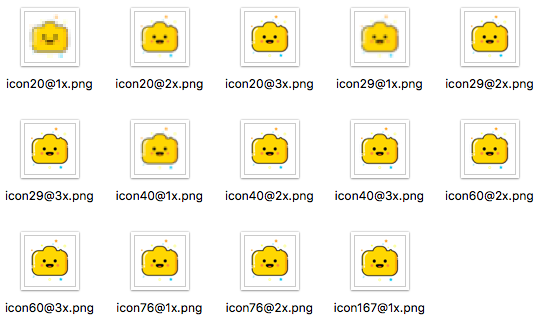
程式碼如下:
#encoding=utf-8
#by 不滅的小燈燈
#create date 2016/5/22
#update 2016/9/21
#support iOS 10
#site www.winterfeel.com
import os
import sys
from PIL import Image

iosSizes = ['20@1x','20@2x','20@3x','29@1x','29@2x','29@3x','40@1x','40@2x','40@3x','60@2x','60@3x','60@3x','76@1x','76@2x','167@1x']
androidSizes = [32,48,72,96,144,192]
androidNames = ['ldpi','mdpi','hdpi','xhdpi','xxhdpi','xxxhdpi']

sizesiOS = [(640,960),(640, 1136),(750, 1334),(1242, 2208),(1536, 2048),(2048, 2732)]
foldersiOS = ['iPhone4s','iPhone5','iPhone6','iPhone6plus','iPad','iPadLarge']
sizesAndroid = [(480,800),(720,1280),(1080,1920)]
foldersAndroid = ['480x800','720x1280','1080x1920']

def processIcon(filename, platform):
    icon = Image.open(filename).convert("RGBA")
    if icon.size[0] != icon.size[1]:
        print 'Icon file must be a rectangle!'
        return
    if platform == 'android':
        # 安卓圓角
        mask = Image.open('mask.png')
        r,g,b,a = mask.split()
        icon.putalpha(a)
        if not os.path.isdir('androidIcon'):
            os.mkdir('androidIcon')
        index = 0
        for size in androidSizes:
            im = icon.resize((size,size), Image.BILINEAR)
            im.save('androidIcon/icon-'+ androidNames[index]+'.png')
            index = index + 1
    else:
        if not os.path.isdir('iosIcon'):
            os.mkdir('iosIcon')
        for size in iosSizes:
            originalSize = int(size.split('@')[0])  # 原始尺寸
            multiply = int(size.split('@')[1][0:1])  # 倍數
            im = icon.resize((originalSize*multiply, originalSize*multiply), Image.BILINEAR)
            im.save('iosIcon/icon'+size+'.png')
    print 'Congratulations!It\'s all done!'

def walk_dir(dir, platform):
    files = os.listdir(dir)
    for name in files:
        if name.split('.')[-1] == 'jpg' or name.split('.')[-1] == 'png':  # 處理 jpg 和 png
            produceImage(name, platform)
    print 'Congratulations!It\'s all done!'

def produceImage(filename, platform):
    print 'Processing:' + filename
    img = Image.open(filename)
    index = 0
    sizes = sizesiOS
    folders = foldersiOS
    if platform == 'android':  # 默認 ios,如果是安卓
        sizes = sizesAndroid
        folders = foldersAndroid
    for size in sizes:
        if not os.path.isdir(folders[index]):
            os.mkdir(folders[index])
        if img.size[0] > img.size[1]:  # 如果是橫屏,交換坐標
            im = img.resize((size[1],size[0]), Image.BILINEAR)
            im.save(folders[index]+'/'+filename)
        else:
            im = img.resize(size, Image.BILINEAR)
            im.save(folders[index]+'/'+filename)
        index = index + 1

action = sys.argv[1]  # action: icon or screenshot
if action == 'screenshot':
    platform = sys.argv[2]  # platform
    if platform == 'ios':
        walk_dir('./','ios')
    elif platform == 'android':
        walk_dir('./','android')
    else:
        print 'Hey,Platform can only be "ios" or "android" !'
elif action == 'icon':
    filename = sys.argv[2]  # image filename
    platform = sys.argv[3]  # platform
    if not os.path.exists(filename):
        print 'Hey,File Not Found!'
    else:
        if platform == 'ios':
            processIcon(filename,'ios')
        elif platform == 'android':
            processIcon(filename,'android')
        else:
            print 'Hey,Platform can only be "ios" or "android" !'
else:
    print 'Hey,action can only be "icon" or "screenshot" !'
執行環境需求
這支腳本運行於 Python 2.7,並需要安裝 PIL 或 Pillow 影像處理函式庫。筆者親測時發現直接安裝 PIL 常常出錯,最後改用 Pillow,效果完全相同,推薦大家也走這條路。
如何使用
在 Windows 的命令提示字元或 Mac 的終端機中,輸入以下格式的指令即可:
python tool.py [action] [filename] [platform]
action:icon 或 screenshot
filename:圖示檔名;產生截圖時不需要檔名,會自動遍歷
platform:ios 或 android
舉幾個實際的例子:
產生 iOS 圖示:python tool.py icon icon.jpg ios
產生 Android 圖示:python tool.py icon icon.jpg android
產生 iOS 截圖:python tool.py screenshot ios
產生 Android 截圖:python tool.py screenshot android
注意事項
產生 Android 圓角圖示時,需要一張 512x512、圓角 70 的 PNG 作為遮罩來裁切,GitHub 專案裡已經附帶這張圖。
產生截圖時會自動遍歷所有 JPG 與 PNG 檔,並自動判斷是橫屏還是直屏。
結語
如果你覺得這支腳本有幫助,歡迎到 GitHub 給個 Star,也歡迎一起改進。程式碼寫得簡單易懂並附上註解,方便大家二次開發。
作者:不滅的小燈燈
- 上一篇文章: 為 UITabBar 標籤切換加入靈巧的點擊動效
- 下一篇文章: 用 iOS 手機鏡頭實作心率偵測的完整思路與程式碼