
iOS 自製滑動解鎖元件 HBLockSliderView
編輯:iOS 開發基礎
最近需要一個類似滑動解鎖的控件。原本想繼承 UISlider 並重寫
- (CGRect)trackRectForBounds:(CGRect)bounds來改高度,結果坑太多、樣式也不好看,最後干脆用 UIView 自己寫了一個。樣式可自訂,雖然還沒做太多優化,但基本不太吃效能。
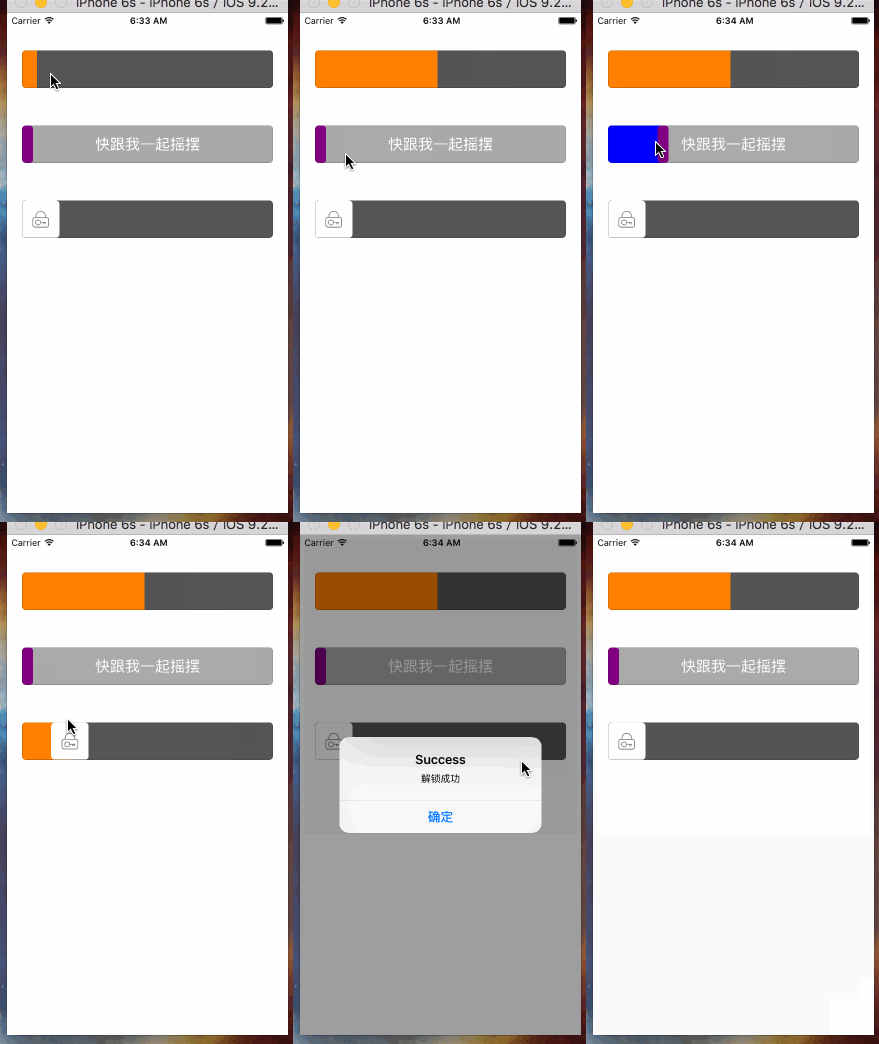
先看看 .h 檔暴露了哪些能力:
#import@class HBLockSliderView; @protocol HBLockSliderDelegate @optional - (void)sliderValueChanging:(HBLockSliderView *)slider; - (void)sliderEndValueChanged:(HBLockSliderView *)slider; @end @interface HBLockSliderView : UIView @property (nonatomic, assign) CGFloat value; @property (nonatomic, copy) NSString *text; @property (nonatomic, strong) UIFont *font; @property (nonatomic, strong) UIImage *thumbImage; @property (nonatomic, strong) UIImage *finishImage; @property (nonatomic, assign) BOOL thumbHidden; /** 拖動後是否返回 */ @property (nonatomic, assign) BOOL thumbBack; @property (nonatomic, weak) id delegate; /** 設定滑動進度,value 取 0~1 */ - (void)setSliderValue:(CGFloat)value; /** 以動畫設定滑動進度 */ - (void)setSliderValue:(CGFloat)value animation:(BOOL)animation completion:(void(^)(BOOL finish))completion; /** 設定各部位顏色 * @param backgroud 背景色 * @param foreground 前景色 * @param thumb 滑塊顏色 * @param border 邊框色 */ - (void)setColorForBackgroud:(UIColor *)backgroud foreground:(UIColor *)foreground thumb:(UIColor *)thumb border:(UIColor *)border textColor:(UIColor *)textColor; /** 設定滑塊的起始圖與完成圖(可選) */ - (void)setThumbBeginImage:(UIImage *)beginImage finishImage:(UIImage *)finishImage; /** 移除圓角與邊框 */ - (void)removeRoundCorners:(BOOL)corners border:(BOOL)border; @end
整個 slider 由四個 view 疊加而成,層級由下而上依序是:view(背景)→ label → foregroundView → thumbImageView。
@interface HBLockSliderView () {
    UILabel *_label;
    UIImageView *_thumbImageView;
    UIView *_foregroundView;
    ...
}
核心實作原理很單純:拖動 thumb 時改變 foregroundView 的尺寸,讓它始終緊貼 thumb。透過觸控事件取得手指位置,再用這個位置去更新 foregroundView。
- (void)touchesMoved:(NSSet*)touches withEvent:(UIEvent *)event { UITouch *touch = [touches anyObject]; CGPoint point = [touch locationInView:self]; [self fillForeGroundViewWithPoint:point]; ... } - (void)fillForeGroundViewWithPoint:(CGPoint)point { CGPoint p = point; // 修正 p.x += thunmbW / 2; if (p.x > kSliderW) { p.x = kSliderW; } if (p.x < 0) { p.x = 0; } self.value = p.x / kSliderW; _foregroundView.frame = CGRectMake(0, 0, point.x, kSliderH); ... }
.m 檔中定義了一些巨集,例如圓角、線寬與預設顏色,有需要的話可自行調整。完整 demo 請見 GitHub。
- 上一篇文章: Xcode 中 Info.plist 欄位完整詳解
- 下一篇文章: iOS 音頻拼接實作