
RunLoop 應用場景(二):讓 NSTimer 在列表滑動時不再停擺
上一篇講了如何用 RunLoop 讓子線程保持長期存活,而不是任務跑完就被銷毀。這篇換個場景:RunLoop 怎樣保證 NSTimer 在視圖滑動期間照樣正常觸發。
參考資料
好書值得反覆讀,好文章和好資料也一樣——不同階段重讀同一份材料,收穫往往不同,這就是判斷它是否優質的標準。iOS 裡關於 RunLoop 的優質資料其實不多,以下幾份都很值得投入時間:
CF 框架源碼:一份非常重要的源碼,能看到 CF 的每次迭代,可以下載最新版本分析,或與下面的文章對照學習(目前最新是 CF-1153.18.tar.gz)。
RunLoop 官方文檔:學 iOS 任何技術,官方文檔都是入門與深入的最佳手冊。路徑:Xcode → Help → Documentation and API Reference → 搜索 RunLoop → Guides →《Threading Programming Guide: Run Loops》。
深入理解 RunLoop:看右側滾動條很長,其實正文只佔 2/5 左右,剩下都是評論,可見其熱度。
RunLoop 個人小結:講得非常通俗好懂。
sunnyxx 線下分享 RunLoop:線下分享與討論的視頻。
iPhonedevwiki 中的 CFRunLoop:commonModes 裡其實包含三種 Mode,我們通常只知道兩種,還有一種是什麼?
維基百科的 Event loop:快速建立事件循環的概念。
兩個典型場景
場景一:tableView 的 header 上放一個橫向 ScrollView,用 NSTimer 每隔幾秒切一張圖。可一旦開始滑動 tableView,頂部的輪播就不動了。
場景二:界面上有個倒計時 Label,滑動 tableView 時倒計時也停了。
問題代碼與原因
Timer 一般寫在主線程(比如某個控制器的 viewDidLoad 裡),常見有兩種寫法,但都會出現上述問題:
// 第一種寫法NSTimer *timer = [NSTimer timerWithTimeInterval:1.0 target:self selector:@selector(timerUpdate) userInfo:nil repeats:YES]; [[NSRunLoop currentRunLoop] addTimer:timer forMode:NSDefaultRunLoopMode]; [timer fire]; // 第二種寫法NSTimer *timer = [NSTimer scheduledTimerWithTimeInterval:1.0 target:self selector:@selector(timerUpdate) userInfo:nil repeats:YES]; [timer fire];
這兩種寫法其實等價——第二種默認也是把 timer 加到了 NSDefaultRunLoopMode 下。想驗證,只要在 timerUpdate 裡把當前 runLoop 的 currentMode 打印出來:
- (void)timerUpdate { NSLog(@"當前線程:%@",[NSThread currentThread]); NSLog(@"啟動RunLoop後--%@",[NSRunLoop currentRunLoop].currentMode); // NSLog(@"currentRunLoop:%@",[NSRunLoop currentRunLoop]); dispatch_async(dispatch_get_main_queue(), ^{ self.count ++; NSString *timerText = [NSString stringWithFormat:@"計時器:%ld",self.count]; self.timerLabel.text = timerText; }); } // 控制台輸出結果: 2016-12-02 15:33:57.829 RunLoopDemo02[6698:541533] 當前線程:{number = 1, name = main} 2016-12-02 15:33:57.829 RunLoopDemo02[6698:541533] 啟動RunLoop後--kCFRunLoopDefaultMode 接著滑動 tableView,你會發現 timerUpdate 不再被調用。
原因在 Mode 切換:滑動 scrollView 時,主線程 RunLoop 會切到 UITrackingRunLoopMode,此時執行的是該 Mode 下的 item;而 timer 掛在 NSDefaultRunLoopMode 上,自然排不上隊。只有等 UITrackingRunLoopMode 的任務跑完、RunLoop 切回 NSDefaultRunLoopMode,timer 才會恢復觸發。
解法:掛到 CommonModes
修復方式很簡單,添加 timer 時把 mode 設為 NSRunLoopCommonModes:
- (void)timerTest { // 第一種寫法 NSTimer *timer = [NSTimer timerWithTimeInterval:1.0 target:self selector:@selector(timerUpdate) userInfo:nil repeats:YES]; [[NSRunLoop currentRunLoop] addTimer:timer forMode:NSRunLoopCommonModes]; [timer fire]; // 第二種寫法,因為是固定添加到defaultMode中,就不要用了 }依據 RunLoop 官方文檔和 iPhonedevwiki 的 CFRunLoop 說明,NSRunLoopCommonModes 並不是一個真正的 Mode,而是一個特殊標記,它聚合了三種 mode(kCFRunLoopDefaultMode、NSTaskDeathCheckMode、UITrackingRunLoopMode)。加入 CommonModes 的任務,會在 Mode 切換時被重新添加到當前 Mode 中,這樣無論 RunLoop 切到哪裡,任務都能繼續執行;這些任務會存儲在 runLoop 的 commonModeItems 裡。
其他關於 Timer 的坑
把 timer 放到子線程也能繞開這個問題,但要注意:加到 runLoop 之後必須把 runLoop 跑起來,否則 timer 只會觸發一次。
示例代碼:
//首先是創建一個子線程 - (void)createThread { NSThread *subThread = [[NSThread alloc] initWithTarget:self selector:@selector(timerTest) object:nil]; [subThread start]; self.subThread = subThread; } // 創建timer,並添加到runloop的mode中 - (void)timerTest { NSRunLoop *runLoop = [NSRunLoop currentRunLoop]; NSLog(@"啟動RunLoop前--%@",runLoop.currentMode); NSLog(@"currentRunLoop:%@",[NSRunLoop currentRunLoop]); // 第一種寫法,改正前 // NSTimer *timer = [NSTimer timerWithTimeInterval:1.0 target:self selector:@selector(timerUpdate) userInfo:nil repeats:YES]; // [[NSRunLoop currentRunLoop] addTimer:timer forMode:NSDefaultRunLoopMode]; // [timer fire]; // 第二種寫法 NSTimer *timer = [NSTimer scheduledTimerWithTimeInterval:1.0 target:self selector:@selector(timerUpdate) userInfo:nil repeats:YES]; [timer fire]; [[NSRunLoop currentRunLoop] run]; } //更新label - (void)timerUpdate { NSLog(@"當前線程:%@",[NSThread currentThread]); NSLog(@"啟動RunLoop後--%@",[NSRunLoop currentRunLoop].currentMode); NSLog(@"currentRunLoop:%@",[NSRunLoop currentRunLoop]); dispatch_async(dispatch_get_main_queue(), ^{ self.count ++; NSString *timerText = [NSString stringWithFormat:@"計時器:%ld",self.count]; self.timerLabel.text = timerText; }); }添加 timer 前的控制台輸出:
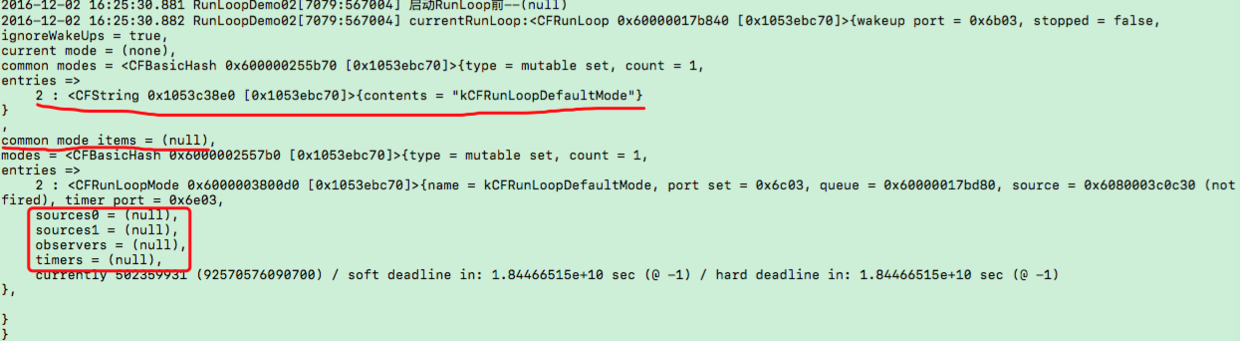
添加 timer 前的 runloop
添加 timer 後的控制台輸出:

添加 timer 後的 runloop
可以看到 timer 確實進了 NSDefaultRunLoopMode。奇怪的是,掛在子線程的 defaultMode 裡,無論怎麼滑動都運行正常。這是為什麼?
答案在多線程與 RunLoop 的關係:每條線程都有與之關聯的 RunLoop,每個 RunLoop 又可能包含多個 Mode。CPU 在多線程間切換執行任務,才有了多線程並行的錯覺;所謂執行任務,就是 RunLoop 去各個 Mode 裡跑各個 item。主線程和子線程的 RunLoop 相互獨立、互不干擾,所以 timer 加在子線程時,滑動主線程的視圖並不影響它。
總結
timer 跑在主線程,希望界面滾動時它照樣工作 —— 添加時把 mode 設為
NSRunLoopCommonModes。timer 跑在子線程 —— mode 設 NSDefaultRunLoopMode 或 NSRunLoopCommonModes 都可以,但必須保證 RunLoop 已經 run 起來,且其中有任務。
文中示例代碼來自 RunLoopDemos 中的 RunLoopDemo02。