
iOS 架構實踐:用 MVVM + ReactiveCocoa 從零搭框架,再落地一個列表頁
寫這篇的動機很簡單:MVVM 的文章已經多到滿天飛,但多數停在「概念上它很好」,真正從空專案開始把目錄、基類、實戰一路搭完的記錄並不多。下面是我自己在專案裡沉澱出來的一套做法,歡迎拍磚。
一、為什麼要談 MVVM 與 RAC
1. MVC 的三個老問題
MVC 是 Apple 官方推薦的組織方式,也是絕大多數 App 的起點。它本身沒錯,但工程做大了之後,三個毛病會反覆出現:
ViewController 越寫越厚:視圖、資料請求、業務判斷、跳轉邏輯全塞進一個類;網路邏輯無處安放:它既不属于 Model,也不屬於 View,最後往往被硬塞進 VC;可測試性差:邏輯和 UIKit 綁死,想寫單測幾乎無從下手。
MVVM 正是針對這三點而來。它源自微軟,但別因為出身就排斥它 —— 它做的事情其實很樸素:把「顯示邏輯、驗證邏輯、網路請求」從 VC 裡抽出來,交給 ViewModel。

關於 ViewModel 只有一條硬性紀律:不要引用任何 UIKit(也就是別在 VM 裡 import UIKit)。視圖的引用一旦滲進 VM,它就沒法脫離畫面被測試了。至於 image 這類東西算視圖還是算資料,看你怎麼定義,不影響整體分層。
這樣一來,VC 瘦身了,而 VM 因為只依賴資料和邏輯,反而變成了最容易寫測試的一層。
2. RAC 到底解決了什麼
ReactiveCocoa 是函數式 + 響應式編程的結合體(FRP)。它最常被拿來宣傳的賣點是:用一套統一的機制處理所有異步 —— delegate、block 回檔、target-action、通知、KVO。
但如果只把它理解成「少寫幾行 delegate」,那就低估它了。RAC 真正帶來的價值是一種新的組裝方式:當 UI 事件、邏輯處理、資料庫讀寫、網路請求、結果渲染全都能寫在同一條鏈上,同一個業務流程終於可以在同一塊程式碼裡讀完。進入頁面時把關係搭好,使用者一點,整條鏈按預期的順序依次觸發,最後落到畫面上。
學習曲線確實存在,早期中文教學少、踩坑多。但現在這套東西已經相當成熟,教程也一大把,願意花時間就能拿下。
3. 本文的取捨
接下來會用 MVVM + RAC 做一個支援下拉刷新、上拉載入更多、頂部還能橫向滑動的列表。重點放在 MVVM 的分層與解耦,而不是 RAC 的鏈式操作技巧 —— 後者用登入頁來演示會更有說服力。這裡 RAC 主要負責把回調變成可組裝的信號,讓程式碼層次分明。
二、框架目錄怎麼擺
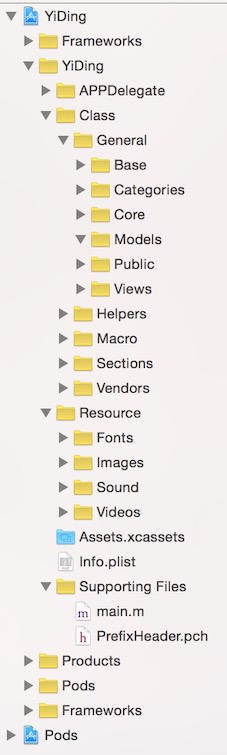
1)Frameworks
這是放系統庫的虛擬資料夾。手動建立一個名為 Frameworks 的群組,之後在 Build Phases 裡添加的系統庫會自動歸到這裡,不會散落在專案根目錄把結構搞亂。
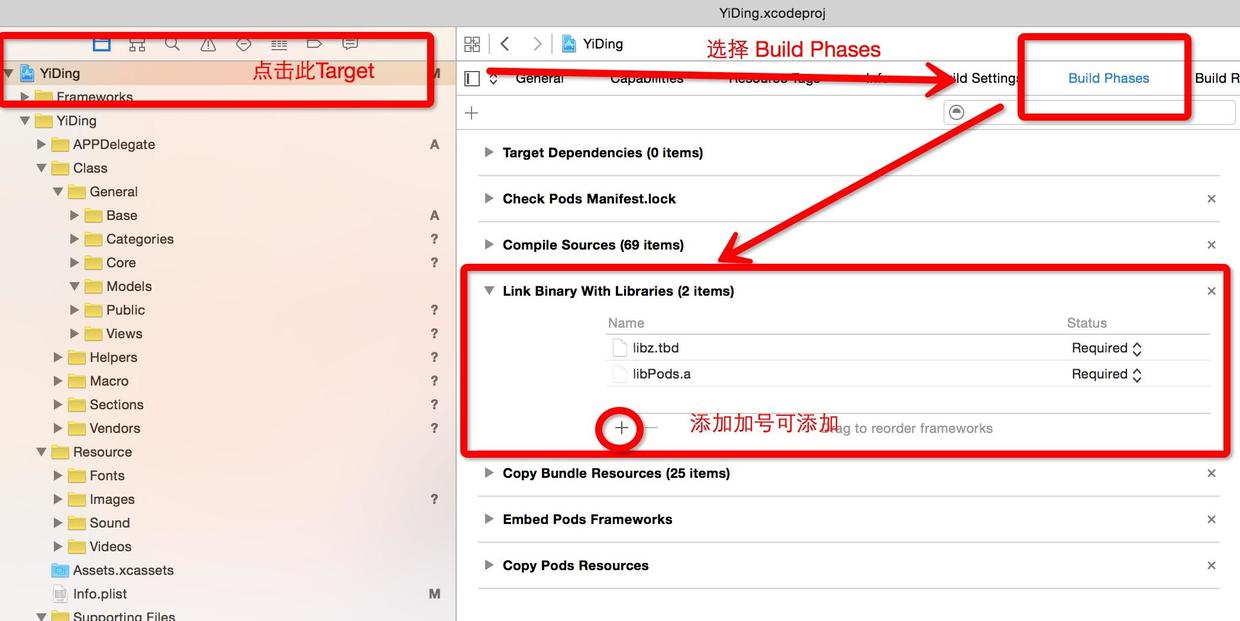
眼尖的人會發現有兩個 Frameworks。上面那個是自己加的;下面那個是 Pods target 附帶生成的。既然不衝突,留著也無妨。
2)CocoaPods
iOS 開發離不開第三方庫,而第三方庫又常常依賴更多第三方庫,子子孫孫無窮盡。早期手動一個個下載、放進專案、處理依賴,是真正的體力活;庫一升級,還得重來一遍。CocoaPods 就是來收拾這件事的,可以說是 iOS 圈子裡最有名、也最該掌握的類庫管理工具。
3)AppDelegate
應用入口單獨成一個資料夾。後面會講到怎麼把它寫得短一點,這裡會陸續加進一些啟動時要跑的類,獨立放一層比較清爽。
4)Class
主體程式碼都在這,再往下細分:
通用類
General:跨專案移植時完全不用改就能用的通用類
Base:整個框架的基類
Categories:常用擴展(分享之類的)
Core:核心內容,例如使用者資訊、接口 API
Models:公共資料模型
Views:封裝好的公共 View
工具類
Helpers:資料請求、表單上傳、網路監測等輔助工具
巨集定義
Macro:全應用範圍的巨集
AppMacro.h:App 相關
NotificationMacro.h:通知名
VendorMacro.h:第三方相關
UtilsMacro.h:為簡化程式碼而定義
業務模組
Sections:各模組資料夾,通常按負責人劃分(LSSections、CLSections……)
每個人的資料夾下面,再按模組一層層展開,例如某個模組底下會是:
模組名(或 HomePage 之類的命名)
ViewControllers:頁面控制器
ViewModels:MVVM 的核心,處理邏輯與解耦
Views:頁面用到的子 View
Models:純資料模型,一點都不胖
這就是標準的 MVVM 分層了。
5)Resource
Fonts(字體)、Images(圖片,也可以丟進 Assets.xcassets)、Sounds(音效)、Videos(影片)。
三、基類怎麼設計
基類存在的意義是統一風格、統一管理,讓每個人都知道「這段程式碼該寫在哪、要改時去哪找」。如果只是想附加一些能力,更推薦用 Protocol 或 Category,移植性和可擴展性都更好,不至於牽一髮而動全身。
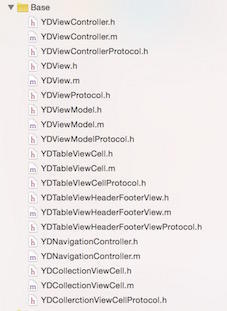
1)YDViewController
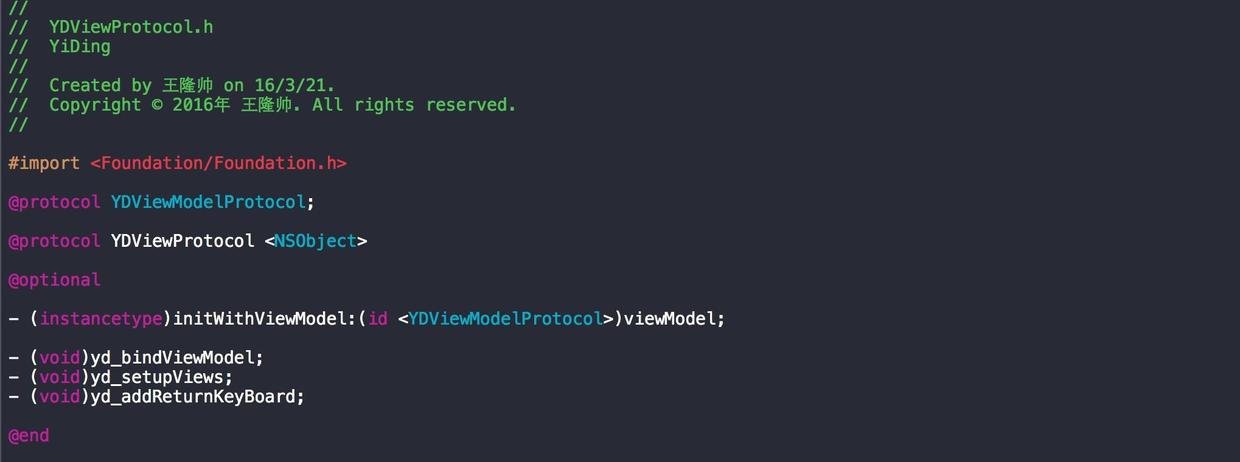
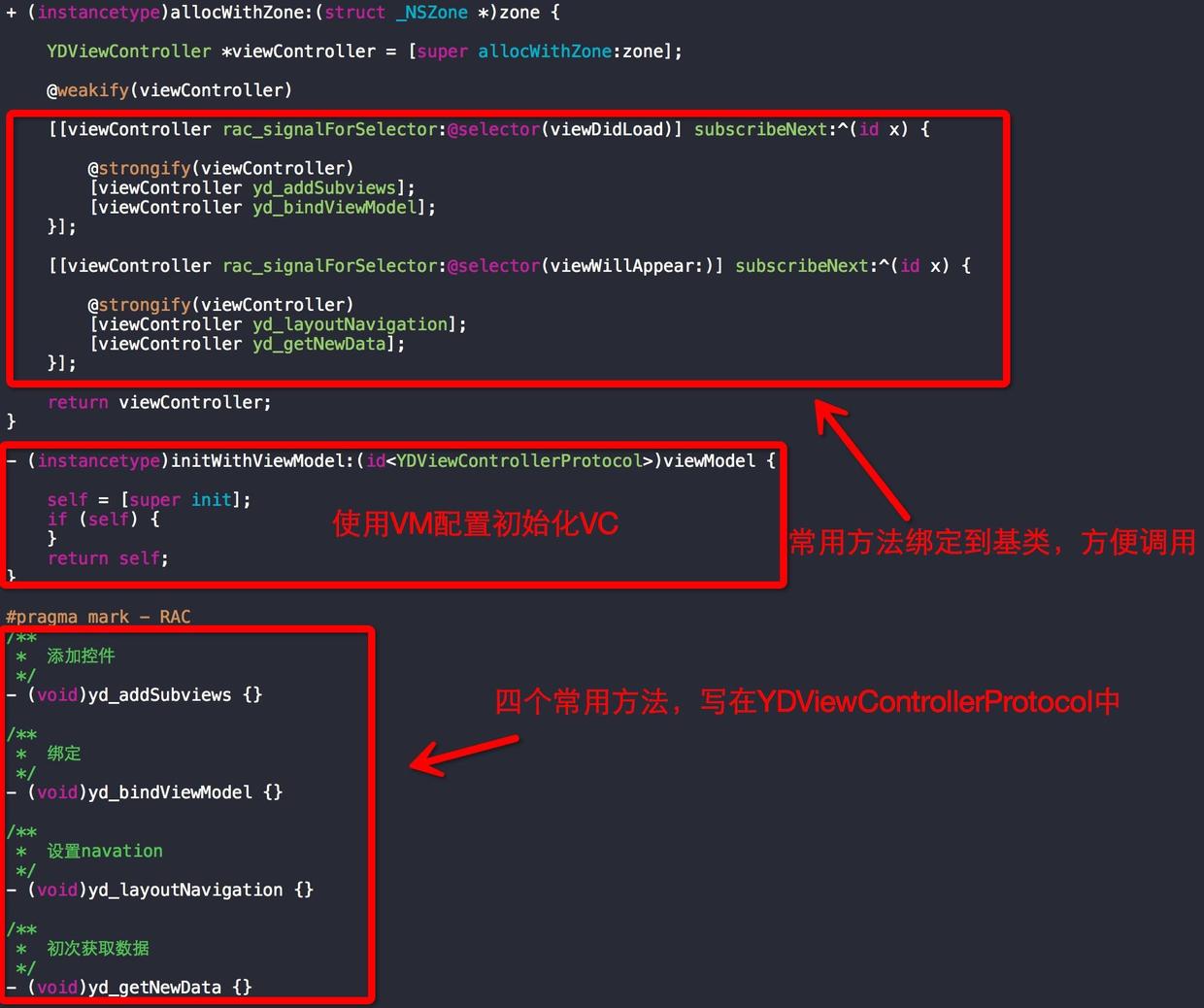
預留四個方法給子類覆寫:
yd_addSubviews:把 View 掛到 VC 上
yd_bindViewModel:綁定 V(VC) 與 VM
yd_layoutNavigation:設定導航欄
yd_getNewData:首次載入資料時呼叫(非必要)
2)YDView
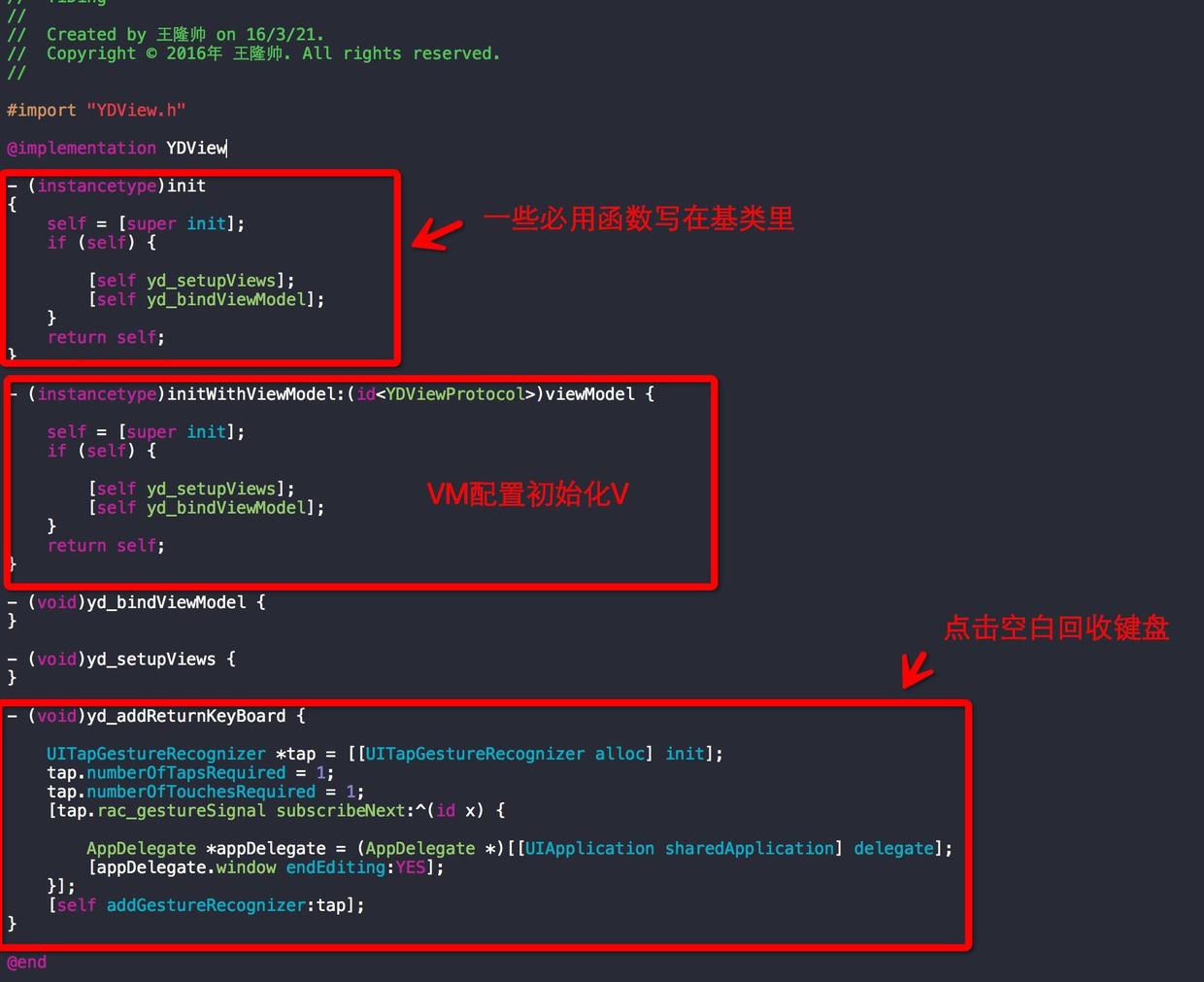
yd_setupViews:添加子 View
yd_bindViewModel:綁定 V 與 VM
yd_addReturnKeyBoard:點空白處收起鍵盤
3)YDViewModel
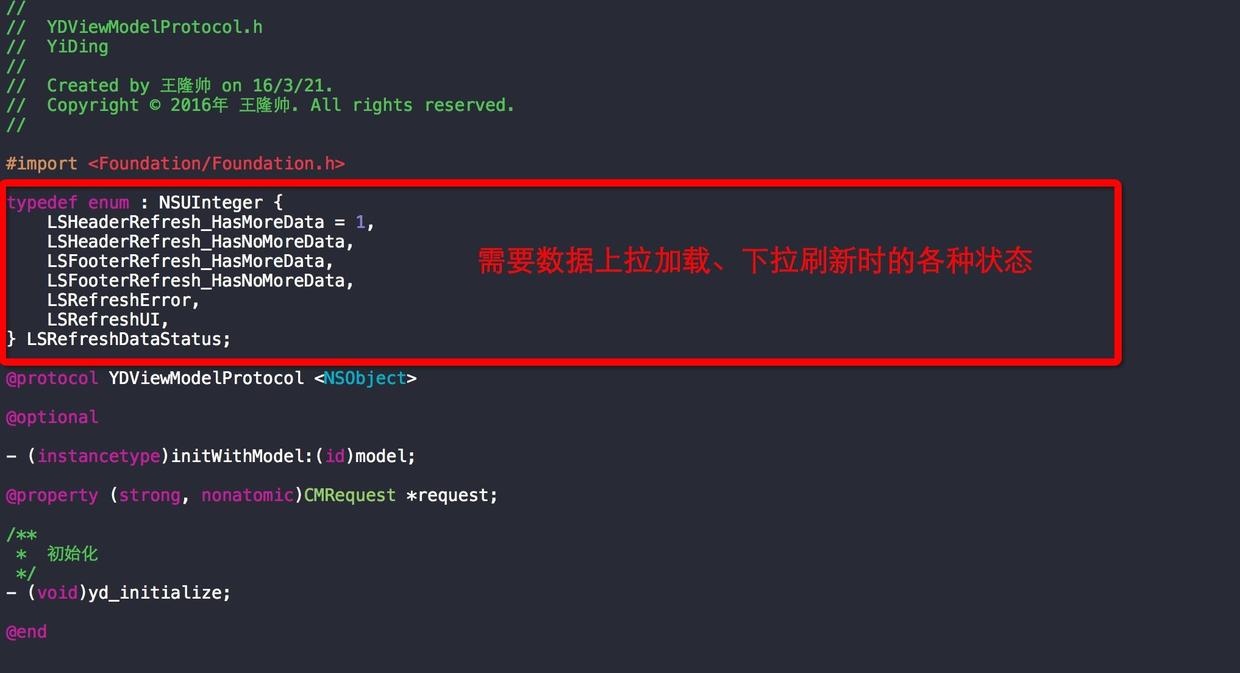
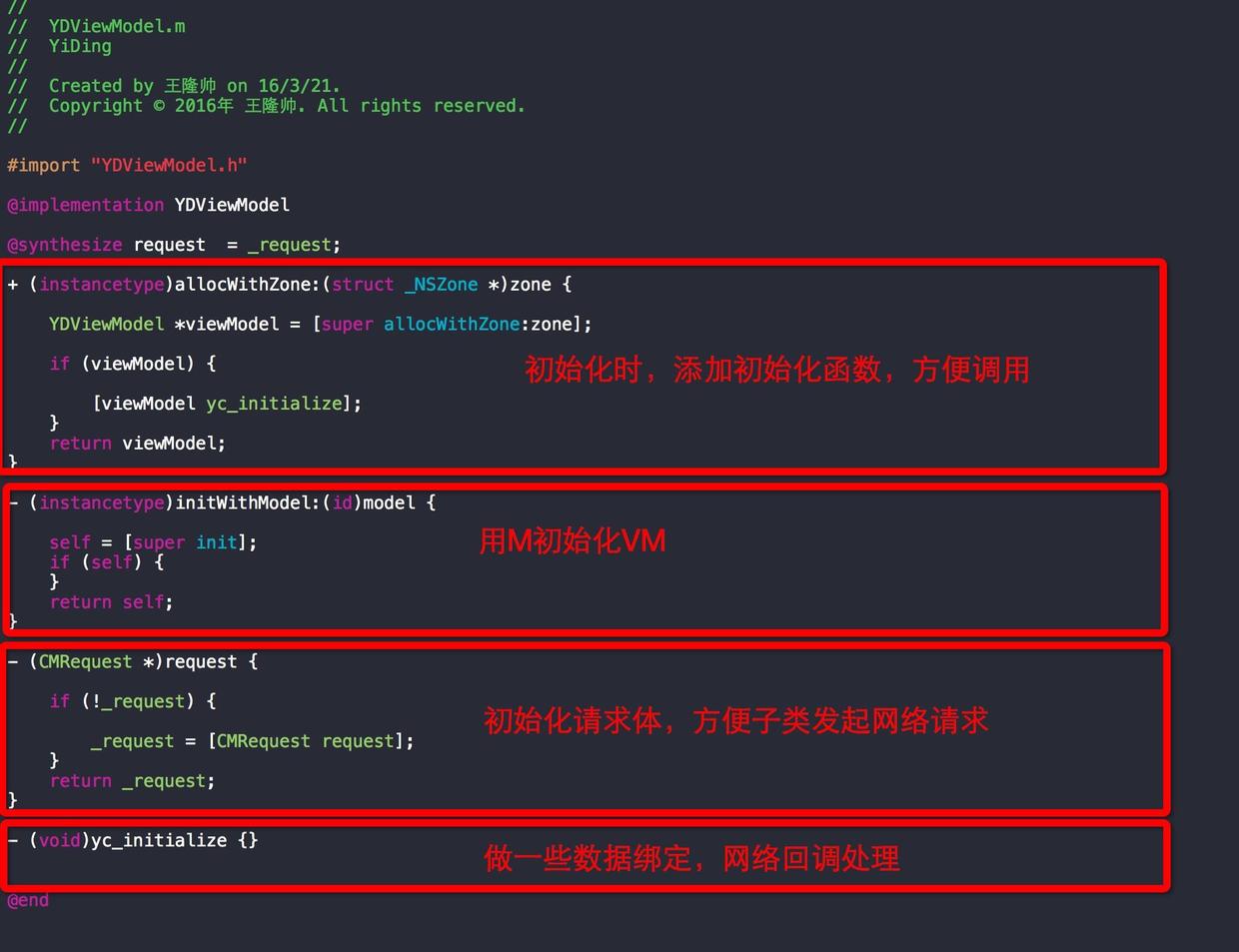
yc_initialize:邏輯綁定與網路請求的入口
LSRefreshDataStatus:資料處理後要執行的動作標識
LSHeaderRefresh_HasMoreData / HasNoMoreData:下拉後還有/沒有更多
LSFooterRefresh_HasMoreData / HasNoMoreData:上拉後還有/沒有更多
LSRefreshError:刷新失敗
LSRefreshUI:只刷新版面
4)YDTableViewCell 的特殊之處
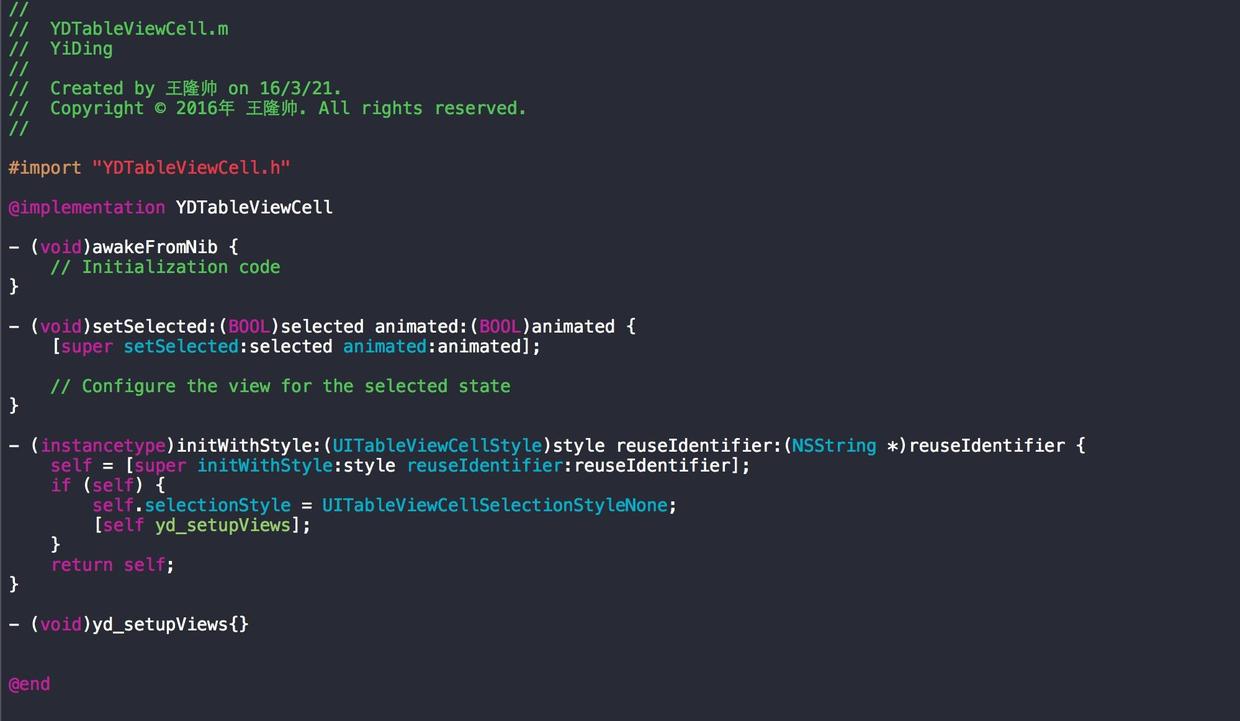
其他基類都在初始化流程裡做資料綁定,但 Cell 不行。原因是基類的綁定時機在初始化對象返回之前,而 Cell 的資料綁定如果放在 bindViewModel 裡,複用會失效,點擊沒有反應。正確做法是把綁定挪到資料賦值時(例如 setViewModel 裡),因為 RAC 的複用機制 rac_prepareForReuseSignal 在 Cell 尚未初始化完成時是不生效的。
四、實戰:一個典型列表頁

需求是:頂部若干入口,數量多時可左右滑;整體可下拉刷新、上拉載入。我的拆法是 —— 整體一個 TableView,內部分為 Header、一個 Section 和主體列表;Header 裡再嵌一個可複用的 CollectionView。
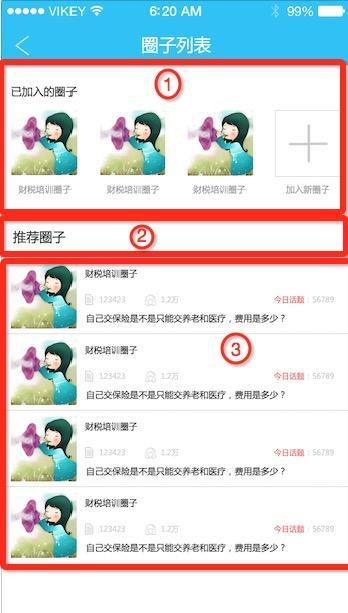
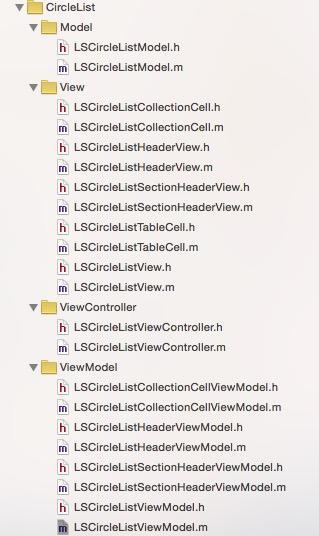
各層職責:
ViewController
LSCircleListViewController:主控制器,負責跳轉、Navigation、TabBar
View
LSCircleListView:主 View
LSCircleListHeaderView:頂部 Header,內部含一個 CollectionView
LSCircleListCollectionCell:Header 內 CollectionView 的 Cell
LSCircleListSectionHeaderView:Section 頭,此處不需複用所以直接用 View;若需複用則繼承 TableViewHeaderFooterView
LSCircleListTableCell:主列表 Cell
ViewModel
LSCircleListViewModel:主 VM
LSCircleListHeaderViewModel:Header 的 VM
LSCircleListCollectionCellViewModel:Header Cell 與 TableViewCell 共用(兩者資料結構一致)
LSCircleListSectionHeaderViewModel:Section 的 VM
Model
LSCircleListModel:圈子資料模型
一個小頁面這麼多類,第一眼看確實嚇人。但反過來想:如果全塞進 VC,那會是幾千行的巨獸。
1、ViewController
#import "LSCircleListViewController.h" #import "LSCircleListView.h" #import "LSCircleListViewModel.h" #import "LSCircleMainPageViewController.h" #import "LSCircleMainPageViewModel.h" #import "LSCircleListCollectionCellViewModel.h" #import "LSNewCircleListViewController.h" @interface LSCircleListViewController () @property (nonatomic, strong) LSCircleListView *mainView; @property (nonatomic, strong) LSCircleListViewModel *viewModel; @end @implementation LSCircleListViewController #pragma mark - system - (void)updateViewConstraints { WS(weakSelf) [self.mainView mas_makeConstraints:^(MASConstraintMaker *make) { make.edges.equalTo(weakSelf.view); }]; [super updateViewConstraints]; } #pragma mark - private - (void)yc_addSubviews { [self.view addSubview:self.mainView]; } - (void)yc_bindViewModel { @weakify(self); [[self.viewModel.cellClickSubject takeUntil:self.rac_willDeallocSignal] subscribeNext:^(LSCircleListCollectionCellViewModel *viewModel) { @strongify(self); LSCircleMainPageViewModel *mainViewModel = [[LSCircleMainPageViewModel alloc] init]; mainViewModel.headerViewModel.circleId = viewModel.idStr; mainViewModel.headerViewModel.headerImageStr = viewModel.headerImageStr; mainViewModel.headerViewModel.title = viewModel.name; mainViewModel.headerViewModel.numStr = viewModel.peopleNum; LSCircleMainPageViewController *circleMainVC = [[LSCircleMainPageViewController alloc] initWithViewModel:mainViewModel]; [self.rdv_tabBarController setTabBarHidden:YES animated:YES]; [self.navigationController pushViewController:circleMainVC animated:YES]; }]; [self.viewModel.listHeaderViewModel.addNewSubject subscribeNext:^(id x) { @strongify(self); LSNewCircleListViewController *newCircleListVC = [[LSNewCircleListViewController alloc] init]; [self.rdv_tabBarController setTabBarHidden:YES animated:YES]; [self.navigationController pushViewController:newCircleListVC animated:YES]; }]; } - (void)yc_layoutNavigation { self.title = @"圈子列表"; [self.rdv_tabBarController setTabBarHidden:NO animated:YES]; } #pragma mark - lazyLoad - (LSCircleListView *)mainView { if (!_mainView) { _mainView = [[LSCircleListView alloc] initWithViewModel:self.viewModel]; } return _mainView; } - (LSCircleListViewModel *)viewModel { if (!_viewModel) { _viewModel = [[LSCircleListViewModel alloc] init]; } return _viewModel; } @endVC 只留三塊:
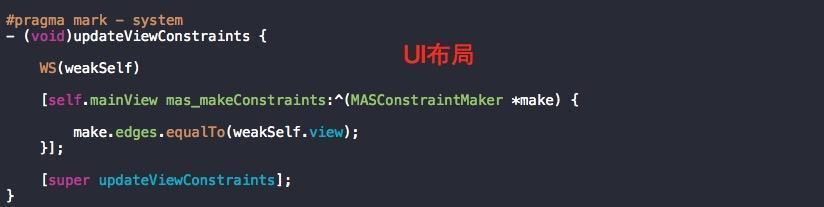
系統函數 —— 重寫 updateViewConstraints。這是 iOS 6 之後 VC 提供的更新約束入口,系統在更新視圖布局時會先呼叫它。重寫時記得呼叫 super 或對應 View 的 updateConstraints,這樣就不必為了改約束去繼承 View。
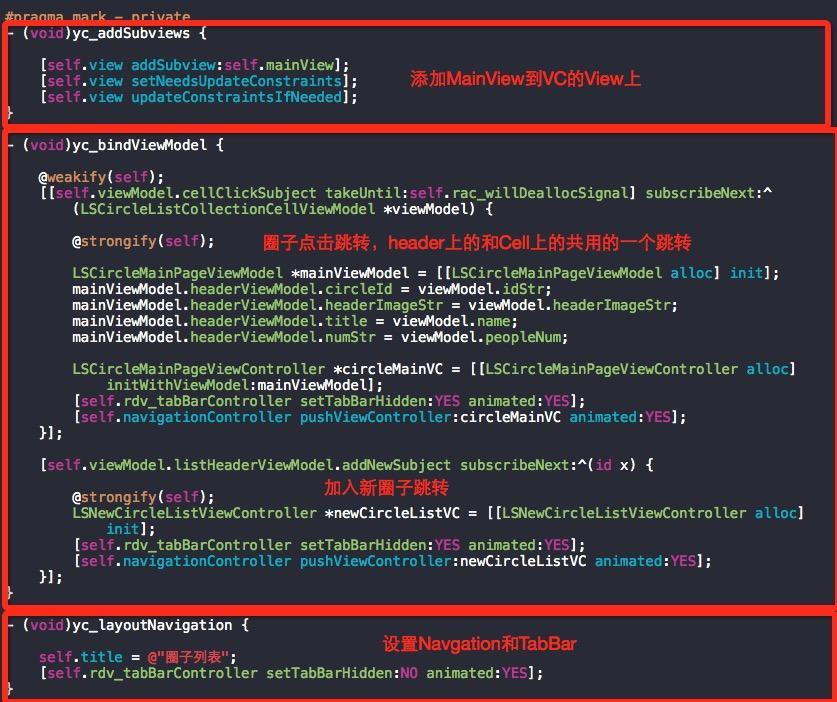
私有函數 —— 三個 yc_ 開頭的方法:掛子 View、綁定跳轉事件、設定標題與 TabBar 顯示。
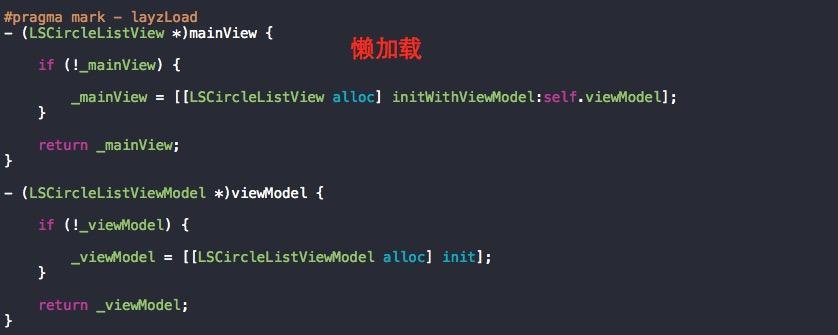
懶載入 —— 用到才建立。
2、View
#import "LSCircleListView.h" #import "LSCircleListViewModel.h" #import "LSCircleListHeaderView.h" #import "LSCircleListSectionHeaderView.h" #import "LSCircleListTableCell.h" @interface LSCircleListView () @property (strong, nonatomic) LSCircleListViewModel *viewModel; @property (strong, nonatomic) UITableView *mainTableView; @property (strong, nonatomic) LSCircleListHeaderView *listHeaderView; @property (strong, nonatomic) LSCircleListSectionHeaderView *sectionHeaderView; @end @implementation LSCircleListView #pragma mark - system - (instancetype)initWithViewModel:(id)viewModel { self.viewModel = (LSCircleListViewModel *)viewModel; return [super initWithViewModel:viewModel]; } - (void)updateConstraints { WS(weakSelf) [self.mainTableView mas_makeConstraints:^(MASConstraintMaker *make) { make.edges.equalTo(weakSelf); }]; [super updateConstraints]; } #pragma mark - private - (void)yc_setupViews { [self addSubview:self.mainTableView]; [self setNeedsUpdateConstraints]; [self updateConstraintsIfNeeded]; } - (void)yc_bindViewModel { [self.viewModel.refreshDataCommand execute:nil]; @weakify(self); [self.viewModel.refreshUI subscribeNext:^(id x) { @strongify(self); [self.mainTableView reloadData]; }]; [self.viewModel.refreshEndSubject subscribeNext:^(id x) { @strongify(self); [self.mainTableView reloadData]; switch ([x integerValue]) { case LSHeaderRefresh_HasMoreData: { [self.mainTableView.mj_header endRefreshing]; if (self.mainTableView.mj_footer == nil) { self.mainTableView.mj_footer = [MJRefreshBackNormalFooter footerWithRefreshingBlock:^{ @strongify(self); [self.viewModel.nextPageCommand execute:nil]; }]; } } break; case LSHeaderRefresh_HasNoMoreData: { [self.mainTableView.mj_header endRefreshing]; self.mainTableView.mj_footer = nil; } break; case LSFooterRefresh_HasMoreData: { [self.mainTableView.mj_header endRefreshing]; [self.mainTableView.mj_footer resetNoMoreData]; [self.mainTableView.mj_footer endRefreshing]; } break; case LSFooterRefresh_HasNoMoreData: { [self.mainTableView.mj_header endRefreshing]; [self.mainTableView.mj_footer endRefreshingWithNoMoreData]; } break; case LSRefreshError: { [self.mainTableView.mj_footer endRefreshing]; [self.mainTableView.mj_header endRefreshing]; } break; default: break; } }]; } #pragma mark - lazyLoad - (UITableView *)mainTableView { if (!_mainTableView) { _mainTableView = [[UITableView alloc] init]; _mainTableView.delegate = self; _mainTableView.dataSource = self; _mainTableView.backgroundColor = GX_BGCOLOR; _mainTableView.separatorStyle = UITableViewCellSeparatorStyleNone; _mainTableView.tableHeaderView = self.listHeaderView; [_mainTableView registerClass:[LSCircleListTableCell class] forCellReuseIdentifier:[NSString stringWithUTF8String:object_getClassName([LSCircleListTableCell class])]]; WS(weakSelf) _mainTableView.mj_header = [MJRefreshNormalHeader headerWithRefreshingBlock:^{ [weakSelf.viewModel.refreshDataCommand execute:nil]; }]; _mainTableView.mj_footer = [MJRefreshAutoNormalFooter footerWithRefreshingBlock:^{ [weakSelf.viewModel.nextPageCommand execute:nil]; }]; } return _mainTableView; } #pragma mark - UITableViewDataSource - (NSInteger)tableView:(UITableView *)tableView numberOfRowsInSection:(NSInteger)section { return self.viewModel.dataArray.count; } - (UITableViewCell *)tableView:(UITableView *)tableView cellForRowAtIndexPath:(NSIndexPath *)indexPath { LSCircleListTableCell *cell = [tableView dequeueReusableCellWithIdentifier:[NSString stringWithUTF8String:object_getClassName([LSCircleListTableCell class])] forIndexPath:indexPath]; if (self.viewModel.dataArray.count > indexPath.row) { cell.viewModel = self.viewModel.dataArray[indexPath.row]; } return cell; } #pragma mark - UITableViewDelegate - (void)tableView:(UITableView *)tableView didSelectRowAtIndexPath:(NSIndexPath *)indexPath { if (self.viewModel.dataArray.count > indexPath.row) { [self.viewModel.cellClickSubject sendNext:self.viewModel.dataArray[indexPath.row]]; } } @end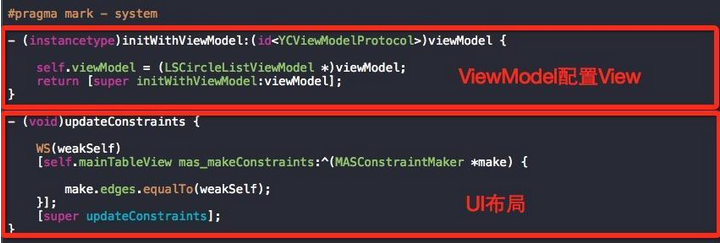
主 View 也是四塊。系統函數部分,每個 View 都持有自己的 VM,而主 View 我通常讓它和 VC 共用同一個 VM —— 跳轉、資料共享都方便得多。
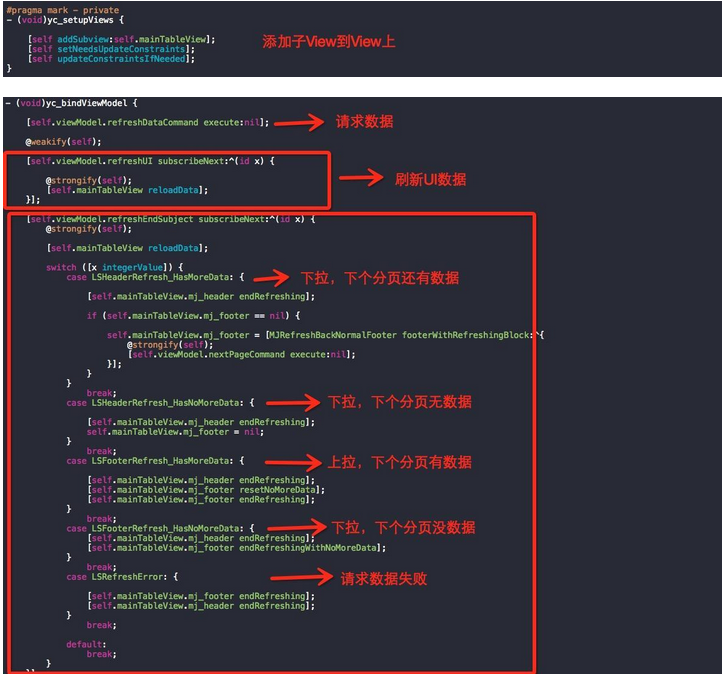
私有函數裡的 refreshEndSubject 就是前面那個 switch,按 VM 給出的狀態決定 header / footer 如何收尾。這部分邏輯是我按自己專案的協議寫的,未必嚴謹,僅供參考。
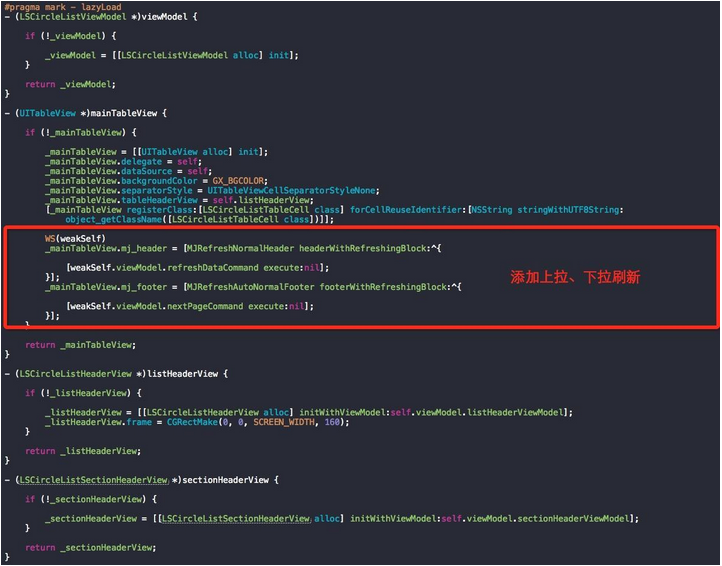
懶載入用 MJRefresh 做刷新。注意 Header 和 SectionHeader 這兩個 View 都是用 VM 初始化配置的,思路和主 View 一致。
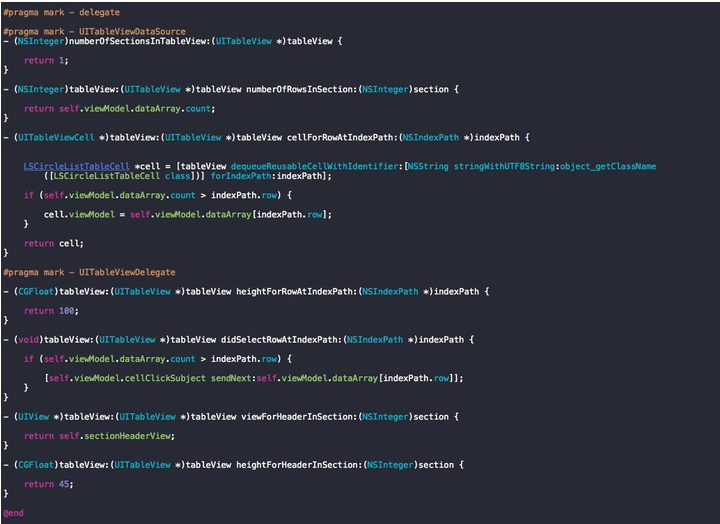
代理與資料源:自訂 Cell 同樣由 VM 配置,點擊事件通過 cellClickSubject 拋回 VC 完成跳轉,並把對應 VM 一起帶過去。
3、Model
@interface LSCircleListModel : NSObject @property (nonatomic, copy) NSString *idStr; @property (nonatomic, copy) NSString *title; @property (nonatomic, copy) NSString *intro; @property (nonatomic, copy) NSString *img; @property (nonatomic, copy) NSString *memberCount; @property (nonatomic, copy) NSString *topicCount; @end --- @implementation LSCircleListModel + (NSDictionary *)mj_replacedKeyFromPropertyName { return @{ @"idStr":@"id", @"title":@"title", @"intro":@"intro", @"img":@"img", @"memberCount":@"MemberCount", @"topicCount":@"TopicCount", }; } @end純資料模型,用 MJExtension 做字典映射,因為後端欄位大小寫不統一(MemberCount / TopicCount),所以覆寫了 mj_replacedKeyFromPropertyName。不含任何邏輯。
4、ViewModel
@interface LSCircleListViewModel : YCViewModel @property (nonatomic, strong) RACSubject *refreshEndSubject; @property (nonatomic, strong) RACSubject *refreshUI; @property (nonatomic, strong) RACCommand *refreshDataCommand; @property (nonatomic, strong) RACCommand *nextPageCommand; @property (nonatomic, strong) LSCircleListHeaderViewModel *listHeaderViewModel; @property (nonatomic, strong) LSCircleListSectionHeaderViewModel *sectionHeaderViewModel; @property (nonatomic, strong) NSArray *dataArray; @property (nonatomic, strong) RACSubject *cellClickSubject; @end --- @implementation LSCircleListViewModel - (void)yc_initialize { @weakify(self); [self.refreshDataCommand.executionSignals.switchToLatest subscribeNext:^(NSDictionary *dict) { @strongify(self); if (dict == nil) { [self.refreshEndSubject sendNext:@(LSRefreshError)]; ShowErrorStatus(@"網絡連接失敗"); return; } if ([dict[@"status"] integerValue] == 0) { self.listHeaderViewModel.dataArray = [[[[(NSDictionary *)dict[@"res"] arrayForKey:@"JoinCircles"].rac_sequence map:^id(NSDictionary *dic) { LSCircleListModel *model = [LSCircleListModel mj_objectWithKeyValues:dic]; LSCircleListCollectionCellViewModel *viewModel = [[LSCircleListCollectionCellViewModel alloc] init]; viewModel.model = model; return viewModel; }] array] mutableCopy]; self.dataArray = [[[[(NSDictionary *)dict[@"res"] arrayForKey:@"Circles"].rac_sequence map:^id(NSDictionary *dic) { LSCircleListModel *model = [LSCircleListModel mj_objectWithKeyValues:dic]; LSCircleListCollectionCellViewModel *viewModel = [[LSCircleListCollectionCellViewModel alloc] init]; viewModel.model = model; return viewModel; }] array] mutableCopy]; [self ls_setHeaderRefreshWithArray:dict[@"Circles"]]; [self ls_dismiss]; } else { [self.refreshEndSubject sendNext:@(LSRefreshError)]; ShowMessage(dict[@"mes"]); } }]; [[[self.refreshDataCommand.executing skip:1] take:1] subscribeNext:^(id x) { @strongify(self); if ([x isEqualToNumber:@(YES)]) { [self ls_showWithStatus:@"正在加載"]; } }]; [self.nextPageCommand.executionSignals.switchToLatest subscribeNext:^(NSDictionary *dict) { @strongify(self); if (dict == nil) { [self.refreshEndSubject sendNext:@(LSRefreshError)]; ShowErrorStatus(@"網絡連接失敗"); return; } if ([dict[@"status"] integerValue] == 0) { NSMutableArray *recommandArray = [[NSMutableArray alloc] initWithArray:self.dataArray]; for (NSDictionary *subDic in [(NSDictionary *)dict[@"res"] arrayForKey:@"Circles"]) { LSCircleListModel *model = [LSCircleListModel mj_objectWithKeyValues:subDic]; LSCircleListCollectionCellViewModel *viewModel = [[LSCircleListCollectionCellViewModel alloc] init]; viewModel.model = model; [recommandArray addObject:viewModel]; } self.dataArray = recommandArray; [self ls_setFootRefreshWithArray:dict[@"Circles"]]; [self ls_dismiss]; } else { [self.refreshEndSubject sendNext:@(LSRefreshError)]; ShowMessage(dict[@"mes"]); } }]; } #pragma mark - lazyLoad - (RACCommand *)refreshDataCommand { if (!_refreshDataCommand) { @weakify(self); _refreshDataCommand = [[RACCommand alloc] initWithSignalBlock:^RACSignal *(id input) { @strongify(self); return [RACSignal createSignal:^RACDisposable *(id subscriber) { @strongify(self); self.currentPage = 1; [self.request POST:LS_URL_CIRCLE_MEMBER_LIST parameters:[self requestCircleListWithId:@"1" currentPage:[NSString stringWithFormat:@"%d", self.currentPage]] success:^(CMRequest *request, NSString *responseString) { NSDictionary *dict = [responseString objectFromJSONString]; [subscriber sendNext:dict]; [subscriber sendCompleted]; } failure:^(CMRequest *request, NSError *error) { ShowErrorStatus(@"網絡連接失敗"); [subscriber sendCompleted]; }]; return nil; }]; }]; } return _refreshDataCommand; } @end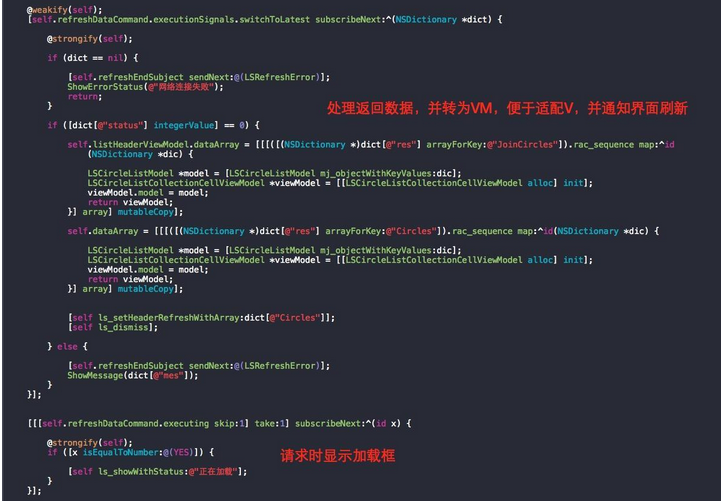
VM 的職責可以概括成一句:字典 → Model → ViewModel → UI。回來的信號裡先把 JSON 轉成 Model,再用 Model 配置一層 Cell ViewModel,最後由 View 訂閱並刷新。
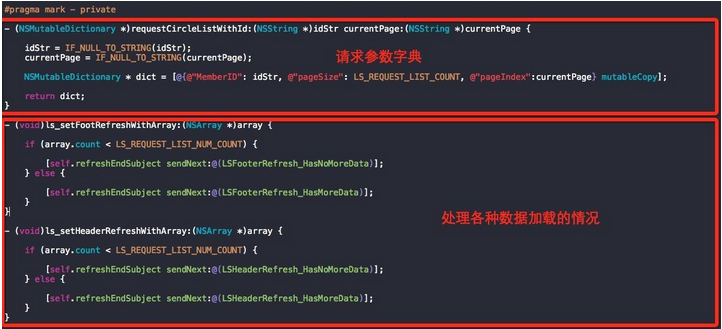
請求參數字典放 VM 裡方便模組移植,放公共 API 裡方便集中管理 —— 沒有絕對正確的位置,只有更適合團隊習慣的位置。另外兩個私有方法負責判斷上拉/下拉後還有沒有更多資料。
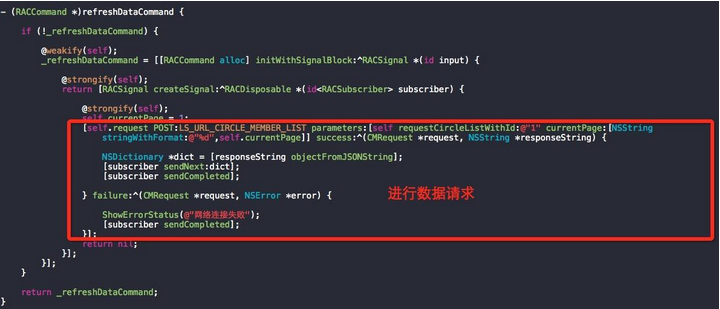
網路層這裡用的是 AFNetworking。
5、給 AppDelegate 減肥
專案上線久了,AppDelegate 會變成垃圾桶:推送、統計、支付、引導頁……什麼都往 didFinishLaunching 裡塞。既然其他部分都解耦了,這裡也該處理。
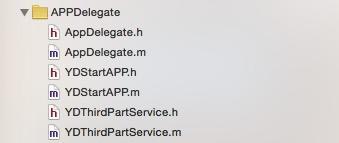
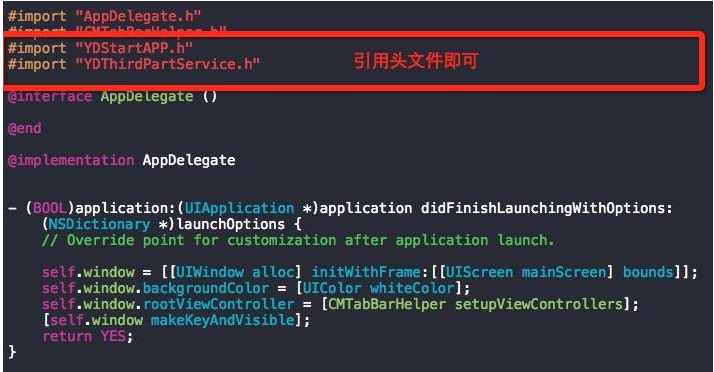
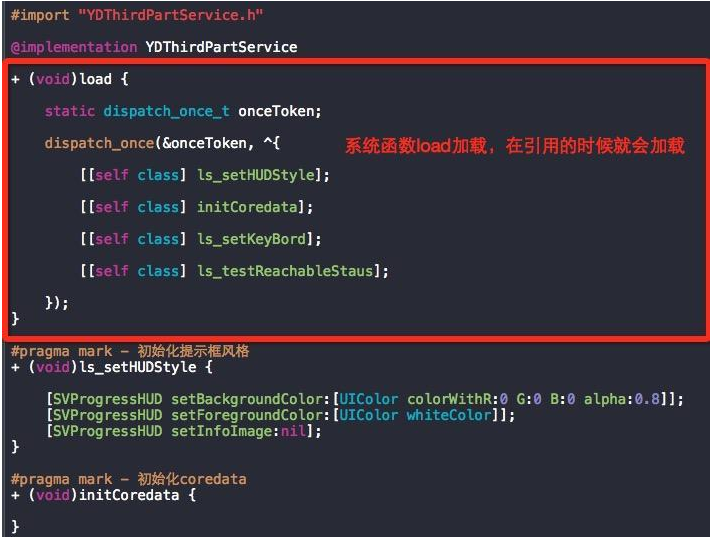
關鍵在 load 方法:類被引入時 runtime 會向它發送 load 消息,且每個類及分類只呼叫一次,順序是父類先於子類、子類先於分類,也不會被自動繼承(不需要像 viewDidLoad 那樣寫 super)。把各模組的啟動註冊拆到自己的類裡,用 load 收集起來,AppDelegate 就能瘦下來。
五、後記:我曾經想干掉基類
原本打算用 Category + Protocol,配合 Runtime 的 Method Swizzling 給系統方法掛上自己的私有方法,這樣就不需要繼承基類。VC 那部分確實跑通了,但很快撞牆:給 VC 做 Category,UINavigationController 之類的子類也跟著受影響;給 View 做 Category,所有子類都受牽連。更麻煩的是多個 Category 裡交換同一個方法時會互相覆蓋,第二個直接把第一個蓋掉。判斷這條路成本太高,就停在半路了。
整套架構的核心其實只有一句話:用 VM 配置 V(VC),並用 Protocol 約束必須實作的介面。這樣程式碼風格統一,各部分職責清晰,寫新頁面時不用再糾結「這段該放哪」。
牽涉的細節實在太多,文中若有不周之處,歡迎在評論區一起討論。
Demo:https://github.com/wanglongshuai/MVVM-RAC-Demo