
iOS小技巧總結,絕對有你想要的
原文
在這裡總結一些iOS開發中的小技巧,能大大方便我們的開發,持續更新。
UITableView的Group樣式下頂部空白處理
//分組列表頭部空白處理
UIView *view = [[UIView alloc] initWithFrame:CGRectMake(0, 0, 0, 0.1)];
self.tableView.tableHeaderView = view;
UITableView的plain樣式下,取消區頭停滯效果
- (void)scrollViewDidScroll:(UIScrollView *)scrollView
{
    CGFloat sectionHeaderHeight = sectionHead.height;
    if (scrollView.contentOffset.y=0)
    {
        scrollView.contentInset = UIEdgeInsetsMake(-scrollView.contentOffset.y, 0, 0, 0);
    }
    else if(scrollView.contentOffset.y>=sectionHeaderHeight)
    {
        scrollView.contentInset = UIEdgeInsetsMake(-sectionHeaderHeight, 0, 0, 0);
    }
}
那個,其實,還是用Group樣式吧哈哈。
獲取某個view所在的控制器
- (UIViewController *)viewController
{
  UIViewController *viewController = nil;
  UIResponder *next = self.nextResponder;
  while (next)
  {
    if ([next isKindOfClass:[UIViewController class]])
    {
      viewController = (UIViewController *)next;
      break;
    }
    next = next.nextResponder;
  }
    return viewController;
}
兩種方法刪除NSUserDefaults所有記錄
//方法一
NSString *appDomain = [[NSBundle mainBundle] bundleIdentifier];
[[NSUserDefaults standardUserDefaults] removePersistentDomainForName:appDomain];


//方法二
- (void)resetDefaults
{
    NSUserDefaults * defs = [NSUserDefaults standardUserDefaults];
    NSDictionary * dict = [defs dictionaryRepresentation];
    for (id key in dict)
    {
        [defs removeObjectForKey:key];
    }
    [defs synchronize];
}
打印系統所有已注冊的字體名稱
#pragma mark - 打印系統所有已注冊的字體名稱
void enumerateFonts()
{
    for(NSString *familyName in [UIFont familyNames])
   {
        NSLog(@"%@",familyName);
        NSArray *fontNames = [UIFont fontNamesForFamilyName:familyName];
        for(NSString *fontName in fontNames)
       {
            NSLog(@"\t|- %@",fontName);
       }
   }
}
取圖片某一像素點的顏色 在UIImage的分類中
- (UIColor *)colorAtPixel:(CGPoint)point
{
    if (!CGRectContainsPoint(CGRectMake(0.0f, 0.0f, self.size.width, self.size.height), point))
    {
        return nil;
    }

    CGColorSpaceRef colorSpace = CGColorSpaceCreateDeviceRGB();
    int bytesPerPixel = 4;
    int bytesPerRow = bytesPerPixel * 1;
    NSUInteger bitsPerComponent = 8;
    unsigned char pixelData[4] = {0, 0, 0, 0};

    CGContextRef context = CGBitmapContextCreate(pixelData,
                                                 1,
                                                 1,
                                                 bitsPerComponent,
                                                 bytesPerRow,
                                                 colorSpace,
                                                 kCGImageAlphaPremultipliedLast | kCGBitmapByteOrder32Big);
    CGColorSpaceRelease(colorSpace);
    CGContextSetBlendMode(context, kCGBlendModeCopy);

    CGContextTranslateCTM(context, -point.x, point.y - self.size.height);
    CGContextDrawImage(context, CGRectMake(0.0f, 0.0f, self.size.width, self.size.height), self.CGImage);
    CGContextRelease(context);

    CGFloat red   = (CGFloat)pixelData[0] / 255.0f;
    CGFloat green = (CGFloat)pixelData[1] / 255.0f;
    CGFloat blue  = (CGFloat)pixelData[2] / 255.0f;
    CGFloat alpha = (CGFloat)pixelData[3] / 255.0f;

    return [UIColor colorWithRed:red green:green blue:blue alpha:alpha];
}
字符串反轉
第一種:
- (NSString *)reverseWordsInString:(NSString *)str
{
    NSMutableString *newString = [[NSMutableString alloc] initWithCapacity:str.length];
    for (NSInteger i = str.length - 1; i >= 0 ; i --)
    {
        unichar ch = [str characterAtIndex:i];
        [newString appendFormat:@"%c", ch];
    }
     return newString;
}

//第二種:
- (NSString*)reverseWordsInString:(NSString*)str
{
     NSMutableString *reverString = [NSMutableString stringWithCapacity:str.length];
     [str enumerateSubstringsInRange:NSMakeRange(0, str.length) options:NSStringEnumerationReverse | NSStringEnumerationByComposedCharacterSequences  usingBlock:^(NSString *substring, NSRange substringRange, NSRange enclosingRange, BOOL *stop) {
          [reverString appendString:substring];
      }];
     return reverString;
}
禁止鎖屏
默認情況下,當設備一段時間沒有觸控動作時,iOS會鎖住屏幕。但有一些應用是不需要鎖屏的,比如視頻播放器。
[UIApplication sharedApplication].idleTimerDisabled = YES;
或
[[UIApplication sharedApplication] setIdleTimerDisabled:YES];
模態推出透明界面
UIViewController *vc = [[UIViewController alloc] init];
UINavigationController *na = [[UINavigationController alloc] initWithRootViewController:vc];

if ([[[UIDevice currentDevice] systemVersion] floatValue] >= 8.0)
{
     na.modalPresentationStyle = UIModalPresentationOverCurrentContext;
}
else
{
     self.modalPresentationStyle=UIModalPresentationCurrentContext;
}

[self presentViewController:na animated:YES completion:nil];
Xcode調試不顯示內存占用
editSCheme  裡面有個選項叫叫做enable zoombie Objects  取消選中
顯示隱藏文件

//顯示
defaults write com.apple.finder AppleShowAllFiles -bool true
killall Finder

//隱藏
defaults write com.apple.finder AppleShowAllFiles -bool false
killall Finder
字符串按多個符號分割

iOS跳轉到App Store下載應用評分
[[UIApplication sharedApplication] openURL:[NSURL URLWithString:@"itms-apps://itunes.apple.com/WebObjects/MZStore.woa/wa/viewContentsUserReviews?type=Purple+Software&id=APPID"]];
iOS 獲取漢字的拼音
+ (NSString *)transform:(NSString *)chinese
{
    //將NSString裝換成NSMutableString
    NSMutableString *pinyin = [chinese mutableCopy];
    //將漢字轉換為拼音(帶音標)
    CFStringTransform((__bridge CFMutableStringRef)pinyin, NULL, kCFStringTransformMandarinLatin, NO);
    NSLog(@"%@", pinyin);
    //去掉拼音的音標
    CFStringTransform((__bridge CFMutableStringRef)pinyin, NULL, kCFStringTransformStripCombiningMarks, NO);
    NSLog(@"%@", pinyin);
    //返回最近結果
    return pinyin;
 }
手動更改iOS狀態欄的顏色
- (void)setStatusBarBackgroundColor:(UIColor *)color
{
    UIView *statusBar = [[[UIApplication sharedApplication] valueForKey:@"statusBarWindow"] valueForKey:@"statusBar"];

    if ([statusBar respondsToSelector:@selector(setBackgroundColor:)])
    {
        statusBar.backgroundColor = color;
    }
}
判斷當前ViewController是push還是present的方式顯示的
NSArray *viewcontrollers=self.navigationController.viewControllers;

if (viewcontrollers.count > 1)
{
    if ([viewcontrollers objectAtIndex:viewcontrollers.count - 1] == self)
    {
        //push方式
       [self.navigationController popViewControllerAnimated:YES];
    }
}
else
{
    //present方式
    [self dismissViewControllerAnimated:YES completion:nil];
}
獲取實際使用的LaunchImage圖片

- (NSString *)getLaunchImageName
{
    CGSize viewSize = self.window.bounds.size;
    // 豎屏
    NSString *viewOrientation = @"Portrait";
    NSString *launchImageName = nil;
    NSArray* imagesDict = [[[NSBundle mainBundle] infoDictionary] valueForKey:@"UILaunchImages"];
    for (NSDictionary* dict in imagesDict)
    {
        CGSize imageSize = CGSizeFromString(dict[@"UILaunchImageSize"]);
        if (CGSizeEqualToSize(imageSize, viewSize) && [viewOrientation isEqualToString:dict[@"UILaunchImageOrientation"]])
        {
            launchImageName = dict[@"UILaunchImageName"];
        }
    }
    return launchImageName;
}
iOS在當前屏幕獲取第一響應
UIWindow * keyWindow = [[UIApplication sharedApplication] keyWindow];
UIView * firstResponder = [keyWindow performSelector:@selector(firstResponder)];
判斷對象是否遵循了某協議
if ([self.selectedController conformsToProtocol:@protocol(RefreshPtotocol)])
{
     [self.selectedController performSelector:@selector(onTriggerRefresh)];
}
判斷view是不是指定視圖的子視圖
BOOL isView = [textView isDescendantOfView:self.view];
NSArray 快速求總和 最大值 最小值 和 平均值
NSArray *array = [NSArray arrayWithObjects:@"2.0", @"2.3", @"3.0", @"4.0", @"10", nil];
CGFloat sum = [[array valueForKeyPath:@"@sum.floatValue"] floatValue];
CGFloat avg = [[array valueForKeyPath:@"@avg.floatValue"] floatValue];
CGFloat max =[[array valueForKeyPath:@"@max.floatValue"] floatValue];
CGFloat min =[[array valueForKeyPath:@"@min.floatValue"] floatValue];
NSLog(@"%f\n%f\n%f\n%f",sum,avg,max,min);
修改UITextField中Placeholder的文字顏色
[textField setValue:[UIColor redColor] forKeyPath:@"_placeholderLabel.textColor"];
關於NSDateFormatter的格式
G: 公元時代,例如AD公元
yy: 年的後2位
yyyy: 完整年
MM: 月,顯示為1-12
MMM: 月,顯示為英文月份簡寫,如 Jan
MMMM: 月,顯示為英文月份全稱,如 Janualy
dd: 日,2位數表示,如02
d: 日,1-2位顯示,如 2
EEE: 簡寫星期幾,如Sun
EEEE: 全寫星期幾,如Sunday
aa: 上下午,AM/PM
H: 時,24小時制,0-23
K:時,12小時制,0-11
m: 分,1-2位
mm: 分,2位
s: 秒,1-2位
ss: 秒,2位
S: 毫秒
獲取一個類的所有子類
+ (NSArray *) allSubclasses
{
    Class myClass = [self class];
    NSMutableArray *mySubclasses = [NSMutableArray array];
    unsigned int numOfClasses;
    Class *classes = objc_copyClassList(&numOfClasses;);
    for (unsigned int ci = 0; ci ( numOfClasses; ci++)
    {
        Class superClass = classes[ci];
        do{
            superClass = class_getSuperclass(superClass);
        } while (superClass && superClass != myClass);

        if (superClass)
        {
            [mySubclasses addObject: classes[ci]];
        }
    }
    free(classes);
    return mySubclasses;
}
監測IOS設備是否設置了代理,需要CFNetwork.framework
NSDictionary *proxySettings = (__bridge NSDictionary *)(CFNetworkCopySystemProxySettings());
NSArray *proxies = (__bridge NSArray *)(CFNetworkCopyProxiesForURL((__bridge CFURLRef _Nonnull)([NSURL URLWithString:@"http://www.baidu.com"]), (__bridge CFDictionaryRef _Nonnull)(proxySettings)));
NSLog(@"\n%@",proxies);

NSDictionary *settings = proxies[0];
NSLog(@"%@",[settings objectForKey:(NSString *)kCFProxyHostNameKey]);
NSLog(@"%@",[settings objectForKey:(NSString *)kCFProxyPortNumberKey]);
NSLog(@"%@",[settings objectForKey:(NSString *)kCFProxyTypeKey]);

if ([[settings objectForKey:(NSString *)kCFProxyTypeKey] isEqualToString:@"kCFProxyTypeNone"])
{
     NSLog(@"沒代理");
}
else
{
     NSLog(@"設置了代理");
}
阿拉伯數字轉中文格式
+(NSString *)translation:(NSString *)arebic
{
    NSString *str = arebic;
    NSArray *arabic_numerals = @[@"1",@"2",@"3",@"4",@"5",@"6",@"7",@"8",@"9",@"0"];
    NSArray *chinese_numerals = @[@"一",@"二",@"三",@"四",@"五",@"六",@"七",@"八",@"九",@"零"];
    NSArray *digits = @[@"個",@"十",@"百",@"千",@"萬",@"十",@"百",@"千",@"億",@"十",@"百",@"千",@"兆"];
    NSDictionary *dictionary = [NSDictionary dictionaryWithObjects:chinese_numerals forKeys:arabic_numerals];

    NSMutableArray *sums = [NSMutableArray array];
    for (int i = 0; i ( str.length; i ++) {
        NSString *substr = [str substringWithRange:NSMakeRange(i, 1)];
        NSString *a = [dictionary objectForKey:substr];
        NSString *b = digits[str.length -i-1];
        NSString *sum = [a stringByAppendingString:b];
        if ([a isEqualToString:chinese_numerals[9]])
        {
            if([b isEqualToString:digits[4]] || [b isEqualToString:digits[8]])
            {
                sum = b;
                if ([[sums lastObject] isEqualToString:chinese_numerals[9]])
                {
                    [sums removeLastObject];
                }
            }else
            {
                sum = chinese_numerals[9];
            }

            if ([[sums lastObject] isEqualToString:sum])
            {
                continue;
            }
        }

        [sums addObject:sum];
    }

    NSString *sumStr = [sums componentsJoinedByString:@""];
    NSString *chinese = [sumStr substringToIndex:sumStr.length-1];
    NSLog(@"%@",str);
    NSLog(@"%@",chinese);
    return chinese;
}
Base64編碼與NSString對象或NSData對象的轉換
// Create NSData object
NSData *nsdata = [@"iOS Developer Tips encoded in Base64"
  dataUsingEncoding:NSUTF8StringEncoding];

// Get NSString from NSData object in Base64
NSString *base64Encoded = [nsdata base64EncodedStringWithOptions:0];

// Print the Base64 encoded string
NSLog(@"Encoded: %@", base64Encoded);

// Let's go the other way...

// NSData from the Base64 encoded str
NSData *nsdataFromBase64String = [[NSData alloc]
  initWithBase64EncodedString:base64Encoded options:0];

// Decoded NSString from the NSData
NSString *base64Decoded = [[NSString alloc]
  initWithData:nsdataFromBase64String encoding:NSUTF8StringEncoding];
NSLog(@"Decoded: %@", base64Decoded);
取消UICollectionView的隱式動畫
UICollectionView在reloadItems的時候,默認會附加一個隱式的fade動畫,有時候很討厭,尤其是當你的cell是復合cell的情況下(比如cell使用到了UIStackView)。
下面幾種方法都可以幫你去除這些動畫
//方法一
[UIView performWithoutAnimation:^{
    [collectionView reloadItemsAtIndexPaths:@[[NSIndexPath indexPathForItem:index inSection:0]]];
}];

//方法二
[UIView animateWithDuration:0 animations:^{
    [collectionView performBatchUpdates:^{
        [collectionView reloadItemsAtIndexPaths:@[[NSIndexPath indexPathForItem:index inSection:0]]];
    } completion:nil];
}];

//方法三
[UIView setAnimationsEnabled:NO];
[self.trackPanel performBatchUpdates:^{
    [collectionView reloadItemsAtIndexPaths:@[[NSIndexPath indexPathForItem:index inSection:0]]];
} completion:^(BOOL finished) {
    [UIView setAnimationsEnabled:YES];
}];
讓Xcode的控制台支持LLDB類型的打印
打開終端輸入三條命令:
touch ~/.lldbinit
echo display @import UIKit >> ~/.lldbinit
echo target stop-hook add -o \"target stop-hook disable\" >> ~/.lldbinit
CocoaPods pod install/pod update更新慢的問題
pod install --verbose --no-repo-update
pod update --verbose --no-repo-update
如果不加後面的參數,默認會升級CocoaPods的spec倉庫,加一個參數可以省略這一步,然後速度就會提升不少
UIImage 占用內存大小
UIImage *image = [UIImage imageNamed:@"aa"];
NSUInteger size  = CGImageGetHeight(image.CGImage) * CGImageGetBytesPerRow(image.CGImage);
GCD timer定時器
dispatch_queue_t queue = dispatch_get_global_queue(DISPATCH_QUEUE_PRIORITY_DEFAULT, 0);
dispatch_source_t timer = dispatch_source_create(DISPATCH_SOURCE_TYPE_TIMER, 0, 0,queue);
dispatch_source_set_timer(timer,dispatch_walltime(NULL, 0),1.0*NSEC_PER_SEC, 0); //每秒執行
dispatch_source_set_event_handler(timer, ^{
    //@"倒計時結束,關閉"
    dispatch_source_cancel(timer);
    dispatch_async(dispatch_get_main_queue(), ^{

    });
});
dispatch_resume(timer);
圖片上繪制文字 寫一個UIImage的category
- (UIImage *)imageWithTitle:(NSString *)title fontSize:(CGFloat)fontSize
{
    //畫布大小
    CGSize size=CGSizeMake(self.size.width,self.size.height);
    //創建一個基於位圖的上下文
    UIGraphicsBeginImageContextWithOptions(size,NO,0.0);//opaque:NO  scale:0.0

    [self drawAtPoint:CGPointMake(0.0,0.0)];

    //文字居中顯示在畫布上
    NSMutableParagraphStyle* paragraphStyle = [[NSParagraphStyle defaultParagraphStyle] mutableCopy];
    paragraphStyle.lineBreakMode = NSLineBreakByCharWrapping;
    paragraphStyle.alignment=NSTextAlignmentCenter;//文字居中

    //計算文字所占的size,文字居中顯示在畫布上
    CGSize sizeText=[title boundingRectWithSize:self.size options:NSStringDrawingUsesLineFragmentOrigin
                                     attributes:@{NSFontAttributeName:[UIFont systemFontOfSize:fontSize]}context:nil].size;
    CGFloat width = self.size.width;
    CGFloat height = self.size.height;

    CGRect rect = CGRectMake((width-sizeText.width)/2, (height-sizeText.height)/2, sizeText.width, sizeText.height);
    //繪制文字
    [title drawInRect:rect withAttributes:@{ NSFontAttributeName:[UIFont systemFontOfSize:fontSize],NSForegroundColorAttributeName:[ UIColor whiteColor],NSParagraphStyleAttributeName:paragraphStyle}];

    //返回繪制的新圖形
    UIImage *newImage= UIGraphicsGetImageFromCurrentImageContext();
    UIGraphicsEndImageContext();
    return newImage;
}
查找一個視圖的所有子視圖
- (NSMutableArray *)allSubViewsForView:(UIView *)view
{
    NSMutableArray *array = [NSMutableArray arrayWithCapacity:0];
    for (UIView *subView in view.subviews)
    {
        [array addObject:subView];
        if (subView.subviews.count > 0)
        {
            [array addObjectsFromArray:[self allSubViewsForView:subView]];
        }
    }
    return array;
}
計算文件大小
//文件大小
- (long long)fileSizeAtPath:(NSString *)path
{
    NSFileManager *fileManager = [NSFileManager defaultManager];

    if ([fileManager fileExistsAtPath:path])
    {
        long long size = [fileManager attributesOfItemAtPath:path error:nil].fileSize;
        return size;
    }

    return 0;
}

//文件夾大小
- (long long)folderSizeAtPath:(NSString *)path
{
    NSFileManager *fileManager = [NSFileManager defaultManager];
    long long folderSize = 0;
    if ([fileManager fileExistsAtPath:path])
    {
        NSArray *childerFiles = [fileManager subpathsAtPath:path];
        for (NSString *fileName in childerFiles)
        {
            NSString *fileAbsolutePath = [path stringByAppendingPathComponent:fileName];
            if ([fileManager fileExistsAtPath:fileAbsolutePath])
            {
                long long size = [fileManager attributesOfItemAtPath:fileAbsolutePath error:nil].fileSize;
                folderSize += size;
            }
        }
    }

    return folderSize;
}
UIView設置部分圓角
你是不是也遇到過這樣的問題,一個button或者label,只要右邊的兩個角圓角,或者只要一個圓角。該怎麼辦呢。這就需要圖層蒙版來幫助我們了
CGRect rect = view.bounds;
CGSize radio = CGSizeMake(30, 30);//圓角尺寸
UIRectCorner corner = UIRectCornerTopLeft|UIRectCornerTopRight;//這只圓角位置
UIBezierPath *path = [UIBezierPath bezierPathWithRoundedRect:rect byRoundingCorners:corner cornerRadii:radio];
CAShapeLayer *masklayer = [[CAShapeLayer alloc]init];//創建shapelayer
masklayer.frame = view.bounds;
masklayer.path = path.CGPath;//設置路徑
view.layer.mask = masklayer;
取上整與取下整
floor(x),有時候也寫做Floor(x),其功能是“下取整”,即取不大於x的最大整數 例如:
x=3.14,floor(x)=3
y=9.99999,floor(y)=9

與floor函數對應的是ceil函數,即上取整函數。

ceil函數的作用是求不小於給定實數的最小整數。
ceil(2)=ceil(1.2)=cei(1.5)=2.00

floor函數與ceil函數的返回值均為double型
計算字符串字符長度,一個漢字算兩個字符
//方法一:
- (int)convertToInt:(NSString*)strtemp
{
    int strlength = 0;
    char* p = (char*)[strtemp cStringUsingEncoding:NSUnicodeStringEncoding];
    for (int i=0 ; i([strtemp lengthOfBytesUsingEncoding:NSUnicodeStringEncoding] ;i++)
    {
        if (*p)
        {
            p++;
            strlength++;
        }
        else
        {
            p++;
        }

    }
    return strlength;
}

//方法二:
-(NSUInteger) unicodeLengthOfString: (NSString *) text
{
    NSUInteger asciiLength = 0;
    for (NSUInteger i = 0; i ( text.length; i++)
    {
        unichar uc = [text characterAtIndex: i];
        asciiLength += isascii(uc) ? 1 : 2;
    }
    return asciiLength;
}
給UIView設置圖片
UIImage *image = [UIImage imageNamed:@"image"];
self.MYView.layer.contents = (__bridge id _Nullable)(image.CGImage);
self.MYView.layer.contentsRect = CGRectMake(0, 0, 0.5, 0.5);
防止scrollView手勢覆蓋側滑手勢
[scrollView.panGestureRecognizerrequireGestureRecognizerToFail:self.navigationController.interactivePopGestureRecognizer];
去掉導航欄返回的back標題
[[UIBarButtonItemappearance]setBackButtonTitlePositionAdjustment:UIOffsetMake(0, -60)forBarMetrics:UIBarMetricsDefault];
字符串中是否含有中文
+ (BOOL)checkIsChinese:(NSString *)string
{
    for (int i=0; i(string.length; i++)
    {
        unichar ch = [string characterAtIndex:i];
        if (0x4E00 (= ch  && ch (= 0x9FA5)
        {
            return YES;
        }
    }
    return NO;
}
dispatch_group的使用
 dispatch_group_t dispatchGroup = dispatch_group_create();
    dispatch_group_enter(dispatchGroup);
    dispatch_after(dispatch_time(DISPATCH_TIME_NOW, (int64_t)(1 * NSEC_PER_SEC)), dispatch_get_main_queue(), ^{
        NSLog(@"第一個請求完成");
        dispatch_group_leave(dispatchGroup);
    });

    dispatch_group_enter(dispatchGroup);

    dispatch_after(dispatch_time(DISPATCH_TIME_NOW, (int64_t)(10 * NSEC_PER_SEC)), dispatch_get_main_queue(), ^{
        NSLog(@"第二個請求完成");
        dispatch_group_leave(dispatchGroup);
    });

    dispatch_group_notify(dispatchGroup, dispatch_get_main_queue(), ^(){
        NSLog(@"請求完成");
    });
UITextField每四位加一個空格,實現代理
- (BOOL)textField:(UITextField *)textField shouldChangeCharactersInRange:(NSRange)range replacementString:(NSString *)string
{
    // 四位加一個空格
    if ([string isEqualToString:@""])
    {
        // 刪除字符
        if ((textField.text.length - 2) % 5 == 0)
        {
            textField.text = [textField.text substringToIndex:textField.text.length - 1];
        }
        return YES;
    }
    else
    {
        if (textField.text.length % 5 == 0)
        {
            textField.text = [NSString stringWithFormat:@"%@ ", textField.text];
        }
    }
    return YES;
}
獲取私有屬性和成員變量 #import(objc/runtime.h)(由於系統原因此處用圓括號代替尖括號)
//獲取私有屬性 比如設置UIDatePicker的字體顏色
- (void)setTextColor
{
    //獲取所有的屬性,去查看有沒有對應的屬性
    unsigned int count = 0;
    objc_property_t *propertys = class_copyPropertyList([UIDatePicker class], &count);
    for(int i = 0;i ( count;i ++)
    {
        //獲得每一個屬性
        objc_property_t property = propertys[i];
        //獲得屬性對應的nsstring
        NSString *propertyName = [NSString stringWithCString:property_getName(property) encoding:NSUTF8StringEncoding];
        //輸出打印看對應的屬性
        NSLog(@"propertyname = %@",propertyName);
        if ([propertyName isEqualToString:@"textColor"])
        {
            [datePicker setValue:[UIColor whiteColor] forKey:propertyName];
        }
    }
}
//獲得成員變量 比如修改UIAlertAction的按鈕字體顏色
unsigned int count = 0;
Ivar *ivars = class_copyIvarList([UIAlertAction class], &count);
for(int i =0;i ( count;i ++)
{
Ivar ivar = ivars[i];
NSString *ivarName = [NSString stringWithCString:ivar_getName(ivar) encoding:NSUTF8StringEncoding];
NSLog(@"uialertion.ivarName = %@",ivarName);
if ([ivarName isEqualToString:@"_titleTextColor"])
{
[alertOk setValue:[UIColor blueColor] forKey:@"titleTextColor"];
[alertCancel setValue:[UIColor purpleColor] forKey:@"titleTextColor"];
}
}獲取手機安裝的應用
Class c =NSClassFromString(@"LSApplicationWorkspace");
id s = [(id)c performSelector:NSSelectorFromString(@"defaultWorkspace")];
NSArray *array = [s performSelector:NSSelectorFromString(@"allInstalledApplications")];
for (id item in array)
{
    NSLog(@"%@",[item performSelector:NSSelectorFromString(@"applicationIdentifier")]);
    //NSLog(@"%@",[item performSelector:NSSelectorFromString(@"bundleIdentifier")]);
    NSLog(@"%@",[item performSelector:NSSelectorFromString(@"bundleVersion")]);
    NSLog(@"%@",[item performSelector:NSSelectorFromString(@"shortVersionString")]);
}
判斷兩個日期是否在同一周 寫在NSDate的category裡面
- (BOOL)isSameDateWithDate:(NSDate *)date
{
    //日期間隔大於七天之間返回NO
    if (fabs([self timeIntervalSinceDate:date]) >= 7 * 24 *3600)
    {
        return NO;
    }

    NSCalendar *calender = [NSCalendar currentCalendar];
    calender.firstWeekday = 2;//設置每周第一天從周一開始
    //計算兩個日期分別為這年第幾周
    NSUInteger countSelf = [calender ordinalityOfUnit:NSCalendarUnitWeekday inUnit:NSCalendarUnitYear forDate:self];
    NSUInteger countDate = [calender ordinalityOfUnit:NSCalendarUnitWeekday inUnit:NSCalendarUnitYear forDate:date];

    //相等就在同一周,不相等就不在同一周
    return countSelf == countDate;
}
應用內打開系統設置界面
//iOS8之後
[[UIApplication sharedApplication] openURL:[NSURL URLWithString:UIApplicationOpenSettingsURLString]];
//如果App沒有添加權限,顯示的是設定界面。如果App有添加權限(例如通知),顯示的是App的設定界面。
//iOS8之前
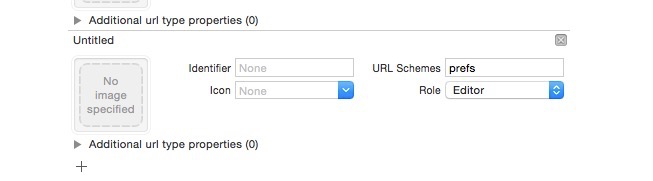
//先添加一個url type如下圖,在代碼中調用如下代碼,即可跳轉到設置頁面的對應項
[[UIApplication sharedApplication] openURL:[NSURL URLWithString:@"prefs:root=WIFI"]];

可選值如下:
About — prefs:root=General&path=About
Accessibility — prefs:root=General&path=ACCESSIBILITY
Airplane Mode On — prefs:root=AIRPLANE_MODE
Auto-Lock — prefs:root=General&path=AUTOLOCK
Brightness — prefs:root=Brightness
Bluetooth — prefs:root=General&path=Bluetooth
Date & Time — prefs:root=General&path=DATE_AND_TIME
FaceTime — prefs:root=FACETIME
General — prefs:root=General
Keyboard — prefs:root=General&path=Keyboard
iCloud — prefs:root=CASTLE
iCloud Storage & Backup — prefs:root=CASTLE&path=STORAGE_AND_BACKUP
International — prefs:root=General&path=INTERNATIONAL
Location Services — prefs:root=LOCATION_SERVICES
Music — prefs:root=MUSIC
Music Equalizer — prefs:root=MUSIC&path=EQ
Music Volume Limit — prefs:root=MUSIC&path=VolumeLimit
Network — prefs:root=General&path=Network
Nike + iPod — prefs:root=NIKE_PLUS_IPOD
Notes — prefs:root=NOTES
Notification — prefs:root=NOTIFICATI*****_ID
Phone — prefs:root=Phone
Photos — prefs:root=Photos
Profile — prefs:root=General&path=ManagedConfigurationList
Reset — prefs:root=General&path=Reset
Safari — prefs:root=Safari
Siri — prefs:root=General&path=Assistant
Sounds — prefs:root=Sounds
Software Update — prefs:root=General&path=SOFTWARE_UPDATE_LINK
Store — prefs:root=STORE
Twitter — prefs:root=TWITTER
Usage — prefs:root=General&path=USAGE
VPN — prefs:root=General&path=Network/VPN
Wallpaper — prefs:root=Wallpaper
Wi-Fi — prefs:root=WIFI
屏蔽觸發事件,2秒後取消屏蔽
[[UIApplication sharedApplication] beginIgnoringInteractionEvents];
dispatch_after(dispatch_time(DISPATCH_TIME_NOW, (int64_t)(2 * NSEC_PER_SEC)), dispatch_get_main_queue(), ^{
    [[UIApplication sharedApplication] endIgnoringInteractionEvents]
});
動畫暫停再開始
-(void)pauseLayer:(CALayer *)layer
{
    CFTimeInterval pausedTime = [layer convertTime:CACurrentMediaTime() fromLayer:nil];
    layer.speed = 0.0;
    layer.timeOffset = pausedTime;
}

-(void)resumeLayer:(CALayer *)layer
{
    CFTimeInterval pausedTime = [layer timeOffset];
    layer.speed = 1.0;
    layer.timeOffset = 0.0;
    layer.beginTime = 0.0;
    CFTimeInterval timeSincePause = [layer convertTime:CACurrentMediaTime() fromLayer:nil] - pausedTime;
    layer.beginTime = timeSincePause;
}
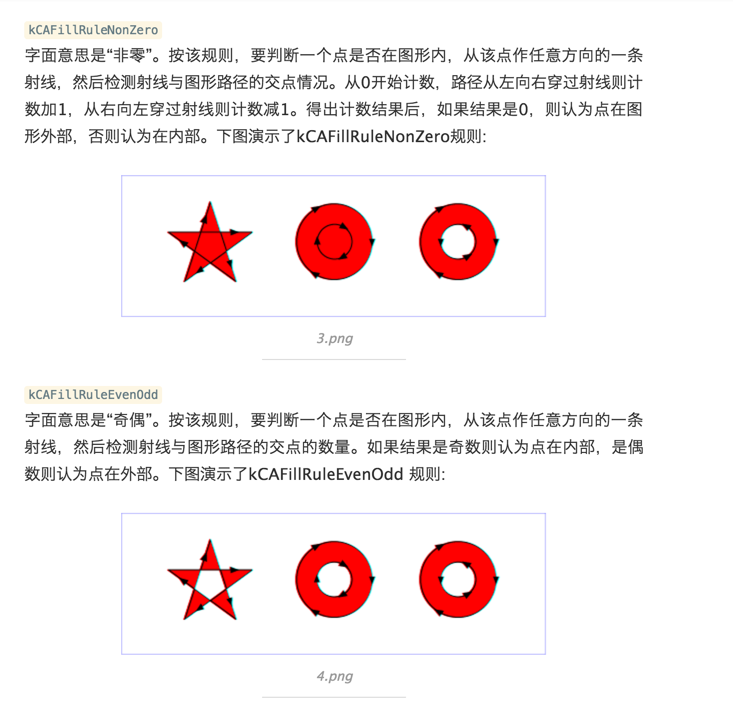
fillRule原理
iOS中數字的格式化
//通過NSNumberFormatter,同樣可以設置NSNumber輸出的格式。例如如下代碼:
NSNumberFormatter *formatter = [[NSNumberFormatter alloc] init];
formatter.numberStyle = NSNumberFormatterDecimalStyle;
NSString *string = [formatter stringFromNumber:[NSNumber numberWithInt:123456789]];
NSLog(@"Formatted number string:%@",string);
//輸出結果為:[1223:403] Formatted number string:123,456,789

//其中NSNumberFormatter類有個屬性numberStyle,它是一個枚舉型,設置不同的值可以輸出不同的數字格式。該枚舉包括:
typedef NS_ENUM(NSUInteger, NSNumberFormatterStyle) {
    NSNumberFormatterNoStyle = kCFNumberFormatterNoStyle,
    NSNumberFormatterDecimalStyle = kCFNumberFormatterDecimalStyle,
    NSNumberFormatterCurrencyStyle = kCFNumberFormatterCurrencyStyle,
    NSNumberFormatterPercentStyle = kCFNumberFormatterPercentStyle,
    NSNumberFormatterScientificStyle = kCFNumberFormatterScientificStyle,
    NSNumberFormatterSpellOutStyle = kCFNumberFormatterSpellOutStyle
};
//各個枚舉對應輸出數字格式的效果如下:其中第三項和最後一項的輸出會根據系統設置的語言區域的不同而不同。
[1243:403] Formatted number string:123456789
[1243:403] Formatted number string:123,456,789
[1243:403] Formatted number string:¥123,456,789.00
[1243:403] Formatted number string:-539,222,988%
[1243:403] Formatted number string:1.23456789E8
[1243:403] Formatted number string:一億二千三百四十五萬六千七百八十九
如何獲取WebView所有的圖片地址
在網頁加載完成時,通過js獲取圖片和添加點擊的識別方式
//UIWebView
- (void)webViewDidFinishLoad:(UIWebView *)webView
{
    //這裡是js,主要目的實現對url的獲取
    static  NSString * const jsGetImages =
    @"function getImages(){\
    var objs = document.getElementsByTagName(\"img\");\
    var imgScr = '';\
    for(var i=0;i(objs.length;i++){\
    imgScr = imgScr + objs[i].src + '+';\
    };\
    return imgScr;\
    };";

    [webView stringByEvaluatingJavaScriptFromString:jsGetImages];//注入js方法
    NSString *urlResult = [webView stringByEvaluatingJavaScriptFromString:@"getImages()"];
    NSArray *urlArray = [NSMutableArray arrayWithArray:[urlResult componentsSeparatedByString:@"+"]];
    //urlResurlt 就是獲取到得所有圖片的url的拼接;mUrlArray就是所有Url的數組
}
//WKWebView
- (void)webView:(WKWebView *)webView didFinishNavigation:(null_unspecified WKNavigation *)navigation
{
static NSString * const jsGetImages =
@"function getImages(){\
var objs = document.getElementsByTagName(\"img\");\
var imgScr = '';\
for(var i=0;i(objs.length;i++){\
imgScr = imgScr + objs[i].src + '+';\
};\
return imgScr;\
};";
[webView evaluateJavaScript:jsGetImages completionHandler:nil];
[webView evaluateJavaScript:@"getImages()" completionHandler:^(id _Nullable result, NSError * _Nullable error) {
NSLog(@"%@",result);
}];
}獲取到webview的高度
CGFloat height = [[self.webView stringByEvaluatingJavaScriptFromString:@"document.body.offsetHeight"] floatValue];
navigationBar變為純透明
//第一種方法
//導航欄純透明
[self.navigationBar setBackgroundImage:[UIImage new] forBarMetrics:UIBarMetricsDefault];
//去掉導航欄底部的黑線
self.navigationBar.shadowImage = [UIImage new];

//第二種方法
[[self.navigationBar subviews] objectAtIndex:0].alpha = 0;
tabBar同理
[self.tabBar setBackgroundImage:[UIImage new]];
self.tabBar.shadowImage = [UIImage new];
navigationBar根據滑動距離的漸變色實現
//第一種
- (void)scrollViewDidScroll:(UIScrollView *)scrollView
{
    CGFloat offsetToShow = 200.0;//滑動多少就完全顯示
    CGFloat alpha = 1 - (offsetToShow - scrollView.contentOffset.y) / offsetToShow;
    [[self.navigationController.navigationBar subviews] objectAtIndex:0].alpha = alpha;
}
//第二種
- (void)scrollViewDidScroll:(UIScrollView *)scrollView
{
CGFloat offsetToShow = 200.0;
CGFloat alpha = 1 - (offsetToShow - scrollView.contentOffset.y) / offsetToShow;
[self.navigationController.navigationBar setShadowImage:[UIImage new]];
[self.navigationController.navigationBar setBackgroundImage:[self imageWithColor:[[UIColor orangeColor]colorWithAlphaComponent:alpha]] forBarMetrics:UIBarMetricsDefault];
}
//生成一張純色的圖片
- (UIImage *)imageWithColor:(UIColor *)color
{
CGRect rect = CGRectMake(0.0f, 0.0f, 1.0f, 1.0f);
UIGraphicsBeginImageContext(rect.size);
CGContextRef context = UIGraphicsGetCurrentContext();
CGContextSetFillColorWithColor(context, [color CGColor]);
CGContextFillRect(context, rect);
UIImage *theImage = UIGraphicsGetImageFromCurrentImageContext();
UIGraphicsEndImageContext();
return theImage;
}iOS 開發中一些相關的路徑
模擬器的位置:
/Applications/Xcode.app/Contents/Developer/Platforms/iPhoneSimulator.platform/Developer/SDKs
文檔安裝位置:
/Applications/Xcode.app/Contents/Developer/Documentation/DocSets
插件保存路徑:
~/Library/ApplicationSupport/Developer/Shared/Xcode/Plug-ins
自定義代碼段的保存路徑:
~/Library/Developer/Xcode/UserData/CodeSnippets/
如果找不到CodeSnippets文件夾,可以自己新建一個CodeSnippets文件夾。
描述文件路徑
~/Library/MobileDevice/Provisioning Profiles
navigationItem的BarButtonItem如何緊靠屏幕右邊界或者左邊界?
一般情況下,右邊的item會和屏幕右側保持一段距離:
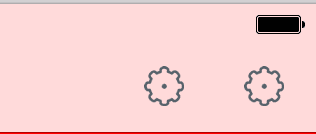
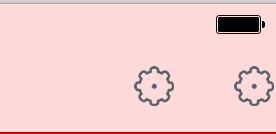
下面是通過添加一個負值寬度的固定間距的item來解決,也可以改變寬度實現不同的間隔:
UIImage *img = [[UIImage imageNamed:@"icon_cog"] imageWithRenderingMode:UIImageRenderingModeAlwaysOriginal];
//寬度為負數的固定間距的系統item
UIBarButtonItem *rightNegativeSpacer = [[UIBarButtonItem alloc] initWithBarButtonSystemItem:UIBarButtonSystemItemFixedSpace target:nil action:nil];
[rightNegativeSpacer setWidth:-15];

UIBarButtonItem *rightBtnItem1 = [[UIBarButtonItem alloc]initWithImage:img style:UIBarButtonItemStylePlain target:self action:@selector(rightButtonItemClicked:)];
UIBarButtonItem *rightBtnItem2 = [[UIBarButtonItem alloc]initWithImage:img style:UIBarButtonItemStylePlain target:self action:@selector(rightButtonItemClicked:)];
self.navigationItem.rightBarButtonItems = @[rightNegativeSpacer,rightBtnItem1,rightBtnItem2];
NSString進行URL編碼和解碼
NSString *string = @"http://abc.com?aaa=你好&bbb=tttee";

//編碼 打印:http://abc.com?aaa=%E4%BD%A0%E5%A5%BD&bbb=tttee
string = [string stringByAddingPercentEncodingWithAllowedCharacters:[NSCharacterSet URLQueryAllowedCharacterSet]];

//解碼 打印:http://abc.com?aaa=你好&bbb=tttee
string = [string stringByRemovingPercentEncoding];
UIWebView設置User-Agent。
//設置
NSDictionary *dic = @{@"UserAgent":@"your UserAgent"};
[[NSUserDefaults standardUserDefaults] registerDefaults:dic];
//獲取
NSString *agent = [self.WebView stringByEvaluatingJavaScriptFromString:@"navigator.userAgent"];
獲取硬盤總容量與可用容量:
NSFileManager *fileManager = [NSFileManager defaultManager];
NSDictionary *attributes = [fileManager attributesOfFileSystemForPath:NSHomeDirectory() error:nil];
1
NSLog(@"容量%.2fG",[attributes[NSFileSystemSize] doubleValue] / (powf(1024, 3)));
NSLog(@"可用%.2fG",[attributes[NSFileSystemFreeSize] doubleValue] / powf(1024, 3));
獲取UIColor的RGBA值
UIColor *color = [UIColor colorWithRed:0.2 green:0.3 blue:0.9 alpha:1.0];
const CGFloat *components = CGColorGetComponents(color.CGColor);
NSLog(@"Red: %.1f", components[0]);
NSLog(@"Green: %.1f", components[1]);
NSLog(@"Blue: %.1f", components[2]);
NSLog(@"Alpha: %.1f", components[3]);
修改textField的placeholder的字體顏色、大小
[self.textField setValue:[UIColor redColor] forKeyPath:@"_placeholderLabel.textColor"];
[self.textField setValue:[UIFont boldSystemFontOfSize:16] forKeyPath:@"_placeholderLabel.font"];
AFN移除JSON中的NSNull
AFJSONResponseSerializer *response = [AFJSONResponseSerializer serializer];
response.removesKeysWithNullValues = YES;
ceil()和floor()
ceil()功 能:返回大於或者等於指定表達式的最小整數
floor()功 能:返回小於或者等於指定表達式的最大整數
UIWebView裡面的圖片自適應屏幕
在webView加載完的代理方法裡面這樣寫:
- (void)webViewDidFinishLoad:(UIWebView *)webView
{
    NSString *js = @"function imgAutoFit() { \
    var imgs = document.getElementsByTagName('img'); \
    for (var i = 0; i ( imgs.length; ++i) { \
    var img = imgs[i]; \
    img.style.maxWidth = %f; \
    } \
    }";

    js = [NSString stringWithFormat:js, [UIScreen mainScreen].bounds.size.width - 20];

    [webView stringByEvaluatingJavaScriptFromString:js];
    [webView stringByEvaluatingJavaScriptFromString:@"imgAutoFit()"];
}
持續更新中……。


- iOS學習:AVFoundation 視頻流處理
- Callback Hell 與編程思路的探索
- 源碼推薦(7.15):重寫UIFont方法 設置字體格式以及大小,可重用的水平滾動scrollView列表 極致性能優化
- 如何設計一個 iOS 控件?(iOS 控件完全解析)
- iOS微信安裝包瘦身
- 源碼推薦(02.15B):多任務斷點下載,展示文字標題相關的動效
- 【投稿】Xcode7中你一定要知道的炸裂調試神技
- 源碼推薦(6.8):帶標題、可改變樣式的自定義ActionSheet,TYWaterWaveView 水波浪圓形進度
- 源碼推薦(3.12):可擴展iOS 彈出視圖,Paper卡片式切換效果
- 獲取iOS設備信息(內存