iOS 的 XMPPFramework 簡介
XMPPFramework是一個OS X/iOS平台的開源項目,使用Objective-C實現了XMPP協議(RFC-3920),同時還提供了用於讀寫XML的工具,大大簡化了基於XMPP的通信應用的開發。
1. 登錄和好友上下線
1.1XMPP中常用對象們
XMPPStream:xmpp基礎服務類
XMPPRoster:好友列表類
XMPPRosterCoreDataStorage:好友列表(用戶賬號)在core data中的操作類
XMPPvCardCoreDataStorage:好友名片(昵稱,簽名,性別,年齡等信息)在core data中的操作類
XMPPvCardTemp:好友名片實體類,從數據庫裡取出來的都是它
xmppvCardAvatarModule:好友頭像
XMPPReconnect:如果失去連接,自動重連
XMPPRoom:提供多用戶聊天支持
XMPPPubSub:發布訂閱
1.2登錄操作,也就是連接xmpp服務器
- (void)connect {
    if (self.xmppStream == nil) {
        self.xmppStream = [[XMPPStream alloc] init];
        [self.xmppStream addDelegate:self delegateQueue:dispatch_get_main_queue()];
    }
    if (![self.xmppStream isConnected]) {
        NSString *username = [[NSUserDefaults standardUserDefaults] objectForKey:@"username"];
        XMPPJID *jid = [XMPPJID jidWithUser:username domain:@"lizhen" resource:@"Ework"];
        [self.xmppStream setMyJID:jid];
        [self.xmppStream setHostName:@"10.4.125.113"];
        NSError *error = nil;
        if (![self.xmppStream connect:&error]) {
            NSLog(@"Connect Error: %@", [[error userInfo] description]);
        }
    }
}
connect成功之後會依次調用XMPPStreamDelegate的方法,首先調用
- (void)xmppStream:(XMPPStream *)sender socketDidConnect:(GCDAsyncSocket *)socket

...
然後
- (void)xmppStreamDidConnect:(XMPPStream *)sender
在該方法下面需要使用xmppStream 的authenticateWithPassword方法進行密碼驗證,成功的話會響應delegate的方法,就是下面這個
- (void)xmppStreamDidAuthenticate:(XMPPStream *)sender
1.3上線
實現 - (void)xmppStreamDidAuthenticate:(XMPPStream *)sender 委托方法
- (void)xmppStreamDidAuthenticate:(XMPPStream *)sender {
    XMPPPresence *presence = [XMPPPresence presenceWithType:@"available"];
    [self.xmppStream sendElement:presence];
}
1.4退出並斷開連接
- (void)disconnect {
    XMPPPresence *presence = [XMPPPresence presenceWithType:@"unavailable"];
    [self.xmppStream sendElement:presence];

    [self.xmppStream disconnect];
}
1.5好友狀態
獲取好友狀態,通過實現
- (void)xmppStream:(XMPPStream *)sender didReceivePresence:(XMPPPresence *)presence

...
方法,當接收到 presence 標簽的內容時,XMPPFramework 框架回調該方法
一個 presence 標簽的格式一般如下:
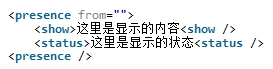
presence 的狀態:
available 上線
away 離開
do not disturb 忙碌
unavailable 下線
- (void)xmppStream:(XMPPStream *)sender didReceivePresence:(XMPPPresence *)presence {
    NSString *presenceType = [presence type];
    NSString *presenceFromUser = [[presence from] user];
    if (![presenceFromUser isEqualToString:[[sender myJID] user]]) {
        if ([presenceType isEqualToString:@"available"]) {
            //
        } else if ([presenceType isEqualToString:@"unavailable"]) {
            //
        }
    }
}
2. 接收消息和發送消息
2.1接收消息
通過實現
- (void)xmppStream:(XMPPStream *)sender didReceiveMessage:(XMPPMessage *)message;
方法
當接收到 message 標簽的內容時,XMPPFramework 框架回調該方法
根據 XMPP 協議,消息體的內容存儲在標簽 body 內
- (void)xmppStream:(XMPPStream *)sender didReceiveMessage:(XMPPMessage *)message {
    NSString *messageBody = [[message elementForName:@"body"] stringValue];
}
2.2發送消息
發送消息,我們需要根據 XMPP 協議,將數據放到

- (void)sendMessage:(NSString *) message toUser:(NSString *) user {
    NSXMLElement *body = [NSXMLElement elementWithName:@"body"];
    [body setStringValue:message];
    NSXMLElement *message = [NSXMLElement elementWithName:@"message"];
    [message addAttributeWithName:@"type" stringValue:@"chat"];
    NSString *to = [NSString stringWithFormat:@"%@@example.com", user];
    [message addAttributeWithName:@"to" stringValue:to];
    [message addChild:body];
    [self.xmppStream sendElement:message];
}
3. 獲取好友信息和刪除好友
3.1好友列表和好友名片
[_xmppRoster fetchRoster];//獲取好友列表
//獲取到一個好友節點
- (void)xmppRoster:(XMPPRoster *)sender didRecieveRosterItem:(NSXMLElement *)item
//獲取完好友列表
- (void)xmppRosterDidEndPopulating:(XMPPRoster *)sender
//到服務器上請求聯系人名片信息
- (void)fetchvCardTempForJID:(XMPPJID *)jid;
//請求聯系人的名片,如果數據庫有就不請求,沒有就發送名片請求
- (void)fetchvCardTempForJID:(XMPPJID *)jid ignoreStorage:(BOOL)ignoreStorage;
//獲取聯系人的名片,如果數據庫有就返回,沒有返回空,並到服務器上抓取
- (XMPPvCardTemp *)vCardTempForJID:(XMPPJID *)jid shouldFetch:(BOOL)shouldFetch;
//更新自己的名片信息
- (void)updateMyvCardTemp:(XMPPvCardTemp *)vCardTemp;
//獲取到一盒聯系人的名片信息的回調
- (void)xmppvCardTempModule:(XMPPvCardTempModule *)vCardTempModule
        didReceivevCardTemp:(XMPPvCardTemp *)vCardTemp
                     forJID:(XMPPJID *)jid
3.2添加好友
    //name為用戶賬號
    - (void)XMPPAddFriendSubscribe:(NSString *)name
    {
        //XMPPHOST 就是服務器名,  主機名
        XMPPJID *jid = [XMPPJID jidWithString:[NSString stringWithFormat:@"%@@%@",name,XMPPHOST]];
        //[presence addAttributeWithName:@"subscription" stringValue:@"好友"];
        [xmppRoster subscribePresenceToUser:jid];

    }
3.3收到添加好友的請求
    - (void)xmppRoster:(XMPPRoster *)sender didReceivePresenceSubscriptionRequest:(XMPPPresence *)presence
    {
        //取得好友狀態
        NSString *presenceType = [NSString stringWithFormat:@"%@", [presence type]]; //online/offline
        //請求的用戶
        NSString *presenceFromUser =[NSString stringWithFormat:@"%@", [[presence from] user]];
        NSLog(@"presenceType:%@",presenceType);

        NSLog(@"presence2:%@  sender2:%@",presence,sender);

        XMPPJID *jid = [XMPPJID jidWithString:presenceFromUser];
        //接收添加好友請求
        [xmppRoster acceptPresenceSubscriptionRequestFrom:jid andAddToRoster:YES];

    }
3.4刪除好友
//刪除好友,name為好友賬號
- (void)removeBuddy:(NSString *)name
{
    XMPPJID *jid = [XMPPJID jidWithString:[NSString stringWithFormat:@"%@@%@",name,XMPPHOST]];

    [self xmppRoster] removeUser:jid];
}
4. 聊天室
初始化聊天室
    XMPPJID *roomJID = [XMPPJID jidWithString:ROOM_JID];

    xmppRoom = [[XMPPRoom alloc] initWithRoomStorage:self jid:roomJID];

    [xmppRoom activate:xmppStream];
    [xmppRoom addDelegate:self delegateQueue:dispatch_get_main_queue()];
創建聊天室成功
    - (void)xmppRoomDidCreate:(XMPPRoom *)sender
    {
        DDLogInfo(@"%@: %@", THIS_FILE, THIS_METHOD);
    }
加入聊天室,使用昵稱
[xmppRoom joinRoomUsingNickname:@"quack" history:nil];
獲取聊天室信息
    - (void)xmppRoomDidJoin:(XMPPRoom *)sender
    {
        [xmppRoom fetchConfigurationForm];
        [xmppRoom fetchBanList];
        [xmppRoom fetchMembersList];
        [xmppRoom fetchModeratorsList];
    }
如果房間存在,會調用委托
    // 收到禁止名單列表
    - (void)xmppRoom:(XMPPRoom *)sender didFetchBanList:(NSArray *)items;
    // 收到好友名單列表
    - (void)xmppRoom:(XMPPRoom *)sender didFetchMembersList:(NSArray *)items;
    // 收到主持人名單列表
    - (void)xmppRoom:(XMPPRoom *)sender didFetchModeratorsList:(NSArray *)items;
房間不存在,調用委托
    - (void)xmppRoom:(XMPPRoom *)sender didNotFetchBanList:(XMPPIQ *)iqError;
    - (void)xmppRoom:(XMPPRoom *)sender didNotFetchMembersList:(XMPPIQ *)iqError;
    - (void)xmppRoom:(XMPPRoom *)sender didNotFetchModeratorsList:(XMPPIQ *)iqError;
離開房間
[xmppRoom deactivate:xmppStream];
XMPPRoomDelegate的其他代理方法:
離開聊天室
    - (void)xmppRoomDidLeave:(XMPPRoom *)sender
    {
        DDLogVerbose(@"%@: %@", THIS_FILE, THIS_METHOD);
    }
新人加入群聊
    - (void)xmppRoom:(XMPPRoom *)sender occupantDidJoin:(XMPPJID *)occupantJID
    {
        DDLogVerbose(@"%@: %@", THIS_FILE, THIS_METHOD);
    }
有人退出群聊
    - (void)xmppRoom:(XMPPRoom *)sender occupantDidLeave:(XMPPJID *)occupantJID
    {
        DDLogVerbose(@"%@: %@", THIS_FILE, THIS_METHOD);
    }
有人在群裡發言
    - (void)xmppRoom:(XMPPRoom *)sender didReceiveMessage:(XMPPMessage *)message fromOccupant:(XMPPJID *)occupantJID
    {
        DDLogVerbose(@"%@: %@", THIS_FILE, THIS_METHOD);
    }
5. 消息回執
這個是XEP-0184協議的內容
協議內容:
發送消息時附加回執請求
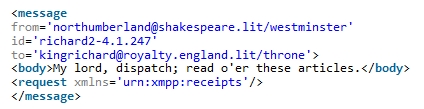
代碼實現
    NSString *siID = [XMPPStream generateUUID];
    //發送消息
    XMPPMessage *message = [XMPPMessage messageWithType:@"chat" to:jid elementID:siID];
    NSXMLElement *receipt = [NSXMLElement elementWithName:@"request" xmlns:@"urn:xmpp:receipts"];
    [message addChild:receipt];
    [message addBody:@"測試"];
    [self.xmppStream sendElement:message];
收到回執請求的消息,發送回執
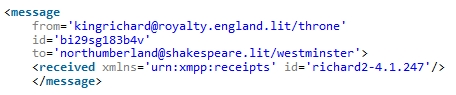
代碼實現
    - (void)xmppStream:(XMPPStream *)sender didReceiveMessage:(XMPPMessage *)message
    {
        //回執判斷
        NSXMLElement *request = [message elementForName:@"request"];
        if (request)
        {
            if ([request.xmlns isEqualToString:@"urn:xmpp:receipts"])//消息回執
            {
                //組裝消息回執
                XMPPMessage *msg = [XMPPMessage messageWithType:[message attributeStringValueForName:@"type"] to:message.from elementID:[message attributeStringValueForName:@"id"]];
                NSXMLElement *recieved = [NSXMLElement elementWithName:@"received" xmlns:@"urn:xmpp:receipts"];
                [msg addChild:recieved];

                //發送回執
                [self.xmppStream sendElement:msg];
            }
        }else
        {
            NSXMLElement *received = [message elementForName:@"received"];
            if (received)
            {
                if ([received.xmlns isEqualToString:@"urn:xmpp:receipts"])//消息回執
                {
                    //發送成功
                    NSLog(@"message send success!");
                }
            }
        }

        //消息處理
        //...
    }
6. 添加AutoPing
為了監聽服務器是否有效,增加心跳監聽。用XEP-0199協議,在XMPPFrameWork框架下,封裝了 XMPPAutoPing 和 XMPPPing兩個類都可以使用,因為XMPPAutoPing已經組合進了XMPPPing類,所以XMPPAutoPing使用起來更方便。
//初始化並啟動ping
-(void)autoPingProxyServer:(NSString*)strProxyServer
{
    _xmppAutoPing = [[XMPPAutoPingalloc] init];
    [_xmppAutoPingactivate:_xmppStream];
    [_xmppAutoPingaddDelegate:selfdelegateQueue:  dispatch_get_main_queue()];
    _xmppAutoPing.respondsToQueries = YES;
    _xmppAutoPing.pingInterval=2;//ping 間隔時間
    if (nil != strProxyServer)
    {
       _xmppAutoPing.targetJID = [XMPPJID jidWithString: strProxyServer ];//設置ping目標服務器,如果為nil,則監聽socketstream當前連接上的那個服務器
    }
}
//卸載監聽
 [_xmppAutoPing   deactivate];
  [_xmppAutoPing   removeDelegate:self];
   _xmppAutoPing = nil;
//ping XMPPAutoPingDelegate的委托方法:
- (void)xmppAutoPingDidSendPing:(XMPPAutoPing *)sender
{
    NSLog(@"- (void)xmppAutoPingDidSendPing:(XMPPAutoPing *)sender");
}
- (void)xmppAutoPingDidReceivePong:(XMPPAutoPing *)sender
{
    NSLog(@"- (void)xmppAutoPingDidReceivePong:(XMPPAutoPing *)sender");
}

- (void)xmppAutoPingDidTimeout:(XMPPAutoPing *)sender
{
    NSLog(@"- (void)xmppAutoPingDidTimeout:(XMPPAutoPing *)sender");
}
(原文地址。作者:易穎。本文為作者授權轉載,需要轉載請聯系作者。)