【投稿】iOS自定義鍵盤
前段時間下載了招商銀行掌上銀行app,發現它的密碼輸入時彈出的鍵盤是自定義的,每次數字展示的排布都不一樣,所以准備自己也實現一個(強行給自己找個理由)。
演示效果
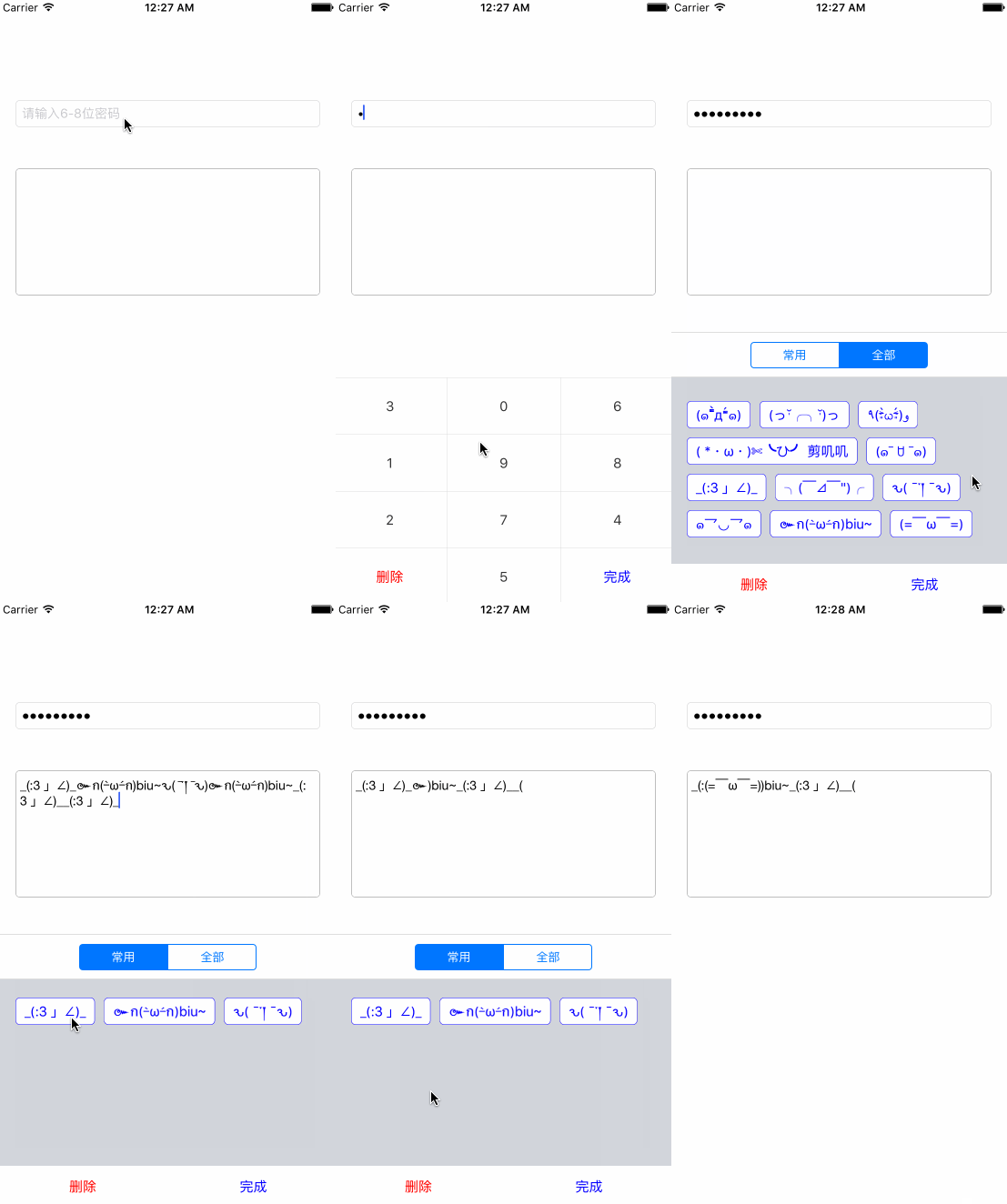
代碼放在這裡,歡迎star和fork~
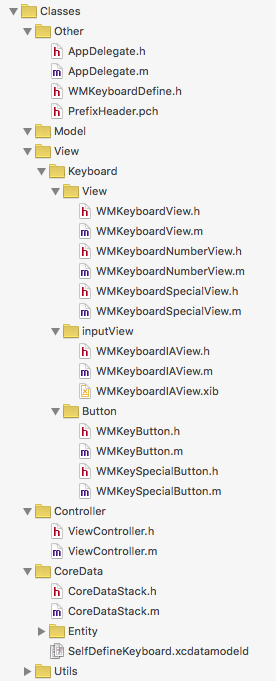
代碼目錄結構
一開始的時候思路就被帶歪了。。。一直以為自定義鍵盤需要獲取鍵盤所在的window,然後從中剝離出view,結果。。。一個坑接著一個坑踩得不要不要的,在差點就完全陷進去的時候才看到了textField的兩個屬性:inputView和inputAccessoryView,終於爬出來了(? ̄ ?  ̄?),這裡附上獲取鍵盤view的方法:iOS get Keyboard Window
話不多少,直接上代碼,讓我們一層一層來剝離這個demo。
零.一些零星的定義
typedef enum : NSUInteger {
    WMKeyButtonTypeDel,   // 按鍵類型:刪除
    WMKeyButtonTypeDone,  // 按鍵類型:完成
    WMKeyButtonTypeOther  // 按鍵類型:其他
} WMKeyButtonType;

typedef enum : NSUInteger {
    WMKeyboardOtherTypeCommon, // 常用
    WMKeyboardOtherTypeAll     // 全部
} WMKeyboardOtherType;
在WMKeyboardDefine.h文件中定義了鍵盤的類型以及特殊鍵盤上不同的類型,這在演示中可以體現。
一.Button
首先寫了一個通用按鈕WMKeyButton,定義了初始化方法以及block和一些初始化時用到的數據。通用按鈕的.h文件:
static CGFloat const WMKeyButtonFont = 15;

typedef void(^buttonClickBlock)(WMKeyButtonType buttonType, NSString *text);

@interface WMKeyButton : UIButton

@property (assign, nonatomic) WMKeyButtonType type;
+ (instancetype)keyButtonWithFrame:(CGRect)frame;
- (instancetype)initKeyButtonWithFrame:(CGRect)frame;

// 設置block
- (void)setButtonClickBlock:(buttonClickBlock)block;
@end
當按鈕被點擊的時候通過通過block將按鈕的類型和按鈕上的文字傳遞,而對於特殊按鈕則設置了每個按鈕所包含的數據,並且重新定義了block:
@class Button;

typedef void(^sButtonClickBlock)(WMKeyButtonType buttonType, NSString *text, Button *button);

@interface WMKeySpecialButton : WMKeyButton

@property (strong, nonatomic) Button *button;

- (void)setSButtonClickBlock:(sButtonClickBlock)block;

@end
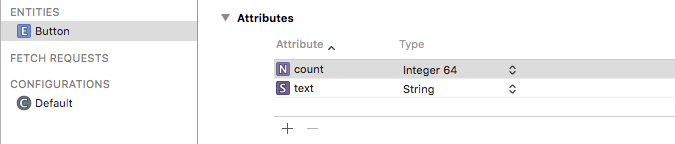
其中Button類是通過.xcdatamodeld文件生成的Entity實體類,包含了text和count兩個屬性
二.KeyboardView
同樣地定義了通用鍵盤WMKeyboardView:
static CGFloat WMKeyboardViewNumberHeight = 250;

typedef void(^WMKeyboardBlock)(WMKeyButtonType type, NSString *text);

@interface WMKeyboardView : UIView

- (instancetype)initKeyboardWithFrame:(CGRect)frame;
+ (instancetype)keyboardWithFrame:(CGRect)frame;

- (void)setWMKeyboardBlock:(WMKeyboardBlock)block;

@end
只不過這個通用View只是定義了一些初始化方法,程序中數字鍵盤和表情鍵盤繼承了WMKeyboardView,並在各自的.m文件中實現view中控件的布局。為了實現數字鍵盤上的數字交換,在WMKeyboardNumberView中定義了交換數字的方法:
- (void)exchangeNumber {
    NSMutableArray *numbers = [NSMutableArray array];

    int startNum = 0;
    int length = 10;

    for (int i = startNum; i < length; i++) {
        [numbers addObject:[NSString stringWithFormat:@"%d", i]];
    }

    for (int i = 0; i < self.numberKeys.count; i++) {
        WMKeyButton *button = self.numberKeys[i];

        if (i == kWMKeyboardNumberDelIndex) {
            [button setTitle:DeleteText forState:UIControlStateNormal];
            continue;
        } else if (i == kWMKeyboardNumberDoneIndex) {
            [button setTitle:DoneText forState:UIControlStateNormal];
            continue;
        }

        int index = arc4random() % numbers.count;
        [button setTitle:numbers[index] forState:UIControlStateNormal];

        [numbers removeObjectAtIndex:index];
    }
}
對於這個方法的調用就交給控制器去操心了~
另外,在WMKeyboardSpecialView中定義了setButtonsWithType:(WMKeyboardOtherType)type方法,在切換類型(常用or全部)時更新界面,而每次點擊按鈕更新button的count屬性則是放在了block中。
三.控制器
在控制器中定義了兩個控件,textField和textView,要實現鍵盤中的數字變更在textField的代理方法textFieldShouldBeginEditing:(UITextField *)textField中調用numberKeyboardView的exchangeNumber方法。至於修改textField和textView中文字的方法放在了各自的分類中。
/**
 *  修改textField中的文字
 */
- (void)changetext:(NSString *)text {
    UITextPosition *beginning = self.beginningOfDocument;
    UITextPosition *start = self.selectedTextRange.start;
    UITextPosition *end = self.selectedTextRange.end;
    NSInteger startIndex = [self offsetFromPosition:beginning toPosition:start];
    NSInteger endIndex = [self offsetFromPosition:beginning toPosition:end];

    // 將輸入框中的文字分成兩部分,生成新字符串,判斷新字符串是否滿足要求
    NSString *originText = self.text;
    NSString *part1 = [originText substringToIndex:startIndex];
    NSString *part2 = [originText substringFromIndex:endIndex];

    NSInteger offset;

    if (![text isEqualToString:@""]) {
        offset = text.length;
    } else {
        if (startIndex == endIndex) { // 只刪除一個字符
            if (startIndex == 0) {
                return;
            }
            offset = -1;
            part1 = [part1 substringToIndex:(part1.length - 1)];
        } else {
            offset = 0;
        }
    }

    NSString *newText = [NSString stringWithFormat:@"%@%@%@", part1, text, part2];
    self.text = newText;

    // 重置光標位置
    UITextPosition *now = [self positionFromPosition:start offset:offset];
    UITextRange *range = [self textRangeFromPosition:now toPosition:now];
    self.selectedTextRange = range;
}
首先我們需要獲取到光標的位置從而判斷用戶想把文字插入的地方,根據光標所在的位置(也可能是一個范圍)將文字分成兩個部分,判斷不同的用戶操作對文字進行替換之後我們需要重新設置光標的位置。這樣就實現了插入和刪除操作。
四.數據存儲
表情的文字最初存儲在plist裡面,在第一次運行的時候讀取出來,通過CoreData進行存儲以及管理。
- (void)addKeyboardButtonText {
    NSEntityDescription *entity = [NSEntityDescription entityForName:CoreDataStackButton inManagedObjectContext:self.stack.managedObjectContext];

    NSString *plistPath = [[NSBundle mainBundle] pathForResource:@"KeyboardButtonText" ofType:@"plist"];
    NSDictionary *dict = [NSDictionary dictionaryWithContentsOfFile:plistPath];
    NSArray *textArray = dict[@"texts"];
    for (NSString *text in textArray) {
        Button *button = [[Button alloc] initWithEntity:entity insertIntoManagedObjectContext:self.stack.managedObjectContext];
        button.text = text;
        button.count = 0;
    }

    [self.stack saveContext];
}
好了,整個demo的大體思路就是這樣子,自己水平有限,有問題和可以改進的地方也歡迎大家指正。


- 【投稿】如何在運行時改變App的圖標
- 【投稿】iOS藍牙開發(一)藍牙相關基礎知識
- 【投稿】使用 fastlane 實現 iOS 持續集成
- 【投稿】用同一個工程創建兩個不同版本的應用
- 【投稿】友好的 ContainerView & AutoLayout 資料推薦
- 【投稿】CocoaPods的一些略為高級一丁點的使用
- 【投稿】iOS 藍牙開發(二)iOS 連接外設的代碼實現
- 【投稿】Xcode 創建靜態庫和動態庫
- 打造Objective
- 開發該選擇Blocks還是Delegates
- iOS相冊Moment功能的優化方案
- Cocoapods 應用第二部分
- iOS 9:快速讓你的APP支持spotlight搜索
- 【投稿】UIAppearance教程:入門
- 【投稿】Xcode插件XBookmark開發筆記