Runtime實戰之定制TabBarItem大小

投稿文章,作者:Dreamer-Panda(微博)
本篇blog主要講解如何定制TabBarItem的大小,最終實現AppStore各大主流APP TabBarItem超出TabBar的效果。希望對大家有所幫助。
方案一:UIEdgeInsets
適用場景:
適合APP的TabBarItemImage的圖片資源放在本地
圖片超出tabbar的高度,需移動其位置,來進行適應
弊端:
若在本地配置好後,tabbar的圖片就不能改動了,若tabbar的圖片來自服務端,且不停的切換圖片的大小,以上則很難滿足。若有此方面的需求請看方案二。
實現:
[tabbarItem setImageInsets:UIEdgeInsetsMake(<#CGFloat top#>, <#CGFloat left#>, <#CGFloat bottom#>, <#CGFloat right#>)]
注:圖片太大超出tabbar時,系統並不會調整image和title的位置,你需要根據圖片的高度,計算出需要往上移動的高度,然後設置top和bottom屬性即可。切記top = - bottom,否則image將會被拉伸或者被壓縮。
方案二:Runtime
利用runtime的話相對方案一來說要比較復雜一點,但其靈活度比較高,我們能夠根據服務端所給的image來動態的變化TabBarItem的大小,類似像淘寶、京東活動時。思想:主要是利用runtime對UITabBar的layoutSubviews進行重寫,然後調整UITabBarItem的位置。另外,當時在做的APP已經有4-5年的歷史了,一開始打算自已定制tabbar,發現要改動的還是挺多的,於是就放棄了。做之前也看了前輩iOS程序犭袁的CYLTabBarController,從中也學到了不少思路。
實現:
首先我們使用runtime method swizzling交換系統的- (void)layoutSubviews;
使用KVC對系統的UITabBarButton、UITabBarSwappableImageView、UITabBarButtonLabel、_UIBadgeView進行捕獲
拿到控件後我們對其的frame進行計算,判斷當前有沒有超出tabbar的高度,若超出則進行處理
再次利用runtime method swizzling交換系統的- (nullable UIView *)hitTest:(CGPoint)point withEvent:(nullable UIEvent *)event;使圖片超過後也能接受點擊
代碼:
method swizzling:
static void ExchangedMethod(SEL originalSelector, SEL swizzledSelector, Class class) {
    Method originalMethod = class_getInstanceMethod(class, originalSelector);
    Method swizzledMethod = class_getInstanceMethod(class, swizzledSelector);
    BOOL didAddMethod =
    class_addMethod(class,
                    originalSelector,
                    method_getImplementation(swizzledMethod),
                    method_getTypeEncoding(swizzledMethod));
    if (didAddMethod) {
        class_replaceMethod(class,
                     swizzledSelector,
                     method_getImplementation(originalMethod),
                     method_getTypeEncoding(originalMethod));
    }
    else {
        method_exchangeImplementations(originalMethod, swizzledMethod);
    }
}
計算frame,並對其重新布局
UIView *tabBarImageView, *tabBarButtonLabel, *tabBarBadgeView;
        for (UIView *sTabBarItem in childView.subviews) {
            if ([sTabBarItem isKindOfClass:NSClassFromString(@"UITabBarSwappableImageView")]) {
                tabBarImageView = sTabBarItem;
            }
            else if ([sTabBarItem isKindOfClass:NSClassFromString(@"UITabBarButtonLabel")]) {
                tabBarButtonLabel = sTabBarItem;
            }
            else if ([sTabBarItem isKindOfClass:NSClassFromString(@"_UIBadgeView")]) {
                tabBarBadgeView = sTabBarItem;
            }
        }
        NSString *tabBarButtonLabelText = ((UILabel *)tabBarButtonLabel).text;
        CGFloat y = CGRectGetHeight(self.bounds) - (CGRectGetHeight(tabBarButtonLabel.bounds) + CGRectGetHeight(tabBarImageView.bounds));
        if (y < 3) {
            if (!tabBarButtonLabelText.length) {
                space -= tabBarButtonLabelHeight;
            }
            childView.frame = CGRectMake(childView.frame.origin.x,
                               y - space,
                               childView.frame.size.width,
                               childView.frame.size.height - y + space);
        }
讓圖片超出部分也能響應點擊事件
- (UIView *)s_hitTest:(CGPoint)point withEvent:(UIEvent *)event {
    if (!self.clipsToBounds && !self.hidden && self.alpha > 0) {
        UIView *result = [super hitTest:point withEvent:event];
        if (result) {
            return result;
        }
        else {
            for (UIView *subview in self.subviews.reverseObjectEnumerator) {
                CGPoint subPoint = [subview convertPoint:point fromView:self];
                result = [subview hitTest:subPoint withEvent:event];
                if (result) {
                    return result;
                }
            }
        }
    }
    return nil;
}
注意事項
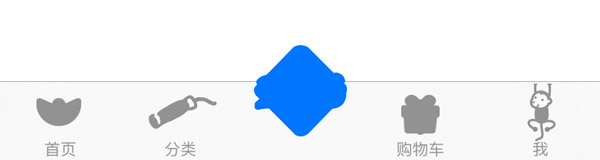
在給tabbar設置圖片的時候一定要設置圖片的renderingMode,否則就會出現下圖中圖片丟失的現象
UITabBarButton被修改frame之後,僅有UITabBarSwappableImageView能夠響應點擊事件,不過我們能夠在UITabBar的- (void)touchesBegan:(NSSet
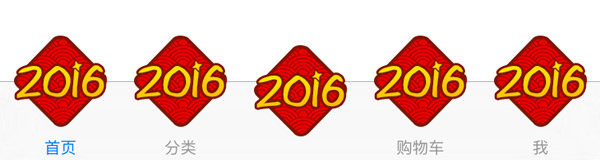
*)touches withEvent:(nullable UIEvent *)event;方法中捕獲到 當適配圖片後不要忘記適配_UIBadgeView的frame
效果圖
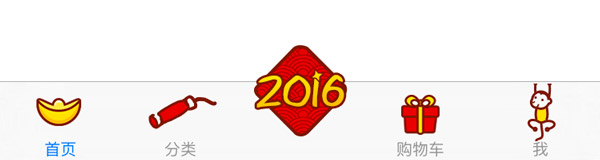
正常中間超出
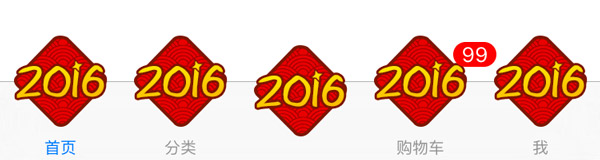
做活動時全部超出
圖片丟失
UIBadgeView
感謝大家花費時間來查看這篇blog,需要下載demo的同學請猛戳GitHub。

- 進修iOS自界說導航掌握器UINavigationController
- iOS 開辟中 NavigationController常常湧現的成績緣由剖析
- iOS簡略登錄LoginViewController、注冊RegisterViewController等功效完成辦法
- ios開辟navigationController pushViewController 方法屢次跳轉前往到最下層前往到指定的某一層的完成辦法
- iOS突變圓環扭轉動畫CAShapeLayer CAGradientLayer
- UIMenuController在Cell外部沒法顯示的處理方法(iOS9.2)
- iOS中navigationController 去失落配景圖片、去失落底部線條的焦點代碼
- iOS Runntime 靜態添加類辦法並挪用-class_addMethod
- iOS應用runtime修正文本框(TextField)的占位文字色彩
- 總結iOS中runtime的應用
- iOS App開辟中UIViewController類的應用教程
- 實例講授iOS中的UIPageViewController翻頁視圖掌握器
- iOS中長按調出菜單組件UIMenuController的應用實例
- iOS App開辟中的UISegmentedControl分段組件用法總結
- iOS App開辟中的UIPageControl分頁控件應用小結