UITableViewCell 高度自適應
UITableViewCell 高度自適應一直是我們做動態Cell高度時遇到的最煩躁的問題,Cell動態高度計算可以去看看sunny的這篇文章介紹,今天主要和大家分享下我在使用systemLayoutSizeFittingSize系統自帶方法計算高度的一些心得!
Demo gif

先看原函數注釋
/* The size fitting most closely to targetSize in which the receiver's subtree can be laid out while optimally satisfying the constraints. If you want the smallest possible size, pass UILayoutFittingCompressedSize; for the largest possible size, pass UILayoutFittingExpandedSize.
 Also see the comment for UILayoutPriorityFittingSizeLevel.
 */- (CGSize)systemLayoutSizeFittingSize:(CGSize)targetSize NS_AVAILABLE_IOS(6_0); // Equivalent to sending -systemLayoutSizeFittingSize:withHorizontalFittingPriority:verticalFittingPriority: with UILayoutPriorityFittingSizeLevel for both priorities.
從注釋中我們可以看出,當你的約束條件配置好後它可以計算出最接近目標的Size,那我們該如何下手呢?
1.首先我們需要建一個UITableViewCell
假如我們Cell的布局如下所示:
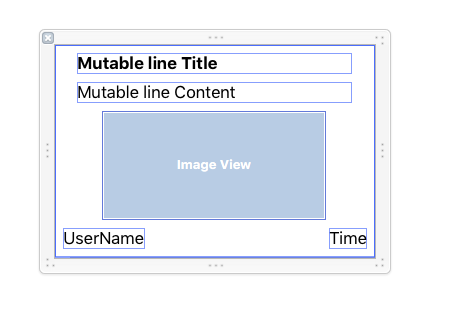
Cell所對應的Class我們取名為ZHCalculateTableViewCell
所帶屬性我們定義為:
@interface ZHCalculateTableViewCell : UITableViewCell
@property (weak, nonatomic) IBOutlet UILabel *TitleLabel;
@property (weak, nonatomic) IBOutlet UILabel *ContentLabel;
@property (weak, nonatomic) IBOutlet UIImageView *showImgView;
@property (weak, nonatomic) IBOutlet UILabel *UseNameLabel;
@property (weak, nonatomic) IBOutlet UILabel *TimeLabel;
@property (strong, nonatomic) ZHCalculateHeightModel *model;
@end
看到這裡也許你會疑惑ZHCalculateHeightModel是什麼,它是我們Cell所要展示的數據來源!
2.然後我們為我們的Cell建個數據模型
Cell的模型名稱我們暫定為:ZHCalculateHeightModel
所帶屬性:
@interface ZHCalculateHeightModel : NSObject
@property (nonatomic, strong) NSString *title;
@property (nonatomic, strong) NSString *content;
@property (nonatomic, strong) NSString *username;
@property (nonatomic, strong) NSString *time;
@property (nonatomic, strong) NSString *imageName;
Ok,數據模型建立好了,展示的TableViewCell也有了, Just Show it~
3. 建一個繼承於UITableViewController的ZHCustomLayoutTableViewController
建一個在函數
-(CGFloat)tableView:(UITableView *)tableView heightForRowAtIndexPath:(NSIndexPath *)indexPath中調用的Cell:@property (nonatomic, strong) ZHCalculateTableViewCell *prototypeCell;
注冊Cell
[self.tableView registerNib:[UINib nibWithNibName:@"ZHCalculateTableViewCell" bundle:[NSBundle mainBundle]] forCellReuseIdentifier:CellIdentifier];
self.tableView.estimatedRowHeight = 100;//很重要保障滑動流暢性
self.prototypeCell = [self.tableView dequeueReusableCellWithIdentifier:CellIdentifier];
動態計算高度
   -(CGFloat)tableView:(UITableView *)tableView heightForRowAtIndexPath:(NSIndexPath *)indexPath
{

    ZHCalculateTableViewCell *cell = self.prototypeCell;
    cell.contentView.translatesAutoresizingMaskIntoConstraints = NO;
    [self configureCell:cell atIndexPath:indexPath];//必須先對Cell中的數據進行配置使動態計算時能夠知道根據Cell內容計算出合適的高度

    /*------------------------------重點這裡必須加上contentView的寬度約束不然計算出來的高度不准確-------------------------------------*/
    CGFloat contentViewWidth = CGRectGetWidth(self.tableView.bounds);
    NSLayoutConstraint *widthFenceConstraint = [NSLayoutConstraint constraintWithItem:cell.contentView attribute:NSLayoutAttributeWidth relatedBy:NSLayoutRelationEqual toItem:nil attribute:NSLayoutAttributeNotAnAttribute multiplier:1.0 constant:contentViewWidth];
    [cell.contentView addConstraint:widthFenceConstraint];
    // Auto layout engine does its math
    CGFloat fittingHeight = [cell.contentView systemLayoutSizeFittingSize:UILayoutFittingCompressedSize].height;
    [cell.contentView removeConstraint:widthFenceConstraint];
    /*-------------------------------End------------------------------------*/

    return fittingHeight+2*1/[UIScreen mainScreen].scale;//必須加上上下分割線的高度
}


#pragma mark Configure Cell Data
- (void)configureCell:(ZHCalculateTableViewCell *)cell atIndexPath:(NSIndexPath *)indexPath {
    cell.model = [dataArray objectAtIndex:indexPath.row];//Cell中對其進行處理
}
ZHCalculateTableViewCell Model的Set函數重寫為
#pragma mark - Setters
-(void)setModel:(ZHCalculateHeightModel *)model
{
    _model = model;
    self.TitleLabel.text = model.title;
    self.ContentLabel.text = model.content;
    self.showImgView.image = model.imageName.length > 0 ? [UIImage imageNamed:model.imageName] : nil;
    self.UseNameLabel.text = model.username;
    self.TimeLabel.text = model.time;

}
擴展
我們可以在計算高度後對其進行緩存,下次可以直接返回!
總結
在
-(CGFloat)tableView:(UITableView *)tableView heightForRowAtIndexPath:(NSIndexPath *)indexPath一定不要用ZHCalculateTableViewCell *cell = [tableView cellForRowAtIndexPath:indexPath];來獲取Cell。上述動態計算Cell高度中最最重要的是需要在計算前先初始化Cell中的數據。
一定要對ContentView加上寬度約束。
CGFloat contentViewWidth = CGRectGetWidth(self.tableView.bounds);
  NSLayoutConstraint *widthFenceConstraint = [NSLayoutConstraint constraintWithItem:cell.contentView attribute:NSLayoutAttributeWidth relatedBy:NSLayoutRelationEqual toItem:nil attribute:NSLayoutAttributeNotAnAttribute multiplier:1.0 constant:contentViewWidth];
  [cell.contentView addConstraint:widthFenceConstraint];
  // Auto layout engine does its math
  CGFloat fittingHeight = [cell.contentView systemLayoutSizeFittingSize:UILayoutFittingCompressedSize].height;
  [cell.contentView removeConstraint:widthFenceConstraint];
Demo 下載地址
GitHub



- iOS開源一個簡略的訂餐app UI框架
- 在uiview 的tableView中點擊cell進入跳轉到另外一個界面的完成辦法
- iOS開辟之UIScrollView控件詳解
- 進修iOS自界說導航掌握器UINavigationController
- iOS仿熱點話題熱門輪播界面tableView
- IOS中UITableView轉動到指定地位
- iOS為UIView設置暗影後果
- iOS設置UIButton文字顯示地位和字體年夜小、色彩的辦法
- iOS開辟之UIPickerView完成城市選擇器的步調詳解
- iOS長按UIlabel完成可復制功效
- iOS開辟中UIWebView的加載當地數據的三種方法
- iOS中修正UITextField占位符字體色彩的辦法總結
- IOS 仿時間網選票UI實例代碼
- iOS推送之當地告訴UILocalNotification
- 應用UITextField限制只可輸出中,英文,數字的辦法