iOS runtime實用篇
程序崩潰經歷
其實在很早之前就想寫這篇文章了,一直拖到現在。
程序崩潰經歷1
我們公司做的是股票軟件,但集成的是第三方的靜態庫(我們公司和第三方公司合作,他們提供股票的服務,我們付錢)。平時開發測試的時候好好的,結果上線幾天發現有崩潰的問題,其實責任大部分在我身上。
我的責任: 過分信賴文檔,沒進行容錯處理,也就是沒有對數據進行相應的判斷處理。
下面附上代碼,說明崩潰的原因
因第三方公司提供的數據錯亂導致有時候創建字典的時候個別value為nil才導致的崩潰
//宏#define CStringToOcString(cstr) [NSString stringWithCString:cstr encoding:GBK_ENCODE]//將每組數據都保存起來NSMutableArray *returnArray = [NSMutableArray array];for (int i = 0; i < recordM.count; i++) {
    Withdrawqry_entrust_record *record = (Withdrawqry_entrust_record *)alloca(sizeof(Withdrawqry_entrust_record));    memset(record, 0x00, sizeof(Withdrawqry_entrust_record));
    [[recordM objectAtIndex:i] getValue:record];    //崩潰的原因在創建字典的時候,有個別value為nil  (CStringToOcString)

    NSDictionary *param =   @{
      @"batch_no" : CStringToOcString(record->batch_no),// 委托批號
      @"entrust_no" : CStringToOcString(record->entrust_no),// 委托編號
      @"entrust_type" : @(record->entrust_type),//委托類別  6 融資委托 7 融券委托 和entrust_bs結合形成融資買入,融資賣出,融券賣出,融券買入
      @"entrust_bs" : @(record->entrust_bs),// 買賣標志
      @"stock_account" : CStringToOcString(record->stock_account),//證券賬號
      @"gdcode" : CStringToOcString(record->gdcode),
      .....
      .....
      .....

                              };
解決辦法,在宏那裡做了個判斷,若果value為nil,直接賦值為@""
#define CStringToOcString(cstr) [NSString stringWithCString:cstr encoding:GBK_ENCODE] ? [NSString stringWithCString:cstr encoding:GBK_ENCODE] : @""
程序崩潰經歷2
不做過多的闡述,直接看代碼
    //服務器返回的日期格式為20160301
    //我要將格式轉換成2016-03-01

    /** 委托日期 */
    NSMutableString *dateStrM = 服務器返回的數據

    [dateStrM insertString:@"-" atIndex:4];
    [dateStrM insertString:@"-" atIndex:7];
就是上面的代碼導致了上線的程序崩潰,搞的我在第二天緊急再上線了一個版本。
為何會崩潰呢?原因是服務器返回的數據錯亂了,返回了0。這樣字符串的長度就為1,而卻插入下標為4的位置,程序必然會崩潰。後來在原本代碼上加了一個判斷,如下代碼:
  if (dateStrM.length >= 8) {
      [dateStrM insertString:@"-" atIndex:4];
      [dateStrM insertString:@"-" atIndex:7];
   }
醒悟
1、不要過分相信服務器返回的數據會永遠的正確。
2、在對數據處理上,要進行容錯處理,進行相應判斷之後再處理數據,這是一個良好的編程習慣。
思考:如何防止存在潛在崩潰方法的崩潰
眾所周知,Foundation框架裡有非常多常用的方法有導致崩潰的潛在危險。對於一個已經將近竣工的項目,若起初沒做容錯處理又該怎麼辦?你總不會一行行代碼去排查有沒有做容錯處理吧!-------- 別逗逼了,老板催你明天就要上線了!
那有沒有一種一勞永逸的方法?無需動原本的代碼就可以解決潛在崩潰的問題呢?
解決方案
攔截存在潛在崩潰危險的方法,在攔截的方法裡進行相應的處理,就可以防止方法的崩潰
步驟:
1、通過category給類添加方法用來替換掉原本存在潛在崩潰的方法。
2、利用runtime方法交換技術,將系統方法替換成我們給類添加的新方法。
3、利用異常的捕獲來防止程序的崩潰,並且進行相應的處理。
如果對異常NSException不了解,可以點擊查看NSException的介紹。
具體實現
創建一個工具類AvoidCrash,來處理方法的交換,獲取會導致崩潰代碼的具體位置,在控制台輸出錯誤的信息......
代碼中有正則表達式的知識點,不熟悉正則表達式的朋友們點我
AvoidCrash.h
//// AvoidCrash.h// AvoidCrash//// Created by mac on 16/9/21.// Copyright ? 2016年 chenfanfang. All rights reserved.//#import#import //通知的名稱,若要獲取詳細的崩潰信息,請監聽此通知#define AvoidCrashNotification @"AvoidCrashNotification"#define AvoidCrashDefaultReturnNil @"This framework default is to return nil."#define AvoidCrashDefaultIgnore @"This framework default is to ignore this operation to avoid crash."@interface AvoidCrash : NSObject/** * become effective . You can call becomeEffective method in AppDelegate didFinishLaunchingWithOptions * * 開始生效.你可以在AppDelegate的didFinishLaunchingWithOptions方法中調用becomeEffective方法 */+ (void)becomeEffective; + (void)exchangeClassMethod:(Class)anClass method1Sel:(SEL)method1Sel method2Sel:(SEL)method2Sel; + (void)exchangeInstanceMethod:(Class)anClass method1Sel:(SEL)method1Sel method2Sel:(SEL)method2Sel; + (NSString *)getMainCallStackSymbolMessageWithCallStackSymbolStr:(NSString *)callStackSymbolStr; + (void)noteErrorWithException:(NSException *)exception defaultToDo:(NSString *)defaultToDo;@end
AvoidCrash.m
////  AvoidCrash.m//  AvoidCrash////  Created by mac on 16/9/21.//  Copyright ? 2016年 chenfanfang. All rights reserved.//#import "AvoidCrash.h"//category#import "NSArray+AvoidCrash.h"#import "NSMutableArray+AvoidCrash.h"#import "NSDictionary+AvoidCrash.h"#import "NSMutableDictionary+AvoidCrash.h"#import "NSString+AvoidCrash.h"#import "NSMutableString+AvoidCrash.h"#define AvoidCrashSeparator         @"================================================================"#define AvoidCrashSeparatorWithFlag @"========================AvoidCrash Log=========================="#define key_errorName        @"errorName"#define key_errorReason      @"errorReason"#define key_errorPlace       @"errorPlace"#define key_defaultToDo      @"defaultToDo"#define key_callStackSymbols @"callStackSymbols"#define key_exception        @"exception"@implementation AvoidCrash/**
 *  開始生效(進行方法的交換)
 */+ (void)becomeEffective {    static dispatch_once_t onceToken;    dispatch_once(&onceToken, ^{

        [NSArray avoidCrashExchangeMethod];
        [NSMutableArray avoidCrashExchangeMethod];

        [NSDictionary avoidCrashExchangeMethod];
        [NSMutableDictionary avoidCrashExchangeMethod];

        [NSString avoidCrashExchangeMethod];
        [NSMutableString avoidCrashExchangeMethod];

    });
}/**
 *  類方法的交換
 *
 *  @param anClass    哪個類
 *  @param method1Sel 方法1
 *  @param method2Sel 方法2
 */+ (void)exchangeClassMethod:(Class)anClass method1Sel:(SEL)method1Sel method2Sel:(SEL)method2Sel {
    Method method1 = class_getClassMethod(anClass, method1Sel);
    Method method2 = class_getClassMethod(anClass, method2Sel);
    method_exchangeImplementations(method1, method2);
}/**
 *  對象方法的交換
 *
 *  @param anClass    哪個類
 *  @param method1Sel 方法1
 *  @param method2Sel 方法2
 */+ (void)exchangeInstanceMethod:(Class)anClass method1Sel:(SEL)method1Sel method2Sel:(SEL)method2Sel {
    Method method1 = class_getInstanceMethod(anClass, method1Sel);
    Method method2 = class_getInstanceMethod(anClass, method2Sel);
    method_exchangeImplementations(method1, method2);
}/**
 *  獲取堆棧主要崩潰精簡化的信息<根據正則表達式匹配出來>
 *
 *  @param callStackSymbolStr 堆棧主要崩潰信息
 *
 *  @return 堆棧主要崩潰精簡化的信息
 */+ (NSString *)getMainCallStackSymbolMessageWithCallStackSymbolStr:(NSString *)callStackSymbolStr {    //不熟悉正則表達式的朋友,可以看我另外一篇文章,鏈接在下面
    //http://www.jianshu.com/p/b25b05ef170d

    //mainCallStackSymbolMsg的格式為   +[類名 方法名]  或者 -[類名 方法名]
    __block NSString *mainCallStackSymbolMsg = nil;    //匹配出來的格式為 +[類名 方法名]  或者 -[類名 方法名]
    NSString *regularExpStr = @"[-\\+]\\[.+\\]";    NSRegularExpression *regularExp = [[NSRegularExpression alloc] initWithPattern:regularExpStr options:NSRegularExpressionCaseInsensitive error:nil];

    [regularExp enumerateMatchesInString:callStackSymbolStr options:NSMatchingReportProgress range:NSMakeRange(0, callStackSymbolStr.length) usingBlock:^(NSTextCheckingResult * _Nullable result, NSMatchingFlags flags, BOOL * _Nonnull stop) {        if (result) {
            mainCallStackSymbolMsg = [callStackSymbolStr substringWithRange:result.range];
            *stop = YES;
        }
    }];    return mainCallStackSymbolMsg;
}/**
 *  提示崩潰的信息(控制台輸出、通知)
 *
 *  @param exception   捕獲到的異常
 *  @param defaultToDo 這個框架裡默認的做法
 */+ (void)noteErrorWithException:(NSException *)exception defaultToDo:(NSString *)defaultToDo {    //堆棧數據
    NSArray *callStackSymbolsArr = [NSThread callStackSymbols];    //獲取在哪個類的哪個方法中實例化的數組  字符串格式 -[類名 方法名]  或者 +[類名 方法名]
    NSString *mainCallStackSymbolMsg = [AvoidCrash getMainCallStackSymbolMessageWithCallStackSymbolStr:callStackSymbolsArr[2]];    if (mainCallStackSymbolMsg == nil) {

        mainCallStackSymbolMsg = @"崩潰方法定位失敗,請您查看函數調用棧來排查錯誤原因";

    }    NSString *errorName = exception.name;    NSString *errorReason = exception.reason;    //errorReason 可能為 -[__NSCFConstantString avoidCrashCharacterAtIndex:]: Range or index out of bounds
    //將avoidCrash去掉
    errorReason = [errorReason stringByReplacingOccurrencesOfString:@"avoidCrash" withString:@""];    NSString *errorPlace = [NSString stringWithFormat:@"Error Place:%@",mainCallStackSymbolMsg];    NSString *logErrorMessage = [NSString stringWithFormat:@"\n\n%@\n\n%@\n%@\n%@\n%@\n\n%@\n\n",AvoidCrashSeparatorWithFlag, errorName, errorReason, errorPlace, defaultToDo, AvoidCrashSeparator];    NSLog(@"%@", logErrorMessage);    NSDictionary *errorInfoDic = @{
                                   key_errorName        : errorName,
                                   key_errorReason      : errorReason,
                                   key_errorPlace       : errorPlace,
                                   key_defaultToDo      : defaultToDo,
                                   key_exception        : exception,
                                   key_callStackSymbols : callStackSymbolsArr
                                   };    //將錯誤信息放在字典裡,用通知的形式發送出去
    [[NSNotificationCenter defaultCenter] postNotificationName:AvoidCrashNotification object:nil userInfo:errorInfoDic];
}@end創建一個NSDictionary的分類,來防止創建一個字典而導致的崩潰。NSDictionary+AvoidCrash.h
//// NSDictionary+AvoidCrash.h// AvoidCrash//// Created by mac on 16/9/21.// Copyright ? 2016年 chenfanfang. All rights reserved.//#import@interface NSDictionary (AvoidCrash)+ (void)avoidCrashExchangeMethod;@end
NSDictionary+AvoidCrash.m
在這裡先補充一個知識點: 我們平常用的快速創建字典的方式@{key : value}; 其實調用的方法是dictionaryWithObjects:forKeys:count: 而該方法可能導致崩潰的原因為: key數組中的key或者objects中的value為空
////  NSDictionary+AvoidCrash.m//  AvoidCrash////  Created by mac on 16/9/21.//  Copyright ? 2016年 chenfanfang. All rights reserved.//#import "NSDictionary+AvoidCrash.h"#import "AvoidCrash.h"@implementation NSDictionary (AvoidCrash)+ (void)avoidCrashExchangeMethod {

    [AvoidCrash exchangeClassMethod:self method1Sel:@selector(dictionaryWithObjects:forKeys:count:) method2Sel:@selector(avoidCrashDictionaryWithObjects:forKeys:count:)];
}

+ (instancetype)avoidCrashDictionaryWithObjects:(const id  _Nonnull __unsafe_unretained *)objects forKeys:(const id  _Nonnull __unsafe_unretained *)keys count:(NSUInteger)cnt {    id instance = nil;    @try {
        instance = [self avoidCrashDictionaryWithObjects:objects forKeys:keys count:cnt];
    }    @catch (NSException *exception) {        NSString *defaultToDo = @"This framework default is to remove nil key-values and instance a dictionary.";
        [AvoidCrash noteErrorWithException:exception defaultToDo:defaultToDo];        //處理錯誤的數據,然後重新初始化一個字典
        NSUInteger index = 0;        id  _Nonnull __unsafe_unretained newObjects[cnt];        id  _Nonnull __unsafe_unretained newkeys[cnt];        for (int i = 0; i < cnt; i++) {            if (objects[i] && keys[i]) {
                newObjects[index] = objects[i];
                newkeys[index] = keys[i];
                index++;
            }
        }
        instance = [self avoidCrashDictionaryWithObjects:newObjects forKeys:newkeys count:index];
    }    @finally {        return instance;
    }
}@end
來看下防止崩潰的效果
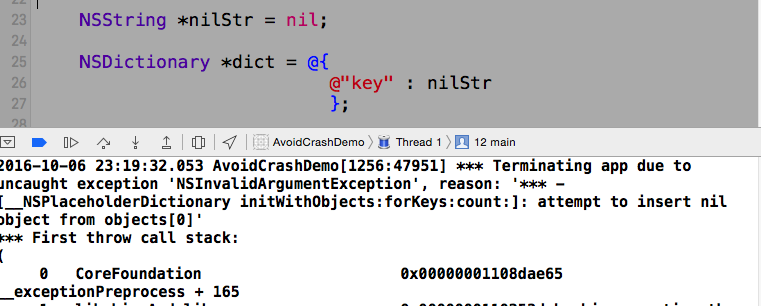
正常情況下,若沒有我們上面的處理,如下代碼就會導致崩潰
  NSString *nilStr = nil;  NSDictionary *dict = @{                         @"key" : nilStr
                         };
崩潰截圖如下:
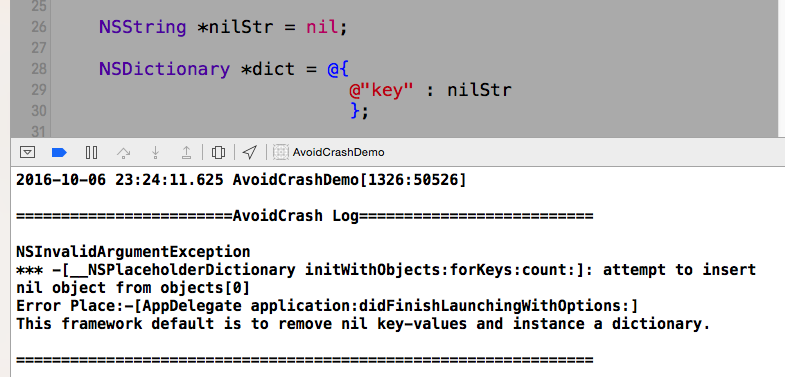
若通過如上的處理,就可以避免崩潰了
[AvoidCrash becomeEffective];
控制台的輸出截圖如下
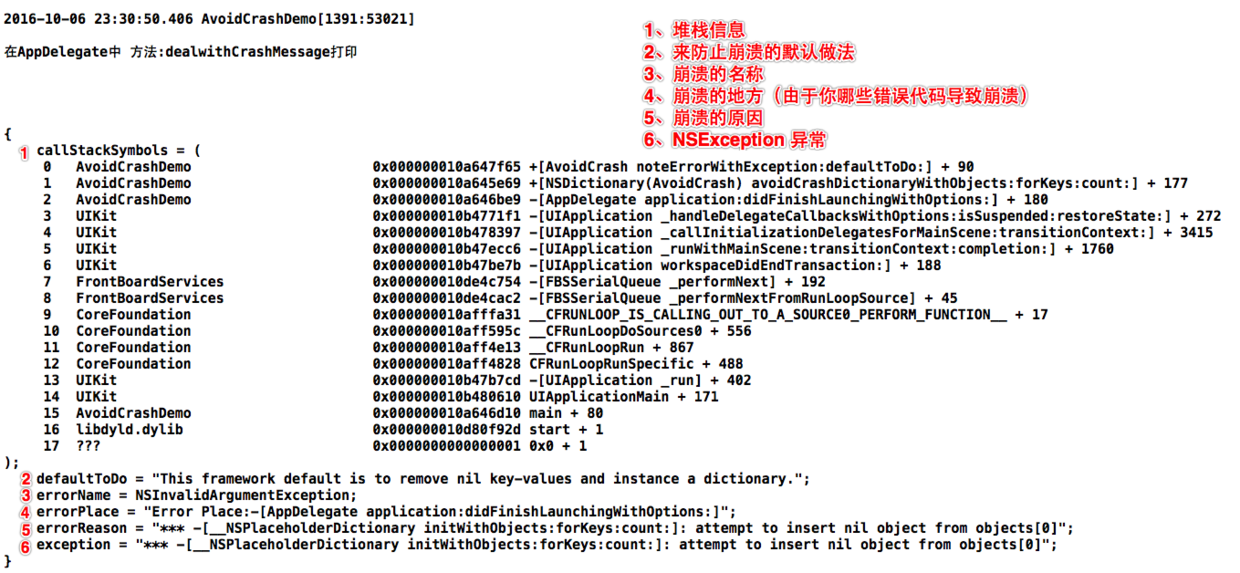
若想要獲取到崩潰的詳細信息(我們可以監聽通知,通知名為:AvoidCrashNotification):可以將這些信息傳到我們的服務器,或者在集成第三方收集Crash信息的SDK中自定義信息,這樣我們就可以防止程序的崩潰,並且又得知哪些代碼導致了崩潰。
 //監聽通知:AvoidCrashNotification, 獲取AvoidCrash捕獲的崩潰日志的詳細信息
 [[NSNotificationCenter defaultCenter] addObserver:self selector:@selector(dealwithCrashMessage:) name:AvoidCrashNotification object:nil];


- (void)dealwithCrashMessage:(NSNotification *)note {    //注意:所有的信息都在userInfo中
    //你可以在這裡收集相應的崩潰信息進行相應的處理(比如傳到自己服務器)
    NSLog(@"\n\n在AppDelegate中 方法:dealwithCrashMessage打印\n\n\n\n\n%@\n\n\n\n",note.userInfo);
}
附上一張截圖查看通知中攜帶的崩潰信息是如何的
結束語
程序崩潰有崩潰的好處,就是讓開發者快速認識到自己所寫的代碼有問題,這樣才能及時修復BUG,當然這種好處只限於在開發階段。若一個上線APP出現崩潰的問題,這問題可就大了(老板不高興,後果很嚴重)。
個人建議:在發布的時候APP的時候再用上面介紹的方法來防止程序的崩潰,在開發階段最好不用。
上面只是舉個例子,更多防止崩潰的方法請查看Github源碼 AvoidCrash,這是我最近寫的一個框架,大家可以集成到自己的項目中去,在發布APP的時候在appDelegate的didFinishLaunchingWithOptions中調用方法
[AvoidCrash becomeEffective];即可,若要獲取崩潰信息,監聽通知即可。
- (BOOL)application:(UIApplication *)application didFinishLaunchingWithOptions:(NSDictionary *)launchOptions {
    [AvoidCrash becomeEffective];    //監聽通知:AvoidCrashNotification, 獲取AvoidCrash捕獲的崩潰日志的詳細信息
    [[NSNotificationCenter defaultCenter] addObserver:self selector:@selector(dealwithCrashMessage:) name:AvoidCrashNotification object:nil];    return YES;
}

- (void)dealwithCrashMessage:(NSNotification *)note {    //注意:所有的信息都在userInfo中
    //你可以在這裡收集相應的崩潰信息進行相應的處理(比如傳到自己服務器)
    NSLog(@"\n\n在AppDelegate中 方法:dealwithCrashMessage打印\n\n\n\n\n%@\n\n\n\n",note.userInfo);
}
同時希望大家能夠提出更多容易導致崩潰的方法,我好添加到AvoidCrash框架中,當然也歡迎大家和我一起維護這個框架。
最後,希望大家給上你們珍貴的一票(帥哥、美女,給個star哈)。
AvoidCrash更新
2016-10-15
修復上一個版本部分方法不能攔截崩潰的BUG,具體修復哪些可以查看issues和簡書上的留言。
優化崩潰代碼的定位,定位崩潰代碼更加准確。
增加對KVC賦值防止崩潰的處理。
增加對NSAttributedString防止崩潰的處理
增加對NSMutableAttributedString防止崩潰的處理
源碼
https://github.com/chenfanfang/AvoidCrash