iOS 開發
自從在百度實習開始後,習慣了把 ViewController 裡面的一些通用邏輯寫在一個基類,然後其它 ViewController 再繼承這個基類,以前一直都認為這是一個不錯的做法,但今天看了篇關於 View 層的架構文章,完全顛覆了我以前的想法,派生基類並不是最好的選擇。
簡單的分析下原因
派生的基類會增加業務使用的成本
增加集成成本,在百度實習的時候,開發的 App 依賴於百度地圖和百度導航,而且都是直接源碼依賴進來的,每次編譯一次都好幾分鐘,在添加新的頁面和調試頁面時,需要經常運行查看,單是編譯的時間都讓人無法接受了。想新建一個基於我們開發的 App 環境的 Demo,但我們所有的 ViewController 都繼承於一個基類,而基類又依賴於各種樣的基礎庫,折騰半天也搞不出這麼一個 Demo.
增加學習成本,使用派生的基類時還需要我們去學習派生基類的使用
既然這種方式不是最好的選擇,那當然有更好的方式去取代這種方式來實現相同的效果,下面說下通過攔截器來實現和派生基類一樣的功能。
這裡我使用已經造好的輪子 Aspects 來進行方法的攔截,我們來創建一個繼承 NSObject 的 ViewController 的攔截器:
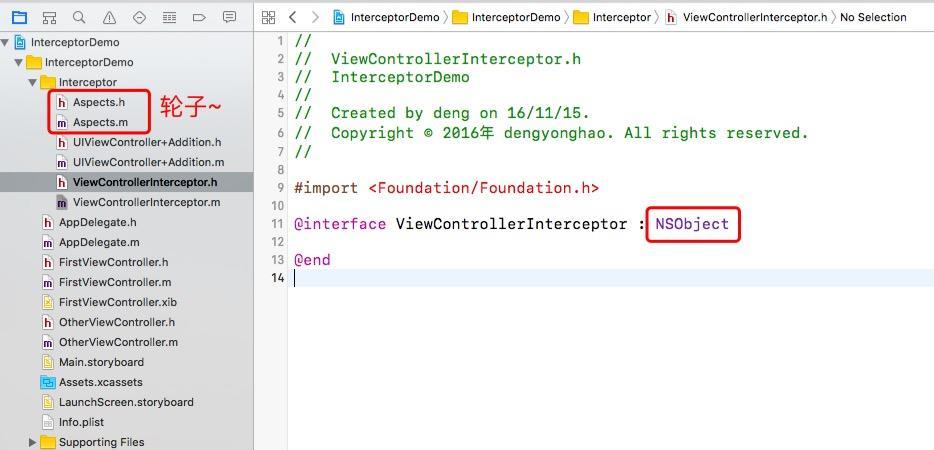
.m 文件:
@implementation ViewControllerInterceptor

// 會在應用啟動的時候自動被runtime調用,通過這個方法可以實現代碼的注入
+ (void)load {
    [super load];
    [ViewControllerInterceptor sharedInstance];
}

// 單例
+ (instancetype)sharedInstance {
    static dispatch_once_t onceToken;
    static ViewControllerInterceptor *sharedInstance;
    dispatch_once(&onceToken, ^{
        sharedInstance = [[ViewControllerInterceptor alloc] init];
    });
    return sharedInstance;
}

- (instancetype)init {
    if ([super init]) {

    }
    return self;
}

@end
實現一個單例來確保只初始化一次。因為繼承 NSObject,load() 方法就會在啟動時被runtime調用,通過這個方法可以實現代碼的注入。所以我們把 Aspects 的攔截方法實現在 init() 方法裡面:
- (instancetype)init {
    if ([super init]) {
         // 使用 Aspects 進行方法的攔截
         // AspectOptions 三種方式選擇:在原本方法前執行、在原本方法後執行、替換原本方法
        [UIViewController aspect_hookSelector:@selector(viewWillAppear:) withOptions:AspectPositionAfter usingBlock:^(id aspectInfo, BOOL animated){
            UIViewController * vc = [aspectInfo instance];
            [self viewWillAppear:animated viewController:vc];
        } error:NULL];
    }
    return self;
}
這裡會監聽 UIViewController 的 viewWillAppear: 方法,當 UIViewController 執行 viewWillAppear: 方法後,就會攔截到,然後執行攔截器的模擬 viewWillAppear: 方法:
// 通過這種方式可以代替原來框架中的基類,不必每個 ViewController 再去繼續原框架的基類
#pragma mark - fake methods
- (void)viewWillAppear:(BOOL)animated viewController:(UIViewController *)viewController
{
    // 去做基礎業務相關的內容
    if (!viewController.isInitTheme) {
        [self ThemeDidNeedUpdateStyle];
        viewController.isInitTheme = YES;
    }
    // 其他操作......
}

- (void)ThemeDidNeedUpdateStyle {
    NSLog(@"Theme did need update style");
}
在這裡,我想當的 ViewController 執行 viewWillAppear: 方法後判斷是否需要初始化主題,如果已經初始化成功後就會再次執行,所有我們需要在 ViewController 添加一個標志屬性,但 ViewController 是不確定的,我們並不知道當前 ViewController 是哪一個類,如果我每個 ViewController 都添加一個 isInitTheme 的標志,那就又回到派生基類上去了,這時候,就由神奇的 Category 來處理了。
我們對 UIViewControler Category 添加一個 isInitTheme 的屬性:
@interface UIViewController (Addition)

@property(nonatomic, assign) BOOL isInitTheme;

@end
然後再通過 runtime 來動態添加一個 isInitTheme 的實例變量:
#define KeyIsInitTheme @"KeyIsInitTheme"

@implementation UIViewController (Addition)

#pragma mark - inline property
- (BOOL)isInitTheme {
    return objc_getAssociatedObject(self, KeyIsInitTheme);
}

- (void)setIsInitTheme:(BOOL)isInitTheme {
    objc_setAssociatedObject(self, KeyIsInitTheme, @(isInitTheme), OBJC_ASSOCIATION_RETAIN_NONATOMIC);
}

@end
這裡我們就成功在 UIViewController 的 Category 中添加一個實例變量,然後我們就可以使用這個屬性來進行判斷了。
擴展一個問題,當前的代碼是會攔截所有的 ViewController,如果我們想針對某些 ViewController 不攔截又需要怎麼辦呢?
其實很簡單,同上面的 isInitTheme 屬性一樣,再添加一個判斷是否需要進行監聽的屬性:
// 攔截器是否有效
@property(nonatomic, assign) BOOL disabledInterceptor;
然後一樣需要通過 runtime 來實現實例變量。然後在 Aspects 攔截成功後進行判斷是否需要下一步的操作:
- (instancetype)init {
    if ([super init]) {
         // 使用 Aspects 進行方法的攔截
         // AspectOptions 三種方式選擇:在原本方法前執行、在原本方法後執行、替換原本方法
        [UIViewController aspect_hookSelector:@selector(viewWillAppear:) withOptions:AspectPositionAfter usingBlock:^(id aspectInfo, BOOL animated){
            UIViewController * vc = [aspectInfo instance];
            if (!vc.disabledInterceptor) {
                [self viewWillAppear:animated viewController:vc];
            }
        } error:NULL];
    }
    return self;
}
在這裡,通過攔截來取代派生的基類,這樣的做法的好處是 業務代碼不需要對框架的主動迎合,使得業務能夠被框架感知 ,這裡只拿 UIViewControler 來做例子,但不限 UIViewControler, 其它的類也是適用的。
這裡介紹了通過攔截器來取代派生基類,但是在需要用繼承的地方法還是需要使用繼承,適當選擇最優的方案才是最明智的, Demo 放在 github ,需要的可以自行下載。