iOS開發UI篇—Quartz2D(自定義UIImageView控件)
一、實現思路
Quartz2D最大的用途在於自定義View(自定義UI控件),當系統的View不能滿足我們使用需求的時候,自定義View。
使用Quartz2D自定義View,可以從模仿系統的ImageView的使用開始。
需求驅動開發:模仿系統的imageview的使用過程
1.創建
2.設置圖片
3.設置frame
4.把創建的自定義的view添加到界面上(在自定義的View中,需要一個image屬性接收image圖片參數->5)。
5.添加一個image屬性(接下來,拿到image之後,應該把拿到的這個image給渲染出來。怎麼渲染?自定義的view怎麼把圖片顯示出來?->把圖片給畫出來,所以需要重寫自定義View的drawRect:方法)。
6.重寫自定義View的drawRect:方法,在該方法內部畫出圖形。
二、代碼實現
系統自帶的ImageView的使用
//
//  YYViewController.m
//  02-自定義UIimageview
//
//  Created by apple on 14-6-22.
//  Copyright (c) 2014年 itcase. All rights reserved.
//
#import "YYViewController.h"
@interface YYViewController ()
@end
@implementation YYViewController
- (void)viewDidLoad
{
    [super viewDidLoad];
    //系統的UIImageview的使用
//    1.創建一個UIImageView
    UIImageView *iv=[[UIImageView alloc]init];
//    2.設置圖片
    iv.image=[UIImage imageNamed:@"me"];
//    3.設置frame
    iv.frame=CGRectMake(100, 100, 100, 100);
//    4.把創建的自定義的view添加到界面上
    [self.view addSubview:iv];
}
@end
實現效果:
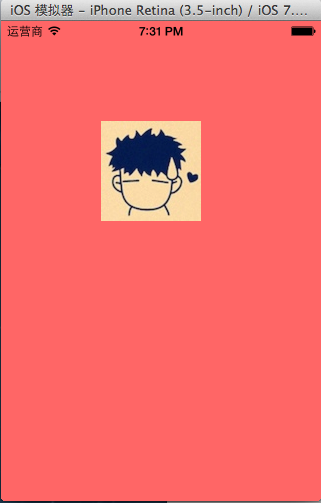
使用Quartz2D自定義View,代碼如下:
新建一個自定義的類,讓其繼承自UIView,YYimageView.h文件代碼如下:
 1 //
 2 //  YYimageView.h
 3 //  02-自定義UIimageview
 4 //
 5 //  Created by apple on 14-6-22.
 6 //  Copyright (c) 2014年 itcase. All rights reserved.
 7 //
 8
 9 #import 10
11 @interface YYimageView : UIView
12 @property(nonatomic,strong)UIImage *image;
13 @end
在自定義類的實現中,重寫DrawRect:方法繪制並渲染圖形。YYimageView.m文件代碼如下:
1 //
 2 //  YYimageView.m
 3 //  02-自定義UIimageview
 4 //
 5 //  Created by apple on 14-6-22.
 6 //  Copyright (c) 2014年 itcase. All rights reserved.
 7 //
 8
 9 #import "YYimageView.h"
10
11 @implementation YYimageView
12
13 //重寫drawRect:方法
14 - (void)drawRect:(CGRect)rect
15 {
16     [self.image drawInRect:rect];
17 }
18
19 @end
在主控制器中,模仿系統自帶的UIImageView的使用過程,實現同樣的效果。
 1 //
 2 //  YYViewController.m
 3 //  02-自定義UIimageview
 4 //
 5 //  Created by apple on 14-6-22.
 6 //  Copyright (c) 2014年 itcase. All rights reserved.
 7 //
 8
 9 #import "YYViewController.h"
10 #import "YYimageView.h"
11
12 @interface YYViewController ()
13
14 @end
15
16 @implementation YYViewController
17
18 - (void)viewDidLoad
19 {
20     [super viewDidLoad];
21
22 //    //系統的UIImageview的使用
23 ////    1.創建一個UIImageView
24 //    UIImageView *iv=[[UIImageView alloc]init];
25 ////    2.設置圖片
26 //    iv.image=[UIImage imageNamed:@"me"];
27 ////    3.設置frame
28 //    iv.frame=CGRectMake(100, 100, 100, 100);
29 ////    4.把創建的自定義的view添加到界面上
30 //    [self.view addSubview:iv];
31
32
33     //自定義UIImageView
34     //1.創建
35     //2.設置圖片
36     //3.設置frame
37     //4.把創建的自定義的view添加到界面上
38     YYimageView *yyiv=[[YYimageView alloc]init];
39     yyiv.image=[UIImage imageNamed:@"me"];
40     yyiv.frame=CGRectMake(100, 100, 100, 100);
41     [self.view addSubview:yyiv];
42
43 }
44 @end
三、完善
存在的問題?
在界面上,添加一個按鈕,要求點擊按鈕,能夠實現圖片的切換。
1 //
 2 //  YYViewController.m
 3 //  02-自定義UIimageview
 4 //
 5 //  Created by apple on 14-6-22.
 6 //  Copyright (c) 2014年 itcase. All rights reserved.
 7 //
 8
 9 #import "YYViewController.h"
10 #import "YYimageView.h"
11
12 @interface YYViewController ()
13 @property(nonatomic,strong)UIImageView *imageView;
14 @end
15
16 @implementation YYViewController
17
18 - (void)viewDidLoad
19 {
20     [super viewDidLoad];
21
22     //系統的UIImageview的使用
23 //    1.創建一個UIImageView
24     UIImageView *iv=[[UIImageView alloc]init];
25 //    2.設置圖片
26     iv.image=[UIImage imageNamed:@"me"];
27 //    3.設置frame
28     iv.frame=CGRectMake(100, 100, 100, 100);
29 //    4.把創建的自定義的view添加到界面上
30     [self.view addSubview:iv];
31     self.imageView=iv;
32
33
34     //自定義UIImageView
35     //1.創建
36     //2.設置圖片
37     //3.設置frame
38     //4.把創建的自定義的view添加到界面上
39 //    YYimageView *yyiv=[[YYimageView alloc]init];
40 //    yyiv.image=[UIImage imageNamed:@"me"];
41 //    yyiv.frame=CGRectMake(100, 100, 100, 100);
42 //    [self.view addSubview:yyiv];
43
44     //添加一個button按鈕,當點擊button按鈕的時候,切換圖片
45     UIButton *btn=[[UIButton alloc]initWithFrame:CGRectMake(100, 300, 100, 50)];
46     [btn setTitleColor:[UIColor blackColor] forState:UIControlStateNormal];
47     [btn setTitle:@"點擊切換" forState:UIControlStateNormal];
48     [btn addTarget:self action:@selector(btnClick) forControlEvents:UIControlEventTouchUpInside];
49     [self.view addSubview:btn];
50
51 }
52
53 -(void)btnClick
54 {
55     UIImage *image=[UIImage imageNamed:@"psb.jpeg"];
56     self.imageView.image=image;
57 }
58 @end
點擊按鈕後,實現圖片的切換。
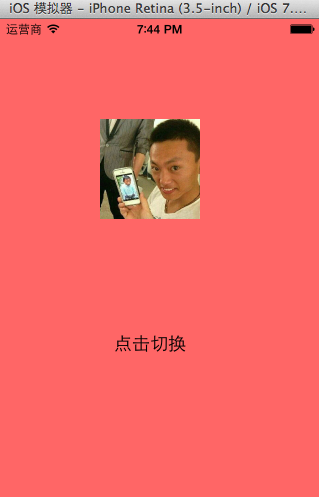
說明:系統的UIimage可以替換。而自定義imageview不會變換,因為自定義的view要想換圖片,需要重新繪制並渲染一次圖片。所以在拿到替換圖片的時候,需要重新繪制一次圖片,重寫setimage方法。
完善後的代碼如下:
主控制器中,YYViewController.m文件的代碼:
1 //
 2 //  YYViewController.m
 3 //  02-自定義UIimageview
 4 //
 5 //  Created by apple on 14-6-22.
 6 //  Copyright (c) 2014年 itcase. All rights reserved.
 7 //
 8
 9 #import "YYViewController.h"
10 #import "YYimageView.h"
11
12 @interface YYViewController ()
13 @property(nonatomic,strong)UIImageView *imageView;
14 @property(nonatomic,strong)YYimageView *yyimageView;
15 @end
16
17 @implementation YYViewController
18
19 - (void)viewDidLoad
20 {
21     [super viewDidLoad];
22
23 //    //系統的UIImageview的使用
24 ////    1.創建一個UIImageView
25 //    UIImageView *iv=[[UIImageView alloc]init];
26 ////    2.設置圖片
27 //    iv.image=[UIImage imageNamed:@"me"];
28 ////    3.設置frame
29 //    iv.frame=CGRectMake(100, 100, 100, 100);
30 ////    4.把創建的自定義的view添加到界面上
31 //    [self.view addSubview:iv];
32 //    self.imageView=iv;
33
34
35     //自定義UIImageView
36     //1.創建
37     //2.設置圖片
38     //3.設置frame
39     //4.把創建的自定義的view添加到界面上
40     YYimageView *yyiv=[[YYimageView alloc]init];
41     yyiv.image=[UIImage imageNamed:@"me"];
42     yyiv.frame=CGRectMake(100, 100, 100, 100);
43     [self.view addSubview:yyiv];
44     self.yyimageView=yyiv;
45
46     //添加一個button按鈕,當點擊button按鈕的時候,切換圖片
47     UIButton *btn=[[UIButton alloc]initWithFrame:CGRectMake(100, 300, 100, 50)];
48     [btn setTitleColor:[UIColor blackColor] forState:UIControlStateNormal];
49     [btn setTitle:@"點擊切換" forState:UIControlStateNormal];
50     [btn addTarget:self action:@selector(btnClick) forControlEvents:UIControlEventTouchUpInside];
51     [self.view addSubview:btn];
52
53 }
54
55 -(void)btnClick
56 {
57     NSLog(@"按鈕被點擊了");
58     UIImage *image=[UIImage imageNamed:@"psb.jpeg"];
59 //    self.imageView.image=image;
60     self.yyimageView.image=image;
61 }
62 @end
YYimageView.m文件的代碼:
1 //
 2 //  YYimageView.m
 3 //  02-自定義UIimageview
 4 //
 5 //  Created by apple on 14-6-22.
 6 //  Copyright (c) 2014年 itcase. All rights reserved.
 7 //
 8
 9 #import "YYimageView.h"
10
11 @implementation YYimageView
12
13 //重寫drawRect:方法
14 - (void)drawRect:(CGRect)rect
15 {
16     [self.image drawInRect:rect];
17 }
18
19 //重寫set方法
20 -(void)setImage:(UIImage *)image
21 {
22     _image=image;
23     [self setNeedsDisplay];
24 }
25 @end