性能優化之NSDateFormatter
為什麼要優化NSDateFormatter?
首先,過度的創建NSDateFormatter用於NSDate與NSString之間轉換,會導致App卡頓,打開Profile工具查一下性能,你會發現這種操作占CPU比例是非常高的。據官方說法,創建NSDateFormatter代價是比較高的,如果你使用的非常頻繁,那麼建議你緩存起來,緩存NSDateFormatter一定能提高效率。
Creating a date formatter is not a cheap operation. If you are likely to use a formatter frequently, it is typically more efficient to cache a single instance than to create and dispose of multiple instances. One approach is to use a static variable
優化方式有哪些?
a.延遲轉換
即只有在UI需要使用轉換結果時在進行轉換。
b.Cache in Memory
根據NSDateFormatter線程安全性,不同的iOS系統版本內存緩存如下:
prior to iOS 7
如果直接采用靜態變量進行存儲,那麼可能就會存在線程安全問題,在iOS 7之前,NSDateFormatter是非線程安全的,因此可能就會有兩條或以上的線程同時訪問同一個日期格式化對象,從而導致App崩潰。
+ (NSDateFormatter *)cachedDateFormatter {

NSMutableDictionary *threadDictionary = [[NSThread currentThread] threadDictionary];

NSDateFormatter *dateFormatter = [threadDictionary objectForKey:@"cachedDateFormatter"];

if (!dateFormatter) {

dateFormatter = [[NSDateFormatter alloc] init];

[dateFormatter setLocale:[NSLocale currentLocale]];

[dateFormatter setDateFormat: @"YYYY-MM-dd HH:mm:ss"];

[threadDictionary setObject:dateFormatter forKey:@"cachedDateFormatter"];

}

return dateFormatter;

}
iOS 7 or later
在iOS 7、macOS 10.9及以上系統版本,NSDateFormatter都是線程安全的,因此我們無需擔心日期格式化對象在使用過程中被另外一條線程給修改,為了提高性能,我們還可以在上述代碼塊中進行簡化(除去冗余部分)。
static NSDateFormatter *cachedDateFormatter = nil;

+ (NSDateFormatter *)cachedDateFormatter {

// If the date formatters aren't already set up, create them and cache them for reuse.

if (!dateFormatter) {

dateFormatter = [[NSDateFormatter alloc] init];

[dateFormatter setLocale:[NSLocale currentLocale]];

[dateFormatter setDateFormat: @"YYYY-MM-dd HH:mm:ss"];

}

return dateFormatter;

}如果緩存了日期格式化或者是其他依賴於current locale的對象,那麼我們應該監聽NSCurrentLocaleDidChangeNotification通知,當current locale變化時及時更新被緩存的日期格式化對象。
In theory you could use an auto-updating locale (autoupdatingCurrentLocale) to create a locale that automatically accounts for changes in the user’s locale settings. In practice this currently does not work with date formatters.
Apple Threading Programming Guide
c.利用標准C語言庫
如果時間日期格式是固定的,我們可以采用C語言中的strptime函數,這樣更加簡單高效。
- (NSDate *) easyDateFormatter{

time_t t;

struct tm tm;

char *iso8601 = "2016-09-18";

strptime(iso8601, "%Y-%m-%d", &tm);

tm.tm_isdst = -1;

tm.tm_hour = 0;//當tm結構體中的tm.tm_hour為負數,會導致mktime(&tm)計算錯誤

/**

//NSString *iso8601String = @"2016-09-18T17:30:08+08:00";

//%Y-%m-%d [iso8601String cStringUsingEncoding:NSUTF8StringEncoding]

{

tm_sec = 0

tm_min = 0

tm_hour = 0

tm_mday = 18

tm_mon = 9

tm_year = 116

tm_wday = 2

tm_yday = 291

tm_isdst = 0

tm_gmtoff = 28800

tm_zone = 0x00007fd9b600c31c "CST"

}

ISO8601時間格式:2004-05-03T17:30:08+08:00 參考Wikipedia

*/

t = mktime(&tm);

//http://pubs.opengroup.org/onlinepubs/9699919799/functions/mktime.html

//secondsFromGMT: The current difference in seconds between the receiver and Greenwich Mean Time.

return [NSDate dateWithTimeIntervalSince1970:t + [[NSTimeZone localTimeZone] secondsFromGMT]];

}
相關資料:
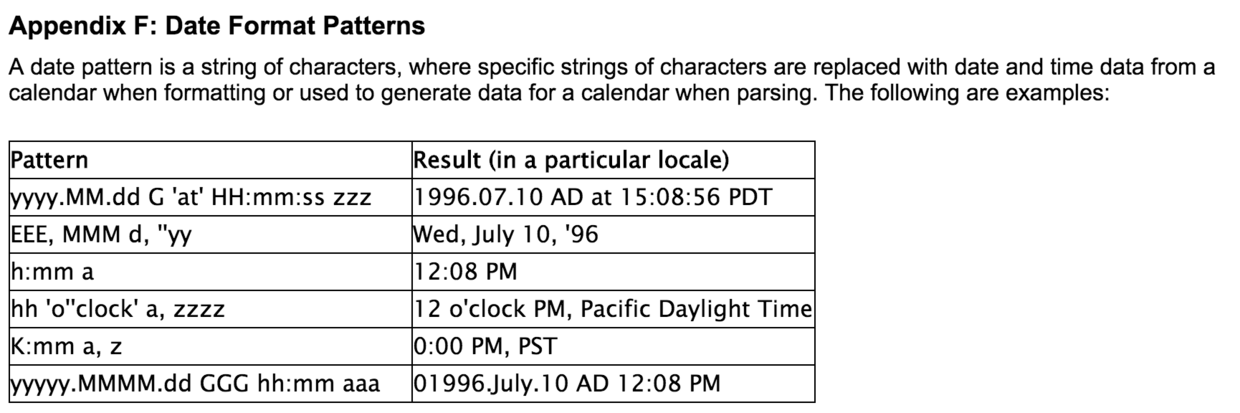
Date Formate Patterns :
Standard C library
ISO_8601

- IOS 機能優化中離屏襯著
- iOS開辟中罕見的項目文件與MVC構造優化思緒解析
- iOS開辟中UITableview控件的根本應用及機能優化辦法
- 挪動開發周報 Issue #170:罕見功能優化戰略的總結
- iOS 功能優化:Instruments 工具的救命三招
- 【iOS深思錄】UITableView的重用機制與加載優化步驟
- iOS頁面圖層性能和頁面卡頓的原因
- iOS性能優化
- iOS之性能的優化
- iOS性能之HTTP2.0
- iOS開發:對MKMapView的性能優化
- 蘋果ios8針對中國的優化內容有哪些?[圖]
- iPhone6硬件性能怎麼樣?iPhone6硬件性能詳細說明[圖]
- iphone6處理器A8性能探究[多圖]
- 蘋果iPhone6s配置怎麼樣?iPhone6s配置性能介紹[圖]