UIWebView (NSURLProtocol)攔截js、css
公司最近有個需求,去除h5頁面的廣告,最後實現的方式是後台去過濾,移動端這裡只需要攔截裡面的一個css地址重定向就可以.開會的時候以為很簡單,畢竟
UIWebView協議方法裡面有個每次請求都會走的協議方法- (BOOL)webView:(UIWebView *)webView shouldStartLoadWithRequest:(NSURLRequest *)request navigationType:(UIWebViewNavigationType)navigationType實際開發的過程當中才發現這是行不通的.
中間過程就不說了.結果肯定是可以做到的,用到了神奇的 NSURLProtocol
這裡主要做下筆記:
NSURLProtocol
它是干什麼的呢,是一個挺牛逼的類,它是一個抽象類,不能去實例化它,只能子類化NSURLProtocol,
每次在對一個 URL 進行請求的時候 URL Loading System 都會向 已經注冊的 Protocol 詢問是否可以處理該請求。這裡就看出他的作用來了. 比如: 攔截UIWebView的請求,忽略請求,重定向... ...
如何使用NSURLProtocol
創建
#import@interface FilteredProtocol : NSURLProtocol @end
在合適的地方注冊(demo是在
appdelegate類中)
[NSURLProtocol registerClass:[FilteredProtocol class]];
取消注冊,一般在加載完成或
dealloc方法裡面取消
[NSURLProtocol unregisterClass:[FilteredProtocol class]];
重寫父類方法
+ (BOOL)canInitWithRequest:(NSURLRequest *)request;
+ (NSURLRequest *)canonicalRequestForRequest:(NSURLRequest *)request;
+ (BOOL)requestIsCacheEquivalent:(NSURLRequest *)a toRequest:(NSURLRequest *)b;
- (void)startLoading;
- (void)stopLoading;
一個個的說
+ (BOOL)canInitWithRequest:(NSURLRequest *)request;
這個方法是決定這個 protocol 是否可以處理傳入的 request 的如是返回 true 就代表可以處理,如果返回 false 那麼就不處理這個 request 。
+ (NSURLRequest *)canonicalRequestForRequest:(NSURLRequest *)request;
這個方法主要是用來返回格式化好的request,如果自己沒有特殊需求的話,直接返回當前的request就好了。如果你想做些其他的,比如地址重定向,或者請求頭的重新設置,你可以copy下這個request然後進行設置。
+ (BOOL)requestIsCacheEquivalent:(NSURLRequest *)a toRequest:(NSURLRequest *)b;
該方法主要是判斷兩個請求是否為同一個請求,如果為同一個請求那麼就會使用緩存數據。通常都是調用父類的該方法。
- (void)startLoading;- (void)stopLoading;
開始處理這個請求和結束處理這個請求
我們處理(攔截)好請求之後,就要開始對他經常處理,這個時候就用到了父類裡面的client 對象.
/*! @method client @abstract Returns the NSURLProtocolClient of the receiver. @result The NSURLProtocolClient of the receiver. */ @property (nullable, readonly, retain) idclient;
他是一個協議,裡面的方法和NSURLConnection 差不多
- (void)URLProtocol:(NSURLProtocol *)protocol wasRedirectedToRequest:(NSURLRequest *)request redirectResponse:(NSURLResponse *)redirectResponse;

- (void)URLProtocol:(NSURLProtocol *)protocol cachedResponseIsValid:(NSCachedURLResponse *)cachedResponse;

- (void)URLProtocol:(NSURLProtocol *)protocol didReceiveResponse:(NSURLResponse *)response cacheStoragePolicy:(NSURLCacheStoragePolicy)policy;

- (void)URLProtocol:(NSURLProtocol *)protocol didLoadData:(NSData *)data;

- (void)URLProtocolDidFinishLoading:(NSURLProtocol *)protocol;

- (void)URLProtocol:(NSURLProtocol *)protocol didReceiveAuthenticationChallenge:(NSURLAuthenticationChallenge *)challenge;

- (void)URLProtocol:(NSURLProtocol *)protocol didCancelAuthenticationChallenge:(NSURLAuthenticationChallenge *)challenge;
實際應用(拿我攔截css為例子)
需求是要去掉下面圖片上
立刻下載的廣告:
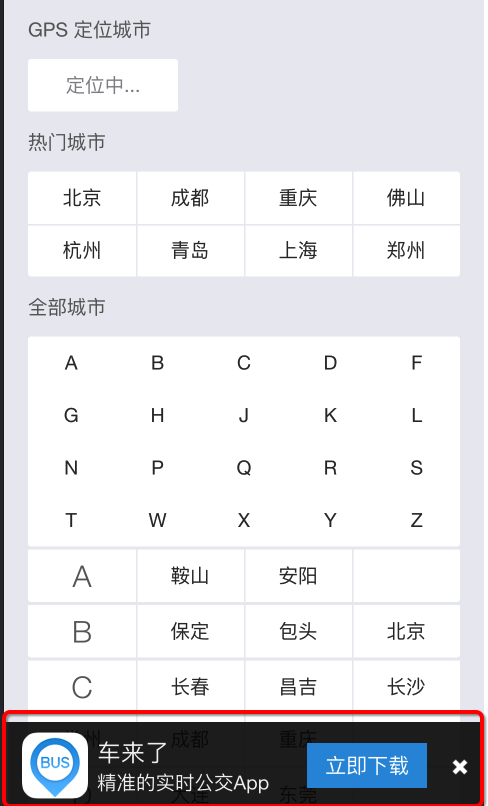
這是運行後打印的log
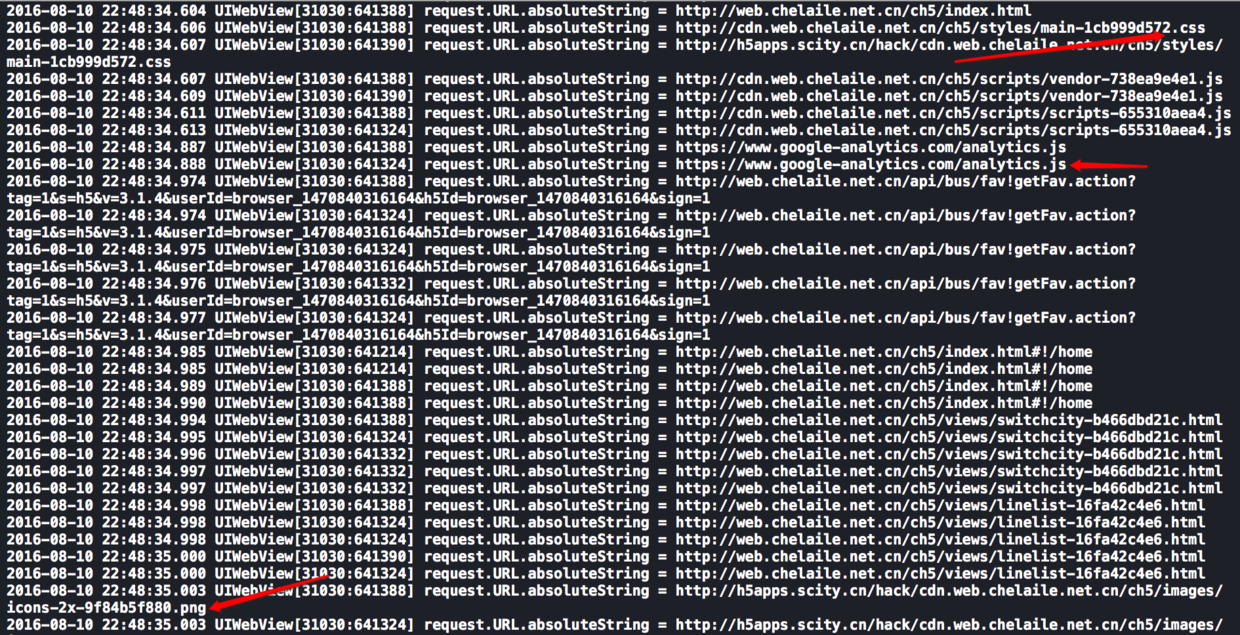 運行ing
運行ing上圖可以看到截獲的所有的請求地址,不管是js,css還是png圖片都有
這是代碼運行後的效果
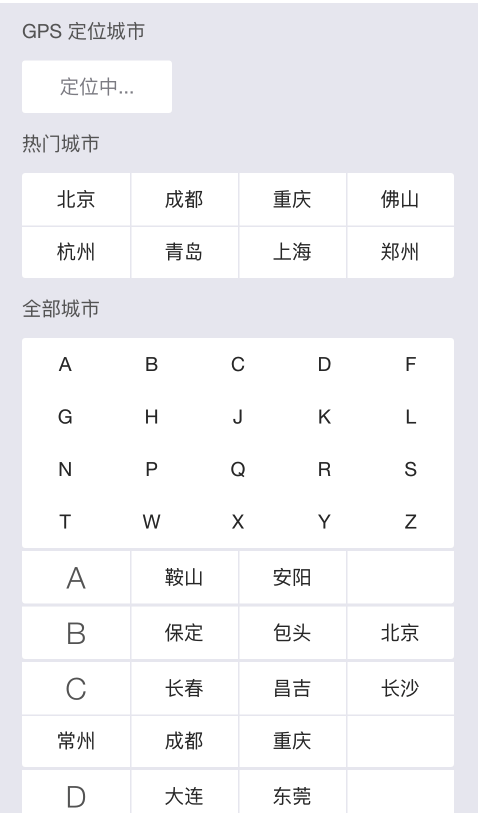
代碼如下:
static NSString*const sourUrl  = @"http://cdn.web.chelaile.net.cn/ch5/styles/main-1cb999d572.css";
static NSString*const localUrl = @"http://h5apps.scity.cn/hack/cdn.web.chelaile.net.cn/ch5/styles/main-1cb999d572.css";
static NSString*const FilteredCssKey = @"filteredCssKey";

@interface FilteredProtocol ()
@property (nonatomic, strong) NSMutableData   *responseData;
@property (nonatomic, strong) NSURLConnection *connection;
@end
@implementation FilteredProtocol

+ (BOOL)canInitWithRequest:(NSURLRequest *)request
{
    NSLog(@"request.URL.absoluteString = %@",request.URL.absoluteString);
    //只處理http和https請求
    NSString *scheme = [[request URL] scheme];
    if ( ([scheme caseInsensitiveCompare:@"http"]  == NSOrderedSame ||
          [scheme caseInsensitiveCompare:@"https"] == NSOrderedSame ))
    {
        //看看是否已經處理過了,防止無限循環
        if ([NSURLProtocol propertyForKey:FilteredCssKey inRequest:request])
            return NO;

        return YES;
    }
    return NO;
}
+ (NSURLRequest *)canonicalRequestForRequest:(NSURLRequest *)request
{
NSMutableURLRequest *mutableReqeust = [request mutableCopy];
//截取重定向
if ([request.URL.absoluteString isEqualToString:sourUrl])
{
NSURL* url1 = [NSURL URLWithString:localUrl];
mutableReqeust = [NSMutableURLRequest requestWithURL:url1];
}
return mutableReqeust;
}+ (BOOL)requestIsCacheEquivalent:(NSURLRequest *)a toRequest:(NSURLRequest *)b
{
return [super requestIsCacheEquivalent:a toRequest:b];
}- (void)startLoading
{
NSMutableURLRequest *mutableReqeust = [[self request] mutableCopy];
//給我們處理過的請求設置一個標識符, 防止無限循環,
[NSURLProtocol setProperty:@YES forKey:FilteredCssKey inRequest:mutableReqeust];
BOOL enableDebug = NO;
//這裡最好加上緩存判斷
if (enableDebug)
{
NSString *str = @"寫代碼是一門藝術";
NSData *data = [str dataUsingEncoding:NSUTF8StringEncoding];
NSURLResponse *response = [[NSURLResponse alloc] initWithURL:mutableReqeust.URL
MIMEType:@"text/plain"
expectedContentLength:data.length
textEncodingName:nil];
[self.client URLProtocol:self
didReceiveResponse:response
cacheStoragePolicy:NSURLCacheStorageNotAllowed];
[self.client URLProtocol:self didLoadData:data];
[self.client URLProtocolDidFinishLoading:self];
}
else
{
self.connection = [NSURLConnection connectionWithRequest:mutableReqeust delegate:self];
}
}- (void)stopLoading
{
if (self.connection != nil)
{
[self.connection cancel];
self.connection = nil;
}
}#pragma mark- NSURLConnectionDelegate
- (void)connection:(NSURLConnection *)connection didFailWithError:(NSError *)error {
[self.client URLProtocol:self didFailWithError:error];
}
#pragma mark - NSURLConnectionDataDelegate
- (void)connection:(NSURLConnection *)connection didReceiveResponse:(NSURLResponse *)response
{
self.responseData = [[NSMutableData alloc] init];
[self.client URLProtocol:self didReceiveResponse:response cacheStoragePolicy:NSURLCacheStorageNotAllowed];
}
- (void)connection:(NSURLConnection *)connection didReceiveData:(NSData *)data {
[self.responseData appendData:data];
[self.client URLProtocol:self didLoadData:data];
}
- (void)connectionDidFinishLoading:(NSURLConnection *)connection {
[self.client URLProtocolDidFinishLoading:self];
}
@end注意點:
Protocols的遍歷是反向的,也就是最後注冊的Protocol會被優先判斷。就是先注冊A再注冊B ,優先判斷B一定要注意標記請求,不然你會無限的循環下去。。。因為一旦你需要處理這個請求,那麼系統會創建你這個
protocol的實例,然後你自己又開啟了connection進行請求的話,又會觸發URL Loading system的回調。系統給我們提供了+ (void)setProperty:(id)value forKey:(NSString *)key inRequest:(NSMutableURLRequest *)request;和+ (id)propertyForKey:(NSString *)key inRequest:(NSURLRequest *)request;這兩個方法進行標記和區分。



- iOS開源一個簡略的訂餐app UI框架
- 在uiview 的tableView中點擊cell進入跳轉到另外一個界面的完成辦法
- iOS開辟之UIScrollView控件詳解
- 進修iOS自界說導航掌握器UINavigationController
- IOS中UITableView轉動到指定地位
- iOS為UIView設置暗影後果
- iOS設置UIButton文字顯示地位和字體年夜小、色彩的辦法
- iOS開辟之UIPickerView完成城市選擇器的步調詳解
- iOS長按UIlabel完成可復制功效
- iOS開辟中UIWebView的加載當地數據的三種方法
- iOS中修正UITextField占位符字體色彩的辦法總結
- iOS Webview自順應現實內容高度的4種辦法詳解
- IOS 仿時間網選票UI實例代碼
- iOS推送之當地告訴UILocalNotification
- 應用UITextField限制只可輸出中,英文,數字的辦法