iOS10裡的通知與推送
原文
通知和推送是一種東西麼?
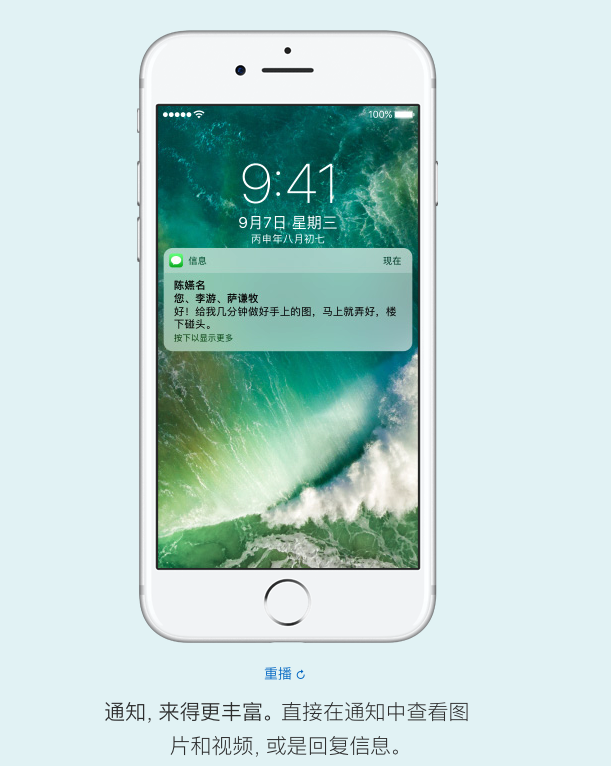
iOS 10通知
推送
圖1為通知,圖2為推送
也許有些同學現在才恍然大悟,今天我們就聊聊這個通知和推送吧。
什麼叫通知,什麼叫推送?
通知是iOS操作系統層面上的功能,說白了就是iPhone上的通知條,通知中心等,App來了一條通知,系統來了升級通知,待辦事項來了一條通知,這裡的通知指的是iOS操作系統內的一個功能,更多體現在UI、交互、觸發邏輯、通知方式上。
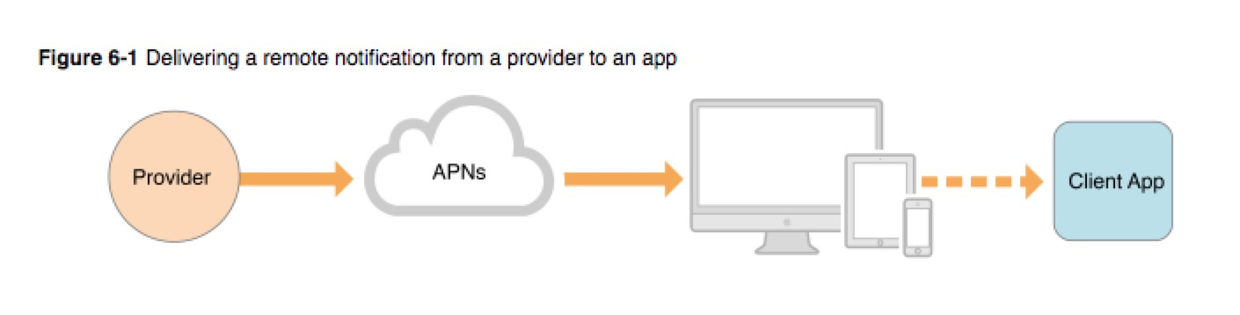
推送指的是由APNs服務器、ProviderService、iOS系統、App構成的通訊系統,是移動互聯網與傳統的Web最明顯的區別的地方。正因為有了推送,實現了服務端能夠反向與用戶建立聯系,而不是等待用戶訪問Web服務器。這裡我們著重講一下APNs與ProviderService。
APNs(Apple Push Notification service-蘋果推送通知服務)
APNs官方文檔
APNs是推送的核心。該服務與iOS設備建立起強大的持久連接通訊(和間接WatchOS,TVOS,和MacOS設備)。在早期的時候,iOS通過管理AppSSL認證的推送證書與APNs建立起長連接通訊,但不是可靠的通訊。隨後,APNs使用持久連接進行服務端推送。在長期的演進過程中,現在iOS10提供的APNs服務是基於HTTP/2協議棧同時使用Json Web Token(json令牌)保證通訊安全。有如下幾項改進:
iOS 8以後,APNs推送的字節是2k,iOS8以前是256字節,iOS10現在是4k
iOS 9以後APNs支持HTTP/2協議棧,優化長連接,具有標准的HTTP返回和管道復用技術
iOS 10以後,APNs可根據推送消息的唯一標示符查詢某條消息是否被用戶閱讀,可更新某一推送消息,而不用發重讀的多條消息
更多的詳細解釋有一篇文章叫做 《國內 90%以上的 iOS 開發者,對 APNs 的認識都是錯的》,大家可以深入了解。
通知
iOS操作系統的通知包括了App的通知、系統的通知和官方應用的通知,實質上就是推送的數據在iOS操作系統上的表現和本地通知在iOS操作系統的表現,在交互上iOS10的通知大大增強,可定制化UI,增加了更加細分的通知權限管理和更多的通知設定,例如遠程通知、時間通知、地理位置通知和日歷通知。
很多開發者都知道iOS10中蘋果升級推出了 User Notifications Framework與 User Notifications UI Framework兩個框架,但是千萬不要跟推送混為一談,這兩個框架升級和打包的是通知的功能增加和通知交互層面上的改進。
推送Push只不過是iOS10通知的一種觸發器。
配合最新的推送服務使用強大的iOS10通知功能
重點介紹一下iOS10的通知新功能,用戶體驗的提升和開發者能夠發揮的地方非常多,使得iOS更具有競爭力。
iOS 10通知系統支持Images, GIFs, Audio and Video類型
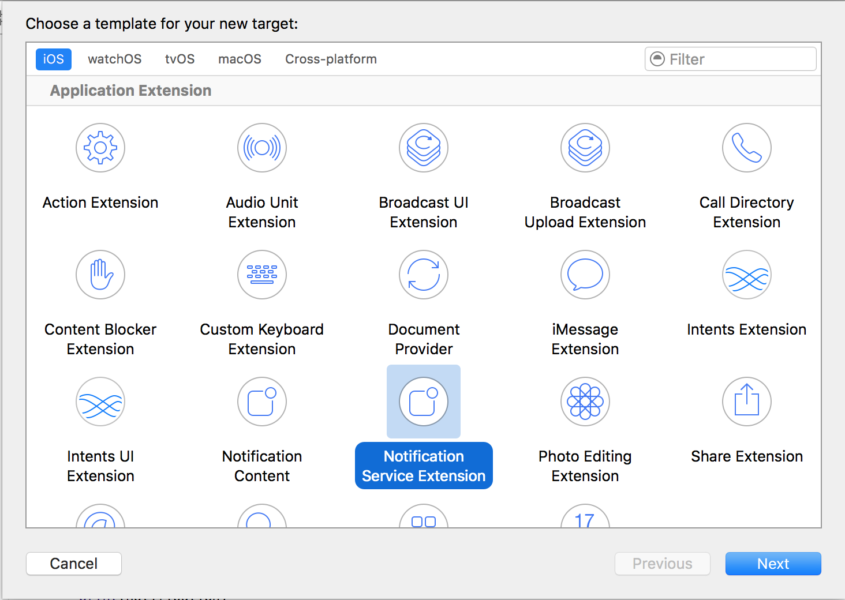
iOS 10推出Notification Service Extension與Notification Content Extension,可以實現推送數據在展示前進行下載更新、定制通知UI
iOS 10統一了通知類型,具有時間間隔通知、地理位置通知和日歷通知
iOS裡的通知擴展
User Notifications Framework 介紹:
關系圖:
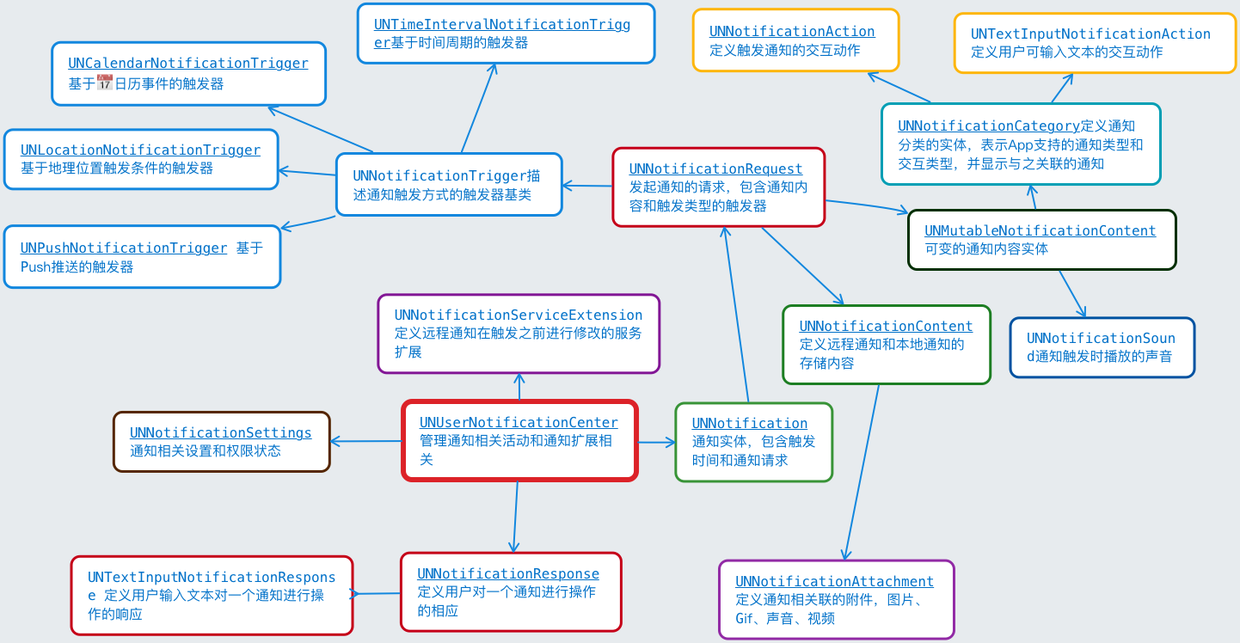
User Notifications Framework類關系圖
重點介紹:
UNUserNotificationCenter通知中心,用以管理通知的注冊、權限獲取和管理、通知的刪除與更新,通過代理分發事件等。
UNNotification 通知實體,在UNUserNotificationCenter的代理回調事件中,告知App接收到一條通知,包含一個發起通知的請求UNNotificationRequest
UNNotificationRequest包含通知內容UNNotificationContent和觸發器UNNotificationTrigger
UNNotificationContent 通知內容,通知的title,sound,badge以及相關的圖像、聲音、視頻附件UNNotificationAttachment,觸發打開App時候指定的LacnchImage等
UNNotificationResponse,用戶在觸發了按鈕或者文本提交的UNNotificationAction的時候,會形成一個response,通過通知中心的代理方法回調給App進行處理或者是交給擴展處理。
UNNotificationServiceExtension,是一個在接收到APNs服務器推送過來的數據進行處理的服務擴展,如果App提供了服務擴展,那麼APNs下發推送後在通知顯示觸發之前,會在UNNotificationServiceExtension內接收到,此處有大約30秒的處理時間,開發者可以進行一些數據下載、數據解密、更新等操作,然後交由而後的內容擴展(UNNotificationContentExtension)或者是App進行觸發顯示
UNNotificationCategory,用以定義一組樣式類型,該分類包含了某一個通知包含的交互動作的組合,比如說UNNotificationRequest內包含了一個Category標示,那該通知就會以預定義好的交互按鈕或者文本框添加到通知實體上。
UNNotificationAttachment,通知內容UNNotificationContent包含的附件,一般為圖片、視頻和音頻,雖然iOS10的通知數據容量為4k,但依舊很少,在添加了UNNotificationServiceExtension擴展的情況下,可以在服務裡下載圖片,生成圖片、視頻等的本地緩存,UNNotificationAttachment根據緩存數據生成並添加到UNNotificationContent中,交由UI顯示
UNNotificationAction,是通知中添加的action,展示在通知欄的下方。默認以的button樣式展示。有一個文本輸入的子類UNTextInputNotificationAction。可以在點擊button之後彈出一個鍵盤,輸入信息。用戶點擊信息和輸入的信息可以在UNNotificationResponse中獲取
User Notifications UI Framework介紹:
關系圖:
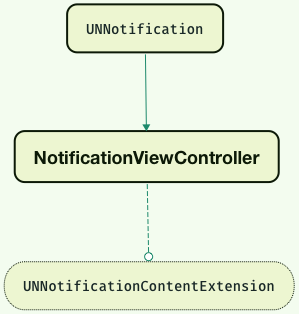
User Notifications UI Framework類關系圖
10.?UNNotificationContentExtension<協議>,NotificationViewController實現該協議,可以獲得iOS展示自定義UI時候分發的UNNotification對象和用戶交互的Response
11.NotificationViewController,App添加Notification Content Extension擴展的時候,自動生成的Controller,可以定義通知UI的主題部分,由StoryBoard指定設計
iOS10注冊通知、回調處理
只簡單介紹一下iOS10的通知注冊
UNUserNotificationCenter *center = [UNUserNotificationCenter currentNotificationCenter];
    // 必須寫代理,不然無法監聽通知的接收與點擊
    center.delegate = self;
//設置預設好的交互類型,NSSet裡面是設置好的UNNotificationCategory
    [center setNotificationCategories:[self createNotificationCategoryActions]];
    [center getNotificationSettingsWithCompletionHandler:^(UNNotificationSettings * _Nonnull settings) {
        if (settings.authorizationStatus==UNAuthorizationStatusNotDetermined) {
            [center requestAuthorizationWithOptions:(UNAuthorizationOptionAlert | UNAuthorizationOptionBadge | UNAuthorizationOptionSound) completionHandler:^(BOOL granted, NSError * _Nullable error) {
                if (granted) {
                } else {

                }
            }];
        }
        else{
            //do other things
        }
    }];


 - (void)application:(UIApplication *)application
didRegisterForRemoteNotificationsWithDeviceToken:(NSData *)deviceToken {
    //上傳token
}
- (void)application:(UIApplication *)application
didFailToRegisterForRemoteNotificationsWithError:(NSError *)error {
    //獲取token失敗,開發調試的時候需要關注,必要的情況下將其上傳到異常統計
}
//代理回調方法,通知即將展示的時候
- (void)userNotificationCenter:(UNUserNotificationCenter *)center willPresentNotification:(UNNotification *)notification withCompletionHandler:(void (^)(UNNotificationPresentationOptions options))completionHandler{

    UNNotificationRequest *request = notification.request; // 原始請求
NSDictionary * userInfo = notification.request.content.userInfo;//userInfo數據
    UNNotificationContent *content = request.content; // 原始內容
    NSString *title = content.title;  // 標題
    NSString *subtitle = content.subtitle;  // 副標題
    NSNumber *badge = content.badge;  // 角標
    NSString *body = content.body;    // 推送消息體
    UNNotificationSound *sound = content.sound;  // 指定的聲音
//建議將根據Notification進行處理的邏輯統一封裝,後期可在Extension中復用~
    completionHandler(UNNotificationPresentationOptionBadge|UNNotificationPresentationOptionSound|UNNotificationPresentationOptionAlert); // 回調block,將設置傳入
}

//用戶與通知進行交互後的response,比如說用戶直接點開通知打開App、用戶點擊通知的按鈕或者進行輸入文本框的文本
- (void)userNotificationCenter:(UNUserNotificationCenter *)center didReceiveNotificationResponse:(UNNotificationResponse *)response withCompletionHandler:(void(^)())completionHandler{

    UNNotificationRequest *request = response.notification.request; // 原始請求
NSDictionary * userInfo = notification.request.content.userInfo;//userInfo數據
    UNNotificationContent *content = request.content; // 原始內容
    NSString *title = content.title;  // 標題
    NSString *subtitle = content.subtitle;  // 副標題
    NSNumber *badge = content.badge;  // 角標
    NSString *body = content.body;    // 推送消息體
    UNNotificationSound *sound = content.sound;
//在此,可判斷response的種類和request的觸發器是什麼,可根據遠程通知和本地通知分別處理,再根據action進行後續回調

}
以上就是iOS10的通知中心注冊和設置管理的過程,一下還有一些比較有用API:
//獲取在Pending狀態下待觸發的通知
- (void)getPendingNotificationRequestsWithCompletionHandler:(void(^)(NSArray *requests))completionHandler;
//移除未觸發的通知
- (void)removePendingNotificationRequestsWithIdentifiers:(NSArray *)identifiers;
- (void)removeAllPendingNotificationRequests;

// 通知已經觸發,但是還在操作系統的通知中心上,可以進行查詢和刪除
- (void)getDeliveredNotificationsWithCompletionHandler:(void(^)(NSArray *notifications))completionHandler __TVOS_PROHIBITED;
- (void)removeDeliveredNotificationsWithIdentifiers:(NSArray *)identifiers __TVOS_PROHIBITED;
- (void)removeAllDeliveredNotifications __TVOS_PROHIBITED;
iOS10本地通知
UNMutableNotificationContent *content = [[UNMutableNotificationContent alloc] init];
    content.title = @"\"Fly to the moon\"";
    content.subtitle = @"by Neo";
    content.body = @"the wonderful song with you~";
    content.badge = @0;
    NSString *path = [[NSBundle mainBundle] pathForResource:@"image1" ofType:@"png"];
    NSError *error = nil;
//將本地圖片的路徑形成一個圖片附件,加入到content中
    UNNotificationAttachment *img_attachment = [UNNotificationAttachment attachmentWithIdentifier:@"att1" URL:[NSURL fileURLWithPath:path] options:nil error:&error];
    if (error) {
        NSLog(@"%@", error);
    }
    content.attachments = @[img_attachment];
    //設置為@""以後,進入app將沒有啟動頁
    content.launchImageName = @"";
    UNNotificationSound *sound = [UNNotificationSound defaultSound];
    content.sound = sound;
    //設置時間間隔的觸發器
    UNTimeIntervalNotificationTrigger *time_trigger = [UNTimeIntervalNotificationTrigger triggerWithTimeInterval:10 repeats:NO];
    NSString *requestIdentifer = @"time interval request";
    content.categoryIdentifier = @"";
    UNNotificationRequest *request = [UNNotificationRequest requestWithIdentifier:requestIdentifer content:content trigger:time_trigger];
    [[UNUserNotificationCenter currentNotificationCenter] addNotificationRequest:request withCompletionHandler:^(NSError * _Nullable error) {
        NSLog(@"%@",error);
    }];
這裡面的圖片附件後面再述,過程上能感受到,通知數據部分在UNMutableNotificationContent中設置,附件UNNotificationAttachment也是在其中包含,categoryIdentifier為指定該通知對應的交互樣式,也就是前面設置的UNNotificationCategory的對象,後面再述。然後創建觸發器,UNTimeIntervalNotificationTrigger,觸發器有很多種,UNNotificationTrigger有四個子類:
UNPushNotificationTrigger,遠程推送觸發器,一般是遠程推送推過來的通知帶有這類觸發器
UNTimeIntervalNotificationTrigger,時間間隔觸發器,定時或者是重復,在本地推送設置中有用
UNCalendarNotificationTrigger,日歷觸發器,指定日期進行通知
UNLocationNotificationTrigger,地理位置觸發器,指定觸發通知的條件是地理位置CLRegion這個類型。
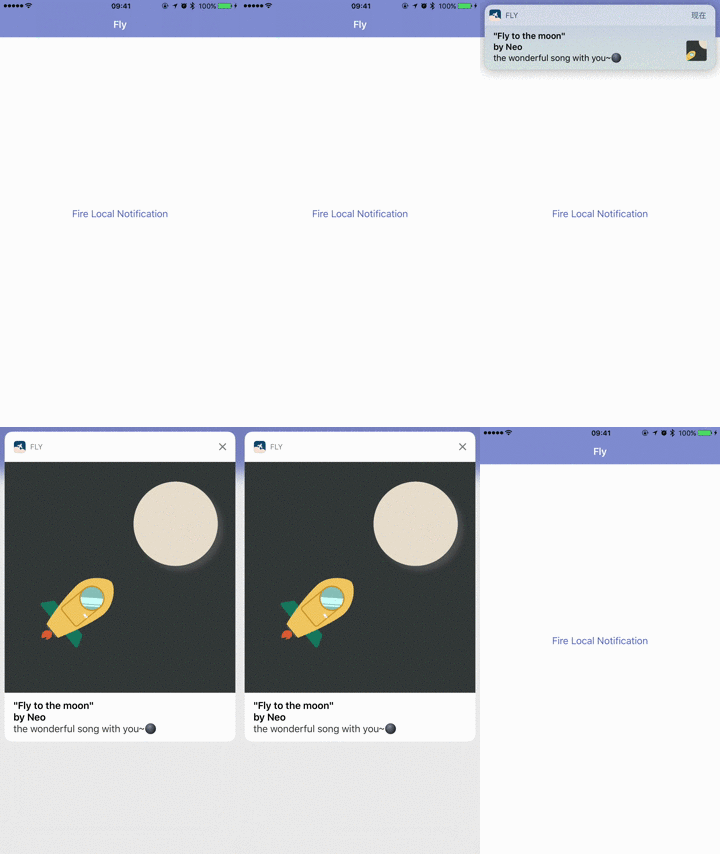
觸發器和內容最後形成UNNotificationRequest,一個通知請求,本地通知的請求,直接交給通知中心進行發送,發送成功後,該通知會按照觸發器的觸發條件進行觸發,並且會顯示到通知中心上,用戶可與指定的category交互方式與通知進行交互
如下圖:
localTimeNotification.gif
iOS10遠程通知
遠程通知與本地通知的流程一樣,只不過觸發器是UNPushNotificationTrigger,並且不需要形成request,又Provider Service發送給APNs到iOS以後生成,在代理回調的函數中獲取request
通知的代理回調
上面代碼有些代理回調函數,可以在這兩個代理回調函數裡做一些事情
- (void)userNotificationCenter:(UNUserNotificationCenter *)center willPresentNotification:(UNNotification *)notification withCompletionHandler:(void (^)(UNNotificationPresentationOptions options))completionHandler{
        //該回調函數是在通知條即將顯示之前調用的
    if ([request.trigger isKindOfClass:[UNPushNotificationTrigger class]]) {
        //遠程通知處理
    }
    if ([request.trigger isKindOfClass:[UNTimeIntervalNotificationTrigger class]]) {
        //時間間隔通知處理
    }
    if () {
        //加解密,數據下載,完成後調用completionHandler
    }
    else{
        completionHandler(UNNotificationPresentationOptionBadge|UNNotificationPresentationOptionSound|UNNotificationPresentationOptionAlert);
    }
}
如果你的App在前台,一般在這個回調函數裡做一些數據加解密、數據下載,然後將下載的數據組裝成UNNotificationAttachment或者是根據通知裡面的content裡面的userinfo裡與後端服務約定好的修改通知對應的categoryId,調用相應的交互組件到通知上,completionHandler在你想要做的邏輯完成以後調用。
如果App在前台,你接收到通知,不想顯示系統提示框,想使用App 自定義的通知消息彈窗,可以在completionHandler回調的時候傳入的opinion不要帶上UNAuthorizationOptionAlert,然後直接彈自定義的彈窗就Ok。
注意:改回調函數僅僅用來處理數據和重新選擇交互方式,其他遠程推送到達設備要做的業務邏輯,最好不要在此回調函數觸發,保持職責單一
//用戶與通知進行交互後的response,比如說用戶直接點開通知打開App、用戶點擊通知的按鈕或者進行輸入文本框的文本
- (void)userNotificationCenter:(UNUserNotificationCenter *)center didReceiveNotificationResponse:(UNNotificationResponse *)response withCompletionHandler:(void(^)())completionHandler{
    //在此,可判斷response的種類和request的觸發器是什麼,可根據遠程通知和本地通知分別處理,再根據action進行後續回調
    if ([response.actionIdentifier isEqualToString:@""]) {

    }
    //也可根據response 判斷是否是text文本輸入
    if ([response isKindOfClass:[UNTextInputNotificationResponse class]]) {
        //該函數是在用戶點擊通知或者是與通知上面指定好的action進行了交互回調的函數,用戶觸發通知的業務邏輯最好放在此處
    }
}
iOS10通知交互,UNNotificationAction與UNNotificationCategory
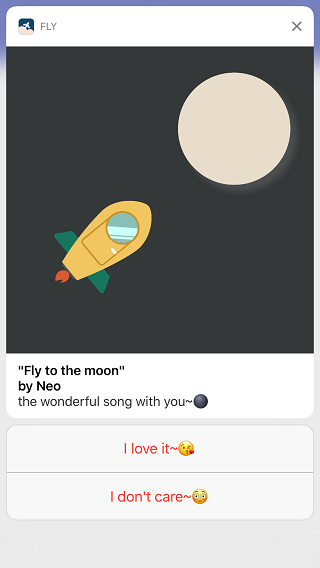
組合按鈕
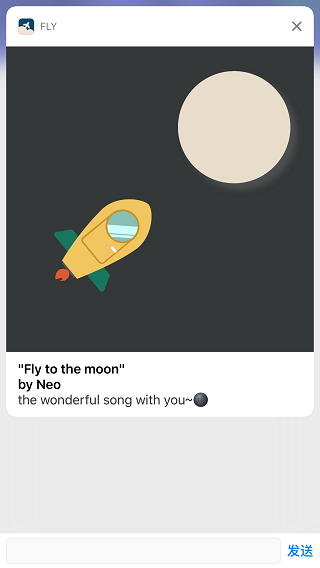
組合文本框
首先說明的是,iOS10通知上的交互只有兩種,一種是Button一種是text,就算使用了iOS10 Notification Content Extension也不能添加自定義的按鈕或者其他交互組件,因為不會響應。
-(NSSet *)createNotificationCategoryActions{
    //定義按鈕的交互button action
    UNNotificationAction * likeButton = [UNNotificationAction actionWithIdentifier:@"see1" title:@"I love it~" options:UNNotificationActionOptionAuthenticationRequired|UNNotificationActionOptionDestructive|UNNotificationActionOptionForeground];
    UNNotificationAction * dislikeButton = [UNNotificationAction actionWithIdentifier:@"see2" title:@"I don't care~" options:UNNotificationActionOptionAuthenticationRequired|UNNotificationActionOptionDestructive|UNNotificationActionOptionForeground];
    //定義文本框的action
    UNTextInputNotificationAction * text = [UNTextInputNotificationAction actionWithIdentifier:@"text" title:@"How about it~?" options:UNNotificationActionOptionAuthenticationRequired|UNNotificationActionOptionDestructive|UNNotificationActionOptionForeground];
    //將這些action帶入category
    UNNotificationCategory * choseCategory = [UNNotificationCategory categoryWithIdentifier:@"seeCategory" actions:@[likeButton,dislikeButton] intentIdentifiers:@[@"see1",@"see2"] options:UNNotificationCategoryOptionNone];
    UNNotificationCategory * comment = [UNNotificationCategory categoryWithIdentifier:@"seeCategory1" actions:@[text] intentIdentifiers:@[@"text"] options:UNNotificationCategoryOptionNone];
    return [NSSet setWithObjects:choseCategory,comment,nil];
}
在上面封裝了上面兩張圖中所示的兩個category組合,每一個category攜帶的action如圖所示,在通知中心初始化的時候設置app要支持的category。
UNUserNotificationCenter *center = [UNUserNotificationCenter currentNotificationCenter];
    [center setNotificationCategories:[self createNotificationCategoryActions]];
UNNotificationAction 在初始化的時候需要定義UNNotificationActionOptions,這個UNNotificationActionOptions的意思是:
typedef NS_OPTIONS(NSUInteger, UNNotificationActionOptions) {

    // Whether this action should require unlocking before being performed.
    //指定該動作是否需要用戶解鎖驗證身份
    UNNotificationActionOptionAuthenticationRequired = (1 << 0),

    // Whether this action should be indicated as destructive.
    //指定用戶執行該動作是否要將通知從iOS的通知中心移除,以防止處理過該通知以後重復處理
    UNNotificationActionOptionDestructive = (1 << 1),

    // Whether this action should cause the application to launch in the foreground.
    //指定通知action點擊後是否要進入app到前台,如果到前台,這個對Notification Content Extension的自定義的通知UI有意義,
    //可以在Extension中處理用戶的點擊或者提交文字,那麼就可以指定該action不需要進入app,
    //UNNotificationActionOptionAuthenticationRequired這個就不要加入
    UNNotificationActionOptionForeground = (1 << 2),
} __IOS_AVAILABLE(10.0) __WATCHOS_AVAILABLE(3.0) __TVOS_PROHIBITED;
測試我們預設好的category
-(void)timeLoacl{
    UNMutableNotificationContent *content = [[UNMutableNotificationContent alloc] init];
    content.title = @"\"Fly to the moon\"";
    content.subtitle = @"by Neo";
    content.body = @"the wonderful song with you~";
    content.badge = @0;
    NSString *path = [[NSBundle mainBundle] pathForResource:@"image1" ofType:@"png"];
    NSError *error = nil;
    UNNotificationAttachment *img_attachment = [UNNotificationAttachment attachmentWithIdentifier:@"att1" URL:[NSURL fileURLWithPath:path] options:nil error:&error];
    if (error) {
        NSLog(@"%@", error);
    }
    content.attachments = @[img_attachment];
    //設置為@""以後,進入app將沒有啟動頁
    content.launchImageName = @"";
    UNNotificationSound *sound = [UNNotificationSound defaultSound];
    content.sound = sound;

    UNTimeIntervalNotificationTrigger *time_trigger = [UNTimeIntervalNotificationTrigger triggerWithTimeInterval:5 repeats:NO];
    NSString *requestIdentifer = @"time interval request";
//在此指定通知內容的categoryIdentifier,就是上面我們預設好的category,一個category代表一種交互組合類型
    content.categoryIdentifier = @"seeCategory1";
//    content.categoryIdentifier = @"seeCategory";
    UNNotificationRequest *request = [UNNotificationRequest requestWithIdentifier:requestIdentifer content:content trigger:time_trigger];

    [[UNUserNotificationCenter currentNotificationCenter] addNotificationRequest:request withCompletionHandler:^(NSError * _Nullable error) {
        NSLog(@"%@",error);
    }];
}
在點擊某個按鈕或者是輸入了文本後,會在通知中心的代理回調函數裡處理交互的response
- (void)userNotificationCenter:(UNUserNotificationCenter *)center didReceiveNotificationResponse:(UNNotificationResponse *)response withCompletionHandler:(void(^)())completionHandler{
    //在此,可判斷response的種類和request的觸發器是什麼,可根據遠程通知和本地通知分別處理,再根據action進行後續回調
    if ([response isKindOfClass:[UNTextInputNotificationResponse class]]) {
        UNTextInputNotificationResponse * textResponse = (UNTextInputNotificationResponse*)response;
        NSString * text = textResponse.userText;
        //do something
    }
    else{
        if ([response.actionIdentifier isEqualToString:@"see1"]) {
            //I love it~的處理
        }
        if ([response.actionIdentifier isEqualToString:@"see2"]) {
            //I don't care~
            [[UNUserNotificationCenter currentNotificationCenter] removeDeliveredNotificationsWithIdentifiers:@[response.notification.request.identifier]];
        }
    }
    completionHandler();
}
這裡需要根據response的類型或者根據actionIdentifier來區分用戶的交互結果來處理邏輯
iOS10通知附件UNNotificationAttachment,展示圖片、Gif、Audio和Video
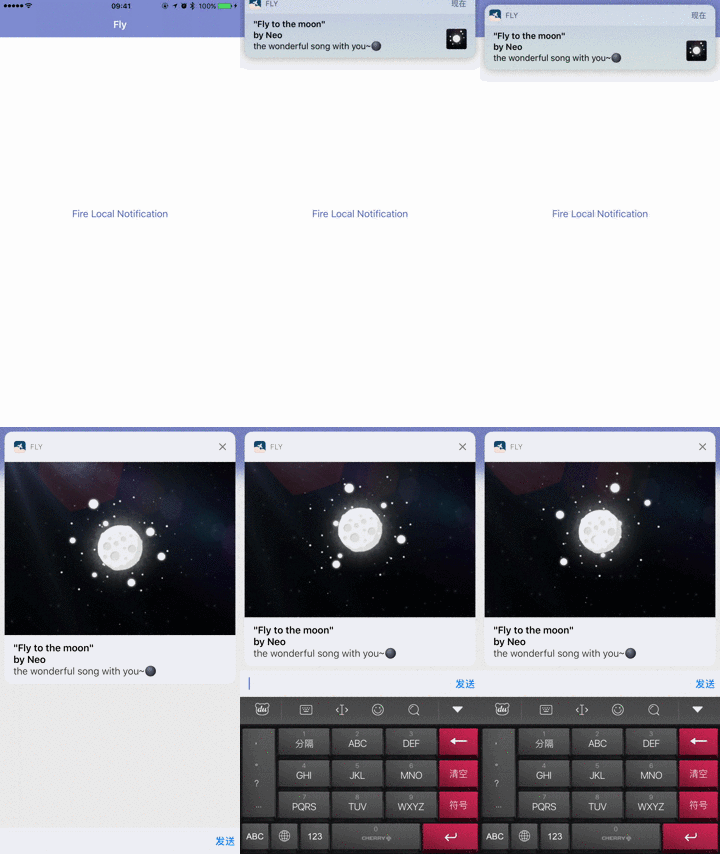
gif通知
-(void)timeLoaclWithImage{
    UNMutableNotificationContent *content = [[UNMutableNotificationContent alloc] init];
    content.title = @"\"Fly to the moon\"";
    content.subtitle = @"by Neo";
    content.body = @"the wonderful song with you~";
    content.badge = @0;
    NSString *path = [[NSBundle mainBundle] pathForResource:@"image1" ofType:@"png"];
    NSError *error = nil;
    UNNotificationAttachment *img_attachment = [UNNotificationAttachment attachmentWithIdentifier:@"att1" URL:[NSURL fileURLWithPath:path] options:nil error:&error];
    if (error) {
        NSLog(@"%@", error);
    }
    content.attachments = @[img_attachment];
    //設置為@""以後,進入app將沒有啟動頁
    content.launchImageName = @"";
    UNNotificationSound *sound = [UNNotificationSound defaultSound];
    content.sound = sound;

    UNTimeIntervalNotificationTrigger *time_trigger = [UNTimeIntervalNotificationTrigger triggerWithTimeInterval:5 repeats:NO];
    NSString *requestIdentifer = @"time interval request";
    content.categoryIdentifier = @"seeCategory1";
    UNNotificationRequest *request = [UNNotificationRequest requestWithIdentifier:requestIdentifer content:content trigger:time_trigger];

    [[UNUserNotificationCenter currentNotificationCenter] addNotificationRequest:request withCompletionHandler:^(NSError * _Nullable error) {
        NSLog(@"%@",error);
    }];
}
UNNotificationAttachment需要指定image、gif、audio與video的文件路徑,
+ (nullable instancetype)attachmentWithIdentifier:(NSString *)identifier URL:(NSURL *)URL options:(nullable NSDictionary *)options error:(NSError *__nullable *__nullable)error;
此處有一個options的字典,傳入的key有一下幾點:
// Key to manually provide a type hint for the attachment. If not set the type hint will be guessed from the attachment's file extension. Value must be an NSString.
extern NSString * const
//指定文件類型,查看文檔可以發現支持哪些文件
UNNotificationAttachmentOptionsTypeHintKey __IOS_AVAILABLE(10.0) __WATCHOS_AVAILABLE(3.0);

// Key to specify if the thumbnail for this attachment is hidden. Defaults to NO. Value must be a boolean NSNumber.
extern NSString * const
//指定通知上是否顯示文件的縮略圖
UNNotificationAttachmentOptionsThumbnailHiddenKey __IOS_AVAILABLE(10.0) __WATCHOS_AVAILABLE(3.0);

// Key to specify a normalized clipping rectangle to use for the attachment thumbnail. Value must be a CGRect encoded using CGRectCreateDictionaryRepresentation.
//指定縮略圖的切割比例
extern NSString * const UNNotificationAttachmentOptionsThumbnailClippingRectKey __IOS_AVAILABLE(10.0) __WATCHOS_AVAILABLE(3.0);

// Key to specify the animated image frame number or the movie time to use as the thumbnail.
// An animated image frame number must be an NSNumber. A movie time must either be an NSNumber with the time in seconds or a CMTime encoded using CMTimeCopyAsDictionary.
extern NSString * const
//影片切割時間
UNNotificationAttachmentOptionsThumbnailTimeKey __IOS_AVAILABLE(10.0) __WATCHOS_AVAILABLE(3.0);
從網上獲取gif下載後展示
-(void)timeLoaclWithGif{
    NSURLSessionConfiguration *config = [NSURLSessionConfiguration defaultSessionConfiguration];
    NSURLSession *session = [NSURLSession sessionWithConfiguration:config];
    NSURLSessionDataTask *task = [session dataTaskWithURL:[NSURL URLWithString:@"http://ww3.sinaimg.cn/large/006y8lVagw1faknzht671g30b408c1l2.gif"] completionHandler:^(NSData * _Nullable data, NSURLResponse * _Nullable response, NSError * _Nullable error) {
        if (!error) {
//緩存到tmp文件夾
            NSString *path = [NSHomeDirectory() stringByAppendingPathComponent:[NSString stringWithFormat:@"tmp/%@att.%@",@([NSDate date].timeIntervalSince1970),@"gif"]];
            NSError *err = nil;
            [data writeToFile:path atomically:YES];
            UNNotificationAttachment *gif_attachment = [UNNotificationAttachment attachmentWithIdentifier:@"attachment" URL:[NSURL fileURLWithPath:path] options:@{UNNotificationAttachmentOptionsThumbnailClippingRectKey:[NSValue valueWithCGRect:CGRectMake(0, 0, 1, 1)]} error:&err];
            UNMutableNotificationContent *content = [[UNMutableNotificationContent alloc] init];
            content.title = @"\"Fly to the moon\"";
            content.subtitle = @"by Neo";
            content.body = @"the wonderful song with you~";
            content.badge = @0;
            NSError *error = nil;
            if (gif_attachment) {
                content.attachments = @[gif_attachment];
            }
            if (error) {
                NSLog(@"%@", error);
            }
            //設置為@""以後,進入app將沒有啟動頁
            content.launchImageName = @"";
            UNNotificationSound *sound = [UNNotificationSound defaultSound];
            content.sound = sound;
            UNTimeIntervalNotificationTrigger *time_trigger = [UNTimeIntervalNotificationTrigger triggerWithTimeInterval:1 repeats:NO];
            NSString *requestIdentifer = @"time interval request";
            content.categoryIdentifier = @"seeCategory1";
            UNNotificationRequest *request = [UNNotificationRequest requestWithIdentifier:requestIdentifer content:content trigger:time_trigger];
            [[UNUserNotificationCenter currentNotificationCenter] addNotificationRequest:request withCompletionHandler:^(NSError * _Nullable error) {
                NSLog(@"%@",error);
            }];
        }
    }];
    [task resume];
}
在文件緩存以後,發起本地通知。值得注意的一點是,形成request發起以後,如果URL所代表的文件過大,打開通知的交互界面的時候會非常慢,甚至有時候會出現資源顯示不出來,還有一點是,當你在通知觸發展示以後,再通過request取出attachment文件的URL的時候,發現URL竟然發生了變化,文件是緩存到一個叫pushstore的文件夾下,這個在後面介紹 Notification Service Extension與Notification Content Extension 數據共享的時候會討論該問題。
iOS10 Notification Service Extension:
Notification Service Extension是Xcode8中加入眾多extension的其中一種,Extension實際上是App提供了一個額外插件功能,以供iOS操作系統調用,與App是宿主關系。
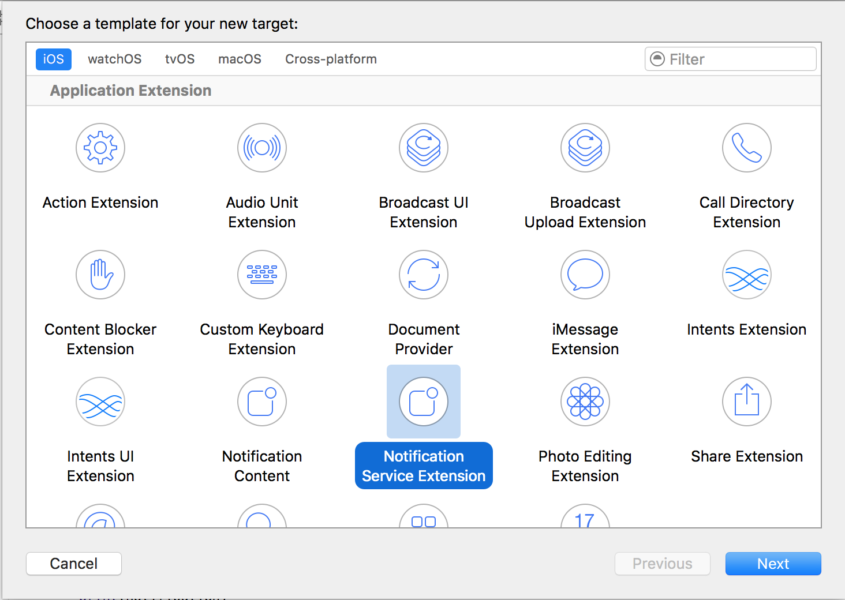
Notification Service Extension target
工作流程如下:
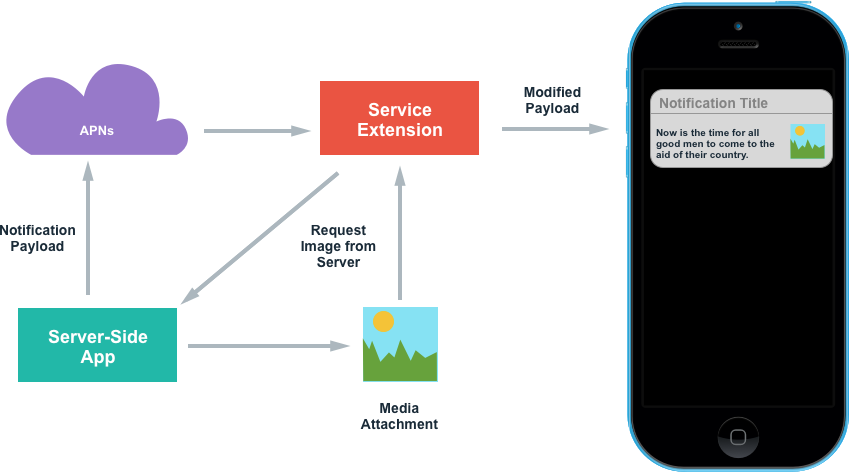
Notification Service Extension流程
Notification Service Extension的作用:
使得推送的數據在iOS系統展示之前,經過App開發者的Extension,可以在不啟動App的情況下,完成一些快捷操作邏輯,比如上面的例子,如果你是個社交App,可以在不啟動App的情況下,直接點贊回復,而不用打開App,提高效率
雖然iOS10的推送數據包已經達到4k,但是對於一些圖片視頻gif還是無力的,有了Extension,可以在此下載完畢然後直接展示,豐富的圖片和視頻可以在此顯示
可以在此Extension中如果要完成1中所述的用戶行為操作,則必須加強安全性,服務端可以對推送的數據配合RSA算法用服務端的私鑰加密,在Extension中使用服務端私鑰解密,其實APNs從SSL數字安全證書到Json Web Token令牌,已經非常安全,但是大量的App使用第三方諸如JPush的推送服務,來跟APNs交互,業務數據跑在別人的管道上,當然有所顧忌,所以,這個地方加密的更多現實意義是防止業務數據被第三方服務商窺探。
新建一個target
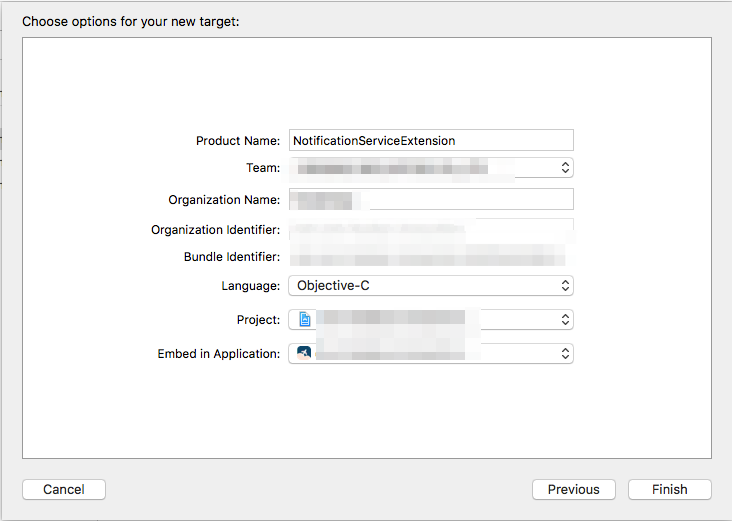
addtarget_notification_service_extension
這點沒什麼好說的,BundleID 就是宿主App的BundleID.這裡設置的ProductName ,自動生成。
注意使用組織名與team證書。
在新生成的NotificationService文件裡有如下方法
 -(void)didReceiveNotificationRequest:(UNNotificationRequest *)request withContentHandler:(void (^)(UNNotificationContent * _Nonnull))contentHandler {
    self.contentHandler = contentHandler;
    self.bestAttemptContent = [request.content mutableCopy];
    self.bestAttemptContent.title =@"";
    // Modify the notification content here...
    NSDictionary * userInfo = request.content.userInfo;
    NSURLSessionConfiguration *config = [NSURLSessionConfiguration defaultSessionConfiguration];
    NSURLSession *session = [NSURLSession sessionWithConfiguration:config];
    //服務端與客戶端約定各種資源的url,根據url資源進行下載
    NSString * imageUrl = [userInfo objectForKey:@"imageUrl"];
    NSString * gifUrl = [userInfo objectForKey:@"gifUrl"];
    NSString * typeString ;
    NSURL * url;
    if (imageUrl.length>0) {
        url = [NSURL URLWithString:imageUrl];
        typeString = @"jpg";
    }
    if (gifUrl.length>0) {
        url = [NSURL URLWithString:gifUrl];
        typeString = @"gif";
    }
    if (url) {
        NSURLRequest * urlRequest = [NSURLRequest requestWithURL:url cachePolicy:NSURLRequestUseProtocolCachePolicy timeoutInterval:5];
//注意使用DownloadTask,這點會詳細說明
        NSURLSessionDownloadTask *task = [session downloadTaskWithRequest:urlRequest completionHandler:^(NSURL * _Nullable location, NSURLResponse * _Nullable response, NSError * _Nullable error) {
            if (!error) {
                NSString *path = [location.path stringByAppendingString:[NSString stringWithFormat:@".%@",typeString]];
                NSError *err = nil;
                NSURL * pathUrl = [NSURL fileURLWithPath:path];
                [[NSFileManager defaultManager] moveItemAtURL:location toURL:pathUrl error:nil];
//下載完畢生成附件,添加到內容中
                UNNotificationAttachment *resource_attachment = [UNNotificationAttachment attachmentWithIdentifier:@"attachment" URL:pathUrl options:nil error:&err];
                if (resource_attachment) {
                    self.bestAttemptContent.attachments = @[resource_attachment];
                }
                if (error) {
                    NSLog(@"%@", error);
                }
                //設置為@""以後,進入app將沒有啟動頁
                self.bestAttemptContent.launchImageName = @"";
                UNNotificationSound *sound = [UNNotificationSound defaultSound];
                self.bestAttemptContent.sound = sound;
//回調給系統
                self.contentHandler(self.bestAttemptContent);
            }
            else{
                self.contentHandler(self.bestAttemptContent);
            }
        }];
        [task resume];
    }
    else{
        self.contentHandler(self.bestAttemptContent);
    }
}
6
- (void)serviceExtensionTimeWillExpire {
    // Called just before the extension will be terminated by the system.
    // Use this as an opportunity to deliver your "best attempt" at modified content, otherwise the original push payload will be used.
    self.contentHandler(self.bestAttemptContent);
}
WWDC2016上的俄羅斯口音小伙上台講Notification Service Extension的時候,明確提到了”You will get a short execution time, which means this is not for long background running tasks.“,但實際測試過程中,Notification Service Extension非常容易崩潰crash和內存溢出out of memory。
更加坑的是debug運行的時候和真機運行的時候,Notification Service Extension性能表現是不一樣的,真機運行的時候Notification Service Extension非常容易不起作用,我做了幾次實驗,圖片稍大,Notification Service Extension就崩潰了不起作用了,而相同的debug調試環境下則沒問題,我覺得他應該也提提這個,比如說你下載資源的時候最好分段緩存下載,真機環境下NSURLSessionDataTask下載數據不好使,必須使用NSURLSessionDownloadTask才可以,這點很無奈。
iOS10 Notification Content Extension:
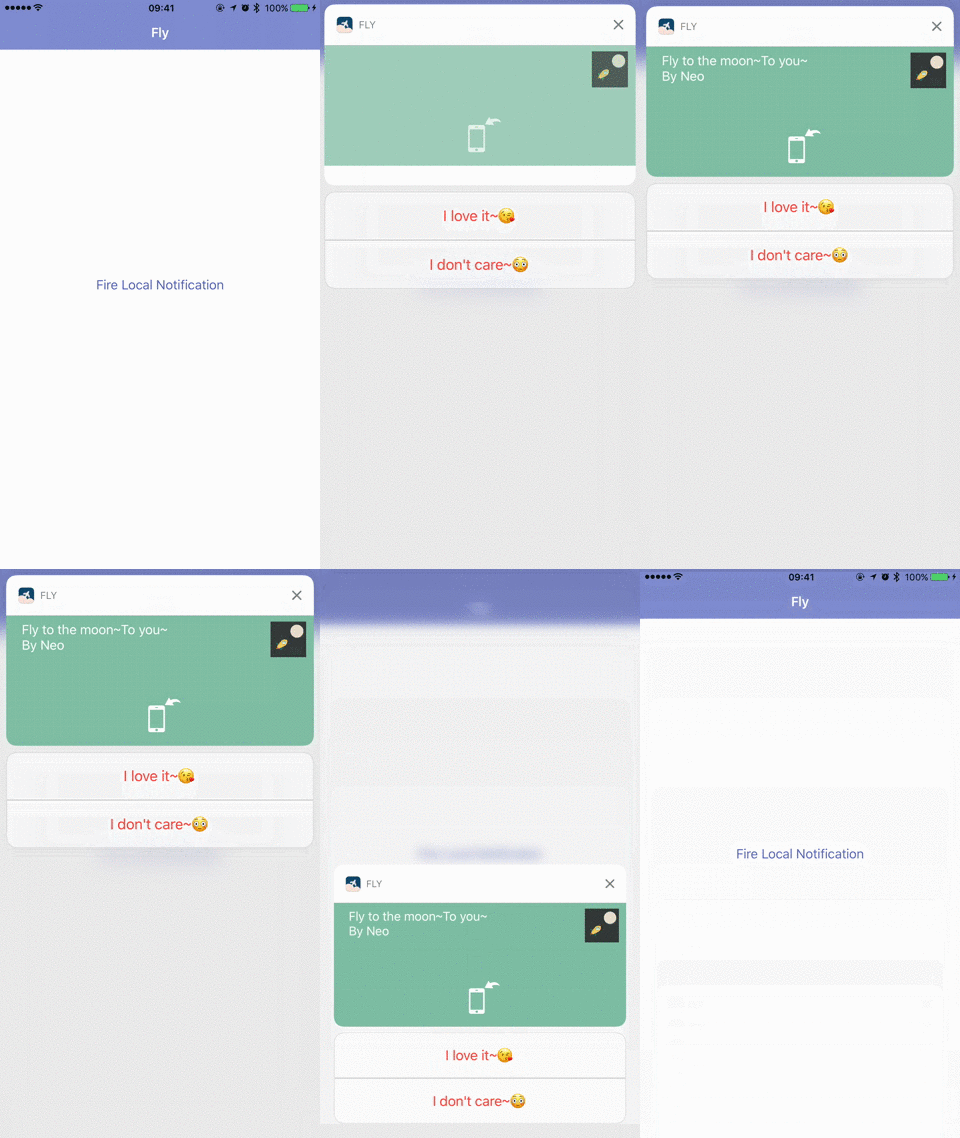
自定義通知UI
Notification Content Extension是另外一個擴展,其內容使用了UserNotificationsUIFramework,首先還是創建Notification Content Extension的target。
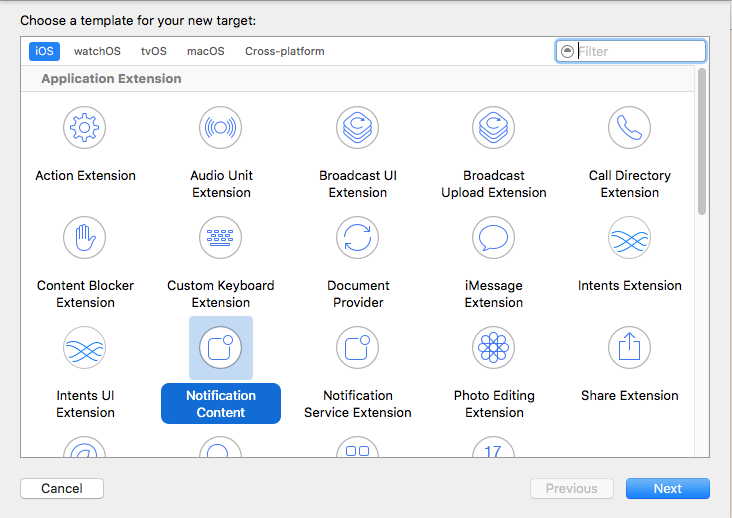
Notification Content Extension
此時會得到Notification Content Extension與MainInterface,storyboard裡面含有一個試圖控制器,這個試圖控制器就是Notification點擊後中間顯示的那部分。這部分你可以自定義UI,注意的是該視圖控制器無法響應交互控件,要想使用交互組件,就必須配合UNNotificationAction和category來對應你的UI部分,還有一點,Notification Content Extension只能有一個控制器,所以你要想定制多種UI,就需要代碼判斷加載不同的View來實現。
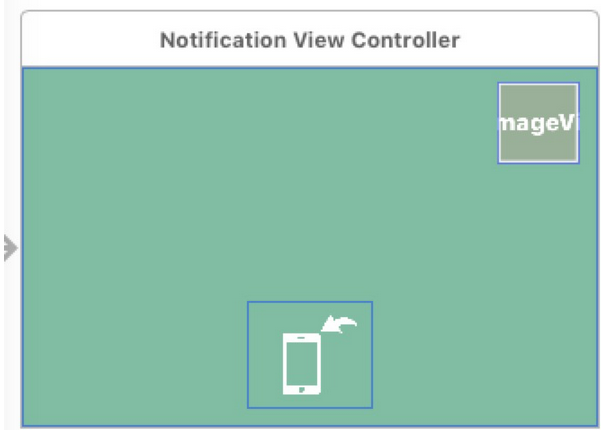
自定義UI部分.png
在視圖控制器部分,代碼如下:
- (void)didReceiveNotification:(UNNotification *)notification {
    self.label.text = notification.request.content.body;
    UNNotificationAttachment * attachment = notification.request.content.attachments.firstObject;
    if (attachment) {
        //開始訪問pushStore的存儲權限
        [attachment.URL startAccessingSecurityScopedResource];
        NSData * data = [NSData dataWithContentsOfFile:attachment.URL.path];
        [attachment.URL stopAccessingSecurityScopedResource];
        self.imageView.image = [UIImage imageWithData:data];
    }
}
- (void)didReceiveNotificationResponse:(UNNotificationResponse *)response completionHandler:(void (^)(UNNotificationContentExtensionResponseOption option))completion;{
    if ([response isKindOfClass:[UNTextInputNotificationAction class]]) {
        //處理提交文本的邏輯
    }
    if ([response.actionIdentifier isEqualToString:@"see1"]) {
        //處理按鈕3
    }
    if ([response.actionIdentifier isEqualToString:@"see2"]) {
        //處理按鈕2
    }
    //可根據action的邏輯回調的時候傳入不同的UNNotificationContentExtensionResponseOption
    completion(UNNotificationContentExtensionResponseOptionDismiss);
}
加入你有了Service Extension在前面下載好了圖片或者是視頻,在自定義UI部分你想獲取,就可以通過UNNotificationAttachment * attachment = notification.request.content.attachments.firstObject;查找附件來獲取數據,但是必須注意,前面提到的是,形成附件後,文件的實際存儲被移到了pushStore的一個系統級別的緩存文件夾,此時需要調用NSURL在iOS8開始提供的兩個方法來獲取權限,提取數據。
startAccessingSecurityScopedResource
stopAccessingSecurityScopedResource
點擊按鈕後,回調的方法是didReceiveNotificationResponse,在前面已經演示過,在這,可以不用打開App進而完成一些交互動作。
Info.plist文件有一些設置需要表明
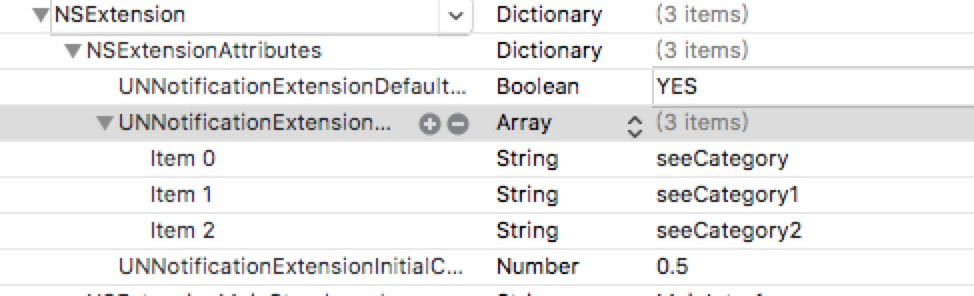
Info.plist設置
UNNotificationExtensionCategory改成數組,將你自定義的UI支持的categoryIdentifier一一放上,這樣,APNs推過來的數據中category包含哪個值,就調用哪個UNNotificationCategory設置好的actions交互組合
UNNotificationExtensionInitialContentSizeRatio,自定義內容的高度與寬度的比值,當然也可以在ViewDidLoad中修改preferredContentSize來完成這一目標
UNNotificationExtensionDefaultContentHidden,決定是否在自定義UI下部顯示通知的原內容,默認是顯示
Extensions 數據共享:
ServiceExtension與ContentExtension配合使用是非常棒的組合,在ServiceExtension中預先下載好數據,用戶點擊後在ContentExtension中直接展示,這樣交互會比較流暢,有一個問題是,如果你想在不打開App的時候使用自定義的action來與用戶交互,就必須加ContentExtension,因為只有它能接收用戶點擊action的response,ServiceExtension是沒有的。
如果你想使你的App在打開的時候訪問到這些數據,同樣可以根據UNNotificationAttachment來查找,但是更好的方案我個人覺得可以是用App Group來解決這個問題,當然App Group的過多討論是偏離本文章的話題的。
動態配置通知交互:
上面我們可以知道,Notification可以配上很多category與action來自定義交互方式,但都是硬編碼來實現,有時候我們想讓某個actionIdentifier對應的按鈕文字改變一下,或者是某個category對應的actions改變一下,來滿足運營活動的靈活性,需要思考動態配置UNNotificationCategory和UNNotificationAction的問題。有如下這個方案,可以把UNNotificationCategory和UNNotificationAction做成配置文件,如下:
{
     "NotificationConfig": {
        "UNNotificationCategory": {
            "seeCategory": {
                "identifier": "seeCategory",
                "actions": ["see1","see2"],
                "options": 0
            }
        },
        "UNNotificationAction": {
            "see1": {
                "identifier": "see1",
                "title": "I love it~",
                "options": 4
            },
            "see2": {
                "identifier": "see2",
                "title": "I dont't care~",
                "options": 4
            }
        }
    }
}
然後在通知中心設置categorys的時候
-(NSSet *)createNotificationCategoryActions{
    if (HBCONFIGOBJECT.moduleConfig.userNotificationConfig) {
      //讀取json文件
        NSDictionary * notificationConfig;
        NSDictionary * UNNotificationCategorys =[notificationConfig objectForKey:@"UNNotificationCategory"];
        NSDictionary * UNNotificationActions = [notificationConfig objectForKey:@"UNNotificationAction"];
        NSMutableSet * set = [NSMutableSet set];
        for (NSString * categoryKey in UNNotificationCategorys.allKeys) {
            NSDictionary * cateDict = UNNotificationCategorys[categoryKey];
            NSString * cateId = [cateDict objectForKey:@"identifier"];
            NSArray * cateActions = [cateDict objectForKey:@"actions"];
            NSNumber * cateOptions = [cateDict objectForKey:@"options"];
            NSMutableArray * actionsArr = [[NSMutableArray alloc]init];
            for (NSString * actionKey in cateActions) {
                NSDictionary * actionDict = [UNNotificationActions objectForKey:actionKey];
                if (actionDict) {
                    NSString * actionId = [actionDict objectForKey:@"identifier"];
                    NSString * actionTitle = [actionDict objectForKey:@"title"];
                    NSNumber * actionOption = [actionDict objectForKey:@"options"];
                    UNNotificationAction * action = [UNNotificationAction actionWithIdentifier:actionId title:actionTitle options:actionOption.unsignedIntegerValue];
                    [actionsArr addObject:action];
                }
            }
            UNNotificationCategory * category = [UNNotificationCategory categoryWithIdentifier:cateId actions:actionsArr intentIdentifiers:cateActions options:cateOptions.unsignedIntegerValue];
            [set addObject:category];
        }
        return set;
    }
    else
    {
        return nil;
    }
}
這樣就可以任意組合category和actions了,json文件可以在App內部做全量更新,在運營活動之前,就下發好給客戶端。
有一個問題是,ContentExtension需要在plist裡指定category,所以建議將categoryIdentifier按照一定格式進行序列化取名,在ContentExtension提前寫入0-10等很多的category,方面動態配置的時候取用。
運營如何使用通知與推送:
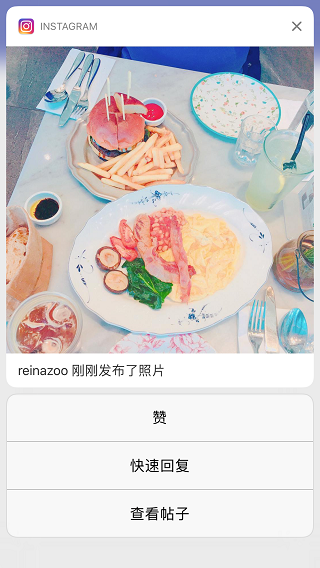
Instagram上iOS10通知的使用
iOS10推出了十分出色的通知以後,我經常使用的Instagram、Twitter、Facebook等都及時跟進,做出了非常好的交互,我希望微信團隊能在通知上快速預覽內容和回復上面增加此功能。
其實,這個話題是我非常想討論的,作為工程師,有得天獨厚的條件深刻理解最新最前沿的技術,那麼,這些技術如何產生現實意義,如何使用,在這點上,工程師是非常具有優勢的,假如你了解硅谷的工程師文化,你就會發現,硅谷的科技公司很少有產品經理的,大部分出色的功能和優質的用戶體驗是由工程師打造的,詳情可以參考MacTalk的一篇文章《硅谷不需要產品經理》。
真正的工程師文化,不像國內的開發者認為的是在某一技術領域非常深的理論研究,在國外的開發者眼裡,真正的工程師文化是一群善於創造並且有巨大的改變現實世界的能力的工程師文化,話說回來,現如今,移動端的工程師很多很多,像本篇這樣的技術介紹類的文章數不勝數,技術水平差不多的工程師非常之多,你如何脫穎而出?這是你需要思考的,我的建議是,作為工程師,跟你一樣熟悉API和開發技術的人多了去了,但是如果你能知道技術在各種場景下的最佳使用方案,並且能切實改變現實情況,舉個,iOS10的通知你是了解,但怎麼用才能更好的提升你的App的用戶體驗?更好的提高你的App在某些功能場景下的用戶使用成本?怎麼樣才能讓運營活動通過通知提高活躍度?如果你有這樣的各種解決方案,你就是勝出者~比方說,你是社交類App的開發者,你有一堆技術解決方案在手,能夠切實提升用戶體驗的,你是電商類開發者,你有通知的技術使用解決方案能夠更好的支撐運營活動的。
那iOS10的通知能想到哪些使用場景呢?
運營活動可以配上活動海報或者是動圖海報,在用戶點擊好能更好的查看運營活動詳情
即時通訊類的App可以通過自定義ContentExtension來在通知上完成回復消息
比方說,你有個秒殺活動,通知一下來,用戶立馬可以通過iOS10的通知交互完成秒殺預定,然後再啟動App慢慢付款~這個用戶體驗的提升那是相當巨大的
比方說,你可以通過推送收取一些用戶對某個活動或者新版本的反饋意見?使用TextAction來做
你是否可可以發個可視化的賬單給用戶,在自定義UI上顯示?
……
再來說說技術方案吧,上面的場景要想實現,有個問題是,通知的ServiceExtension和ContentExtension拿到了用戶反饋的信息,那這些信息該怎麼辦~方案如下:
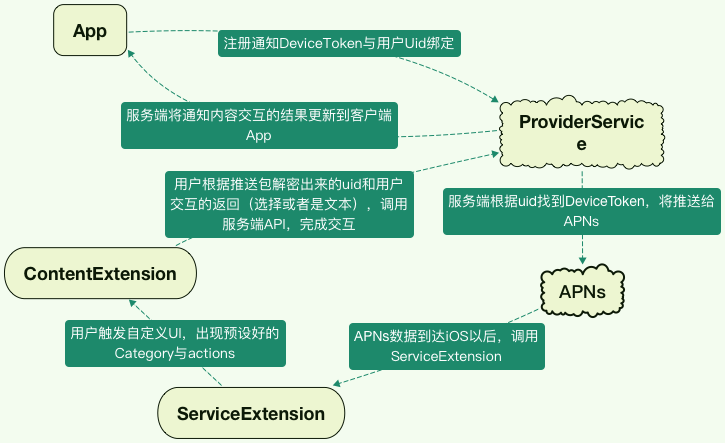
最新通知交互方案
這是個簡單的單推交互方案,其中需要由動態化配置Category與actions支撐,同時要做好加解密工作。
以上,就是本次討論通知和推送的主要內容
番外:推拉結合與Web Service Push
//番外篇待補全
12.24 更新:
Demo地址:https://github.com/Neojoke/UntificationLearn
可以使用工具來測試推送,工具地址:https://github.com/noodlewerk/NWPusher
非常方便~
Enjoy~
- 上一頁:Objective
- 下一頁:幾句代碼快速集成自定義轉場效果+ 全手勢驅動