
iOS 實作多選/單選相簿圖片選擇器
編輯:iOS 程式設計技術
做過相簿挑選功能就知道,多選與單選的切換、選中狀態的同步,細節不少。這篇把當時寫的 demo 整理出來,順便記錄幾個設計上的考量,以後回頭看也方便。
一、準備素材



這裡用到三張圖:一張佔位圖(相機入口),以及選中/未選中的勾選狀態圖。
二、自訂 UICollectionViewCell
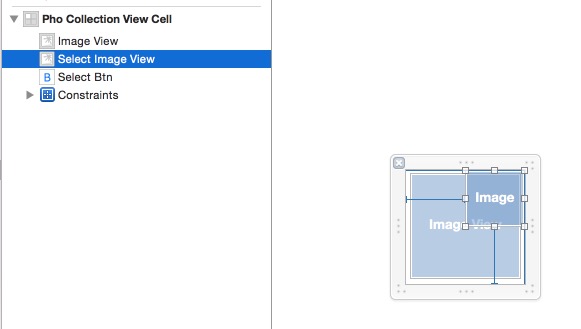
cell 的設計重點是:把「被點擊」這件事用 block 往外拋,讓 cell 不需要知道任何業務邏輯。
#import <UIKit/UIKit.h>

typedef void (^SelectBtnClickBlock)(BOOL isSelect);

@interface PhoCollectionViewCell : UICollectionViewCell
@property (weak, nonatomic) IBOutlet UIImageView *imageView;
@property (weak, nonatomic) IBOutlet UIImageView *selectImageView;
@property (nonatomic, copy) SelectBtnClickBlock selectBtnClickBlock;
@property (weak, nonatomic) IBOutlet UIButton *selectBtn;

- (IBAction)selectBtnClick:(id)sender;
@end
#import "PhoCollectionViewCell.h"
@implementation PhoCollectionViewCell
- (void)awakeFromNib {
[super awakeFromNib];
}
- (IBAction)selectBtnClick:(id)sender {
UIButton *btn = (UIButton *)sender;
btn.selected = !btn.selected;
_selectBtnClickBlock(btn.selected); // 把新的選中狀態回呼出去
}
@end三、資料模型
每張照片包成一個 model,用 isSelected 記錄選取狀態。這樣做的好處是:選中狀態屬於資料,cell 只是資料的呈現,捲動重用時不會出錯。
#import <Foundation/Foundation.h>
#import <AssetsLibrary/ALAssetsLibrary.h>

@interface PhoModel : NSObject
@property (nonatomic, strong) ALAsset *asset;
@property (nonatomic, assign) BOOL isSelected;
@end
#import "PhoModel.h"
@implementation PhoModel
@end四、抓取相簿並顯示
這裡透過 AppDelegate 持有的 ALAssetsLibrary 列舉所有照片群組。
#import "ViewController.h"
#import <AssetsLibrary/AssetsLibrary.h>
#import "AppDelegate.h"
#import "PhoModel.h"
#import "PhoCollectionViewCell.h"

#define ApplicationDelegate ((AppDelegate *)[UIApplication sharedApplication].delegate)

static NSInteger count = 0;

@interface ViewController ()
{
    NSMutableArray *mutableAssets;
}
@property (weak, nonatomic) IBOutlet UICollectionView *collectionView;
@end

@implementation ViewController

- (void)viewDidLoad {
    [super viewDidLoad];
    [self getAllPictures];
    [_collectionView registerNib:[UINib nibWithNibName:@"PhoCollectionViewCell" bundle:nil]
          forCellWithReuseIdentifier:@"CollectionViewCell"];
}

#pragma mark - 取得相簿中的所有照片
- (void)getAllPictures {
    mutableAssets = [[NSMutableArray alloc] init];
    NSMutableArray *assetURLDictionaries = [[NSMutableArray alloc] init];
    NSMutableArray *assetGroups = [[NSMutableArray alloc] init];

    __block NSMutableArray *tempMutableAssets = mutableAssets;
    __block ViewController *tempSelf = self;
    __block NSMutableArray *tempAssetGroups = assetGroups;

    [ApplicationDelegate.library enumerateGroupsWithTypes:ALAssetsGroupSavedPhotos
                                              usingBlock:^(ALAssetsGroup *group, BOOL *stop) {
        if (group != nil) {
            count = [group numberOfAssets];
            __block int groupNum = 0;

            [group enumerateAssetsUsingBlock:^(ALAsset *result, NSUInteger index, BOOL *stop) {
                if (result != nil) {
                    ++groupNum;
                    if ([[result valueForProperty:ALAssetPropertyType] isEqualToString:ALAssetTypePhoto]) {
                        [assetURLDictionaries addObject:[result valueForProperty:ALAssetPropertyURLs]];
                        NSURL *url = (NSURL *)[[result defaultRepresentation] url];
                        NSLog(@"%@, %@", [result valueForProperty:ALAssetPropertyDate], url);

                        PhoModel *phoModel = [[PhoModel alloc] init];
                        phoModel.asset = result;
                        phoModel.isSelected = NO;
                        [tempMutableAssets addObject:phoModel];

                        // 這個群組的照片都處理完畢
                        if (tempMutableAssets.count == (NSUInteger)groupNum) {
                            [tempSelf allPhotosCollected:tempMutableAssets];
                        }
                    }
                }
            }];
            [tempAssetGroups addObject:group];
        }
    } failureBlock:^(NSError *error) {
        NSLog(@"There is an error");
    }];
}

- (void)allPhotosCollected:(NSMutableArray *)mutableAsset {
    [self.collectionView reloadData];
}

#pragma mark - UICollectionViewDataSource

- (CGSize)collectionView:(UICollectionView *)collectionView
                  layout:(UICollectionViewLayout *)collectionViewLayout
  sizeForItemAtIndexPath:(NSIndexPath *)indexPath {
    // 一行四個,間距 5pt
    return CGSizeMake(([UIScreen mainScreen].bounds.size.width - 15) / 4.0,
                      ([UIScreen mainScreen].bounds.size.width - 30) / 4.0);
}

- (NSInteger)collectionView:(UICollectionView *)collectionView
     numberOfItemsInSection:(NSInteger)section {
    return mutableAssets.count + 1;   // 多一格放相機入口
}

- (UICollectionViewCell *)collectionView:(UICollectionView *)collectionView
                   cellForItemAtIndexPath:(NSIndexPath *)indexPath {
    static NSString *CellIdentifier = @"CollectionViewCell";
    PhoCollectionViewCell *cell = [collectionView dequeueReusableCellWithReuseIdentifier:CellIdentifier
                                                                            forIndexPath:indexPath];
    // 第 0 格是相機入口
    if (indexPath.row == 0) {
        cell.imageView.image = [UIImage imageNamed:@"0.png"];
        cell.selectImageView.hidden = YES;
        cell.selectBtnClickBlock = ^(BOOL isSelect) {
            NSLog(@"cell1 block");
        };
        return cell;
    }

    PhoModel *phoModel = mutableAssets[indexPath.row - 1];
    cell.imageView.image = [UIImage imageWithCGImage:[phoModel.asset thumbnail]];
    cell.selectImageView.image = phoModel.isSelected ? [UIImage imageNamed:@"2.png"]
                                                     : [UIImage imageNamed:@"1.png"];
    cell.selectImageView.hidden = NO;
    cell.selectBtn.selected = phoModel.isSelected;

    cell.selectBtnClickBlock = ^(BOOL isSelect) {
        // issangal = NO 為單選,YES 為多選
        BOOL issangal = NO;
        if (issangal) {
            // 單選模式:先把其他全部取消
            for (PhoModel *tmp in mutableAssets) {
                tmp.isSelected = NO;
            }
        }
        phoModel.isSelected = isSelect;
        [_collectionView reloadData];
    };
    return cell;
}

- (void)collectionView:(UICollectionView *)collectionView
didSelectItemAtIndexPath:(NSIndexPath *)indexPath {
    NSLog(@"%ld", (long)indexPath.row);
}

@end
五、效果
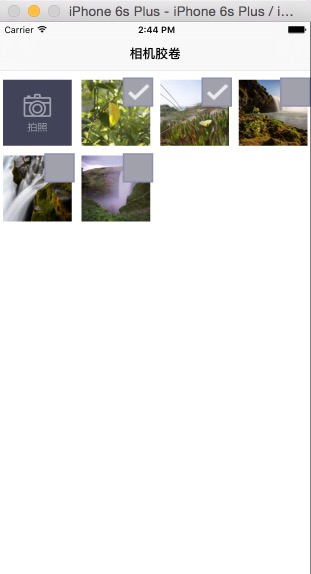
六、幾點說明
- 單選/多選的切換開關就是 cell 回呼裡那個
issangal變數。實務上應該把它抽成 view controller 的屬性或全域設定,而不是寫在 block 內。 - 為什麼選中狀態存在 model 而非 cell:collectionView 會重用 cell,如果把狀態存在 cell 上,捲動後就會錯亂。這是所有列表型選取功能的通用原則。
- AssetsLibrary 已於 iOS 9 被棄用,新專案請改用 Photos 框架(
PHAsset、PHFetchResult、PHImageManager),並記得在 Info.plist 補上NSPhotoLibraryUsageDescription。上面這份程式碼的價值在於「cell 用 block 回呼 + 狀態放 model」的設計思路,那部分與 API 版本無關。
- 上一篇文章: 城市選擇之自訂搜索框
- 下一篇文章: iOS 開發之九宮格手勢解鎖