
iOS 底層學習:KVC 鍵值編碼的實踐與底層原理

簡介
KVC(Key-Value Coding)鍵值編碼,顧名思義:可以通過對象的屬性名(Key)直接對屬性值(Value)進行讀寫,這裡的「編碼」可以理解為「賦值」。這樣做的好處是可以跳過 getter 與 setter 方法,簡化代碼;同時也能用來讀寫系統控件的內部屬性(這個黑魔法且用且珍惜)。
一、最簡單的使用例子
假設有 CYXModel 類與 CYXShopModel 類,前者有 name、product 屬性,後者有 productName 屬性。
@interface CYXModel : NSObject
@property (nonatomic, strong) NSString *name;
@property (nonatomic, strong) CYXShopModel *product;
@end
@interface CYXShopModel : NSObject
@property (nonatomic, strong) NSString *productName;
@end不使用 KVC,我們這樣訪問屬性
取值:
CYXModel *model = [[CYXModel alloc] init];
NSString *name = model.name;
CYXShopModel *shop = model.product;
NSString *productName = shop.productName;
設值:
CYXModel *model = [[CYXModel alloc] init];
model.name = @"CYX";

CYXShopModel *shopModel = [[CYXShopModel alloc] init];
shopModel.productName = @"NIKE";
model.product = shopModel;
使用 KVC,我們可以這樣訪問屬性
取值:
CYXModel *model = [[CYXModel alloc] init];
NSString *name = [model valueForKey:@"name"];
// 通過 keyPath 直接穿透到子對象
NSString *productName = [model valueForKeyPath:@"product.productName"];
設值:
CYXModel *model = [[CYXModel alloc] init];
[model setValue:@"CYX" forKey:@"name"];
[model setValue:@"NIKE" forKeyPath:@"product.productName"];
這個例子看起來似乎沒什麼用處——毕竟直接點語法更短。真正的價值在下面。
二、KVC 字典轉模型的實現原理
假設 dict 字典中有 name、icon 兩個 Key,那麼 CYXModel 模型中必須有同名的 name、icon 屬性與之對應。
我們使用 [CYXModel setValuesForKeysWithDictionary:dict]; 就能完成字典轉模型。它的內部實現原理如下:
(1)遍歷字典裡所有的 key 和 value
// enumerateKeysAndObjectsUsingBlock: 遍歷字典中的所有keys和values
[dict enumerateKeysAndObjectsUsingBlock:^(id key, id obj, BOOL *stop) {
    // 利用KVC給模型中屬性賦值
    // key: 用來給哪個屬性
    // obj: 給模型的值
    [model setValue:obj forKey:key];
}];
(2)分別給屬性賦值
[model setValue:dict[@"name"] forKey:@"name"];
[model setValue:dict[@"icon"] forKey:@"icon"];
setValue:forKey: 的賦值查找順序
這個方法是理解 KVC 的關鍵。當你調用 [model setValue:value forKey:@"icon"] 時,runtime 按以下順序查找:
- 先找有沒有
setIcon:方法,找到就直接調用:[self setIcon:value]; - 找不到 set 方法,就找有沒有
_setIcon:方法(下劃線前綴版本); - 還找不到,就判斷有沒有
icon這個 ivar(判斷_isMemberOfClass等條件後直接賦值):icon = value; - 再找不到,就找
_icon:_icon = value; - 以上全部失敗,就會拋出
NSUnknownKeyException:<Flag 0x7fb74bc7a2c0> setValue:forUndefinedKey:
這也解釋了一個常見的崩潰場景:後端返回的字段和模型屬性名不一致時,就會在這一步崩掉。
擴展:讀者可以進一步了解 KVV(Key-Value Validation,鍵值驗證),配合
setValue:forKey:使用,能在賦值前插入校驗邏輯,也是解決上述崩潰的一種容錯思路。另一種更常用的做法是在模型的setValue:forUndefinedKey:中重寫方法,靜默忽略未知 Key。
三、修改系統控件內部屬性(runtime + KVC)
有時候設計師會給你出點難題。比如界面設計稿是這樣的:
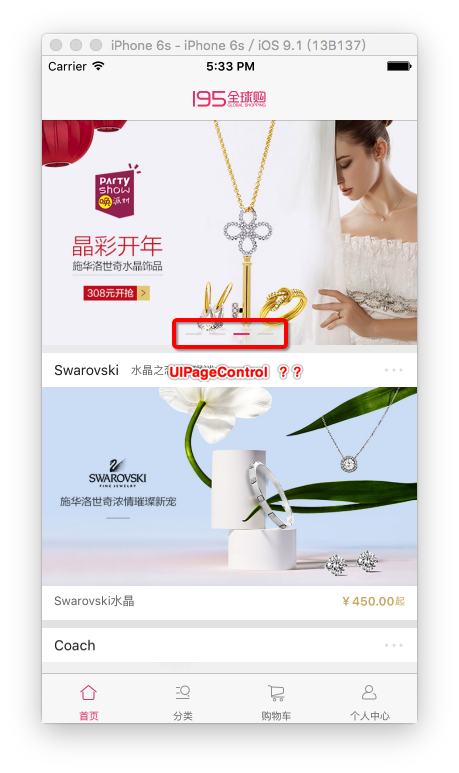
仔細看,這個 UIPageControl 怎麼和我平常用的不太一樣?平時不都是這樣的嗎:

第一反應肯定是翻 UIPageControl 的頭文件:
NS_CLASS_AVAILABLE_IOS(2_0) @interface UIPageControl : UIControl
@property(nonatomic) NSInteger numberOfPages;      // default is 0
@property(nonatomic) NSInteger currentPage;        // default is 0
@property(nonatomic) BOOL hidesForSinglePage;
@property(nonatomic) BOOL defersCurrentPageDisplay;
- (void)updateCurrentPageDisplay;
- (CGSize)sizeForNumberOfPages:(NSInteger)pageCount;
@property(nullable, nonatomic, strong) UIColor *pageIndicatorTintColor NS_AVAILABLE_IOS(6_0) UI_APPEARANCE_SELECTOR;
@property(nullable, nonatomic, strong) UIColor *currentPageIndicatorTintColor NS_AVAILABLE_IOS(6_0) UI_APPEARANCE_SELECTOR;
@end
結果發現:能設的只有幾個顏色和個數,根本沒法塞 UIImage 進去。看來常規路子走不通了。剩下的方案有兩個:
方案一:自定義 PageControl。完全自己繪製,自由度最高,但工作量也最大。
方案二:用 runtime 遍歷出所有屬性(包括私有成員變量),再用 KVC 賦值。
這裡選方案二。使用 runtime 遍歷 UIPageControl 的打印結果如下:
2016-03-23 01:09:26.161 UIPageControl -> _lastUserInterfaceIdiom = q
2016-03-23 01:09:26.161 UIPageControl -> _indicators = @"NSMutableArray"
2016-03-23 01:09:26.161 UIPageControl -> _currentPage = q
2016-03-23 01:09:26.161 UIPageControl -> _displayedPage = q
2016-03-23 01:09:26.162 UIPageControl -> _pageControlFlags = {?="hideForSinglePage"b1"defersCurrentPageDisplay"b1}
2016-03-23 01:09:26.162 UIPageControl -> _currentPageImage = @"UIImage"   // 當前選中圖片
2016-03-23 01:09:26.162 UIPageControl -> _pageImage = @"UIImage"          // 默認圖片
2016-03-23 01:09:26.162 UIPageControl -> _currentPageImages = @"NSMutableArray"
2016-03-23 01:09:26.162 UIPageControl -> _pageImages = @"NSMutableArray"
2016-03-23 01:09:26.162 UIPageControl -> _backgroundVisualEffectView = @"UIVisualEffectView"
2016-03-23 01:09:26.162 UIPageControl -> _currentPageIndicatorTintColor = @"UIColor"
2016-03-23 01:09:26.163 UIPageControl -> _pageIndicatorTintColor = @"UIColor"
2016-03-23 01:09:26.163 UIPageControl -> _legibilitySettings = @"_UILegibilitySettings"
2016-03-23 01:09:26.163 UIPageControl -> _numberOfPages = q
果然找到了想要的兩個屬性:_pageImage 和 _currentPageImage。用 KVC 直接賦值即可:
 UIPageControl *pageControl = [[UIPageControl alloc] init];
[pageControl setValue:[UIImage imageNamed:@"home_slipt_nor"]
               forKeyPath:@"_pageImage"];
[pageControl setValue:[UIImage imageNamed:@"home_slipt_pre"]
               forKeyPath:@"_currentPageImage"];
這裡只是拋磚引玉講了個小例子,其他玩法還等讀者自己去發現。
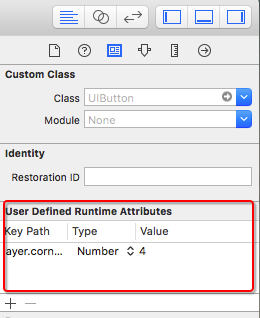
提示:在 xib / Storyboard 中同樣可以使用 KVC。比如下圖就是在 xib 的 User Defined Runtime Attributes 裡配置 KVC,把圖片的圓角半徑設為固定值,這樣不用寫一行代碼就能實現圓角。
四、關於這種做法的風險提醒
必須誠實地說:讀寫系統私有屬性是一把雙刃劍。
- 隨時可能失效:私有屬性沒有任何兼容性承諾,蘋果在系統小版本升級中就可能改名或移除。上面這段代碼基於 iOS 9 時代的實現,後續版本中 UIPageControl 的內部結構已經有過調整。
- 審核風險:這種寫法在靜態掃描中容易被識別,存在被拒的可能。
- 更安全的替代方案:iOS 14 之後,蘋果終於為 UIPageControl 補上了
preferredIndicatorImage與alternativeIndicatorImage兩個公開 API,可以直接自定義指示器圖片。新項目應優先使用官方接口。
KVC 本身是完全推薦使用的優秀特性,尤其在字典轉模型、KVO、批量取值等場景中;但把它用在私有 API 上時,請把它當作最後的手段,並做好降級方案。
- 上一篇文章: iOS 布局新利器:Masonry 快速上手實戰
- 下一篇文章: iOS 動態性(四):用 runtime 一行代碼搞定序列化與反序列化