
在 iOS 上繪製線性漸變填充
編輯:iOS 程式設計技術
在 iOS 上繪製漸變,需要透過 Core Graphics 的 C 函數來完成。這裡並不是把路徑對象交給漸變讓它自行繪製,而是先對當前圖形上下文進行修剪(clip),再從一點向另一點繪製漸變。
「修剪」的意思是將繪製範圍局限於某個形狀之內,這樣可以防止漸變溢出、鋪滿整個視圖。此外,除了提供漸變的角度,還要傳入起始繪製坐標,並把它換算成視圖的坐標系。
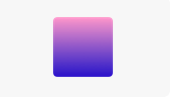
下面的代碼在 Playground 中實現了一個帶圓角的線性漸變:
//: Playground - noun: a place where people can play
import UIKit
class MyView : UIView{
    override func drawRect(rect: CGRect) {
        let colorSpace = CGColorSpaceCreateDeviceRGB()
        let context = UIGraphicsGetCurrentContext()
        let gradientStartColor = UIColor(red: 0.1, green: 0.1, blue: 0.8, alpha: 1)
        let gradientEndColor = UIColor(red: 1, green: 0.6, blue: 0.8, alpha: 1)
        let gradientcolors : CFArray = [gradientStartColor.CGColor,gradientEndColor.CGColor]
        let gradientLocations : [CGFloat] = [0.0,1.0]
        let gradient = CGGradientCreateWithColors(colorSpace, gradientcolors, gradientLocations)
        let pathRect = CGRectInset(self.bounds, 20, 20)
        let topPoint = CGPointMake(self.bounds.size.width/2, 20)
        let bottomPoint = CGPointMake(self.bounds.size.width/2 , self.bounds.size.height-20)
        let roundedRectanglePath = UIBezierPath(roundedRect: pathRect,cornerRadius: 4)
        CGContextSaveGState(context)
        roundedRectanglePath.addClip() //修剪到圓角矩形範圍內
        CGContextDrawLinearGradient(context, gradient, bottomPoint, topPoint, .DrawsAfterEndLocation)
        CGContextRestoreGState(context)
    }
}
let viewRect = CGRect(x: 0, y: 0, width: 100, height: 100)
let myEmptyView = MyView(frame:viewRect)
myEmptyView.backgroundColor = UIColor.clearColor()
效果圖:
- 上一篇文章: 在 iOS 上用變換實現圖形旋轉
- 下一篇文章: 在 iOS 上為圖形添加陰影效果