
Objective-C Runtime 五大核心用法详解
Runtime(運行時)是 Objective-C 靈活性的根源。本文系統梳理 Runtime 的基本概念與五大典型應用場景,並附上可運行的示例代碼。
一、Runtime 簡介
RunTime 即「運行時」,Objective-C 本質上就是一套「運行時機制」,其中最核心的便是消息機制。
對比 C 語言與 OC 的調用方式不難看出差異:C 語言在編譯階段就確定了要調用哪個函數;而 OC 屬於「動態調用」,編譯時並無法確定真正調用哪個函數,只有在運行時才會依據函數名找到對應實現來執行。
這也解釋了兩個有趣現象:在編譯階段,OC 可以「調用任何函數」,即使它尚未實現,只要聲明過就不會報錯;而 C 語言調用未實現的函數則會直接報錯。
二、Runtime 的五大作用
1. 發送消息
方法調用的本質,就是讓對象發送消息,底層由 objc_msgSend 完成。只有對象才能發送消息,因此函數以 objc 開頭。使用前需導入 #import <objc/message.h>,也可透過 clang -rewrite-objc main.m 查看最終生成的代碼。
// 創建 person 對象
Person *p = [[Person alloc] init];
[p eat]; // 本質:讓對象發送消息
objc_msgSend(p, @selector(eat));
// 調用類方法有兩種寫法
[Person eat];              // 通過類名調用
[[Person class] eat];      // 通過類對象調用
// 本質:讓類對象發送消息
objc_msgSend([Person class], @selector(eat));
消息機制的原理是:對象根據方法編號 SEL 去映射表中查找對應的方法實現。
2. 交換方法
當系統自帶方法功能不足,又想保留原有功能時,除了繼承並重寫,還可以用 Runtime 交換方法。典型場景是給 imageNamed: 增加加載判斷:
@implementation ViewController
- (void)viewDidLoad {
    [super viewDidLoad];
    // 需求:每次加載圖片就判斷是否加載成功
    UIImage *image = [UIImage imageNamed:@"123"];
}
@end
@implementation UIImage (Image)
// 分類加載到內存時調用
+ (void)load {
    Method imageWithName = class_getClassMethod(self, @selector(imageWithName:));
    Method imageName = class_getClassMethod(self, @selector(imageNamed:));
    method_exchangeImplementations(imageWithName, imageName);
}
// 分類中不能重寫系統方法,也不能調用 super,否則會覆蓋原功能
+ (instancetype)imageWithName:(NSString *)name {
    UIImage *image = [self imageWithName:name]; // 此處相當於調用原 imageNamed:
    if (image == nil) {
        NSLog(@"加載空的圖片");
    }
    return image;
}
@end
交換的本質,是把兩個方法在映射表中的實現地址對調:
交換之前: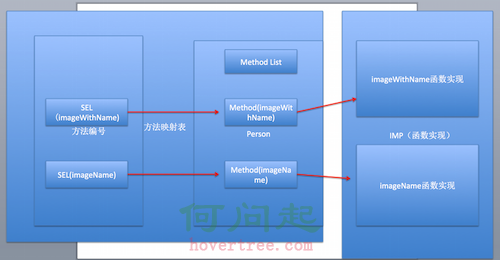
交換之後:
3. 動態添加方法
如果一個類方法眾多,加載時為每個方法生成映射表會消耗不少資源。此時可以改用動態添加方法的方式,在真正需要時才掛上去:
@implementation ViewController
- (void)viewDidLoad {
    [super viewDidLoad];
    Person *p = [[Person alloc] init];
    [p performSelector:@selector(eat)]; // 動態添加後不再報錯
}
@end
@implementation Person
void eat(id self,SEL sel) {
    NSLog(@"%@ %@",self,NSStringFromSelector(sel));
}
// 對象調用未實現的方法時會走到這裡
+ (BOOL)resolveInstanceMethod:(SEL)sel {
    if (sel == @selector(eat)) {
        // class_addMethod(類, 方法編號, 函數實現, 類型簽名)
        class_addMethod(self, @selector(eat), eat, "v@:");
    }
    return [super resolveInstanceMethod:sel];
}
@end
4. 給分類添加屬性
為一個類聲明屬性,本質上是給它添加關聯,而非直接把值塞進類的內存空間。做法是透過關聯對象函數來存取:
@implementation ViewController
- (void)viewDidLoad {
    [super viewDidLoad];
    NSObject *objc = [[NSObject alloc] init];
    objc.name = @"小碼哥";
    NSLog(@"%@",objc.name);
}
@end
static const char *key = "name";
@implementation NSObject (Property)
- (NSString *)name {
    return objc_getAssociatedObject(self, key);
}
- (void)setName:(NSString *)name {
    objc_setAssociatedObject(self, key, name, OBJC_ASSOCIATION_RETAIN_NONATOMIC);
}
@end
5. 字典轉模型
字典轉模型的第一步是設計模型屬性,讓屬性與字典 key 一一對應。若逐個手寫實在費時,可以寫一個分類,根據字典自動生成屬性字符串:
@implementation NSObject (Log)
+ (void)resolveDict:(NSDictionary *)dict{
    NSMutableString *strM = [NSMutableString string];
    [dict enumerateKeysAndObjectsUsingBlock:^(id _Nonnull key, id _Nonnull obj, BOOL * _Nonnull stop) {
        NSString *type;
        if ([obj isKindOfClass:NSClassFromString(@"__NSCFString")]) {
            type = @"NSString";
        }else if ([obj isKindOfClass:NSClassFromString(@"__NSCFArray")]){
            type = @"NSArray";
        }else if ([obj isKindOfClass:NSClassFromString(@"__NSCFNumber")]){
            type = @"int";
        }else if ([obj isKindOfClass:NSClassFromString(@"__NSCFDictionary")]){
            type = @"NSDictionary";
        }
        NSString *str;
        if ([type containsString:@"NS"]) {
            str = [NSString stringWithFormat:@"@property (nonatomic, strong) %@ *%@;",type,key];
        }else{
            str = [NSString stringWithFormat:@"@property (nonatomic, assign) %@ %@;",type,key];
        }
        [strM appendFormat:@"\n%@\n",str];
    }];
    NSLog(@"%@",strM);
}
@end
字典轉模型的第一種方式是 KVC:
@implementation Status
+ (instancetype)statusWithDict:(NSDictionary *)dict {
    Status *status = [[self alloc] init];
    [status setValuesForKeysWithDictionary:dict];
    return status;
}
@end
KVC 的弊端在於必須保證模型屬性與字典 key 完全對應,否則會拋出 setValue:forUndefinedKey: 找不到 key 的錯誤。解法是重寫該方法,把系統行為覆蓋掉:
- (void)setValue:(id)value forUndefinedKey:(NSString *)key { }
第二種方式是 Runtime:遍歷模型的所有成員屬性,逐一去字典中查值並賦值,還能處理字典套字典、數組套字典的嵌套轉換。核心邏輯如下:
@implementation NSObject (Model)
+ (instancetype)modelWithDict:(NSDictionary *)dict {
    id objc = [[self alloc] init];
    unsigned int count;
    Ivar *ivarList = class_copyIvarList(self, &count); // 取出所有成員屬性
    for (int i = 0; i < count; i++) {
        Ivar ivar = ivarList[i];
        NSString *name = [NSString stringWithUTF8String:ivar_getName(ivar)];
        NSString *key = [name substringFromIndex:1]; // 去掉下劃線前綴
        id value = dict[key];
        // 二級轉換:值為字典時轉模型
        if ([value isKindOfClass:[NSDictionary class]]) {
            NSString *type = [NSString stringWithUTF8String:ivar_getTypeEncoding(ivar)];
            NSRange range = [type rangeOfString:@"\""];
            type = [type substringFromIndex:range.location + range.length];
            range = [type rangeOfString:@"\""];
            type = [type substringToIndex:range.location];
            Class modelClass = NSClassFromString(type);
            if (modelClass) {
                value = [modelClass modelWithDict:value];
            }
        }
        // 三級轉換:數組中的字典轉模型
        if ([value isKindOfClass:[NSArray class]]) {
            if ([self respondsToSelector:@selector(arrayContainModelClass)]) {
                id idSelf = self;
                NSString *type = [idSelf arrayContainModelClass][key];
                Class classModel = NSClassFromString(type);
                NSMutableArray *arrM = [NSMutableArray array];
                for (NSDictionary *dict in value) {
                    id model = [classModel modelWithDict:dict];
                    [arrM addObject:model];
                }
                value = arrM;
            }
        }
        if (value) {
            [objc setValue:value forKey:key];
        }
    }
    return objc;
}
@end
- 上一篇文章: 用自定義 UICollectionViewLayout 實作 iOS 瀑布流
- 下一篇文章: iOS 七大手勢識別器完整實作