
iOS 反射的學習與運用:Model 與字典互轉
iOS 反射的學習與運用
反射:透過類名來獲得相應類別實例的這種機制,就叫做反射。
常用的反射場景
- 把 NSDictionary 轉成自訂 model
- 自訂 model 轉成 NSDictionary
(1)第一種其實很好實現:你可以自己寫映射關係,也可以使用優秀的第三方,比如 MJExtension,特別方便。
(2)MJExtension 有一個方法 valueKey,可以轉字典。但這種方法有局限:它比較適合單層次的 model 類,不適合有自訂 model 子類,或本身繼承自其他自訂 model 的派生類。
因為很多時候我們想轉成字典,是為了透過字典轉成 json 做快取;若字典中含有自訂類(另外若有 UI 類型的類,比如 UIColor、UIView、UILabel 等非資料級別的類),會在轉成 json 的過程中失敗甚至崩潰。
網上查了很多資料,有不少類似的說法:「對象的類,如果是派生類,就得靠其他方式來實現了,因為得不到該基底類的屬性」——其實這是錯誤的一句話。
看到各種轉載之後,我甚至一度猶豫:這我真的能做到嗎?現在我可以說,能啊!實際運用時不就是透過點語法獲取父類/子類的屬性或方法嗎?反過來說,為什麼不行?Java、C# 的反射很常見,iOS 也一定行!
關鍵程式碼來了,先上幾個要點:
反射動用了底層,主要是 C 語言。
(1)頭檔 #import <objc/runtime.h>
(2)算法策略:DFS(深度優先搜尋)
(3)透過呼叫自身的 class 方法獲取當前類的元資料:
透過 runtime 的 class_copyPropertyList 方法取得當前類的屬性列表,以指標陣列的形式返回;
遍歷指標陣列,透過 property_getName 獲取屬性名,property_getAttributes 獲取屬性類型。
(4)判斷條件:
a. 用 [value class] 得到的都是 JKArray、JKDictionary、__NSCFString、__NSCFConstantString 等類簇級別的型別,它們是 NSString 等的子類,判斷冗餘條件太多、不易窮盡、也不夠科學。所以獲取類必須用 property_getAttributes 來取,才能取到 NSString、NSArray 等 NS 級別的型別。
轉化後是一個字串類型的類,再轉換成類的方法是:
Class propertyClass = NSClassFromString(className);
這種方法的優勢是動態獲取,甚至不用添加頭檔來制約,甚是方便——因為類在搜尋過程中本來就是從物理條件匿名出發,你不可能預先知道將要搜尋到什麼類。
b. 關鍵是節點檢索條件。我設計的是:
向下:如果當前節點是一個系統級別的類,那麼它已經是葉子節點;否則需要進一步 DFS。
向上:DFS 當前類的 superClass。
結束條件:class 為空,或已到達基底類 NSObject。
判斷是否為系統級別類的方法:
if (propertyClass == NULL) {
} else {
    NSBundle *mainB = [NSBundle bundleForClass:propertyClass];
    if (mainB == [NSBundle mainBundle]) {
        DLog(@"自定義的類");
    } else {
        DLog(@"系統的類");
    }
}
原理:看這個類是否在沙盒裡,在就肯定是系統級別的,否則是自訂的。
上程式碼:
//
// NSDictionary+ModelConvert.h
//
#import <Foundation/Foundation.h>

@interface NSDictionary (ModelConvert)
/**
 * 拓展:獲得當前類及子類和父類的全部屬性和屬性值
 * @returns (NSString) 屬性名 --> 值的字典
 * 注意:不應該使用 UI 的類做處理,可以生成字典,但轉 json 會崩潰
 */
+ (NSDictionary *)toDictionaryFromModel:(id)objectModel;
@end

//
// NSDictionary+ModelConvert.m
//
#import "NSDictionary+ModelConvert.h"
#import <objc/runtime.h>

@implementation NSDictionary (ModelConvert)

+ (NSDictionary *)toDictionaryFromModel:(id)objectModel {
    return [NSDictionary classPropsForClassHierarchyObjectModel:objectModel class:[objectModel class] onDictionary:[NSMutableDictionary dictionary]];
}

static const char *getPropertyType(objc_property_t property) {
    const char *attributes = property_getAttributes(property);
    char buffer[1 + strlen(attributes)];
    strcpy(buffer, attributes);
    char *state = buffer, *attribute;
    while ((attribute = strsep(&state, ",")) != NULL) {
        if (attribute[0] == 'T' && attribute[1] != '@') {
            NSString *name = [[NSString alloc] initWithBytes:attribute + 1 length:strlen(attribute) - 1 encoding:NSASCIIStringEncoding];
            return (const char *)[name cStringUsingEncoding:NSASCIIStringEncoding];
        } else if (attribute[0] == 'T' && attribute[1] == '@' && strlen(attribute) == 2) {
            return "id";
        } else if (attribute[0] == 'T' && attribute[1] == '@') {
            NSString *name = [[NSString alloc] initWithBytes:attribute + 3 length:strlen(attribute) - 4 encoding:NSASCIIStringEncoding];
            return (const char *)[name cStringUsingEncoding:NSASCIIStringEncoding];
        }
    }
    return "";
}

+ (NSDictionary *)classPropsForClassHierarchyObjectModel:(id)objectModel class:(Class)klass onDictionary:(NSMutableDictionary *)results {
    if (klass == NULL) {
        return nil;
    }
    // 到達 NSObject 基底類時停止
    if (klass == [NSObject class]) {
        return [NSDictionary dictionaryWithDictionary:results];
    } else {
        unsigned int outCount, i;
        objc_property_t *properties = class_copyPropertyList(klass, &outCount);
        if (outCount == 0) {
            free(properties);
            return nil;
        }
        for (i = 0; i < outCount; i++) {
            objc_property_t property = properties[i];
            const char *propName = property_getName(property);
            if (propName) {
                NSString *propertyName = [NSString stringWithUTF8String:propName];
                id value = [objectModel valueForKey:propertyName];
                if (value) {
                    const char *propType = getPropertyType(property);
                    NSString *className = [NSString stringWithCString:propType encoding:[NSString defaultCStringEncoding]];
                    Class propertyClass = NSClassFromString(className);
                    if (propertyClass == NULL) {
                        [results setObject:value forKey:propertyName];
                    } else {
                        NSBundle *mainB = [NSBundle bundleForClass:propertyClass];
                        if (mainB == [NSBundle mainBundle]) {
                            // 自定義的類:向下遞歸處理
                            NSDictionary *dic = [NSDictionary toDictionaryFromModel:value];
                            [results setObject:dic forKey:propertyName];
                        } else {
                            // 系統的類
                            if (propertyClass == [UIColor class]) { // 依需求處理
                                continue;
                            }
                            [results setObject:value forKey:propertyName];
                        }
                    }
                }
            }
        }
        free(properties);
        // 向上遞歸處理父類
        return [NSDictionary classPropsForClassHierarchyObjectModel:objectModel class:[klass superclass] onDictionary:results];
    }
}
@end
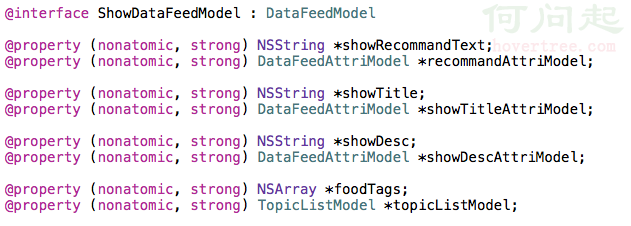
參考多重繼承類:
1.
2.

3.

使用:

執行列印:

ShowDataFeedModel 還有個屬性 foodTags,這裡沒列印出來,是因為 value 為空——我沒有把 value 為空的對象放進字典集合。如有需要,也可以處理一下,放進空資料即可。這樣的字典集合可以直接轉換成 json 存儲,需要時再轉換回對應的資料 model,妥妥的。
- 上一篇文章: iOS 實作:將圖片加入自訂相簿
- 下一篇文章: iOS 多語言支持實作指南