Objective-c 動畫
編輯:IOS編程技術
想提高下以後做的應用給客戶帶去的體驗,所以看了幾天OC的CAAnimation動畫類,也做了幾個小案例,下面講個別案例來做為本文的主要內容。
一:繼承結構截圖
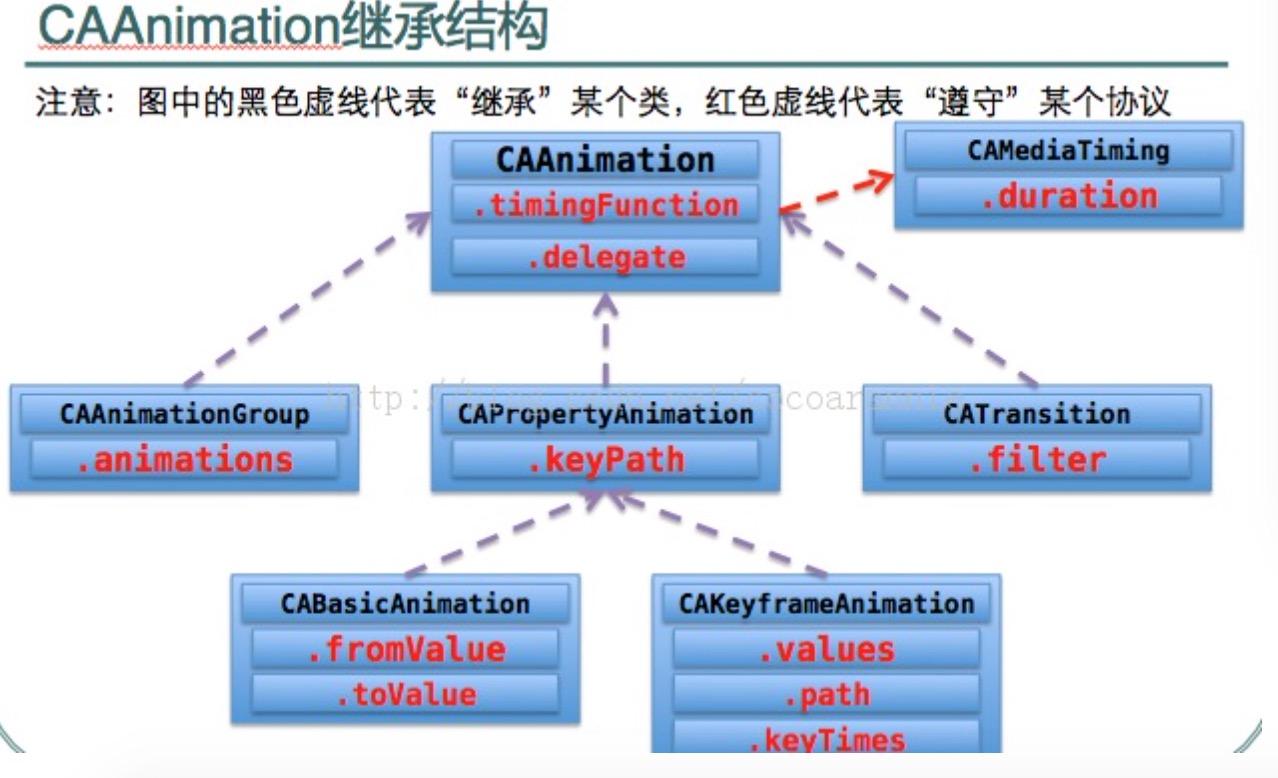
上面截圖中用得最多的類大概就是,CABaseAnimation和 CAKeyframeAnimation,這兩個類的最大區別就是對動畫的控制,CABaseAnimation 不能在類中增加和控制幀,CAKeyframeAnimation這個類可以在代碼中增加和控制幀動畫和每幀運行的時間, CAAnimation是所有類的基類,所以它能實現所有類能實現的功能,我做的案例中也用到了這個類, CAAnimationGroup是組動畫,可以將其他5動畫類的動畫,放入它的屬性數組,然後增加到動畫目標視圖的Layer中去,同時實現多個動畫效果。
二:案例
我這裡一共貼兩個動畫的案例,第一個是CAAniamtion的,第二個是CAAnimationGroup組動畫,它裡面就包含了
CABaseAnimation和CAKeyframeAnimation
CAAniamtion動畫是為抽獎轉盤寫的,中獎後從底部彈出提示中獎動畫視圖, 最後一幀動畫主要實現對彈出視圖的隱藏,X坐標=設備寬度 Y坐標=0
1:封裝動畫方法


- (CAAnimation*)Animation:(CGFloat)axisX jumpValue:(CGFloat)value  thisType:(int)type {
    CGMutablePathRef path = CGPathCreateMutable();
    CGPathMoveToPoint(path,NULL,axisX,DEVICE_Height);

    if (type==0) {

        CGPathAddLineToPoint(path, NULL, axisX, 283);


    }
    else if(type==1)
    {

        CGPathAddLineToPoint(path, NULL, axisX, 170);


    }
    else if(type==2)
    {

        CGPathAddLineToPoint(path, NULL, axisX, 200);


    }
    else
    {

        CGPathAddLineToPoint(path, NULL, axisX, 283);
    }
  CGPathAddLineToPoint(path, NULL, axisX, 179);
    CGPathAddLineToPoint(path, NULL, axisX, 207);
    CGPathAddLineToPoint(path, NULL, axisX, 187);
    CGPathAddLineToPoint(path, NULL, axisX, 199);
    CGPathAddLineToPoint(path, NULL, axisX, 193);
    CGPathAddLineToPoint(path, NULL, axisX, 195);
    CGPathAddLineToPoint(path, NULL, DEVICE_Width, 0);
     CAKeyframeAnimation *
    animation = [CAKeyframeAnimation
                 animationWithKeyPath:@"position"];
    [animation setPath:path];
    [animation setDuration:1.5];
    [animation setCalculationMode:kCAAnimationLinear];
    NSArray *  arr= [NSArray arrayWithObjects:[NSNumber numberWithFloat:0.0],
                     [NSNumber numberWithFloat:0.12],
                     [NSNumber numberWithFloat:0.24],
                     [NSNumber numberWithFloat:0.36],
                     [NSNumber numberWithFloat:0.48],
                     [NSNumber numberWithFloat:0.60],
                     [NSNumber numberWithFloat:0.72],
                     [NSNumber numberWithFloat:0.5],
                     [NSNumber numberWithFloat:value ],nil];

      [animation setKeyTimes:arr];
    [animation setTimingFunctions:[NSArray arrayWithObjects:[CAMediaTimingFunction functionWithName:kCAMediaTimingFunctionEaseIn],
                                   [CAMediaTimingFunction functionWithName:kCAMediaTimingFunctionEaseOut],
                                   [CAMediaTimingFunction functionWithName:kCAMediaTimingFunctionEaseInEaseOut],
                                   [CAMediaTimingFunction functionWithName:kCAMediaTimingFunctionEaseInEaseOut],
                                   [CAMediaTimingFunction functionWithName:kCAMediaTimingFunctionEaseInEaseOut],
                                   [CAMediaTimingFunction functionWithName:kCAMediaTimingFunctionEaseInEaseOut],
                                   [CAMediaTimingFunction functionWithName:kCAMediaTimingFunctionEaseInEaseOut],
                                   [CAMediaTimingFunction functionWithName:kCAMediaTimingFunctionEaseInEaseOut],
                                   [CAMediaTimingFunction functionWithName:kCAMediaTimingFunctionEaseInEaseOut], nil]];     animation.delegate=self;
    animation.duration=1.5;
    CFRelease(path);
    return animation;
}
View Code
2:調用
-(void)viewWillAppear:(BOOL)animated
{
    [super viewWillAppear:YES];

     coinViewArray=[[NSMutableArray alloc]init];//這個數組是一個字段,用來保存底部彈出的視圖,等動畫結束需要將他們移除的
     CGFloat width=DEVICE_Width-60;
    CGFloat everyWidht=(width-60)/4;
     CGFloat theAxisX=30;
    for (int i=0; i<4; i++) {
        UIImageView *scView=[[UIImageView alloc]initWithFrame:CGRectMake(theAxisX+i*20+i*everyWidht, DEVICE_Height, everyWidht, everyWidht)];
        scView.image=[UIImage imageNamed:@"Coin.jpg"];
        scView.layer.cornerRadius=everyWidht/2;
        scView.backgroundColor=[UIColor redColor];
        [coinViewArray addObject:scView];
        CGFloat jumpValue;
        if (i==0) {

            jumpValue=1.2;
        }
        else if(i==1)
        {
             jumpValue=1.1;
              scView.backgroundColor=[UIColor yellowColor];
        }
        else if(i==2)
        {  scView.backgroundColor=[UIColor blueColor];
            jumpValue=1;
        }
        else
        {
             scView.backgroundColor=[UIColor greenColor];
             jumpValue=0.9;

        }

        [scView.layer addAnimation:[self Animation:scView.layer.position.x jumpValue:jumpValue thisType:i]
                            forKey:@"position"];
         [scView.layer setPosition:CGPointMake(scView.frame.origin.x,scView.frame.origin.y)];


        [self addSubview:scView];
    }

    UIImageView     *imgView = [[UIImageView alloc] initWithImage:[UIImage imageNamed:@"LuckyCenterButton"]];
    imgView.backgroundColor=[UIColor redColor];
        imgView.frame = CGRectMake(100, 100, 50, 50);
        [self addSubview:imgView];
}
View Code
3:代理(動畫結束移除執行動畫之後保存在數組裡面的視圖)
- (void)animationDidStop:(CAAnimation *)anim finished:(BOOL)flag
{
    for (int i=0; i<coinViewArray.count; i++) {
        UIImageView *imageView=[coinViewArray objectAtIndex:i];

        [imageView removeFromSuperview];
    }
}
View Code
CAAnimationGroup主動畫,貝塞爾設置關鍵幀動畫的路徑,中間實現縮放,透明.....
1:代碼
-(void)viewWillAppear:(BOOL)animated
{
    [super viewWillAppear:YES];

    UIImageView     *imgView = [[UIImageView alloc] initWithImage:[UIImage imageNamed:@"LuckyCenterButton"]];
    imgView.backgroundColor=[UIColor redColor];
        imgView.frame = CGRectMake(100, 100, 50, 50);
        [self addSubview:imgView];


         //貝塞爾曲線路徑
         UIBezierPath *movePath = [UIBezierPath bezierPath];
    // 設置動畫的起點坐標
         [movePath moveToPoint:CGPointMake(DEVICE_Width/2-25, DEVICE_Height/2-25)];
//    、CABasicAnimation可看做是最多只有2個關鍵幀的CAKeyframeAnimation


    /*  [_pushCoverMudimViewController.view.superview addSubview:_customActionSheet];
     CAKeyframeAnimation *popAnimation = [CAKeyframeAnimation animationWithKeyPath:@"transform"];
     popAnimation.duration = 0.4;
     popAnimation.values = @[[NSValue valueWithCATransform3D:CATransform3DMakeScale(0.01f, 0.01f, 1.0f)],
     [NSValue valueWithCATransform3D:CATransform3DMakeScale(1.1f, 1.1f, 1.0f)],
     [NSValue valueWithCATransform3D:CATransform3DMakeScale(0.9f, 0.9f, 1.0f)],
     [NSValue valueWithCATransform3D:CATransform3DIdentity]];
     popAnimation.keyTimes = @[@0.2f, @0.5f, @0.75f, @1.0f];
     popAnimation.timingFunctions = @[[CAMediaTimingFunction functionWithName:kCAMediaTimingFunctionEaseInEaseOut],
     [CAMediaTimingFunction functionWithName:kCAMediaTimingFunctionEaseInEaseOut],
     [CAMediaTimingFunction functionWithName:kCAMediaTimingFunctionEaseInEaseOut]];
     [_customActionSheet.layer addAnimation:popAnimation forKey:nil];
     */

         [movePath addQuadCurveToPoint:CGPointMake(DEVICE_Width,0) controlPoint:self.view.center];

       //以下必須導入QuartzCore包
      // 關鍵幀動畫(位置)
         CAKeyframeAnimation * posAnim = [CAKeyframeAnimation animationWithKeyPath:@"position"];
          posAnim.path = movePath.CGPath;
         posAnim.removedOnCompletion = YES;

         //縮放動畫
         CABasicAnimation *scaleAnim = [CABasicAnimation animationWithKeyPath:@"transform"];
         scaleAnim.fromValue = [NSValue valueWithCATransform3D:CATransform3DIdentity];

                                                                        //動畫時的放大縮小倍數
         scaleAnim.toValue = [NSValue valueWithCATransform3D:CATransform3DMakeScale(0.3, 0.3, 1)];
          scaleAnim.removedOnCompletion = YES;

         //透明動畫
         CABasicAnimation *opacityAnim = [CABasicAnimation animationWithKeyPath:@"alpha"];
         opacityAnim.fromValue = [NSNumber numberWithFloat:1.0];
          opacityAnim.toValue = [NSNumber numberWithFloat:0.1];
         opacityAnim.removedOnCompletion = YES;

         //動畫組
         CAAnimationGroup *animGroup = [CAAnimationGroup animation];

        animGroup.animations = [NSArray arrayWithObjects:posAnim, scaleAnim, opacityAnim, nil];
        animGroup.duration = 10;
  //  這裡需要對動畫的兩個屬性進行設置,讓圖層在完成動畫後停留在動畫後的狀態。a
    animGroup.fillMode = kCAFillModeForwards;
    animGroup.removedOnCompletion = NO;
        [imgView.layer addAnimation:animGroup forKey:nil];

}
View Code
相關文章
+- Objective-C 宏界說具體引見
- Objective-C 代碼與Javascript 代碼互相挪用實例
- Objective-C 經典字典數組排序 - 省郊區
- iOS中應用JSPatch框架使Objective-C與JavaScript代碼交互
- Objective-C完成自界說的半通明導航
- Objective-C的緩存框架EGOCache在iOS App開辟中的應用
- Objective-C的入門進修筆記
- Objective-C完成無窮輪回輪播器
- iOS App開辟中Objective-C應用正則表達式停止婚配的辦法
- 淺析Objective-C的法式構造及面向對象的編程方法
- Objective-C中字符串NSString的經常使用操作辦法總結
- Objective-C編程中語句和變量的一些編寫標准建議
- Objective-C中編程中一些推舉的書寫標准小結
- 舉例講授Objective-C中@property屬性的用法
- 詳解Obejective-C中將JSON數據轉為模子的辦法