WorkTimer - Swift
編輯:IOS編程技術
隨著工作壓力的增大,工作和休息不能平衡,導致效率下降.這個小Demo模仿了Tomate的核心理念和動畫.
在這個基礎上優化了核心代碼,減少了反復重繪圖片和計算,降低了CPU的使用率,使得擴展性增加,更好的適配不同的機型不同的系統.
雖然界面設計的很簡單,沒有給設置時間等,但是最合理的模式其實還是默認模式,也就是25(工作)+5(休息)模式的反復進行,把效率提高到最大.
原項目:Tomate
本項目:WorkTimer
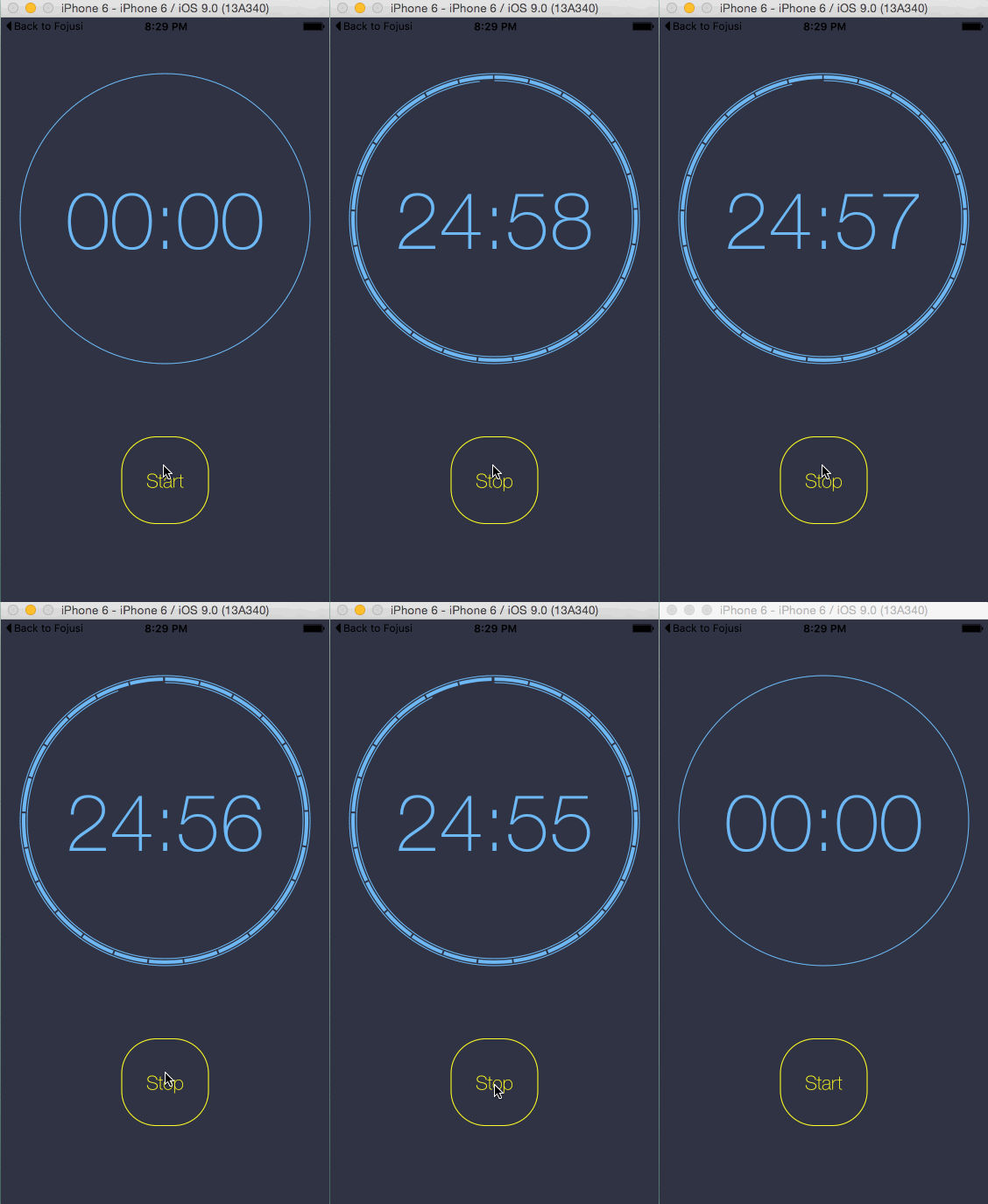
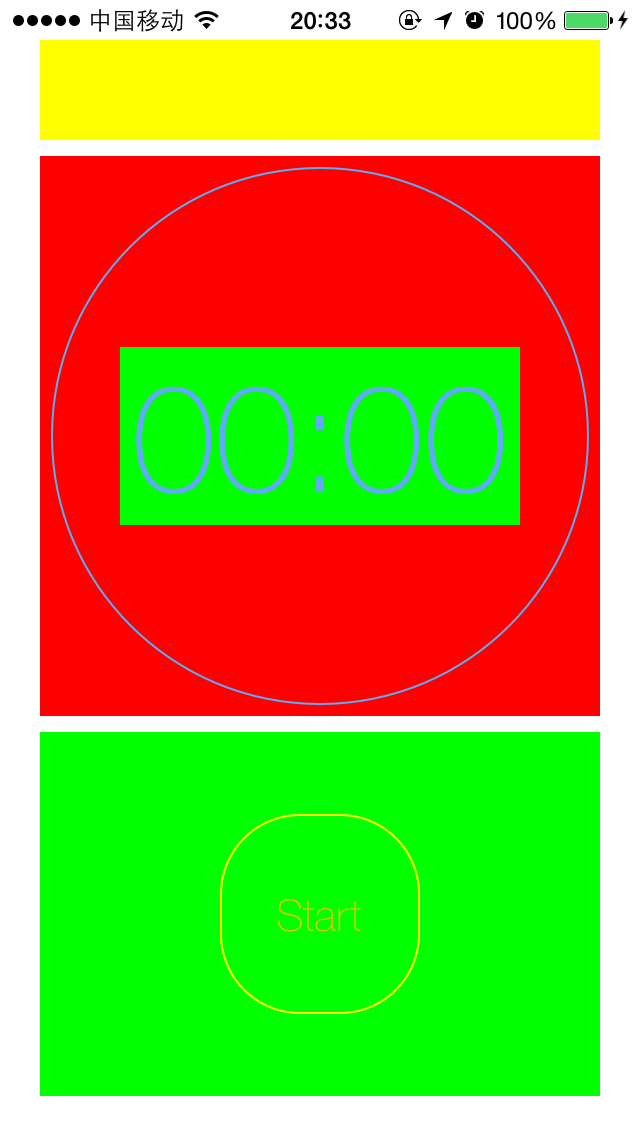
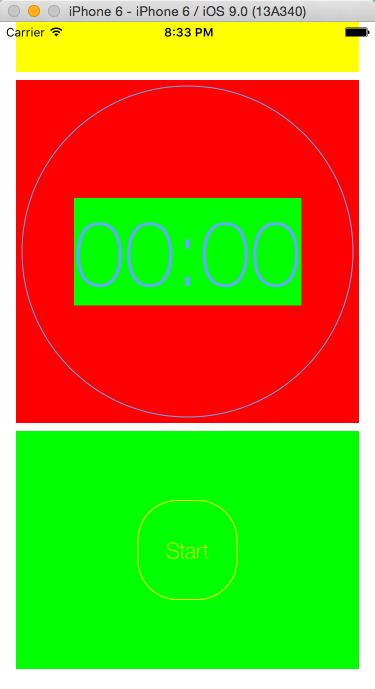
下面給出設計的布局
iPhone5下的布局:
模擬器下的布局:
其中最主要的還是對核心動畫進行優化:
import UIKit
import QuartzCore

/**
*  Update Timer UI
*/
public protocol TimerViewProtocol {
    func updateTimer(durationInSeconds: CGFloat)
}

extension CGFloat {
    func numberTimerFormate() -> String {
        return String(format: "%02d", Int(self))
    }
}


class TimerView: UIView, TimerViewProtocol {

    var totalTimeInSeconds: CGFloat {
        get{
            return totalTime
        }
        set{
            totalTime = newValue
            initTimerState()
        }
    }
    private var totalTime: CGFloat = 0.0

    private var radius: CGFloat = 0.0
    private var timerCenter: CGPoint = CGPoint(x: 0.0, y: 0.0)
    private let startAngle: CGFloat = -CGFloat(M_PI) / 2
    private let endAngle: CGFloat = 3 * CGFloat(M_PI) / 2

    private var minutesRingPath: UIBezierPath!
    private var secondsRingPath: UIBezierPath!
    private var fullRingPath: UIBezierPath!

    private var numberTimeLabel = UILabel()
    private let minutesShapeLayer: CAShapeLayer = CAShapeLayer()
    private let secondsShapeLayer: CAShapeLayer = CAShapeLayer()

    override init(frame: CGRect) {
        super.init(frame: frame)

        layer.addSublayer(minutesShapeLayer)
        layer.addSublayer(secondsShapeLayer)
        addSubview(numberTimeLabel)

        addConstraints(settingNumberTimeLabelConstraint())

        backgroundColor = UIColor.clearColor()
        //backgroundColor = UIColor.redColor()///////////////////////////////////////////////////////////////////////////////////////////
        print("init TimerView complete")
    }

    required init?(coder aDecoder: NSCoder) {
        fatalError("init(coder:) has not been implemented")
    }

    // Only override drawRect: if you perform custom drawing.
    // An empty implementation adversely affects performance during animation.

    override func drawRect(rect: CGRect) {

        timerCenter = CGPointMake(CGRectGetMidX(rect), CGRectGetMidY(rect))
        radius = rect.width / 2 - 10

        settingMinuteStyle()
        settingSecondStyle()
        settingTimeLabelStyle()
        drawRing()

        initTimerState()

        print("Timer View drawRect:\(rect)-timerCenter:\(timerCenter)-radius:\(radius)")
    }


    func updateTimer(durationInSeconds: CGFloat) {
        minutesShapeLayer.strokeEnd = durationInSeconds / totalTime
        secondsShapeLayer.strokeEnd = durationInSeconds % 60 / 60

        numberTimeLabel.text = (durationInSeconds / 60).numberTimerFormate() + ":" + (durationInSeconds % 60).numberTimerFormate()
    }

    private func initTimerState() {
        minutesShapeLayer.strokeEnd = 0.0
        secondsShapeLayer.strokeEnd = 0.0
        numberTimeLabel.text = CGFloat(0).numberTimerFormate() + ":" + CGFloat(0).numberTimerFormate()

        let dashLength = 2 * radius * CGFloat(M_PI) / (totalTime / 60.0);
        minutesShapeLayer.lineDashPattern = [dashLength - 2, 2]

        print("init Time State complete")
    }

    private func settingMinuteStyle() {
        minutesRingPath = UIBezierPath(arcCenter: timerCenter, radius: radius, startAngle: startAngle, endAngle: endAngle, clockwise: true)
        minutesShapeLayer.path = minutesRingPath.CGPath

        minutesShapeLayer.fillColor = UIColor.clearColor().CGColor
        minutesShapeLayer.strokeColor = TimerStyleKit.timerColor.CGColor
        minutesShapeLayer.lineWidth = 4.0

        print("setting Minute Style")
    }

    private func settingSecondStyle() {
        secondsRingPath = UIBezierPath(arcCenter: timerCenter, radius: radius - 4, startAngle: startAngle, endAngle: endAngle, clockwise: true)
        secondsShapeLayer.path = secondsRingPath.CGPath

        secondsShapeLayer.fillColor = UIColor.clearColor().CGColor
        secondsShapeLayer.strokeColor = TimerStyleKit.timerColor.CGColor
        secondsShapeLayer.lineWidth = 1.0

        print("setting Second Style")
    }

    private func settingTimeLabelStyle() {
        numberTimeLabel.textAlignment = .Center
        numberTimeLabel.textColor = TimerStyleKit.timerColor

        numberTimeLabel.font = UIFont(name: "HelveticaNeue-Thin", size: radius / 2 + 10)
        //numberTimeLabel.font = UIFont(name: "HelveticaNeue-Thin", size: 80)
        numberTimeLabel.adjustsFontSizeToFitWidth = true
        numberTimeLabel.center = timerCenter
        //numberTimeLabel.backgroundColor = UIColor.greenColor()///////////////////////////////////////////////////////////////////////////////////////////
        print("setting TimeLabel Style")

    }

    private func drawRing() {
        TimerStyleKit.timerColor.set()

        fullRingPath = UIBezierPath(arcCenter: timerCenter, radius: radius + 4, startAngle: startAngle, endAngle: endAngle, clockwise: true)

        fullRingPath.lineWidth = 1.0
        fullRingPath.stroke()
    }

    private func settingNumberTimeLabelConstraint() -> [NSLayoutConstraint] {
        numberTimeLabel.translatesAutoresizingMaskIntoConstraints = false

        var constraints = [NSLayoutConstraint]()

        if #available(iOS 9.0, *) {
            constraints.append(numberTimeLabel.centerXAnchor.constraintEqualToAnchor(centerXAnchor))
            constraints.append(numberTimeLabel.centerYAnchor.constraintEqualToAnchor(centerYAnchor))
        } else {
            // Fallback on earlier versions
            let views = ["numberTimeLabel": numberTimeLabel]
            constraints += NSLayoutConstraint.constraintsWithVisualFormat("H:|-40-[numberTimeLabel]-40-|", options: [], metrics: [:], views: views)
            //constraints += NSLayoutConstraint.constraintsWithVisualFormat("V:|-40-[numberTimeLabel]-40-|", options: [], metrics: [:], views: views)
        }
        return constraints
    }

}
原項目中反復重繪和計算固定不變的一些屬性,導致cpu占有率還是挺高的.
由於項目經驗不足,只能造輪子了.
經過這個小Demo的制作,也了解了很多UIView和代碼約束布局的相關知識.
其實我們做東西不僅僅只追求好看,而是應該合理的優化.
合理的設計模式和代碼優化,包括好的擴展性,才是我們應該追求的.

相關文章
+- IOS 陀螺儀開辟(CoreMotion框架)實例詳解
- iOS10語音辨認框架SpeechFramework運用詳解
- Mac下獲得AppStore裝置包文件途徑
- iOS制造framework靜態庫圖文教程
- iOS開辟中#import、#include和@class的差別解析
- IOS 運用內顯示 AppStore 某個運用的概況
- iOS 9 Core Spotlight搜刮實例代碼
- iOS的CoreAnimation開辟框架中的Layer層動畫制造解析
- iOS App中數據治理框架Core Data的根本數據操作教程
- iOS App開辟中Core Data框架根本的數據治理功效小結
- IOS CoreAnimation中layer動畫閃耀的處理辦法
- iOS運用開辟中AFNetworking庫的經常使用HTTP操作辦法小結
- iOS中UIActivityIndicatorView的用法及齒輪期待動畫實例
- iOS圖片縮小的方法(transform和frame)
- 詳解iOS運用應用Storyboard結構時的IBOutlet與IBAction