
把「[大笑]」變成圖片:iOS 微博表情的動態替換實作
在上一篇山寨新浪微博的練習中,請求回來的文字裡夾雜著表情標記,例如 "我要[大笑],[得意]"。直接顯示的話使用者只看到一串中括號。本文說明如何把這些標記在本地替換成真正的表情圖片。
需要用到的知識
- iOS 資源檔
.plist的讀取 NSMutableAttributedString(可變的屬性字串)- UITextView 的
attributedText屬性 - 正則表達式的使用(
NSRegularExpression)
整體思路
用正則匹配取得每個表情標記在字串中的範圍(range),依 range 取出標記文字(如 [哈哈]),拿它去 .plist 的 chs 欄位比對,取得對應的圖片檔名;載入圖片後轉成 NSTextAttachment,再變成屬性字串,最後把原字串中的標記區間替換掉。
1. 準備本地資源
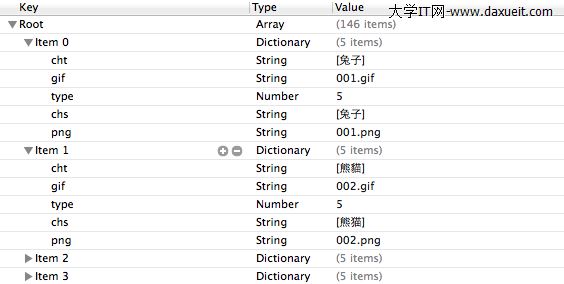
要在手機上顯示表情,本地必須有對應資源。.plist 的結構是:root 為陣列,每個 item 是字典,存放「表情文字 → 圖片檔名」的映射,圖片檔名與本地資源檔名相同:
2. 讀取 plist 資料
先透過 bundle 取得資源路徑,再用該路徑建立陣列:
// 加載 plist 文件中的數據
NSBundle *bundle = [NSBundle mainBundle];
NSString *path = [bundle pathForResource:@"emoticons" ofType:@"plist"];
NSArray *face = [[NSArray alloc] initWithContentsOfFile:path];
3. 建立測試字串
注意最後一項 [123456] 並非任何表情,刻意用來驗證「不存在的標記應該保持原樣」:
NSString *str = @"我[圍觀]你[威武]你[嘻嘻]我[愛你]你[兔子]我[酷]你[帥]我[思考]你[錢][123456]";
4. 轉為可變屬性字串
NSMutableAttributedString *attributeString = [[NSMutableAttributedString alloc] initWithString:str];
5. 正則匹配取得範圍
這個正則會匹配 [/*] 形式的內容,所以 [123456] 也會被匹配上,稍後會做相應處理:
NSString *pattern = @"\\[[a-zA-Z0-9\\u4e00-\\u9fa5]+\\]";
NSError *error = nil;
NSRegularExpression *re = [NSRegularExpression
    regularExpressionWithPattern:pattern
                         options:NSRegularExpressionCaseInsensitive
                           error:&error];
if (!re) {
    NSLog(@"%@", [error localizedDescription]);
}

NSArray *resultArray = [re matchesInString:str
                                  options:0
                                    range:NSMakeRange(0, str.length)];
6. 比對資源並組裝替換資料
遍歷匹配結果,找出對應圖片,把「圖片」與「它在原字串中的位置」一起存進字典,最後收集到陣列中:
// 用來存放字典,字典中存儲的是圖片和圖片對應的位置
NSMutableArray *imageArray = [NSMutableArray arrayWithCapacity:resultArray.count];

for (NSTextCheckingResult *match in resultArray) {
    NSRange range = [match range];
    NSString *subStr = [str substringWithRange:range];

    for (int i = 0; i < face.count; i++) {
        if ([face[i][@"chs"] isEqualToString:subStr]) {
            // face[i][@"png"] 就是我們要加載的圖片
            NSTextAttachment *textAttachment = [[NSTextAttachment alloc] init];
            textAttachment.image = [UIImage imageNamed:face[i][@"png"]];

            // 把附件轉成屬性字串,用於替換表情文字
            NSAttributedString *imageStr =
                [NSAttributedString attributedStringWithAttachment:textAttachment];

            NSMutableDictionary *imageDic = [NSMutableDictionary dictionaryWithCapacity:2];
            [imageDic setObject:imageStr forKey:@"image"];
            [imageDic setObject:[NSValue valueWithRange:range] forKey:@"range"];
            [imageArray addObject:imageDic];
        }
    }
}
7. 從後往前替換
這一步是整個做法中最關鍵、也最容易出錯的地方:必須從後往前替換。若從前往後做,前面插入圖片後,後面所有元素的 range 都會往後位移,導致圖片被放到錯誤的位置:
for (int i = imageArray.count - 1; i >= 0; i--) {
    NSRange range;
    [imageArray[i][@"range"] getValue:&range];
    [attributeString replaceCharactersInRange:range
                         withAttributedString:imageArray[i][@"image"]];
}
8. 顯示結果
self.myTextView.attributedText = attributeString;
9. 替換前後對比
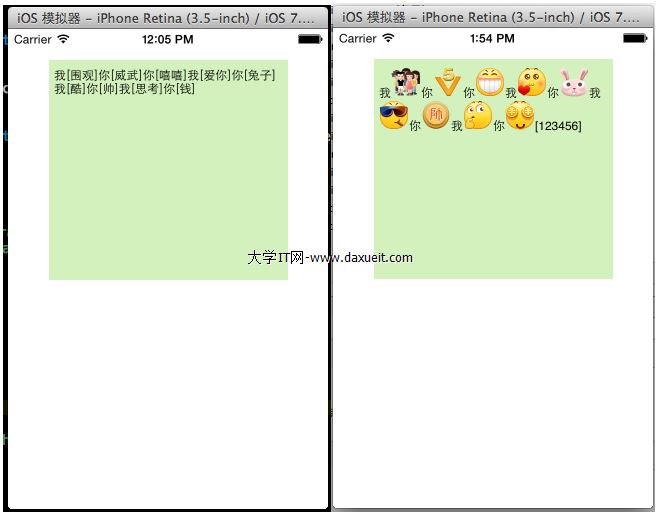
幾點延伸思考
雙層迴圈可以優化。 目前對每個匹配結果都完整掃描一次 face 陣列,時間複雜度是 O(n×m)。把 plist 轉成 userInfo → imageName 的字典,查詢就降到 O(1)。
boundingRect 需要額外設定。 用 NSTextAttachment 插入圖片時,若不設定 bounds,圖片會以原始尺寸顯示並撐高行高,通常會破版。實務上會把 bounds 設為接近行高的正方形,並微調 y 偏移讓表情與文字基線對齊。
建議抽成可重用的元件。 把這套邏輯封裝成 NSAttributedString 的 category,例如 - (NSAttributedString *)emoticonAttributedStringWithPlist:,並搭配快取,就能在 feed 列表、聊天室等多處共用。
支援 GIF 表情。 新浪微博的表情有靜態與動態兩種。若要顯示動態表情,UIImage 無法勝任,需要改用 UIImageView 自製的 attachment 子類,或使用 FLAnimatedImage 這類套件。
- 上一篇文章: 在 iOS 專案中使用自訂字體的三個步驟
- 下一篇文章: iOS 圖片等比縮放與裁切:一段 UIGraphics 的實作