
WPAttributedMarkup:為 UILabel 的特定文字加上樣式與點擊事件
編輯:iOS 技巧大全
純文字 Label 有時不夠用:想在一段話裡讓「服務條款」四個字變色、變粗,點下去還能跳頁;或者把某個關鍵字換成小圖示。若不想為了這種需求改用 UIWebView 或 Core Text,WPAttributedMarkup 是個輕量好用的選擇。
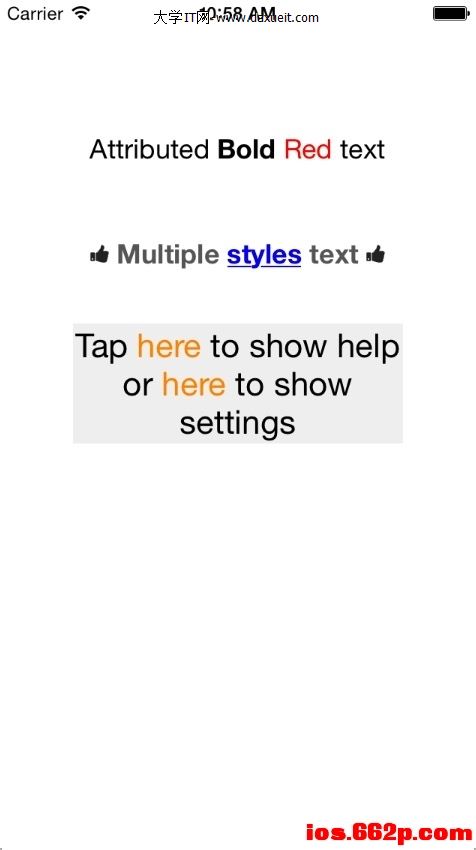
基本用法
做法是「先定義一本樣式字典,再用它產生 NSAttributedString」:
// 範例一:字型與顏色
NSDictionary *style1 = @{
    @"body": [UIFont fontWithName:@"HelveticaNeue" size:18.0],
    @"bold": [UIFont fontWithName:@"HelveticaNeue-Bold" size:18.0],
    @"red":  [UIColor redColor]
};

// 範例二:樣式可為陣列組合,支援底線與圖片
NSDictionary *style2 = @{
    @"body": @[[UIFont fontWithName:@"HelveticaNeue-Bold" size:18.0],
               [UIColor darkGrayColor]],
    @"u": @[[UIColor blueColor],
            @{NSUnderlineStyleAttributeName : @(kCTUnderlineStyleSingle | kCTUnderlinePatternSolid)}],
    @"thumb": [UIImage imageNamed:@"thumbIcon"]
};

// 範例三:用 block 處理點擊事件
NSDictionary *style3 = @{
    @"body": [UIFont fontWithName:@"HelveticaNeue" size:22.0],
    @"help": [WPAttributedStyleAction styledActionWithAction:^{ NSLog(@"Help action"); }],
    @"settings": [WPAttributedStyleAction styledActionWithAction:^{ NSLog(@"Settings action"); }],
    @"link": [UIColor orangeColor]
};

self.label1.attributedText = [@"AttributedBoldRedtext" attributedStringWithStyleBook:style1];
self.label2.attributedText = [@"[td]Multiplestylestext[td]" attributedStringWithStyleBook:style2];
運作原理
字串中的 [bold]、[u]、[thumb] 這類標記,會被對應到樣式字典裡的同名 key;未指定樣式的段落則套用到 body。標記可巢狀,例如 [td] 就代表套用 t 與 d 兩種樣式的組合。點擊事件則透過 WPAttributedStyleAction 包裝的 block 觸發。
幾個提醒
- 點擊事件要能運作,Label 必須開啟
userInteractionEnabled。 - iOS 6 之後,UILabel 本身已原生支援 attributedText,單純的「變色變粗」需求其實不必引入第三方庫;需要「點擊部分文字」時,才需要額外加上手勢辨識或這類工具。
- 較新的替代方案還有用 HTML 字串轉 NSAttributedString(
NSAttributedString HTML 初始化器),或直接改用 UITextView 搭配 dataDetector。
詳細說明可參考:https://ios.662p.com/thread-2190-1-1.html
- 上一篇文章: 一行程式碼防止 App 自動休眠
- 下一篇文章: 在 iOS 專案中使用 SBJson 處理 JSON