
iOS 開發:封裝帶輸入框的 UIAlertView 與按鈕回呼
編輯:iOS 技巧大全
UIAlertView 是 iOS 早期最常被使用的互動元件之一。若想在彈出視窗時同時取得使用者輸入,並針對「確認/取消」做不同處理,可以搭配 RIButtonItem 與 UIAlertView+Blocks 這兩個小工具,把它包成一個好呼叫的方法。
封裝後的 AppUtils
#import "AppUtils.h"
#include "RIButtonItem.h"
#include "UIAlertView+Blocks.h"

@implementation AppUtils

// 彈出帶輸入框的警告視窗,並處理按鈕事件
- (void)showInputDialogWithTitle:(NSString *)title
                         message:(NSString *)message
                     toAlertView:(UIAlertView *)alert
                   confirmAction:(void (^)(void))action {

    RIButtonItem *cancelItem = [RIButtonItem item];
    cancelItem.label = @"No";
    cancelItem.action = ^{
        // 按下 No 時的處理
        UITextField *tf = [alert textFieldAtIndex:0];
        NSLog(@"UITextField = %@", tf.text);
    };

    RIButtonItem *confirmItem = [RIButtonItem item];
    confirmItem.label = @"Yes";

    alert = [alert initWithTitle:title
                         message:message
                  cancelButtonItem:cancelItem
                  otherButtonItems:confirmItem, nil];

    alert.alertViewStyle = UIAlertViewStylePlainTextInput;

    confirmItem.action = action;   // 由外部傳入確認後要執行的區塊
    [alert show];
}

@end
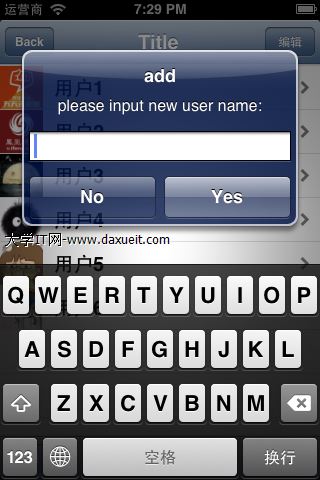
幾個實作細節
UIAlertViewStylePlainTextInput會讓 alert 內出現一個單行輸入框,透過[alert textFieldAtIndex:0]取得。若需要密碼輸入或登入/密碼雙欄,可改用SecureTextInput與LoginAndPasswordInput。- 把「確認後要做什麼」以 block 參數傳入,呼叫端讀起來會直覺很多,也不必為每個 alert 都實作一次 delegate。
- 注意 block 會強引用外層的 alert 變數,若 alert 又要持有 block,實務上建議改用
__weak修飾以避免循環引用。 - UIAlertView 在 iOS 8 之後已被標記為 deprecated,新專案請改用
UIAlertController,它原生支援文字輸入與 block 形式的 action,不必再引入第三方工具。