
iOS 資料庫實作:使用第三方庫 FMDB 操作 SQLite
編輯:iOS 技巧大全
下載與引入 FMDB
1. 引入 sqlite3 工具庫,在需要操作資料庫的類別中匯入標頭檔:因為 FMDB 底層同樣是使用 sqlite 工具庫來操作資料庫,只是它把操作簡化,讓語法更貼近 Objective-C,不必撰寫過多 C 語法。
#import <sqlite3.h>
2. 將 FMDB 加入專案:直接把 FMDB 的來源檔案拖曳進專案即可。
使用 FMDB 存取資料庫
對高手而言,了解第三方庫後很快就能上手;對新手則建議一步一步來。
3.1 指定資料庫存放路徑
一般放在沙盒根目錄下的 Documents 資料夾,副檔名為 .sqlite,例如 db_students.sqlite:
NSString *filePath = [NSHomeDirectory() stringByAppendingPathComponent:@"Documents/db_student.sqlite"];
3.2 建立 FMDatabase 物件
先宣告一個 FMDatabase 物件 *_db:
FMDatabase *_db;
使用前要先初始化:
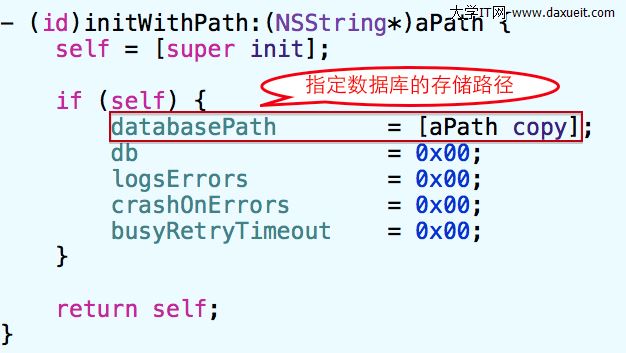
_db = [[FMDatabase alloc] initWithPath:filePath];
觀察它的初始化方法可以發現,除了指定資料庫存放路徑外,並沒有做多餘的操作。程式碼中的 0x00 是一個十六進位址,代表 nil(或 NULL)。
建立並打開資料庫
[_db open];
這行程式碼有兩個作用:
1)若資料庫不存在,則建立並打開;
2)若資料庫已存在,則直接打開。
它其實等同於 C 語言中的 sqlite3_open(path, &_db);,只是前者語法更貼近 Objective-C,本質上仍是透過後者來操作資料庫。
3.3 建立資料表
if (![_db tableExists:@"tb_students"]) {
    [_db executeUpdate:@"create table tb_students (ID integer primary key not null unique, name text, age integer)"];
}
// 先呼叫方法判斷資料表是否存在,若不存在則建立
整個流程如下:
NSString *filePath = [NSHomeDirectory() stringByAppendingPathComponent:@"Documents/db_student.sqlite"];
_db = [[FMDatabase alloc] initWithPath:filePath];
if ([_db open]) {
    if (![_db tableExists:@"tb_students"]) {
        [_db executeUpdate:@"create table tb_students (ID integer primary key not null unique, name text, age integer)"];
    }
}
[_db close];  // 操作結束後別忘了關閉資料庫
3.4 插入、刪除、更新與查詢
基本三步驟:先打開資料庫、進行操作、最後關閉資料庫。
需要注意的是,進行插入、刪除、更新時,呼叫的是:
- (BOOL)executeUpdate:(NSString *)sql, ...;
範例如下:
- (void)insertTable:(ZYStudent *)stu {
    if ([_db open]) {
        [_db executeUpdate:@"insert into tb_students (name, age) values (?, ?)",
            stu.name, [NSNumber numberWithInt:stu.age]];
    }
    // 注意:替換 SQL 中的 ? 時,不能直接使用基本型別,需轉為物件型別以符合 OC 語法
    [_db close];
}
進行查詢時,呼叫的是:
- (FMResultSet *)executeQuery:(NSString *)sql, ...;
原因不難理解:插入、刪除、更新主要影響的是資料表中的「列」(也就是一或多筆記錄);而查詢的目的在於取得資料並加以保存,因此引入了「結果集(ResultSet)」這個概念。
可以簡單把結果集理解為用來接收查詢結果的容器,再把資料從結果集取出並呈現。
- (void)selectTable {
    NSMutableArray *array = [NSMutableArray array];
    if ([_db open]) {
        FMResultSet *rs = [_db executeQuery:@"select * from tb_students"];
        while ([rs next]) {
            ZYStudent *stu = [[[ZYStudent alloc] init] autorelease];
            stu.ID = [rs intForColumnIndex:0];
            stu.name = [rs stringForColumnIndex:1];
            stu.age = [rs intForColumnIndex:2];
            [array addObject:stu];
        }
    }
    [_db close];
    NSLog(@"________%@", array);
}