
iOS 開發:如何呼叫蘋果自帶地圖導航
編輯:iOS 技巧大全
前陣子一直在趕專案,在外包公司工作實在辛苦,天天加班不說,工作都與工期合約掛鉤,稍微逾期就可能被扣獎金。這些煩心事就先放一邊,讓我們來談談 iOS 開發中如何呼叫蘋果手機自帶的地圖。
學習如逆水行舟,不進則退。古人告誡我們要不斷反思與總結,日思則日精,月思則月精,年思則年精。唯有不斷嘗試與累積,才能讓工作與生活更輕鬆美好。接連做了兩個大型商城外包專案,耗時近四個月,反覆修改後終於完美收官,其中的艱辛留待日後慢慢總結。至於百度地圖的用法,之前已有專文詳述,這裡不再贅述。言歸正傳,來看看如何呼叫蘋果自帶的地圖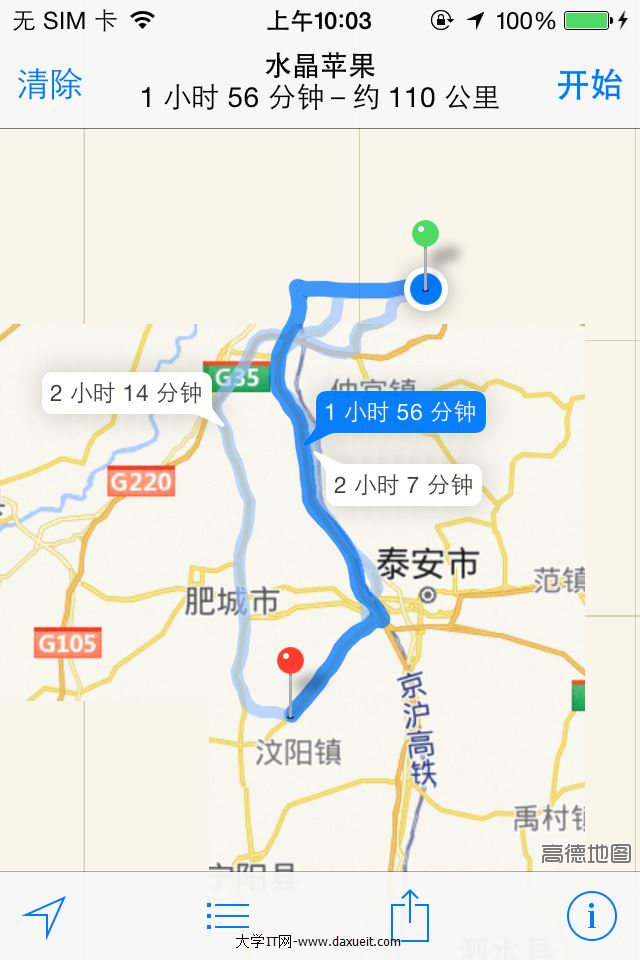 。
第一步:導入地圖檔案 #import <MapKit/MapKit.h>
第二步:取得當前位置與目的地的經緯度,然後打開地圖即可。
// 取得當前位置
MKMapItem *mylocation = [MKMapItem mapItemForCurrentLocation];

// 當前經緯度
float currentLatitude = mylocation.placemark.location.coordinate.latitude;
float currentLongitude = mylocation.placemark.location.coordinate.longitude;

CLLocationCoordinate2D coords1 = CLLocationCoordinate2DMake(currentLatitude, currentLongitude);

// 目的地位置
coordinate.latitude = [[dataSource objectForKey:@"lat"] floatValue];
coordinate.longitude = [[dataSource objectForKey:@"lng"] floatValue];

CLLocationCoordinate2D coords2 = coordinate;

// iOS 6 以下,呼叫 Google Map
if (SYSTEM_VERSION_LESS_THAN(@"6.0")) {
    NSString *urlString = [[NSString alloc] initWithFormat:@"https://maps.google.com/maps?saddr=%f,%f&daddr=%f,%f&dirfl=d", coords1.latitude, coords1.longitude, coords2.latitude, coords2.longitude];
    NSURL *aURL = [NSURL URLWithString:urlString];
    // 打開網頁版 Google 地圖
    [[UIApplication sharedApplication] openURL:aURL];
} else {
    // 直接呼叫 iOS 自帶的 Apple Map
    MKMapItem *currentLocation = [MKMapItem mapItemForCurrentLocation];
    MKMapItem *toLocation = [[MKMapItem alloc] initWithPlacemark:[[MKPlacemark alloc] initWithCoordinate:coords2 addressDictionary:nil]];

    toLocation.name = @"目的地";
    NSString *myname = [dataSource objectForKey:@"name"];
    if (![XtomFunction xfunc_check_strEmpty:myname]) {
        toLocation.name = myname;
    }

    NSArray *items = [NSArray arrayWithObjects:currentLocation, toLocation, nil];
    NSDictionary *options = @{
        MKLaunchOptionsDirectionsModeKey: MKLaunchOptionsDirectionsModeDriving,
        MKLaunchOptionsMapTypeKey: [NSNumber numberWithInteger:MKMapTypeStandard],
        MKLaunchOptionsShowsTrafficKey: @YES
    };
    // 打開蘋果自帶地圖並呈現特定的 item
    [MKMapItem openMapsWithItems:items launchOptions:options];
}
透過這兩步就能輕鬆開啟蘋果自帶地圖導航,效果相當不錯。唯一的缺點是開啟地圖、取得路線資訊會消耗較多行動流量,最好在 Wi-Fi 環境下呼叫。若非必要,還是建議優先使用高德或百度自帶的地圖。
- 上一篇文章: Mac OS X 常用快捷鍵對照(附 Windows 比較)
- 下一篇文章: 如何從子視圖刷新另一個 UITableView